Cloud Costs
Snowflake Cost Optimization Checklist: 20 Checks, Credit Math
A Snowflake cost optimization checklist: 20 checks with SQL, November 2026 credit rates, Gen2 break-even math and the serverless meters most guides skip.

In this article
- How Snowflake bills you, in five meters
- Phase 1: see where your Snowflake credits go (checks 1–4)
- Phase 2: stop paying for idle warehouse time (checks 5–9)
- A worked example: what auto-suspend is worth on one warehouse
- Phase 3: right-size the warehouses (checks 10–14)
- Phase 4: govern serverless and AI meters (checks 15–18)
- Phase 5: trim storage and the contract (checks 19–20)
- The complete Snowflake cost optimization checklist
- When this checklist is not enough
- Next steps
- Frequently asked questions
- Sources
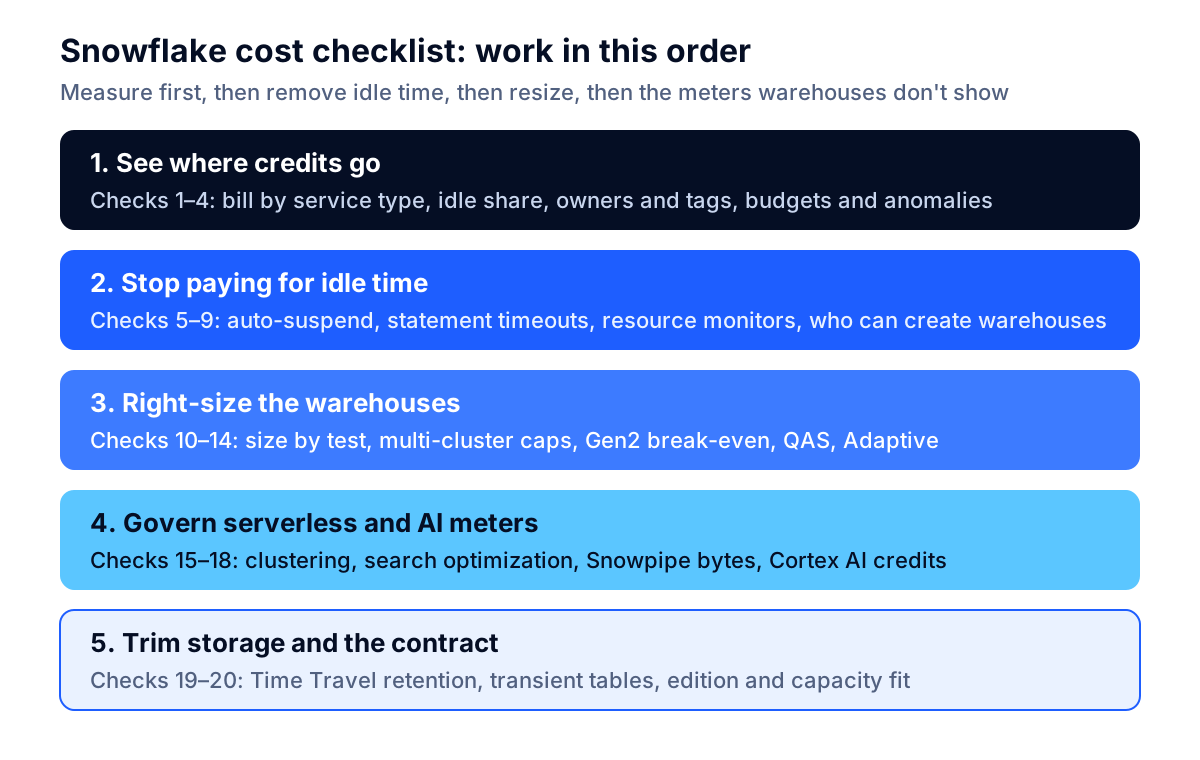
A Snowflake cost optimization checklist works best in a fixed order: first measure which meter is growing, then stop paying for idle warehouse time, then right-size compute, then govern the serverless and AI meters that warehouse settings never touch, and only then trim storage and the contract. The 20 checks below follow that order. Each one names the setting or account usage view involved, and most come with a SQL query you can run today.
Two things make this list different from most of what ranks for the topic. First, every rate in it comes from Snowflake's own Service Consumption Table, effective November 9, 2026, and the official documentation, not from vendor estimates. Second, it covers what changed in the past year: Gen2 warehouses that bill 1.35 times the Gen1 rate on AWS, Query Acceleration switched on by default for new Gen2 warehouses, per-GB Snowpipe billing, Optima Clustering for tables clustered since September 1, 2026, and separately priced AI Credits for Cortex.
How Snowflake bills you, in five meters
Snowflake bills credits for compute and dollars for storage and data transfer, and most surprises come from compute you did not know was running. The compute cost documentation splits compute into four parts, and storage adds a fifth meter:
| Meter | What it bills | Who controls it | Where to see it |
|---|---|---|---|
| Virtual warehouses | Credits per second while running, 60-second minimum per start or resume | You (size, suspend, clusters) | WAREHOUSE_METERING_HISTORY |
| Serverless features | Compute-hours times a feature multiplier, plus some per-unit charges | Snowflake runs it; you choose which features are on | METERING_DAILY_HISTORY by SERVICE_TYPE, feature history views |
| Cloud services | Credits for compilation, metadata, logins; billed only above 10% of daily warehouse use | Indirectly (query patterns) | METERING_DAILY_HISTORY |
| AI features (Cortex) | AI Credits per million tokens or per unit of work | You (which functions, which models) | CORTEX_AI_FUNCTIONS_USAGE_HISTORY and related views |
| Storage | Average TB per month, including Time Travel and Fail-safe | You (retention, table types) | Storage usage views |
The prices behind those meters, from the Service Consumption Table for AWS US East (Northern Virginia), on demand, as of November 2026:
| Item | Price |
|---|---|
| Platform credit, Standard Edition | $2.00 |
| Platform credit, Enterprise Edition | $3.00 |
| Platform credit, Business Critical | $4.00 |
| AI Credit (global / regional processing) | $2.00 / $2.20 |
| Storage, per TB per month | $23.00 |
Two details in that table matter for budgeting. Capacity contracts apply a negotiated discount to Platform Credits, but the table states the Platform Credit discount "does not apply to AI Credits." And $23 per TB-month is the same as the list price of Amazon S3 Standard for the first 50 TB ($0.023 per GB-month on the S3 pricing page), so storage is rarely where a Snowflake bill gets out of hand. Compute is.
Key takeaway: Find the meter before you tune anything. A team that spends a month resizing warehouses while automatic clustering doubles in the background has optimized the wrong line.
Phase 1: see where your Snowflake credits go (checks 1–4)
Start with four checks that tell you which meter grew, which warehouse wastes the most, and who owns it. None of them changes a setting, so you can run them on day one without risk.
Check 1: Break the bill down by service type
METERING_DAILY_HISTORY holds one row per day per service type, with the cloud services adjustment already applied in CREDITS_BILLED. This is the query that answers "why is the bill up when queries did not change?":
SELECT service_type,
       SUM(credits_billed) AS credits_billed_30d
FROM snowflake.account_usage.metering_daily_history
WHERE usage_date >= DATEADD(day, -30, CURRENT_DATE())
GROUP BY 1
ORDER BY 2 DESC;
WAREHOUSE_METERING is your warehouses; PIPE is Snowpipe, and other service types map to clustering, search optimization, serverless tasks, replication and AI features. Run it for two consecutive 30-day windows and compare. The Exploring compute cost page lists every service type and the matching detail view.
Check 2: Measure the idle share of each warehouse
Idle time is the gap between what a warehouse billed and what its queries actually used. WAREHOUSE_METERING_HISTORY shows the first; QUERY_ATTRIBUTION_HISTORY shows the second, and Snowflake states that its attributed credits do not include warehouse idle time:
WITH metered AS (
  SELECT warehouse_name, SUM(credits_used_compute) AS billed
  FROM snowflake.account_usage.warehouse_metering_history
  WHERE start_time >= DATEADD(day, -30, CURRENT_TIMESTAMP())
    AND warehouse_id > 0
  GROUP BY 1
), attributed AS (
  SELECT warehouse_name, SUM(credits_attributed_compute) AS used
  FROM snowflake.account_usage.query_attribution_history
  WHERE start_time >= DATEADD(day, -30, CURRENT_TIMESTAMP())
  GROUP BY 1
)
SELECT m.warehouse_name,
       ROUND(m.billed, 1) AS billed,
       ROUND(COALESCE(a.used, 0), 1) AS used_by_queries,
       ROUND(1 - COALESCE(a.used, 0) / NULLIF(m.billed, 0), 2) AS idle_share
FROM metered m
LEFT JOIN attributed a USING (warehouse_name)
ORDER BY m.billed - COALESCE(a.used, 0) DESC;
Read the result as an estimate, not an invoice. The QUERY_ATTRIBUTION_HISTORY reference notes that queries of about 100 milliseconds or less are not attributed and that the view can lag by up to eight hours, while warehouse metering lags by up to three hours. A warehouse with an idle share above 0.3 is your first target in Phase 2.
Check 3: Give every warehouse and workload an owner
Costs without owners do not go down. Use object tags on warehouses for cost center and environment, and set QUERY_TAG in your orchestration and BI connections so shared warehouses can be split by job. The Attributing cost page includes ready-made queries for cost by department, by user and by query tag, with and without idle time. The FinOps Foundation's data cloud platform scenarios put consistent tags for cost center, environment and owner at the very first maturity stage, before any optimization.
Check 4: Turn on the account budget and anomaly detection
Activate the account budget. A budget monitors all credit usage in the account against a monthly limit and notifies email lists, a cloud queue (Amazon SNS, Azure Event Grid, Google Cloud Pub/Sub) or a webhook such as Slack, Microsoft Teams or PagerDuty when spending is projected to exceed it. Custom budgets do the same for a tagged group of objects. Snowflake's built-in cost anomaly detection is always on at account and organization level, but it needs at least 30 days of consumption and ignores changes when the last seven days used fewer than 10 credits. For how to route and triage those alerts, see our guide to cloud cost anomaly detection.
Phase 2: stop paying for idle warehouse time (checks 5–9)
Most avoidable Snowflake spend is a warehouse that is running but not working. These five checks shrink that time without touching query performance for most workloads.
Check 5: Set auto-suspend to match the gaps in each workload
The default AUTO_SUSPEND is 600 seconds: per the CREATE WAREHOUSE reference, the warehouse suspends after 10 minutes of inactivity. Snowflake's own warehouse considerations recommend "a low value (for example, 5 or 10 minutes or less)" and say the value should match the gaps in your query workload. The FinOps Foundation scenarios likewise recommend shorter thresholds than the 10-minute default for non-production warehouses.
Three rules from the documentation keep you out of trouble:
- Every start or resume bills at least 60 seconds. Suspending and resuming within the first minute restarts that minimum, so a value below 60 seconds rarely saves anything.
- The suspend process runs about every 30 seconds, so use multiples of 30 and expect up to 30 seconds of extra idle.
- Suspending drops the warehouse's local data cache. For a warehouse that serves repeated dashboard queries over the same tables, a slightly longer setting can be cheaper overall than cold reads after every resume.
ALTER WAREHOUSE bi_wh SET AUTO_SUSPEND = 60;
Check 6: Cap runaway statements
STATEMENT_TIMEOUT_IN_SECONDS defaults to 172,800 seconds, which is two days, according to the parameters reference. A bad join on an X-Large warehouse (16 credits an hour on Gen1) can therefore run for 48 hours and bill 768 credits before Snowflake stops it. Set a timeout on each warehouse that fits its slowest legitimate job, for example 1 to 2 hours for BI and longer only for named ETL warehouses. Pair it with STATEMENT_QUEUED_TIMEOUT_IN_SECONDS so queued work fails fast instead of piling up.
Check 7: Put a resource monitor on every warehouse
Resource monitors are the only native control that can suspend warehouses when a credit quota is reached. Each can notify, suspend after running statements finish, or suspend immediately and cancel running statements, and you can set up to five notify thresholds. Know their limits before you rely on them:
- They work for warehouses only. An account-level monitor "does not control credit usage by the Snowflake-provided compute resources for serverless features."
- They count all cloud services credits used by the warehouses, even the share that the 10% adjustment never bills.
- Only ACCOUNTADMIN can create them, and quotas reset at 12:00 AM UTC regardless of the start time you choose.
That is why Check 4 (budgets) and Check 7 (monitors) are not alternatives: monitors enforce limits on warehouses, budgets watch everything.
Check 8: Control who can create and resize warehouses
The warehouse overview lists X-Small as the default size for CREATE WAREHOUSE, but X-Large as the default for warehouses created through the Snowsight interface, which bills 16 times as much per hour. Restrict the CREATE WAREHOUSE privilege to a platform role, require a resource monitor and tags at creation, and review SHOW WAREHOUSES monthly for sizes nobody can explain.
Check 9: Watch resume churn and interactive warehouse minimums
Count resumes, not just hours. A warehouse that suspends after 60 seconds and resumes every 90 seconds pays the 60-second minimum over and over. Interactive warehouses carry a much larger minimum: the Service Consumption Table states that when an interactive warehouse is started or resumed, "a minimum of sixty (60) minutes' worth" of credits is consumed. Their hourly rates are lower (0.6 credits for X-Small), but frequent suspend-and-resume cycles on an interactive warehouse can cost more than leaving it running.
A worked example: what auto-suspend is worth on one warehouse
Here is the arithmetic for one common pattern, using Gen1 rates and the Enterprise on-demand price of $3.00 per credit in AWS US East. The assumptions are stated so you can swap in your own numbers from Check 2.
Assumptions: a Medium warehouse (4 credits per hour) serves a BI tool. On each of 22 business days a month it receives 40 isolated bursts of queries, each keeping it busy for 30 seconds, with gaps longer than 10 minutes between bursts.
| Setting | Billed seconds per burst | Credits per burst | Credits per day | Credits per month | Cost per month |
|---|---|---|---|---|---|
AUTO_SUSPEND = 600 (default) |
30 + 600 = 630 | 0.70 | 28.0 | 616 | $1,848 |
AUTO_SUSPEND = 60 |
30 + 60 to 90 = 90 to 120 | 0.10 to 0.13 | 4.0 to 5.3 | 88 to 117 | $264 to $352 |
The difference is roughly $1,500 a month for one warehouse, and almost all of it was idle time. The range in the second row reflects the 30-second suspend polling interval. The same pattern on a Large warehouse doubles every number. Your result will differ with burst frequency and how much each cold start slows queries, which is why Check 2 comes first: it tells you whether the warehouse is mostly idle before you change anything.
Phase 3: right-size the warehouses (checks 10–14)
Once idle time is under control, the remaining waste is warehouses that are bigger, more numerous or more expensive per hour than the work needs.
Check 10: Size each warehouse by test, not by habit
Each size step roughly doubles both compute and credits per hour, from 1 credit for X-Small to 512 for 6X-Large on Gen1. Because billing is per second, a query that runs twice as fast on twice the size costs the same; one that barely speeds up costs nearly double. Snowflake's documentation adds two useful limits: larger is "not necessarily faster for small, basic queries," and for data loading, a Small, Medium or Large warehouse is "generally sufficient" unless you are loading hundreds or thousands of files concurrently. Test one size down for a week, watch queue time and runtime, and keep the smaller size if users do not notice.
Check 11: Cap multi-cluster warehouses and pick the scaling policy
Multi-cluster warehouses (Enterprise Edition) add clusters for concurrency, and each running cluster bills the full size rate. The considerations page gives the worst case plainly: an X-Large warehouse with a maximum of 10 clusters "will consume 160 credits in an hour" if all 10 run, which is $480 an hour at $3.00 per credit. Keep the minimum at 1 unless you need high availability, set the maximum from observed peak concurrency rather than "as high as possible," and use the Economy scaling policy for batch and ETL warehouses. Per the multi-cluster documentation, Economy starts an extra cluster only if Snowflake estimates enough load to keep it busy for at least 6 minutes, trading some queuing for credits.
Check 12: Run the Gen2 break-even test before converting
Gen2 standard warehouses run on faster hardware and bill more per hour. The November 2026 Service Consumption Table lists them at 1.35 credits per hour for X-Small on AWS and Google Cloud (1.25 on Azure), against 1 credit for Gen1, with the same multiplier at every size up to 4X-Large. That gives a simple rule: Gen2 is cheaper only if the same work finishes in under about 74% of its Gen1 time on AWS or GCP, or under 80% on Azure.
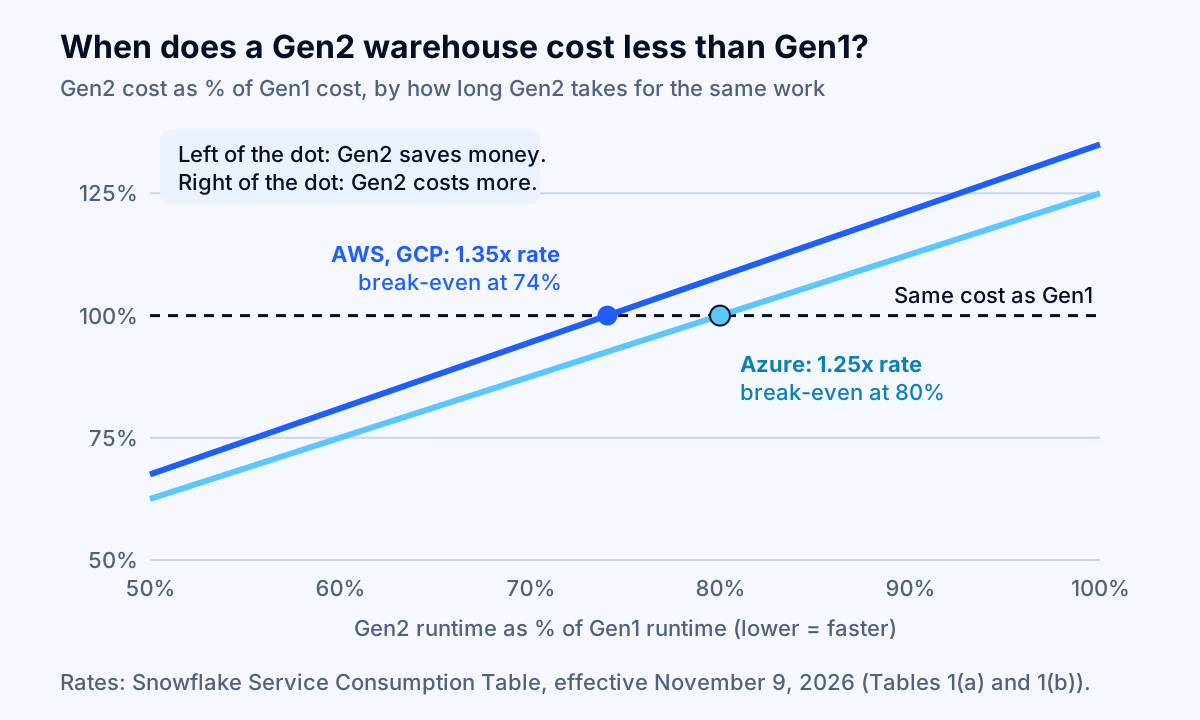
Snowflake says that with Gen2 "the majority of queries" finish faster and recommends testing, which is the right advice. Two practical points from the Gen2 documentation affect the test:
- Idle time is billed at the Gen2 rate too. A warehouse that is 40% idle (Check 2) needs an even larger speedup to break even, so fix auto-suspend before you compare generations.
- Converting a running warehouse bills both generations until in-flight queries finish. Convert while suspended.
Snowflake's own pages disagree on whether new standard warehouses default to Gen2: the Gen2 page says they do where available, while the warehouse overview says Gen2 is "currently not the default." Do not guess. Check the generation and resource_constraint columns in SHOW WAREHOUSES for every warehouse.
Check 13: Review Query Acceleration on every Gen2 warehouse
When you create a new Gen2 warehouse, Snowflake enables the Query Acceleration Service by default with QUERY_ACCELERATION_MAX_SCALE_FACTOR = 8. QAS can help large scans, but it is billed separately from the warehouse, by the second, when in use. The QAS documentation explains the scale factor with an example: a Medium warehouse (4 credits per hour) with a scale factor of 5 can lease up to 20 additional credits per hour. At the default of 8, a Medium warehouse could add up to 32. Use SYSTEM$ESTIMATE_QUERY_ACCELERATION and the QUERY_ACCELERATION_ELIGIBLE view to see whether queries benefit; disable QAS or lower the scale factor where they do not. QUERY_ATTRIBUTION_HISTORY reports QAS credits per query in CREDITS_USED_QUERY_ACCELERATION.
Check 14: Pilot Adaptive Warehouses with caps, not on faith
Adaptive Warehouses remove sizing, multi-cluster, QAS and suspend settings. They are available to Enterprise Edition accounts or higher in select AWS, Azure and Google Cloud regions, and they use query-based billing: each query costs what it uses, and the warehouse total is the sum. Snowflake says they "can run significantly more queries at a similar cost to Gen2." Spend is governed by two settings, MAX_QUERY_PERFORMANCE_LEVEL (default XLARGE) and QUERY_THROUGHPUT_MULTIPLIER (default 2). Note that the November 2026 Service Consumption Table still footnotes Adaptive Compute as a preview while the documentation calls it generally available, so confirm the status for your region. For a cost-sensitive pilot, convert one warehouse, lower the performance level to MEDIUM or LARGE as the documentation suggests for cost-sensitive workloads, keep a resource monitor on it, and compare a month of WAREHOUSE_METERING_HISTORY and QUERY_METERING_HISTORY with the month before.
Phase 4: govern serverless and AI meters (checks 15–18)
Serverless features bill outside your warehouses, so none of the Phase 2 and 3 settings affect them. They are also the most common cause of a bill that rises while query volume stays flat.
Check 15: Audit automatic clustering, and know which version each table uses
Automatic clustering now comes in two versions. Per the Automatic Clustering documentation, tables clustered since September 1, 2026 use Optima Clustering, which bills on the uncompressed GB you ingest times an overlap factor between 0 and 1; tables clustered earlier stay on Clustering Classic, which bills serverless compute-hours, indefinitely. Append-only tables clustered on ingestion time have an overlap factor near 0 and cost little; updates that change clustering key values bill at the full rate.
SELECT database_name, schema_name, table_name, version,
       SUM(credits_used) AS credits_30d,
       SUM(num_bytes_reclustered) / POWER(1024, 3) AS gb_reclustered
FROM snowflake.account_usage.automatic_clustering_history
WHERE start_time >= DATEADD(day, -30, CURRENT_TIMESTAMP())
GROUP BY 1, 2, 3, 4
ORDER BY credits_30d DESC;
For each expensive table, ask whether queries actually filter on the clustering key. If not, ALTER TABLE ... SUSPEND RECLUSTER stops charges on Classic tables. On Optima tables, the documentation warns that suspending to save money "is generally not cost-effective," because resuming applies a catch-up cost; drop the clustering key instead if nobody needs it.
Check 16: Check search optimization on high-churn tables
The search optimization service (Enterprise Edition) adds both storage and compute. Snowflake's cost page says its search access path is typically about a quarter of the table's size, and can approach the full table size in extreme cases, while maintenance costs are "roughly proportional to the amount of data ingested (added or changed)." It also warns that combining automatic clustering and search optimization on a high-churn table can raise maintenance costs further. Keep it on tables that serve frequent point lookups and drop it where the lookups stopped.
Check 17: Cut the bytes Snowpipe bills
Snowpipe no longer bills compute time or per-file fees. Since December 8, 2025 for Standard and Enterprise accounts (August 1, 2025 for Business Critical and VPS), it charges a fixed rate per GB loaded, 0.0037 credits per GB in Snowflake's Snowpipe cost documentation. The billed size is what matters: text files such as CSV and JSON bill at their uncompressed size, while binary formats such as Parquet, Avro and ORC bill at their size in storage. Snowflake's own example loads 200 GB of gzip CSV (1,000 GB uncompressed) and 100 GB of Parquet a day, bills 1,100 GB, and uses about 122 credits a month. If you control the upstream export, delivering the same data as Parquet instead of compressed CSV can cut the billed GB substantially. File count no longer changes the price, though file size still affects latency.
Check 18: Track Cortex AI credits separately
Cortex AI features bill in AI Credits, priced separately from Platform Credits ($2.00 global, $2.20 regional, on demand) and excluded from your capacity discount, per the Service Consumption Table. That makes them easy to miss in a credit-based forecast. Query CORTEX_AI_FUNCTIONS_USAGE_HISTORY, CORTEX_AGENT_USAGE_HISTORY and CORTEX_ANALYST_USAGE_HISTORY weekly, attribute usage to the teams calling the functions, and remember that resource monitors do not cover them; budgets do. The same token-economics rules apply here as with any LLM: smaller models for classification and extraction, shorter prompts and caching where supported. Our guides to LLM API cost optimization and FinOps for AI workloads cover those levers in detail.
Phase 5: trim storage and the contract (checks 19–20)
Storage is usually a smaller line than compute, but two settings quietly multiply it, and the contract sets the price of every credit above.
Check 19: Set Time Travel retention deliberately and use transient tables for staging
Storage includes historical data kept for Time Travel and Fail-safe. Per the storage cost documentation, a permanent table on Enterprise Edition can keep 0 to 90 days of Time Travel plus 7 days of Fail-safe, up to 97 days of historical versions, while transient and temporary tables have no Fail-safe and at most one day of history. A staging table that is fully rewritten every night with 90-day retention can hold dozens of copies of itself. Set DATA_RETENTION_TIME_IN_DAYS by data class (for example 1 day for staging and scratch, longer only for tables with a recovery requirement) and create staging and intermediate tables as TRANSIENT. The FinOps Foundation's scenarios report that lifecycle governance "can sometimes reduce storage costs by 20–40%" in environments with long retention defaults. Get the data owner's sign-off before shortening retention on anything that feeds audits or regulatory reporting.
Check 20: Match edition and capacity to what you use
Your edition sets the price of every credit: $2.00, $3.00 or $4.00 on demand in AWS US East for Standard, Enterprise and Business Critical. Enterprise is required for multi-cluster warehouses, Time Travel beyond one day, search optimization and Adaptive Warehouses, so list which of those you use before paying the Enterprise price on every credit. If spend is stable, a capacity commitment applies a discount to Platform Credits; size it from the trailing 3 to 6 months after Phases 2 to 4, not before, or you will commit to waste. Review commitment burn-down monthly, as the FinOps Foundation recommends, because running out early moves you to on-demand rates.
The complete Snowflake cost optimization checklist
Use this table as the working copy. The "Where to look" column is where the evidence lives.
| # | Check | Where to look | Typical fix |
|---|---|---|---|
| 1 | Bill by service type, two 30-day windows | METERING_DAILY_HISTORY |
Find the meter that grew |
| 2 | Idle share per warehouse | WAREHOUSE_METERING_HISTORY vs QUERY_ATTRIBUTION_HISTORY |
Target warehouses above 30% idle |
| 3 | Owner and environment tags, query tags | Object tags, QUERY_TAG |
Chargeback or showback by team |
| 4 | Account budget, anomaly detection | Budgets, cost anomalies | Alerts to the owning team |
| 5 | Auto-suspend matches workload gaps | SHOW WAREHOUSES (auto_suspend) |
60–300 seconds for bursty work |
| 6 | Statement timeout below 2-day default | STATEMENT_TIMEOUT_IN_SECONDS |
1–2 hours for BI warehouses |
| 7 | Resource monitor on every warehouse | SHOW RESOURCE MONITORS |
Notify at 75%, suspend at 100% |
| 8 | Warehouse creation restricted | Grants on CREATE WAREHOUSE | Platform role, size review |
| 9 | Resume churn, interactive minimums | WAREHOUSE_EVENTS_HISTORY |
Longer suspend or steady schedule |
| 10 | Size by test | Query runtime and queue time | One size down for a week |
| 11 | Multi-cluster caps and policy | max_cluster_count, scaling_policy |
Economy for batch |
| 12 | Gen2 break-even | Runtime ratio vs 74% / 80% | Convert only where faster enough |
| 13 | QAS on Gen2 warehouses | enable_query_acceleration, scale factor |
Disable or lower where unused |
| 14 | Adaptive Warehouse pilot | QUERY_METERING_HISTORY |
Cap performance level |
| 15 | Automatic clustering by table and version | AUTOMATIC_CLUSTERING_HISTORY |
Drop unused keys |
| 16 | Search optimization on high-churn tables | SEARCH_OPTIMIZATION_HISTORY |
Remove where lookups stopped |
| 17 | Snowpipe billed GB | Pipe BYTES_BILLED, CREDITS_USED |
Parquet over compressed CSV |
| 18 | Cortex AI credits | CORTEX_*_USAGE_HISTORY views |
Model choice, budgets |
| 19 | Time Travel retention, transient staging | Table storage metrics | Retention by data class |
| 20 | Edition and capacity fit | Usage statements, burn-down | Commit after cleanup |
When this checklist is not enough
The checklist removes configuration waste. It does not fix expensive data models, dashboards that rescan full tables every five minutes, or pipelines that rebuild what could be loaded incrementally. Those show up in Check 2 and in the top-cost queries from QUERY_ATTRIBUTION_HISTORY grouped by QUERY_PARAMETERIZED_HASH, and they need engineering work: incremental models, materialized results, or a change to how the BI tool queries. Snowflake also reuses persisted query results for 24 hours (renewed on each reuse, up to 31 days), so dashboards that issue identical queries can avoid compute entirely if nothing in the underlying data changed.
If your Snowflake bill sits next to a growing AWS, Azure or Google Cloud bill, the same measure-first approach applies there: see why an AWS bill is higher than expected and our Kubernetes cost optimization checklist. And before buying a third-party optimizer, read whether cloud cost optimization tools actually work: Snowflake's native budgets, attribution views and anomaly detection cover most of Phase 1 at no extra license cost.
Next steps
Run Checks 1 and 2 this week; together they take less than an hour and tell you which of the other 18 matter for your account. Then work through Phase 2, which usually needs only ALTER WAREHOUSE statements and a budget, before you consider Gen2 conversions, Adaptive pilots or a new capacity commitment. Fleurant AI's a stack audit team runs this kind of review across Snowflake and the cloud accounts around it; if you want a second pair of eyes on your numbers, talk to a specialist or start from the Fleurant AI home page.
If you'd like one clear, practical take on AI, software and cloud decisions each month, subscribe to the Fleurant AI Briefing: one email a month, unsubscribe any time.
Frequently asked questions
What is the fastest way to reduce Snowflake costs?
Lower auto-suspend on warehouses that serve short, scattered queries. Warehouses bill per second while running, and the default AUTO_SUSPEND of 600 seconds means every isolated query can carry up to 10 minutes of paid idle time. On a Medium warehouse hit by 40 short query bursts a day, moving from 600 to 60 seconds cuts roughly 23 to 24 credits a day. Check the real idle share first with the SQL in this checklist, and keep longer settings where caches matter.
How much does a Snowflake credit cost?
On demand, as of the November 9, 2026 Service Consumption Table, a credit in AWS US East (Northern Virginia) costs $2.00 on Standard Edition, $3.00 on Enterprise and $4.00 on Business Critical. Other regions cost more, and capacity contracts apply a negotiated discount. Cortex AI features bill in separate AI Credits at $2.00 (global) or $2.20 (regional) on demand, and the capacity discount does not apply to them.
Are Snowflake Gen2 warehouses worth the higher price?
Only when they finish the same work fast enough. Gen2 standard warehouses bill 1.35 times the Gen1 hourly rate on AWS and Google Cloud and 1.25 times on Azure, so they cost less only if the workload runs in under about 74% (AWS, GCP) or 80% (Azure) of its Gen1 time. Snowflake says most queries finish faster, but idle time before auto-suspend is billed at the higher rate too, so test with your own workload.
Do Snowflake resource monitors cover serverless features?
No. Resource monitors track and can suspend warehouses only, including the cloud services those warehouses use. They do not control serverless features such as automatic clustering, Snowpipe or search optimization, or AI services. Use the account budget and custom budgets for those: budgets cover all credit usage in the account and send notifications when spending is projected to exceed the monthly limit.
Why does my Snowflake bill keep rising when queries did not change?
Usually a meter outside the warehouses grew: automatic clustering on a table whose updates rewrite clustered data, search optimization maintenance on high-churn tables, Snowpipe volume, Cortex AI usage, or storage held by long Time Travel retention. Query METERING_DAILY_HISTORY grouped by service type to see which meter moved, then drill into the matching history view.
Should we switch to Snowflake Adaptive Warehouses to save money?
Treat Adaptive Warehouses as a way to stop managing sizes, not a guaranteed saving. They bill per query, are available on Enterprise Edition or higher in select regions, and are controlled by MAX_QUERY_PERFORMANCE_LEVEL and QUERY_THROUGHPUT_MULTIPLIER. Snowflake says they can run significantly more queries at a cost similar to Gen2. Convert one warehouse, compare a month of WAREHOUSE_METERING_HISTORY, and keep budgets and resource monitors on it.
Sources
- Snowflake Service Consumption Table (effective November 9, 2026), Snowflake
- Understanding compute cost, Snowflake Documentation
- Overview of warehouses, Snowflake Documentation
- Warehouse considerations, Snowflake Documentation
- CREATE WAREHOUSE, Snowflake Documentation
- Snowflake generation 2 standard warehouses, Snowflake Documentation
- Adaptive Warehouses, Snowflake Documentation
- Multi-cluster warehouses, Snowflake Documentation
- Using the Query Acceleration Service, Snowflake Documentation
- Working with resource monitors, Snowflake Documentation
- Monitor credit usage with budgets, Snowflake Documentation
- Introduction to cost anomalies, Snowflake Documentation
- Exploring compute cost, Snowflake Documentation
- Attributing cost, Snowflake Documentation
- QUERY_ATTRIBUTION_HISTORY view, Snowflake Documentation
- Automatic Clustering, Snowflake Documentation
- Search optimization cost estimation and management, Snowflake Documentation
- Snowpipe costs, Snowflake Documentation
- Understanding storage cost, Snowflake Documentation
- Understanding and using Time Travel, Snowflake Documentation
- Parameters (STATEMENT_TIMEOUT_IN_SECONDS), Snowflake Documentation
- FinOps for Data Cloud Platforms: Practical Scenarios, FinOps Foundation
- Amazon S3 pricing, Amazon Web Services