Cloud Costs
LLM API Cost Optimization: Seven Levers, Ranked by Payback
LLM API cost optimization in payback order: verified cache and batch discounts, a routing model, a forecasting worksheet and spend caps that work.
In this article
- What actually drives your LLM API bill
- How does prompt caching reduce LLM API costs?
- Which workloads belong in the batch tier?
- How should we route requests between models?
- Four ways to stop sending tokens you do not need
- How to forecast LLM API spend before you ship
- How do you put a hard ceiling on the bill?
- How do you attribute cost per feature, per customer and per agent?
- When LLM API cost optimization is the wrong project
- A 30-day plan
- Where to go from here
- Frequently asked questions
- Sources
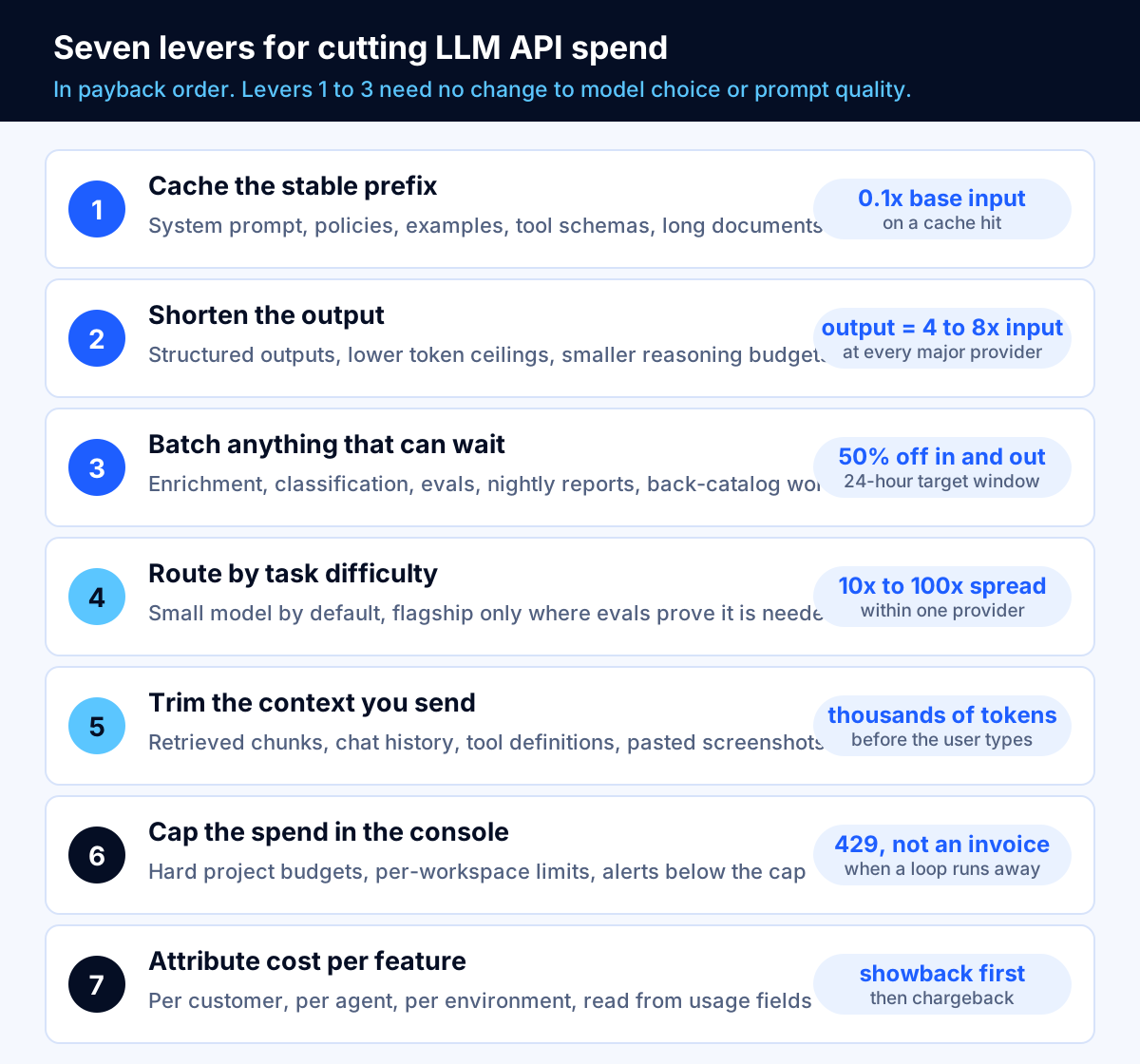
LLM API cost optimization usually comes down to three moves that cost nothing in quality: cache the part of the prompt that never changes, push anything that can wait into the batch tier, and stop sending your hardest-reasoning model work that a small model answers just as well. On most Claude and OpenAI models a cache hit is billed at a tenth of the base input price, and every major provider discounts asynchronous batch work by 50%. Those two levers alone cut a typical repeated-prompt workload by roughly three quarters.
This article is the costing exercise, not a list of tips. You will get the formula for cost per completed task, a worked example that takes one 100,000-task-a-month workload from $2,500 to $374 using nothing but published list prices, the exact caching rules that decide whether a cache earns its keep, a forecasting worksheet with stated assumptions, and the console settings that turn a runaway agent loop into an HTTP 429 instead of an invoice. Every price and limit below is quoted from the provider's own documentation and is current as of October 2026.
What actually drives your LLM API bill
Most teams track spend per month. That number tells you nothing you can act on, because it mixes traffic growth with inefficiency. The unit you need is cost per completed task: one summarized document, one answered support ticket, one enriched record, one agent run to completion.
The FinOps Foundation makes the same point in its AI guidance: the "Basic Price * Quantity = Cost equation still applies," and you reduce cost by reducing either the rate you pay or the quantity you consume. What makes AI spend awkward is the meter. As the Foundation puts it, "Tokens! The meters, or elements of charge can be very different" from anything else on your cloud bill.
For a single-call feature, cost per task is:
cost per task =
    (uncached input tokens      x input price)
  + (cache write tokens         x cache write price)
  + (cache read tokens          x cache read price)
  + (output tokens              x output price)
  + (server-side tool calls     x per-call price)
For an agent, multiply that by the number of model turns per run, and remember that each turn resends the growing conversation. A ten-turn agent does not cost ten times a single call; it costs considerably more, because turn ten carries the transcript of turns one through nine as input. That compounding is why agent costs surprise people, and it is also why caching matters most in exactly those workloads.
Output tokens are the expensive ones
The first thing to internalize is the asymmetry between input and output pricing. It is remarkably consistent:
| Model | Input / 1M | Output / 1M | Output multiple |
|---|---|---|---|
| Claude Haiku 4.5 | $1 | $5 | 5.0x |
| Claude Sonnet 5 | $2 | $10 | 5.0x |
| Claude Opus 5 | $5 | $25 | 5.0x |
| gpt-6.1-sol | $2.00 | $10.00 | 5.0x |
| gpt-6-luna | $0.10 | $0.50 | 5.0x |
| o3 | $2.00 | $8.00 | 4.0x |
| Gemini 3.8 Flash (to Dec 31, 2026) | $0.75 | $3.75 | 5.0x |
| Gemini 3.5 Flash | $1.50 | $9.00 | 6.0x |
| Gemini 2.5 Flash | $0.30 | $2.50 | 8.3x |
Prices from the Anthropic, OpenAI and Google Cloud pricing pages, October 2026. Date your forecast, because these move: Google states that Gemini 3.8, 3.7 and 3.6 Flash "are offered with introductory pricing of $0.75 / $3.75 per 1M tokens input / output through December 31, 2026. Starting January 1, 2027, standard pricing of $1.5 / $7.5 per 1M tokens input / output will apply." That is a doubling on a date already in the calendar. Anthropic moved the other way: the $2/$10 pricing for Claude Sonnet 5 was introductory, and the increase to $3/$15 scheduled for September 1, 2026 "will not occur."
Key takeaway: One output token costs four to eight times what one input token costs. A feature that returns a three-paragraph explanation where a sentence would do is not slightly more expensive. It is several times more expensive, and nobody reads the extra paragraphs.
The spread inside a single catalog
The second thing to internalize is how far apart the models are within one provider's own lineup. Anthropic's catalog runs from Claude Haiku 4.5 at $1/$5 per million tokens to Claude Fable 5.1 at $10/$50, a 10x spread. OpenAI's runs from gpt-6-luna at $0.10/$0.50 to gpt-6-astra at $10/$50, a 100x spread. Nothing about your application changes when you move between them except quality on the specific tasks you measure.
That is the whole argument for routing, and we will come back to it. First, the levers that do not require you to touch model selection at all.
How does prompt caching reduce LLM API costs?
Prompt caching stores the processed form of a prompt prefix so the next request that starts with the same bytes does not pay full price to reprocess it. The discount is steep and well documented.
| Provider | Cache read price | Cache write price | Cache lifetime |
|---|---|---|---|
| Anthropic, most models | 0.1x base input | 1.25x base input (5 min), 2x (1 hour) | 5 minutes or 1 hour |
| Anthropic, Claude Opus 5.5 | 0.05x base input | 1.25x / 2x base input | 5 minutes or 1 hour |
| OpenAI, most models | 0.1x base input | no separate charge | 30 minutes on GPT-5.6 and later |
| OpenAI, GPT-6.1 Sol | 0.05x base input | no separate charge | 30 minutes |
| Google, Gemini 3.5 Flash | $0.15 vs $1.50 input | implicit | per Google Cloud pricing |
| Amazon Bedrock, Claude 3.5 Sonnet v2 | $0.60 vs $6.00 input | $7.50 | per Bedrock documentation |
The numbers in that table are the same shape everywhere: a cache hit costs roughly 10% of a fresh input token, and sometimes 5%. Two things vary by provider and are worth checking in your own contract: whether cache writes are billed separately, and whether the cache discount stacks with the batch discount. Anthropic documents that its caching multipliers "stack with other pricing modifiers, including the Batch API discount." Do not assume the same elsewhere.
When caching pays for itself
Anthropic states the break-even plainly: a cache hit "costs 10% of the standard input price, which means caching pays off after one cache read for the 5-minute duration (1.25x write), or after two cache reads for the 1-hour duration (2x write)." OpenAI puts the same arithmetic the other way round: "writing a prefix once and fully reusing it once costs 1.35x its ordinary input cost, compared with 2x" without caching.
So the rule is simple. If a prefix will be reused even once inside the cache window, cache it. If it will be reused hundreds of times, the saving on that prefix approaches 90%.
The rules that decide whether your cache actually hits
This is where most implementations leak money. A cache you think is working and is not looks identical on your dashboard to no cache at all, except that you are paying the write premium.
There is a minimum prefix length. Anthropic's minimum cacheable prompt is 512 tokens on Claude Opus 5.5, Opus 5, Sonnet 5.5 and the Fable and Mythos 5 models; 1,024 tokens on Sonnet 5, Opus 4.8, Sonnet 4.6 and Sonnet 4.5; 2,048 on Opus 4.7; and 4,096 on Opus 4.6, Opus 4.5 and Haiku 4.5. The documentation is explicit about the failure mode: "Shorter prompts cannot be cached, even if marked with cache_control. Any requests to cache fewer than this number of tokens will be processed without caching, and no error is returned." OpenAI's minimum is 1,024 tokens for GPT-5.6 and later. Note the trap in that list: Haiku 4.5, the cheap model you would route high volume to, has the highest minimum at 4,096 tokens.
Order matters, and the cache invalidates from the top down. Anthropic's cache follows a strict hierarchy of tools then system then messages, and "Changes at each level invalidate that level and all subsequent levels." Change one tool definition and you have invalidated everything. OpenAI gives the matching advice: put "stable developer instructions and shared reference material first," and manage tools "append-only" rather than removing them.
So the practical layout for a cacheable prompt is: tool definitions first, then the system prompt and policies, then long reference documents, then few-shot examples, then the volatile conversation. Anything that changes per request, including the user's own text and anything with a timestamp in it, goes last. A single dynamic value near the top of a 20,000-token prefix destroys the whole cache.
Watch the clock from the wrong end. Anthropic measures the lifetime "from the start of the request that writes or reads the cache entry, not from the end of its response," and spells out the consequence: "if a response takes 4 minutes to stream, a follow-up request that reuses the same cached prefix must start within about 1 minute of that response completing." Long-running agent turns can expire their own cache mid-run. For those, the one-hour cache at a 2x write premium is usually the cheaper choice.
Breakpoints are limited. Anthropic allows at most four explicit cache breakpoints per request, with a 20-block lookback window, and warns that "If a growing conversation pushes your breakpoint 20 or more blocks past the last write, the lookback window misses it."
Caching buys you throughput as well as money
One underused consequence: on most Claude models, cached input tokens do not consume your rate limit. Anthropic documents that "only uncached input tokens count toward your ITPM rate limits," and gives a worked example: "With a 2,000,000 ITPM limit and an 80% cache hit rate, you could effectively process 10,000,000 total input tokens per minute." Claude Haiku 3.5 is the stated exception and does count cache reads.
If you are hitting rate limits rather than budget limits, caching may be a faster fix than a limit increase request.
Which workloads belong in the batch tier?
The batch discount is the most reliable 50% in the business, and it is identical across providers:
| Platform | Discount | Turnaround | Documented limits |
|---|---|---|---|
| OpenAI Batch API | "50% cost discount compared to synchronous APIs" | "within 24 hours (and often more quickly)" | 50,000 requests per batch, 200 MB input file, 2,000 batches per hour |
| Anthropic Batch API | "a 50% discount on both input and output tokens" | asynchronous | 100,000 requests per batch; stacks with prompt caching |
| Google Gemini, batch mode | "Gemini models are available in batch mode at 50% discount" | asynchronous | see Google Cloud pricing |
| Amazon Bedrock batch inference | "a 50% lower price compared to on-demand inference pricing" | asynchronous | select models from Anthropic, Meta, Mistral AI and Amazon |
| Azure OpenAI global batch | "50% less cost than global standard" | "24-hour target turnaround" | separate quota pool |
Two details make this more valuable than the headline discount suggests.
First, the batch tiers run on separate quota. OpenAI describes "substantially more headroom compared to the synchronous APIs" from a pool that does not consume your standard per-model rate limits; Azure global batch has its own quota as well. If your constraint is throughput rather than price, batch is still the answer.
Second, on Anthropic the discounts compound. The pricing documentation states that caching multipliers "stack with other pricing modifiers, including the Batch API discount." A cached prefix processed in a batch is billed at 50% of 10% of the input rate.
The honest list of what can be batched
Candidates are anything where a human is not waiting:
- Back-catalog work: classifying, tagging or summarizing documents you already have.
- Data enrichment and normalization on records loaded overnight.
- Evaluation runs. Your eval suite is the purest batch workload there is, and teams routinely pay synchronous prices for it out of habit.
- Nightly digests, scheduled reports and alerting summaries.
- Embedding generation for a new corpus.
What cannot be batched: anything in a request path where a person is watching a spinner, and anything where the result feeds the next decision within seconds.
The middle tier nobody uses
Between synchronous and batch there is a discounted-but-online tier that most teams have never tried. OpenAI's Flex processing prices tokens "at Batch API rates, with additional discounts from prompt caching" and is aimed at "model evaluations, data enrichment, and asynchronous workloads." The trade-offs are documented honestly: the "default timeout is 10 minutes," and "Flex processing may sometimes lack sufficient resources to handle your requests, resulting in a 429 Resource Unavailable error code. You will not be charged when this occurs."
That makes Flex a good fit for internal tools, admin jobs and back-office queues where a few minutes of latency is tolerable but a 24-hour wait is not. Implement exponential backoff and a fallback to standard processing, and you get the batch price with minutes of latency instead of hours.
And the tier that costs more
Worth knowing so you do not switch it on by accident. Anthropic's fast mode for Claude Opus 5.5 is $8 input and $40 output against the standard $4 and $20, exactly 2x, and the documentation notes it is not available with the Batch API. OpenAI lists a separate higher-priced fast tier as well: gpt-6-astra is $20 input and $100 output in fast mode against $10 and $50 standard. These tiers buy latency, which is sometimes worth it in a customer-facing path and almost never worth it in a background job.
How should we route requests between models?
Routing is the lever with the largest theoretical saving and the most ways to go wrong. The theory is unarguable: within one provider's catalog, models are 10x to 100x apart on price, and most production traffic is not hard. The research supports it too. The RouteLLM paper trains routers that choose between a strong and a weak model per query and reports that this "significantly reduces costs-by over 2 times in certain cases" without degrading response quality, with routers that keep working "even when the strong and weak models are changed at test time."
What goes wrong is routing by vibes. Teams pick percentages off a blog post, send 70% of traffic to a small model, and discover three weeks later that a specific class of request has been failing quietly.
Build the router in this order
- Write the eval set first. Collect 100 to 300 real requests with known-good answers, weighted toward the cases that matter commercially rather than the cases that are common.
- Measure the cheap model alone. Run the whole set through your smallest candidate and score it. You often find it handles 60% to 80% of real traffic at full quality, and the failures cluster into recognizable categories.
- Route on those categories, not on a percentage. Classify by the properties you can detect before the call: input length, task type, whether multi-step reasoning or tool use is required, whether the customer is on a tier where errors are expensive. Deterministic rules beat a learned router at small scale and are far easier to debug.
- Make escalation explicit. When the cheap model's answer fails a validation check, retry on the stronger model. Budget for that retry; a two-call path on a 10% escalation rate still beats a one-call path on the flagship.
- Re-run the evals on every model change. Provider catalogs move monthly. A router tuned to last quarter's models is a liability.
Key takeaway: A router without an eval suite is not a cost optimization, it is an undocumented quality regression with a cost saving attached. Build the evals first, and keep the per-route quality scores on the same dashboard as the per-route spend.
Where routing is the wrong answer
Skip it when your volume is low enough that the absolute saving is small, when the task is uniformly hard, or when every output is read by a regulator, a clinician or a customer's lawyer. In regulated workflows the cost of one wrong answer dwarfs the token saving, and the audit burden of explaining which model answered which request is real. Our guidance on building AI for regulated industries covers the documentation side of that choice.
Four ways to stop sending tokens you do not need
Caching makes repeated context cheap. Trimming makes it unnecessary.
Retrieved chunks. Most RAG systems retrieve more than they need because the top-k was never tuned. Measure answer quality at k=3, k=5 and k=10 on your eval set. If k=3 scores the same as k=10, you have been paying three times over for input tokens on every request. Our RAG chatbot cost breakdown goes through the retrieval and storage side of that bill.
Conversation history. An agent that resends a full transcript every turn grows its own input cost quadratically over a session. Summarize older turns into a compact state object and keep only the recent turns verbatim. Cache the summary.
Tool definitions. These are invisible on a dashboard and large in reality. Anthropic publishes the overhead: the tool-use system prompt alone is 675 input tokens on Claude Opus 4.7 and 286 on Opus 5, the text editor tool adds about 700 tokens, the computer-use toolset "adds about 4,500 input tokens to a request," and the browser toolset "about 6,600 input tokens." An agent with a broad toolbelt can be paying for 10,000 input tokens before the user types a word. Give each agent only the tools its job needs, and cache the definitions.
Fetched and pasted content. Anthropic's published estimates for web content are a useful sanity check: an average 10 kB web page is roughly 2,500 tokens, a 100 kB documentation page about 25,000 tokens, and a 500 kB research PDF about 125,000 tokens. One agent that fetches three PDFs per run and keeps them in context for ten turns is a different cost class from the same agent with a summarization step. Where the API offers a content ceiling, such as Anthropic's max_content_tokens on web fetch, set it.
Do not forget the server-side tools
Token prices are not the whole bill. Web search on the Claude API is "$10 per 1,000 searches" plus the tokens the results consume. Google's grounding with Google Search "Includes 5,000 Grounding Queries per month at no charge, aggregated across all Gemini 3 models," after which queries "are billed at $14 per 1,000 Grounding Queries." Anthropic's code execution gives each organization "1,550 free hours" of container time a month and then charges "$0.05 USD per hour, per container," and its Managed Agents sessions bill runtime at "$0.08 per session-hour" on top of tokens.
An agent that searches the web three times per run has a per-run cost floor of $0.03 before a single token is counted. At 50,000 runs a month that is $1,500 that no token optimization will touch.
How to forecast LLM API spend before you ship
Forecast per task, then multiply. Anything else produces a number you cannot defend.
Fill in six values from a prototype, not from guesswork:
| Input | Where it comes from |
|---|---|
| Stable prefix tokens | Token-count your system prompt, policies, tool schemas and examples |
| Volatile input tokens | Average of the per-request unique content across a sample of real traffic |
| Output tokens | Measured average, not your max_tokens setting |
| Model turns per task | Median and 90th percentile from the prototype logs |
| Expected cache hit rate | Share of requests arriving inside the cache window on real traffic patterns |
| Tasks per month | From the business owner, with a stated growth assumption |
Then price three scenarios: list price with nothing optimized, your realistic post-optimization case, and a pessimistic case at the 90th percentile turn count with a cache hit rate 20 points lower than you hope. Budget against the pessimistic case. The gap between the middle and pessimistic numbers tells you how much your forecast depends on caching behaviour you have not yet proven in production.
A worked example, start to finish
Take a document-summary feature. The assumptions, stated so you can change them:
- 100,000 tasks a month.
- Each task sends an 8,000-token stable prefix (instructions, style guide, four examples, tool schemas) plus 2,000 tokens of unique document text.
- Each task returns 500 output tokens.
- One model turn per task, no tool calls.
- Claude Sonnet 5 at list price: $2 per million input tokens, $10 per million output, cache reads $0.20, five-minute cache writes $2.50.
- No volume discount.
Step 0, nothing optimized. 10,000 input tokens at $2/M is $0.020, plus 500 output tokens at $10/M is $0.005. That is $0.025 per task, or $2,500 a month.
Step 1, cache the prefix. Assume 95% of requests arrive inside the cache window. The 95,000 hits read 8,000 tokens at $0.20/M, which is $0.0016 each, for $152. The 5,000 misses write 8,000 tokens at $2.50/M, which is $0.02 each, for $100. The unique 2,000 tokens still cost $0.004 per task, for $400. Output is unchanged at $500. Total: $1,152 a month, a 54% cut, from a change that touches prompt structure and nothing else.
Step 2, move it to the batch tier. Summaries are not read the moment they are produced, so the work goes into the Batch API at 50% off input and output, which Anthropic confirms stacks with caching. Total: $576 a month.
Step 3, route the easy ones. Evals show that 70% of these documents are summarized just as well by Claude Haiku 4.5, which is priced at exactly half of Sonnet 5 on input ($1 vs $2), output ($5 vs $10) and cache reads ($0.10 vs $0.20). Note that Haiku 4.5's 4,096-token cache minimum still clears the 8,000-token prefix. That 70% slice costs half as much: $201.60, plus $172.80 for the 30% that stays on Sonnet. Total: $374 a month.
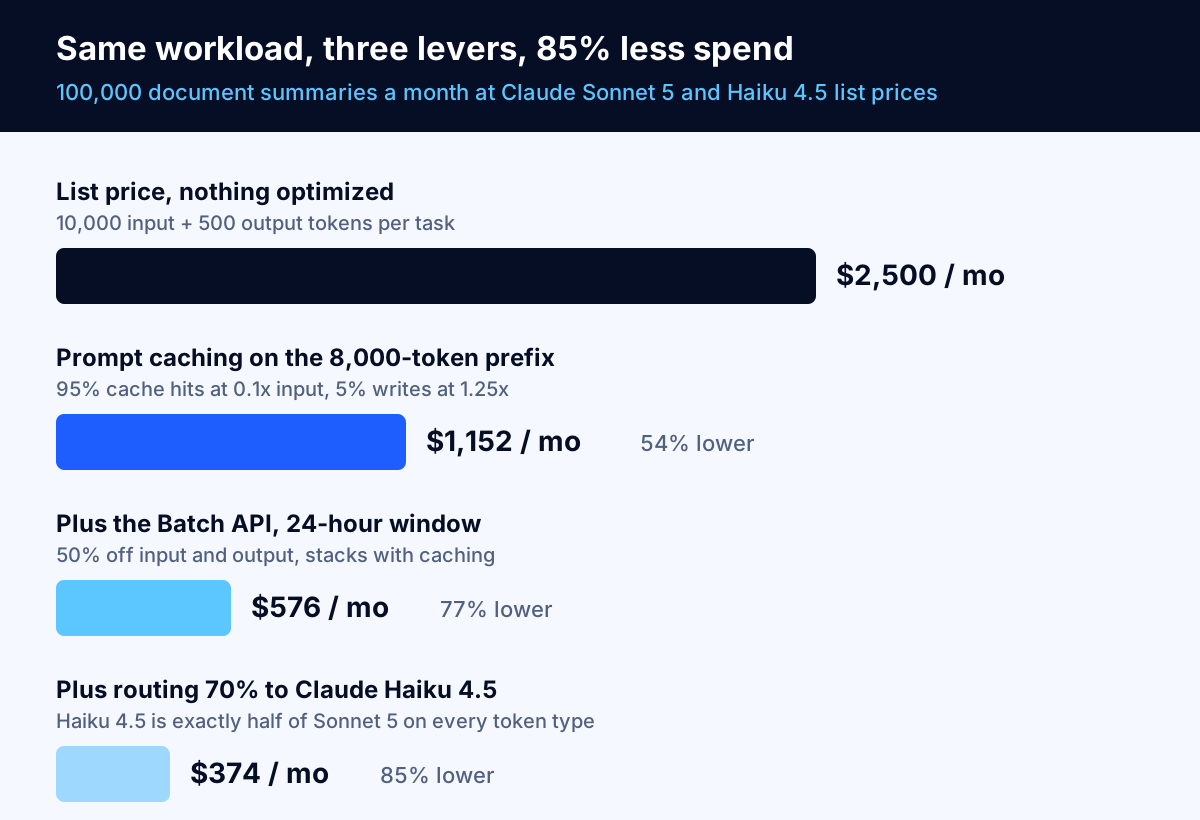
$2,500 to $374 is an 85% reduction, and not one step involved a negotiation, a commitment or a worse answer for the user. Your workload will have a different shape — this one is caching-friendly because the prefix is four times the volatile input — but the method transfers. Run the four steps on your own numbers before you ask anyone for a discount.
For comparison, Anthropic publishes its own worked example for a support workload: roughly 3,700 tokens per conversation on Claude Haiku 4.5 comes to about "$37.00 per 10,000 tickets." If your per-ticket cost is an order of magnitude above that, the problem is almost certainly context you are resending, not the price you are paying.
How do you put a hard ceiling on the bill?
Every team that has been surprised by an API invoice had alerts. Alerts are not caps. Know which control you are using.
OpenAI structures this at two levels. Usage tiers carry monthly limits that rise with cumulative spend: Free and Tier 1 at $100 a month, Tier 2 at $500 after $50 paid, Tier 3 at $1,000 after $100 paid, Tier 4 at $5,000 after $250 paid, and Tier 5 at $200,000 after $1,000 paid. Separately, projects support both spend alerts, which send "a notification; API traffic continues," and hard spend limits, where "Affected API requests return a 429 error."
Anthropic publishes monthly spend caps by tier: $500 on Start, $1,000 on Build and $200,000 on Scale, with no cap on the Custom tier. You can set your own limit below the tier cap, and separate limits per workspace. The two behave differently in a way worth coding for: hitting the tier cap returns HTTP 429 with error_code of enforced_spend_limit_reached and no retry-after header, with usage paused "until 00:00 UTC on the first day of the next month" unless you request an increase, while hitting a limit you set yourself returns HTTP 400 with invalid_request_error.
Three habits make these controls useful rather than decorative:
- One project or workspace per workload. If your experimental agent and your customer-facing feature share a budget, the experiment can take production down. Separate them and set the experiment's limit to something you would not mind losing.
- Set the alert well below the cap. An alert at 100% of budget is a post-mortem. An alert at 50% with a second at 80% is a chance to act.
- Handle the limit error in code. A 429 from a spend cap is not retryable, and Anthropic warns that "Retrying, including the SDK's automatic retries, fails until access resumes." Detect the specific error code and degrade gracefully instead of hammering a closed door.
Also beware the loop. The most expensive failure mode in agent work is not an expensive model, it is an agent that retries a failing tool call 400 times inside one run. Cap turns per run, cap tool calls per turn, cap total tokens per run, and log a hard failure when a cap is hit. Our AI agent development work treats these ceilings as part of the definition of done, not as something added after the first bad week.
How do you attribute cost per feature, per customer and per agent?
A single API key used by four features produces one invoice and no information. Attribution is what turns the levers above into a prioritized list.
Do it from the response, not the invoice. Every call returns the token counts you were billed on — uncached input, cache writes, cache reads, output — plus counters for server-side tools such as web_search_requests. Log those alongside your own dimensions: feature, customer or tenant, environment, agent name, model, and route decision. Then price them yourself with a small table of per-model rates, and you have per-feature and per-customer cost without waiting for a bill.
The FinOps Foundation's AI guidance adds two practices worth copying. First, tagging needs to distinguish workload types: "Tag resources that are used for model training separately from those used for model inference," along with environment tags for development, testing and production. Second, start with visibility rather than billing: use "a showback model to provide visibility into the costs incurred by different teams" without immediately charging them. Showback changes behaviour on its own, and it avoids the political fight that chargeback starts.
Two numbers to put on the dashboard next to spend, because spend alone hides the story:
- Cost per completed task, by feature. Rising spend with flat cost per task is growth. Rising cost per task is a regression.
- Cache hit rate, by feature. Anthropic's Console reports this directly, and a hit rate that falls after a deploy is usually someone putting a dynamic value in the prefix.
When LLM API cost optimization is the wrong project
Three cases where the honest answer is to stop.
The bill is small. If you are spending $400 a month on API calls, a week of engineering time to halve it is a bad trade. Set a spend cap, turn on caching because it is nearly free to do, and spend the week on the product. Revisit at $5,000 a month.
The feature does not work yet. Optimizing the cost of a feature that has not proven its value is a way of avoiding the harder question. Get it working, measure whether anyone uses it, then make it cheap. A feature nobody uses is already optimally cheap to switch off. If you are still sizing the build itself rather than the run cost, start with our AI agent development cost breakdown.
Compliance sets the architecture. Sometimes the cheap option is not available to you. Data residency has an explicit price: Anthropic applies a 1.1x multiplier to all token pricing when you pin inference to the US with inference_geo, and regional or multi-region endpoints on Bedrock and Google Cloud carry "a 10% premium over global endpoints." Google prices the same way on its own models: Gemini 3.5 Flash is $1.50 input and $9.00 output on a global endpoint, and $1.65 and $9.90 non-global. If your regulator or your customer contract requires that routing, the 10% is the cost of doing business, and the optimization conversation has to happen inside that constraint.
The mirror image also holds: do not reach for self-hosting as a cost measure before you have pulled the free levers. Replacing a variable per-token bill with fixed GPU, power and engineering costs makes sense at sustained high volume or under hard data-handling constraints, not as a first response to a surprising invoice. The on-premise LLM deployment cost analysis sets out where that crossover actually lands.
And if your broader cloud bill is the real problem rather than tokens specifically, start there instead: the same diagnostic discipline applies, and we walk through it in why AWS bills come in higher than expected.
A 30-day plan
If you want a sequence rather than a menu:
Week 1, measure. Instrument every call to log token counts by feature, customer and environment. Compute cost per completed task. Set spend caps and alerts per project or workspace. Do not change anything else yet.
Week 2, cache and trim. Restructure prompts so everything stable sits at the front and nothing dynamic contaminates the prefix. Turn on caching, confirm the prefix clears the model's minimum, and watch the hit rate. Audit tool definitions and remove the ones each agent does not need. Tune retrieval top-k against your eval set.
Week 3, move work off the hot path. Identify every workload where no human is waiting and move it to the batch tier, starting with your eval runs. Try the Flex or equivalent tier for internal tools that need minutes rather than hours.
Week 4, route. Build the eval set, score your cheapest viable model on real traffic, write explicit routing rules for the categories it handles well, and add validated escalation to the stronger model. Put per-route quality scores on the same dashboard as per-route cost.
By the end of that month you will know your real cost per task, you will have a ceiling that cannot be breached by accident, and the obvious waste will be gone. What remains is a genuine engineering trade-off between quality and price, which is a much better problem to have.
Where to go from here
The order matters more than the techniques. Measure cost per task, cache the stable prefix, batch everything that can wait, trim the context, then route — and put a hard cap under all of it before you start. Teams that work in that order usually find the first three steps deliver most of the saving without a single conversation about model quality.
If you would rather have someone run that exercise against your actual traffic, our cloud cost optimization work covers AI workloads alongside conventional cloud spend, and the engineering side of caching, routing and agent cost ceilings sits with our custom AI development team. A specialist replies within one business day, and the discovery call is free. Bring a month of usage data and a list of your features, and you will leave with a cost per task for each one — talk to a specialist when you are ready.
Frequently asked questions
What is the single biggest lever for cutting LLM API costs?
Prompt caching, if you have a large stable prefix. A cache hit is billed at 0.1x the base input price on most Claude and OpenAI models, and a five-minute cache write costs 1.25x, so the cache pays for itself after a single reuse. If your prompts are short and your answers are long, the biggest lever is output length instead, because output tokens cost four to eight times input tokens at every major provider.
Is the Batch API really 50% cheaper?
Yes, and it is consistent across providers. OpenAI documents a "50% cost discount compared to synchronous APIs" with a 24-hour completion window, Anthropic's Batch API gives "a 50% discount on both input and output tokens", Google states that "Gemini models are available in batch mode at 50% discount", Amazon Bedrock offers batch inference "at a 50% lower price compared to on-demand", and Azure global batch is 50% less than global standard. On Anthropic, the batch discount stacks with prompt caching.
How do I stop a runaway agent from running up a huge API bill?
Use a hard spend limit, not an alert. OpenAI projects support both spend alerts, where "API traffic continues", and hard spend limits, where "Affected API requests return a 429 error". Anthropic lets you set an organization spend limit below your tier cap and separate per-workspace spend limits; requests past a limit you set return HTTP 400. Put every agent in its own project or workspace so one loop cannot consume the budget for everything else.
Does switching to a newer model always lower my cost per task?
No, because tokenization changes too. Anthropic notes that Claude 4.7 and later models use a newer tokenizer that "produces approximately 30% more tokens for the same text." A lower price per million tokens can still mean a higher price per task. Always re-measure cost per completed task on your own traffic after a model change, not the headline per-token rate.
How do I attribute LLM spend to a specific feature or customer?
Read it from the API response rather than inferring it from the invoice. Every call returns input, output, cache-write and cache-read token counts, plus server-tool counters such as web search requests. Log those with your own identifiers for feature, customer, environment and agent, then price them yourself. The FinOps Foundation recommends starting with "a showback model to provide visibility into the costs incurred by different teams" before charging anyone.
When is a committed-capacity plan cheaper than pay-as-you-go?
When you have steady, predictable, round-the-clock throughput and you have already pulled the free levers. Amazon Bedrock offers Provisioned Throughput with 1-month and 6-month commitments, and Azure and Google Cloud have equivalents. Commitments reward utilization, so a workload that is busy eight hours a day usually loses money on a 24-hour commitment. Measure a full month of real traffic first.
Do cached tokens count against my rate limits?
Usually not, which makes caching a throughput lever as well as a cost lever. Anthropic documents that for most Claude models "only uncached input tokens count toward your ITPM rate limits" and gives the example of a 2,000,000 ITPM limit with an 80% cache hit rate supporting roughly 10,000,000 total input tokens per minute. Claude Haiku 3.5 is the exception and does count cache reads.
Should we self-host an open model instead to save money?
Only at sustained high volume, or when data residency rules make the API route impractical. Self-hosting replaces a variable per-token cost with fixed hardware, power and engineering costs that you pay whether or not anyone uses the feature. Work out the crossover point on your own volumes first; our on-premise LLM deployment cost breakdown walks through the hardware and staffing line items.
Sources
- Pricing, Anthropic (Claude Developer Platform)
- Prompt caching, Anthropic (Claude Developer Platform)
- Rate limits, Anthropic (Claude Developer Platform)
- Pricing, OpenAI
- Prompt caching, OpenAI
- Batch API, OpenAI
- Flex processing, OpenAI
- Rate limits, OpenAI
- Gemini Enterprise Agent Platform pricing, Google Cloud
- Amazon Bedrock pricing, Amazon Web Services
- How to use global batch processing with Azure OpenAI, Microsoft
- FinOps for AI Overview, FinOps Foundation
- RouteLLM: Learning to Route LLMs with Preference Data, arXiv