Web & Software Development
When to Replace Spreadsheets With Custom Software
Replace spreadsheets with custom software only when the math says so. Use a 12-point risk score, four options priced side by side, and a 7-step migration plan.
In this article
- Why spreadsheets fail in ways other software doesn't
- The 12 signs it is time to replace spreadsheets with custom software
- What the spreadsheet you already have actually costs
- Your four options, priced side by side
- How to decide: the break-even you can run on your own numbers
- A seven-step migration plan that doesn't break the business
- What goes wrong, and how to avoid it
- Spreadsheets and regulated data: where the rules change
- What the new system costs to run
- Putting it together
- Frequently asked questions
- Sources
You should replace spreadsheets with custom software when the spreadsheet has stopped being a calculator and started being a system: several people edit it, data gets retyped into it from somewhere else, a wrong value costs money or a customer, and nobody can tell you who changed a cell or when. Until that happens, a spreadsheet is the cheapest and most flexible tool you own, and replacing it wastes money.
The hard part is not recognizing the pain. It is deciding which of four very different answers you need — harden the spreadsheet, buy off-the-shelf software, assemble a low-code app, or commission a custom build — and knowing roughly what each one costs before you talk to a vendor.
This article gives you three things you can use today. A 12-point risk score that tells you whether to act at all. A side-by-side three-year cost comparison for a 25-person process, built from published vendor prices and federal wage data, with every assumption stated. And a seven-step migration plan, in the order that keeps the business running, including the step most projects skip.
Key takeaway: Most companies that should replace a spreadsheet should not start with a custom build. Custom wins on a specific, short list of conditions. The rest of the time, off-the-shelf or low-code is the better first move, and the cost comparison below shows why.
Why spreadsheets fail in ways other software doesn't
Spreadsheets are not bad software. They are extraordinary software, which is precisely the problem: they let one person build a business-critical system in an afternoon, with no review, no tests, no permissions and no record of what happened.
The research on this is unusually clear and unusually ignored. Raymond Panko's survey of spreadsheet error research concludes that errors are rare on a per-cell basis but highly likely to be present in any large spreadsheet, that they are "extremely difficult to detect and correct", and that the people who build spreadsheets are far more confident in their accuracy than the evidence supports. The last point is the dangerous one. Your team is not careless. They are human, and humans do not notice most of the mistakes they make.
The failure modes are also well documented. A 2026 analysis of the European Spreadsheet Risk Interest Group's incident archive examined 121 documented spreadsheet failures from 1995 to 2026 and sorted them into twelve categories. Formula errors, data-entry slips and data-handling mistakes accounted for 71 of them, and recurred across the whole three decades: from a missing minus sign at Fidelity in 1995 to a mistyped date that cost Norway's sovereign wealth fund roughly $92 million in 2024.
The authors' more interesting finding is that a growing share of incidents involve nothing wrong with the arithmetic at all. Data present in a workbook but invisible to whoever receives it — hidden rows, hidden sheets, pivot-table caches, embedded objects — has caused real harm, including a 2022 UK Ministry of Defence spreadsheet that exposed details of roughly 18,700 Afghan applicants through hidden rows. If you email workbooks outside your company, that is your risk too, and no amount of care with formulas addresses it.
The limits you will eventually hit
Separately from human error, spreadsheets have hard ceilings. They are generous, which is why people are surprised when they arrive.
| Limit | Excel | Google Sheets |
|---|---|---|
| Rows per sheet | 1,048,576 | Governed by the cell cap |
| Columns per sheet | 16,384 | Governed by the cell cap |
| Total cells per file | Limited by available memory | 20 million cells or 100 MB |
| Characters per cell | 32,767 | Cells over 50,000 characters are dropped on import |
| People in one shared workbook | 256 | Not published |
| Unique cell formats | 65,490 | Not published |
Sources: Microsoft's Excel specifications and limits and Google's Drive file limits, both as of October 2026.
The more useful lesson is what happens near the limits rather than at them. The best-known case is the NHS Test and Trace data loss in England: roughly 15,000 positive COVID-19 test results recorded between 25 September and 2 October 2020 were not passed on, and the problem was discovered on 5 October. A technical analysis by City, University of London traced it to the legacy XLS format, which stops at 65,536 rows per sheet rather than the modern XLSX limit in the table above. Rows beyond the ceiling were not imported, and the process had no check that would have noticed.
Nothing in that story required anyone to be incompetent. It required a file format with a ceiling, a volume that grew, and no automated reconciliation between what went in and what came out. Most operational spreadsheets have exactly those three properties.
Key takeaway: The question is not whether your spreadsheet contains errors. Assume it does. The question is whether an error in it would be caught before it costs you something.
The 12 signs it is time to replace spreadsheets with custom software
Score your spreadsheet honestly. One point for each statement that is true today — not true in a plan, and not true after the cleanup you keep meaning to do.
- More than one person edits it in the same week.
- Someone retypes or copy-pastes data into it from another system.
- More than one copy exists, and versions travel by email or chat.
- A wrong value in it would cost money, cost a customer, or produce a regulatory finding.
- It has grown past roughly 10,000 rows or 20 tabs.
- It contains formulas or macros that only one person understands.
- It feeds a report that someone outside the team depends on.
- It holds personal, health, financial, payroll or contract data.
- You cannot tell who changed a given cell, or when.
- It requires a review or approval that currently happens over message or email.
- It breaks or slows down regularly: crashes, long recalculations, broken links, file size.
- Workarounds have grown on top of it — a reconciliation tab, a macro, a "do not touch" sheet, or a second spreadsheet that fixes the first.
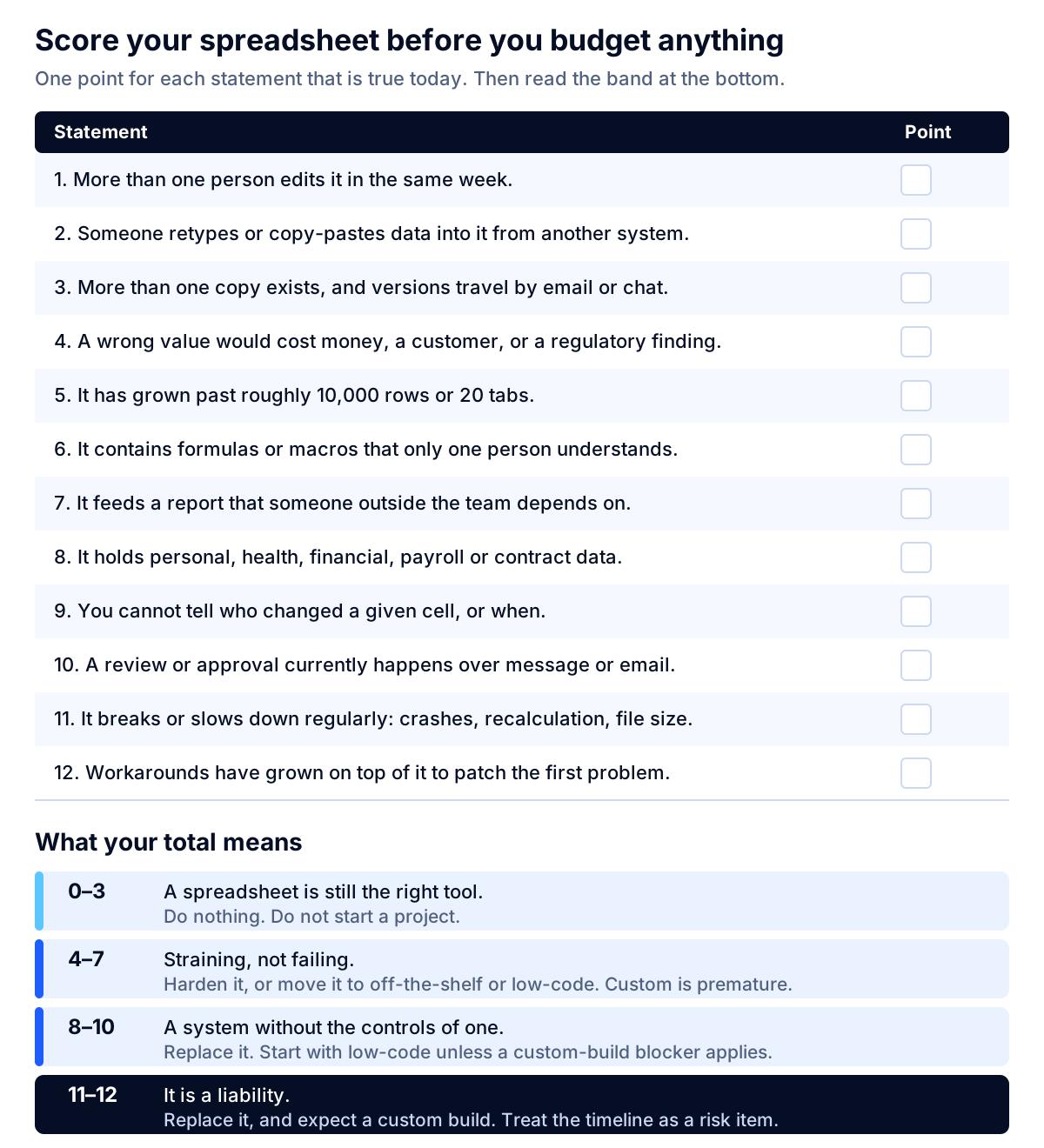
What your score means:
| Score | What it means | What to do |
|---|---|---|
| 0–3 | A spreadsheet is still the right tool | Nothing. Do not start a project. |
| 4–7 | It is straining, not failing | Harden it, or move it to off-the-shelf or low-code. Custom is premature. |
| 8–10 | It is now a system without the controls of one | Replace it. Start with low-code unless a blocker below applies. |
| 11–12 | It is a liability | Replace it, and expect a custom build. Treat the timeline as a risk item. |
The five blockers that genuinely require a custom build
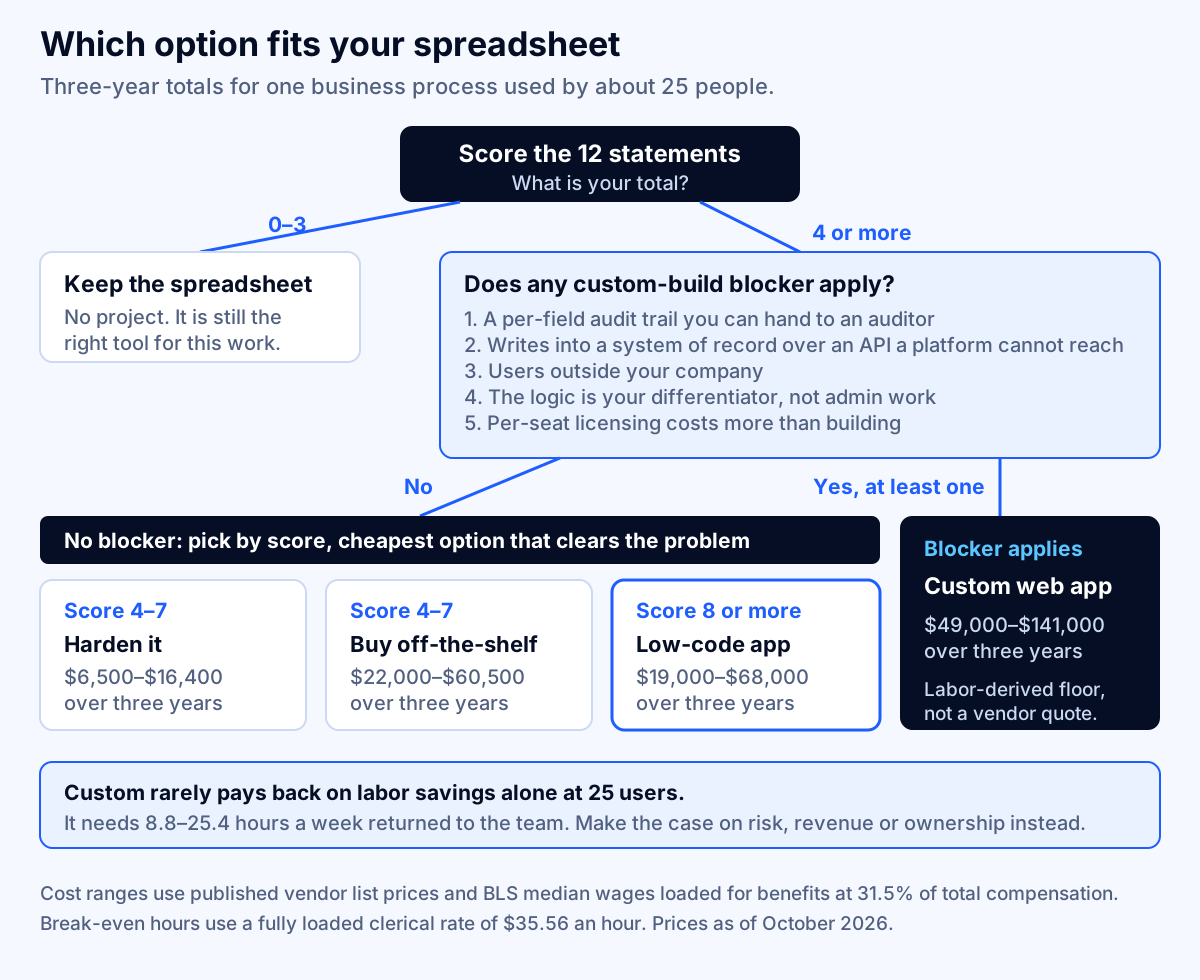
A high score tells you to replace the spreadsheet. It does not tell you to commission custom software. Low-code platforms handle forms, tables, approvals, dashboards and common integrations well, and they handle them in weeks. Reach for a custom web app when at least one of these is true.
- You need a per-field audit trail you can hand to an auditor or regulator — who changed what, when, from which value to which value, immutably, with a retention period you control.
- The workflow must write into a system of record through an API that a low-code platform cannot reach safely or cannot reach at all, especially where a failed write must be retried and reconciled rather than silently dropped.
- People outside your company will use it — customers, brokers, suppliers, patients, contractors. Per-seat internal tooling is the wrong shape and often the wrong license.
- The logic is your differentiator, not an administrative chore. If the spreadsheet encodes how you price, underwrite, schedule or allocate better than your competitors, it belongs in software you own.
- Per-seat licensing costs more than building, which happens when most users are occasional or external. Run the arithmetic in the next section before you accept this one.
If none of the five applies, buying or assembling will almost certainly beat building, and you can revisit the decision in a year with real usage data.
What the spreadsheet you already have actually costs
Before comparing options, price the status quo. Most teams have never done this, which is why the conversation stalls at "but the spreadsheet is free."
Here is the method, with one worked example. Swap in your own numbers.
Step 1: count the hours. Add up time spent on data entry, retyping between systems, chasing the current version, reconciling disagreements, fixing broken formulas, and assembling reports by hand. Ask the people who do it, for one normal week, not an average week.
Step 2: use a fully loaded hourly rate, not salary. The median wage for bookkeeping, accounting and auditing clerks was $24.36 an hour as of May 2025. Benefits made up 31.5% of total employer compensation costs for civilian workers in June 2026, so wages are 68.5% of the real cost. That gives a fully loaded rate of $24.36 ÷ 0.685 = $35.56 an hour. For developer time, the median wage was $64.44 an hour as of May 2025, or $94.07 an hour fully loaded. Both figures are used throughout this article.
Step 3: multiply. Four people spending six hours a week each is 4 × 6 × 52 = 1,248 hours a year. At $35.56, that is $44,379 a year in labor sitting inside one spreadsheet.
Step 4: add what the errors cost. This is the number people refuse to estimate, so estimate it badly rather than not at all. Count the incidents from the last twelve months — the duplicate order, the wrong invoice, the missed renewal, the report that had to be reissued — and attach a cost to each. A single reissued customer report that took two people a day to rebuild is about $570. If you genuinely cannot find any incidents, that is useful information: your score is probably lower than you think.
Step 5: note the costs you cannot price. Decisions delayed because the numbers were not ready. The person who cannot take vacation because they are the only one who understands the model. The deal you did not pursue because onboarding would have broken the sheet. Write them down and leave them unpriced; they belong in the decision even though they do not belong in the arithmetic.
Key takeaway: A spreadsheet that consumes 1,248 staff hours a year costs about $44,000 a year to operate. That is the budget you are comparing against, not zero.
Your four options, priced side by side
Four paths, in ascending order of cost and control. The assumptions below the table are the whole point — change them and the answer changes.
| Option | What it is | Three-year total, 25 users | Annualized |
|---|---|---|---|
| A. Harden the spreadsheet | One owner, locked templates, validation, a single authoritative copy, documented formulas | $6,500–$16,400 | $2,200–$5,500 |
| B. Buy off-the-shelf | A commercial product that already does most of the process | $22,000–$60,500 | $7,300–$20,200 |
| C. Low-code app | A database-backed app assembled on a platform | $19,000–$68,000 | $6,300–$22,700 |
| D. Custom web app | Software built for your process, which you own | $49,000–$141,000 | $16,300–$47,000 |
Assumptions behind each range
A. Harden the spreadsheet. 40–120 hours of a skilled analyst or developer at $94.07 fully loaded, or $3,800–$11,300 one-time, to restructure the file, add data validation, separate inputs from calculations, document the logic and establish one authoritative copy. Plus 2–4 hours a month of owner time at $35.56, or $900–$1,700 a year. This buys you less risk, not less work, and it is the correct answer far more often than vendors will tell you.
B. Buy off-the-shelf. 25 seats at $20–$45 per user per month, which is the band set by published list prices — Airtable charges $20 per user per month for Team and $45 for Business on annual billing as of October 2026. That is $6,000–$13,500 a year. Add $4,000–$20,000 one-time for configuration, data migration and training. The risk here is fit: if the product does 80% of your process, the remaining 20% usually ends up back in a spreadsheet, and you now pay for both.
C. Low-code app. Licenses of $5,000–$18,000 over three years. The low end reflects Retool's Team plan at $10 per builder and $5 per internal user per month on annual billing, so three builders and 22 users is $140 a month. The high end reflects Power Apps Premium at $20 per user per month on annual billing, or Retool's Business plan at $50 per builder and $15 per internal user. Watch for capacity add-ons: Dataverse storage beyond the included allowance is $40 per GB per month. Add 80–320 hours of build at $94.07, or $7,500–$30,100, and 2–6 hours a month of changes thereafter.
D. Custom web app. 350–900 hours of build for one clearly scoped business process at $94.07 fully loaded, or $33,000–$85,000. Hosting of $30–$150 a month covers this size of internal app comfortably — Amazon Lightsail lists a 2 vCPU, 4 GB instance at $24 a month and a standard managed database from $15 a month, as of October 2026 — so $1,100–$5,400 over three years. Maintenance at 15–20% of build cost a year adds $14,900–$51,000.
Two honest caveats on option D. First, these are labor-derived figures built from federal wage medians, so they represent the cost of the work, not a quote. Agency and consultancy quotes sit above them because they include recruiting, management, QA, infrastructure, benefits beyond the federal average, and margin. Treat the range as a floor and a sanity check on bids, not a target price. Second, the range assumes one clearly scoped process. Scope creep is the single largest driver of overrun, and it usually arrives as "while we're in there."
How to decide: the break-even you can run on your own numbers
The cost table above is not a decision. This is: how many hours a year must your team get back for each option to pay for itself?
Divide the annualized cost by your fully loaded hourly rate. Using $35.56 an hour:
| Option | Annualized cost | Hours a year to break even | Hours a week, whole team |
|---|---|---|---|
| A. Harden the spreadsheet | $2,200–$5,500 | 62–155 | 1.2–3.0 |
| B. Buy off-the-shelf | $7,300–$20,200 | 205–568 | 3.9–10.9 |
| C. Low-code app | $6,300–$22,700 | 177–638 | 3.4–12.3 |
| D. Custom web app | $16,300–$47,000 | 458–1,322 | 8.8–25.4 |
Read the right-hand column against the worked example. The four people spending six hours a week each were burning 24 hours a week in total. On labor alone:
- Hardening pays back almost immediately. It needs 1.2–3.0 hours a week back out of 24. Even a modest reduction clears it.
- Buying or low-code pays back comfortably. They need 3.9–12.3 hours a week back. Removing manual retyping and report assembly usually gets there.
- Custom does not pay back on labor alone at this size. At the top of the range it needs 25.4 hours a week back from a process that only consumes 24.
That is the most important sentence in this article, and it is the opposite of what most "replace your spreadsheets" content concludes. A custom build is rarely justified by time savings in a 25-person process. It is justified when the spreadsheet sits in the revenue path or the risk path — when errors cost customers, when regulators will ask for records you cannot produce, when the logic is your competitive advantage, or when the thing you are building will be used by people who do not work for you.
If your justification is labor savings only, you are probably looking at option A, B or C. If your justification is risk, revenue or ownership, option D can be correct at a cost that labor savings would never support, and you should say so explicitly in the business case rather than inflating the efficiency numbers to make it look like a productivity project. For a fuller treatment of how to structure that kind of case, our guide to modeling AI agent costs and payback applies the same method to a different problem.
A seven-step migration plan that doesn't break the business
The order matters more than the tooling. Most failed migrations did the right steps in the wrong sequence.
Step 1: capture the process that actually happens
Sit with the people who use the spreadsheet and watch a full cycle. Document the real process, including every exception, workaround and side conversation. You will find steps nobody knew existed and rules nobody wrote down. The documented process and the actual process are never the same, and the actual one is what you must replace.
Step 2: extract the rules, then judge them
Go through the formulas and write the business rules in plain English: "orders over $5,000 need the regional manager's approval," "we prorate by calendar day, not business day." Then review each one. Some will be wrong. Some will be artifacts of a spreadsheet limitation. Some will contradict each other, and somebody has to decide which wins. Do this before any build, because this step generates decisions, and decisions take calendar time.
Step 3: measure how dirty the data is, then clean it
Count duplicates, blank required fields, dates stored as text, names spelled four ways, totals that do not reconcile. Report the counts. Then clean the data in the spreadsheet, where your team already knows how, rather than during migration, where every anomaly becomes a defect ticket. Migrating dirty data is the fastest way to make the new system look worse than the old one on day one.
Step 4: model the data, not the sheet
This is the step that separates software from a web-shaped spreadsheet. Tabs become tables. Repeated columns become rows. Relationships become explicit: a customer has many orders, an order has many lines, a line references one product at one price on one date. If the new system has a grid that looks exactly like the old spreadsheet, the modeling step was skipped, and every later problem traces back here.
Step 5: build the thinnest version that replaces one complete loop
Not one screen. One loop, end to end: data goes in, the process runs, the output comes out, somebody uses it. A narrow slice that works beats a broad slice that nearly works, because only a complete loop tells you whether the model from step 4 is right.
Step 6: dual-run for two complete business cycles and reconcile
Run the spreadsheet and the new system in parallel, with the same inputs, and reconcile the outputs exactly. Investigate every difference — some will be bugs, and some will be errors in the spreadsheet you have been living with for years. Two complete cycles is the minimum, because the first one finds the bugs and the second one proves the fixes. If your cycle is a monthly close, this step alone sets a two-month floor on the timeline, and it is the step most often cut when a project runs late. Cutting it is how you discover in production that the two systems disagree and nobody knows which is right.
Step 7: retire the spreadsheet deliberately
Set the file to read-only, archive a dated copy, remove edit access, and tell people where the process lives now. A spreadsheet that remains editable will remain in use, and you will end up maintaining two systems that disagree. Then give the analysts a clean export, so the people who need Excel for analysis have it without becoming the system of record again.
Key takeaway: Steps 1 through 4 take longer than step 5 and generate more value. If a vendor's plan starts at step 5, they are quoting for a build and leaving the hard work with you.
What goes wrong, and how to avoid it
Rebuilding the spreadsheet as a web page. The most common failure. Users ask for the grid they know, the team obliges, and you pay custom software prices for a worse spreadsheet with fewer features. The fix is to insist on step 4 and accept that the new screens should look different because the data model is different.
No named internal owner. Software with no owner decays into the thing people work around, and then somebody builds a spreadsheet to cover the gap. Name the owner before the build starts and give them real time for it.
Reports specified last. Somebody outside the team depends on a report built from the spreadsheet, nobody asks them what they need, and the project ends in a scramble. Ask early who consumes the outputs and what they do with them.
Permissions as an afterthought. "Everyone can see everything" is easy to build and hard to unwind later, especially with payroll, pricing, health or customer data in the system. Decide who sees what during step 4.
No export. Analysts will keep using spreadsheets for analysis, and they are right to. If the new system cannot export cleanly, they will export messily, and the shadow spreadsheet returns within a quarter.
Assuming AI makes the spreadsheet unnecessary. Pointing a language model at a messy workbook produces confident answers drawn from inconsistent data. The order is: fix the data and the process first, then add custom AI on top of a clean system if there is a case for it. Our write-up of what to automate first in a small business makes the same argument from the AI side.
When to leave the spreadsheet alone
Honest counsel, because this is where the money is usually wasted.
- One person uses it occasionally. A personal scratchpad is not a system. Leave it.
- The work is modeling and what-if analysis. Spreadsheets are the best tool that exists for this. Do not replace them with forms.
- The process is changing in the next six months. Build after it settles, not during, or you will specify the wrong thing.
- Volume is low. A process that runs a few dozen times a month rarely justifies more than hardening.
- Nobody internal can own it. Without an owner, the new system becomes abandoned software, which is worse than a spreadsheet because it is harder to change.
Spreadsheets and regulated data: where the rules change
If the spreadsheet holds health, financial, payroll or other regulated data, the decision stops being a productivity calculation.
The HIPAA Security Rule's technical safeguards require covered entities and business associates to implement access control allowing access "only to those persons or software programs that have been granted access rights," audit controls that "record and examine activity in information systems that contain or use electronic protected health information," integrity controls protecting records "from improper alteration or destruction," and authentication verifying that a user "is the one claimed" — all at 45 CFR 164.312.
Read those four requirements against a shared workbook. File-level sharing is not per-record access control. Version history is not an audit trail you can produce for a specific record across a retention period. A file that anyone with the link can overwrite does not protect records from improper alteration. And a workbook does not authenticate the person typing into it beyond whoever is signed into the drive.
The same structural gap appears in other regimes with records, retention and traceability obligations. Financial reporting controls, insurance market conduct examinations and life-sciences electronic records rules all expect a record of who did what and when, which a spreadsheet does not produce at the field level. Hidden data makes it worse: the disclosure incidents in the EuSpRIG corpus happened because workbooks carried information the sender could not see, a category of risk that careful formula review does not touch.
Two practical consequences. First, in regulated contexts the audit trail requirement frequently becomes the deciding blocker on its own, which is why option D appears in companies whose labor math would otherwise point at option C. Second, the migration gets a compliance workstream: data mapping, retention periods, access reviews and evidence you can hand to an examiner. Plan for it from the start rather than bolting it on, which is the approach we take to AI and software compliance work generally, and which our HIPAA development checklist covers in more detail.
None of this is legal advice. Confirm which rules apply to your specific data and workflows with your counsel or compliance team before you set a timeline.
What the new system costs to run
A build is a one-time number. Running the result is forever, and that is where budgets get surprised.
For an internal app replacing one spreadsheet-driven process, expect four ongoing lines.
- Hosting and database. $30–$150 a month covers this size comfortably. Using Lightsail list prices as of October 2026, a 2 vCPU and 4 GB instance is $24 a month and a standard managed database starts at $15 a month. Costs rise with data volume, uptime requirements and backup retention, not usually with user count at this scale.
- Platform licenses, if you chose low-code. Per-seat fees keep accruing whether the app changes or not, and they scale with headcount, which is the one cost line a custom build does not have.
- Maintenance and small changes. Budget 15–20% of the build cost a year. Below 15%, the app stops matching the business. Above 20%, you are effectively still building.
- Someone's attention. The owner from step 1 needs real hours every month. Unowned software is the most expensive kind.
Two things reliably drive run costs higher than planned: integrations that break when the other system changes, and reporting that grows faster than the app. If the app will be the source of truth for other teams' numbers, scope reporting as a feature with a budget rather than an afterthought. If you are consolidating several apps onto cloud infrastructure at the same time, the same discipline applies to the bill itself, which is what our cloud cost optimization work addresses.
Putting it together
The decision is simpler than the vendor conversation makes it sound.
- Score the spreadsheet against the 12 statements. Below four, stop — you do not have a software problem.
- Price the status quo in fully loaded hours, plus whatever last year's errors cost.
- Check the five blockers. If none applies, you are choosing between hardening, buying and low-code, in that order of cost.
- Run the break-even. Divide annualized cost by your loaded hourly rate and ask whether the team can realistically give back that many hours a week.
- If a blocker does apply, make the case on risk, revenue or ownership rather than efficiency, and expect the custom range above to be a floor rather than a quote.
- Follow the seven steps in order, and protect step 6. Two complete cycles of dual-running is not padding.
The pattern worth remembering: the spreadsheet is almost never the problem. The problem is that a process outgrew the tool, and the honest question is which of four tools it has grown into. Most companies that ask us about replacing spreadsheets need a smaller answer than they expected, and the ones that genuinely need custom software can usually name a blocker in thirty seconds.
If you want a second opinion on your own score, bring the spreadsheet and last year's error list and talk to a specialist. The discovery call is free, a specialist replies within one business day, and it will usually tell you which of the four options fits. You can also browse our other guides on cost and build decisions or see what we build if you are earlier in the process.
Frequently asked questions
When should a business replace spreadsheets with custom software?
When the spreadsheet runs a process rather than analyzing one: several people edit it, data is retyped from other systems, a wrong value has real consequences, and nobody can say who changed what. Score it with the 12-point test in this article. Below four points, leave it alone. Above eight, replace it — but start with off-the-shelf or low-code unless you hit one of the five blockers that genuinely require a custom build.
How much does it cost to replace a spreadsheet with custom software?
For one business process used by about 25 people, the three-year totals in this article work out to roughly $6,500–$16,400 to harden the spreadsheet, $22,000–$60,500 for off-the-shelf software, $19,000–$68,000 for a low-code app, and $49,000–$141,000 for a custom web app. Those are labor-derived figures using BLS wage data; vendor quotes sit above them because they include overhead and margin.
Is low-code good enough, or do I need a custom app?
Low-code is good enough for most internal spreadsheet replacements: forms, tables, approvals, dashboards and simple integrations. Five things push you to custom — a per-field audit trail you can hand an auditor, writes into a system of record over an API the platform cannot reach safely, external customers or partners as users, logic that is your actual differentiator, and per-seat licensing that costs more than building because most users are occasional.
How long does a spreadsheet-to-software migration take?
Plan it in phases rather than to a date. Extracting the rules and cleaning the data usually takes longer than the build. The hard floor is set by dual-running: you must run the old and new processes side by side for two complete business cycles and reconcile them, so a monthly close means at least two months of overlap before you can retire the spreadsheet.
What are the warning signs that a spreadsheet has become a risk?
Multiple copies in circulation, manual retyping between systems, formulas only one person understands, no record of who changed a cell, approvals happening over chat, regulated data sitting in the file, and workarounds built on top of workarounds. Hidden rows and stale pivot caches are a specific disclosure risk: the EuSpRIG incident corpus records cases where invisible data in a shared workbook caused the harm, not a wrong formula.
Can my team keep using Excel after we replace the spreadsheet?
Yes, and you should plan for it. Spreadsheets are genuinely better than custom software for modeling, what-if analysis and one-off questions. The goal is to move the process of record — entry, approval, status, history — into software, then give analysts a clean export so they can keep doing analysis without becoming the system of record again.
What usually goes wrong in these projects?
Four things, in order of frequency: rebuilding the spreadsheet grid as a web page instead of modeling the data properly, migrating dirty data and inheriting every old inconsistency, launching without a named internal owner, and discovering at the end that nobody specified the reports. The migration plan in this article puts each of those before the build, not after it.
What if the spreadsheet holds health, financial or customer data?
Then the rules, not the inconvenience, decide the timeline. The HIPAA Security Rule requires audit controls that record and examine activity in systems holding electronic protected health information, and access control limited to authorized people, at 45 CFR 164.312. A shared workbook cannot produce that record. Confirm your own obligations with your counsel or compliance team before you plan a migration.
Sources
- Excel specifications and limits, Microsoft
- Files you can store in Google Drive, Google
- Anatomy of a Spreadsheet Failure: Analysing the EuSpRIG Horror Story Corpus, Simon Thorne and Angela Collins, arXiv
- What We Don't Know About Spreadsheet Errors Today: The Facts, Why We Don't Believe Them, and What We Need to Do, Raymond R. Panko, arXiv
- What really caused the Excel error in the NHS Test and Trace COVID-19 system?, City, University of London
- Bookkeeping, Accounting, and Auditing Clerks: Occupational Outlook Handbook, U.S. Bureau of Labor Statistics
- Software Developers, Quality Assurance Analysts, and Testers: Occupational Outlook Handbook, U.S. Bureau of Labor Statistics
- Employer Costs for Employee Compensation, June 2026, U.S. Bureau of Labor Statistics
- Power Apps pricing, Microsoft
- Airtable pricing, Airtable
- Retool pricing, Retool
- Amazon Lightsail pricing, Amazon Web Services
- 45 CFR 164.312 — Technical safeguards, U.S. Government Publishing Office