AI Agents
AI Agents for Small Business: What to Build First, What It Costs
AI agents for small business: a 10-point readiness test, the five workflows that pay back first, honest cost ranges, and where the build-vs-buy break-even sits.
In this article
- Where small businesses actually are with AI
- What an AI agent is, and what the word is being used to sell
- The 10-point AI agent readiness test
- What to build first: five workflows that pay back for small businesses
- What does an AI agent cost for a small business?
- The build-versus-buy break-even, with every assumption stated
- What not to automate yet
- How to buy without getting scammed
- A 90-day plan that fits a small company
- Conclusion
- Frequently asked questions
- Sources
Short answer: most AI agents for small business should not be built. They should be bought, configured, or assembled from tools you already pay for. A custom agent is worth building when one workflow runs at high volume, a wrong answer is cheap to catch, and the numbers clear a break-even that in the model below sits near 1,900 handled items a month. Under that volume, paying per use almost always wins.
That is the opposite of what most articles on this topic tell you, and it is the single most expensive mistake small firms make with AI right now. The second most expensive is automating something nobody was measuring, so there is no way to tell whether it worked.
This article gives you four things: a 10-point readiness test you can score in ten minutes, the five workflows that pay back first for companies under about 100 people, real cost ranges built from published prices and federal wage data, and a build-versus-buy break-even model with every assumption stated so you can swap in your own figures. It also lists what not to automate, and the specific warning signs that you are being sold a scam rather than software.
Where small businesses actually are with AI
Start with the data, because the gap between the marketing and the reality is wide.
The U.S. Census Bureau's Business Trends and Outlook Survey tracks AI use across American firms every two weeks. In a May 26, 2026 analysis, Census researchers reported that overall AI usage hovered between 17% and 20% from December 2025 to May 2026, with 20% to 23% of businesses expecting to use it within six months. The size gap is the striking part. As of the collection period ending May 3, 2026, 37% of firms with at least 250 employees reported using AI, and 32% of firms with 100 to 249 employees did, while fewer than 20% of firms with four or fewer employees did. The analysis is blunt about the trend: "AI use increased among firms with at least 20 employees but didn't change significantly among firms with fewer than 20 employees."
Spending tells a sharper story. The JPMorganChase Institute tracked actual payments to AI services using de-identified Chase Business Banking transaction data from 4.6 million firms. In research published April 14, 2026, it found that roughly 17.7% of small businesses had adopted AI by the end of 2025, up from 1.7% in January 2019. The money is the part worth sitting with: median spending "peaked at approximately $80 per month in 2022 before declining to roughly $30 per month by 2025," and firms that started in 2024 began at about $20 a month compared with $50 a month for the 2019 cohort.
Read those two numbers together. The typical small business using AI today spends about $30 a month on it. Meanwhile the going rate to build a custom production agent for one workflow starts around $30,000. That is a thousand-fold gap, and it is the real decision in front of you — not which agent platform to pick.
Adoption also varies enormously by industry. The same research found 39.3% adoption in information, 30.3% in professional services and 29.5% in educational services by 2025, against 8.9% in construction and 5.4% in transportation and warehousing. If you are in a low-adoption trade, that is not a reason to rush. It usually means the work is physical, the inputs are not digital yet, and the prerequisites below are the actual project.
Key takeaway: The median small business using AI spends about $30 a month. Before you consider a $30,000 build, make sure the $30 and $300 options genuinely cannot do the job.
What an AI agent is, and what the word is being used to sell
The word "agent" now covers everything from a chatbot to a scheduled script, which makes vendor comparisons meaningless. Anthropic's engineering guidance draws the line that matters: "Workflows are systems where LLMs and tools are orchestrated through predefined code paths," while "Agents, on the other hand, are systems where LLMs dynamically direct their own processes and tool usage, maintaining control over how they accomplish tasks."
That distinction has a price tag. The same guidance recommends "finding the simplest solution possible, and only increasing complexity when needed," and warns that "Agentic systems often trade latency and cost for better task performance." On the risk side: "The autonomous nature of agents means higher costs, and the potential for compounding errors."
For a small business, this translates into a practical rule. If you can write down the steps, you want a workflow, not an agent. Workflows are cheaper, faster, easier to test and far easier to debug when a customer complains. True agents earn their complexity on "open-ended problems where it's difficult or impossible to predict the required number of steps," which describes very little of what a 20-person company does every day.
So when a vendor pitches an agent, ask which one they mean. If the answer is a deterministic sequence with a language model doing the writing, that is good news — it is the cheaper thing, and you should not pay agent prices for it.
Three routes, not one
Most small businesses are choosing between three routes, and the pitch decks tend to blur them.
| Route | What it is | Typical setup cost | Typical monthly cost | Best when |
|---|---|---|---|---|
| Configure what you own | Turn on AI features in software you already pay for and connect your own data | $0–$3,000 of internal time | $20–$150 per user | The work lives inside one vendor's product already |
| Assemble | Wire existing tools together on a no-code or low-code platform, with a model doing the drafting | $2,000–$15,000 | $50–$300 plus usage | Two or three systems, read-and-draft only, modest volume |
| Build custom | Purpose-built agent with your own integrations, permissions, evaluation set and monitoring | $30,000–$96,000 | $200–$800 plus maintenance | High volume, unusual process, or data you cannot send out |
Setup and monthly ranges for the first two routes are planning estimates based on published list prices for mainstream business software and on the hourly assumptions in the next section; the custom range matches the tier-2 figures in our AI agent development cost breakdown. Replace all of them with the quotes you actually receive.
The mistake is skipping straight to route three because it sounds more serious. The correct order is almost always one, then two, then three — and many companies stop at one and are right to.
The 10-point AI agent readiness test
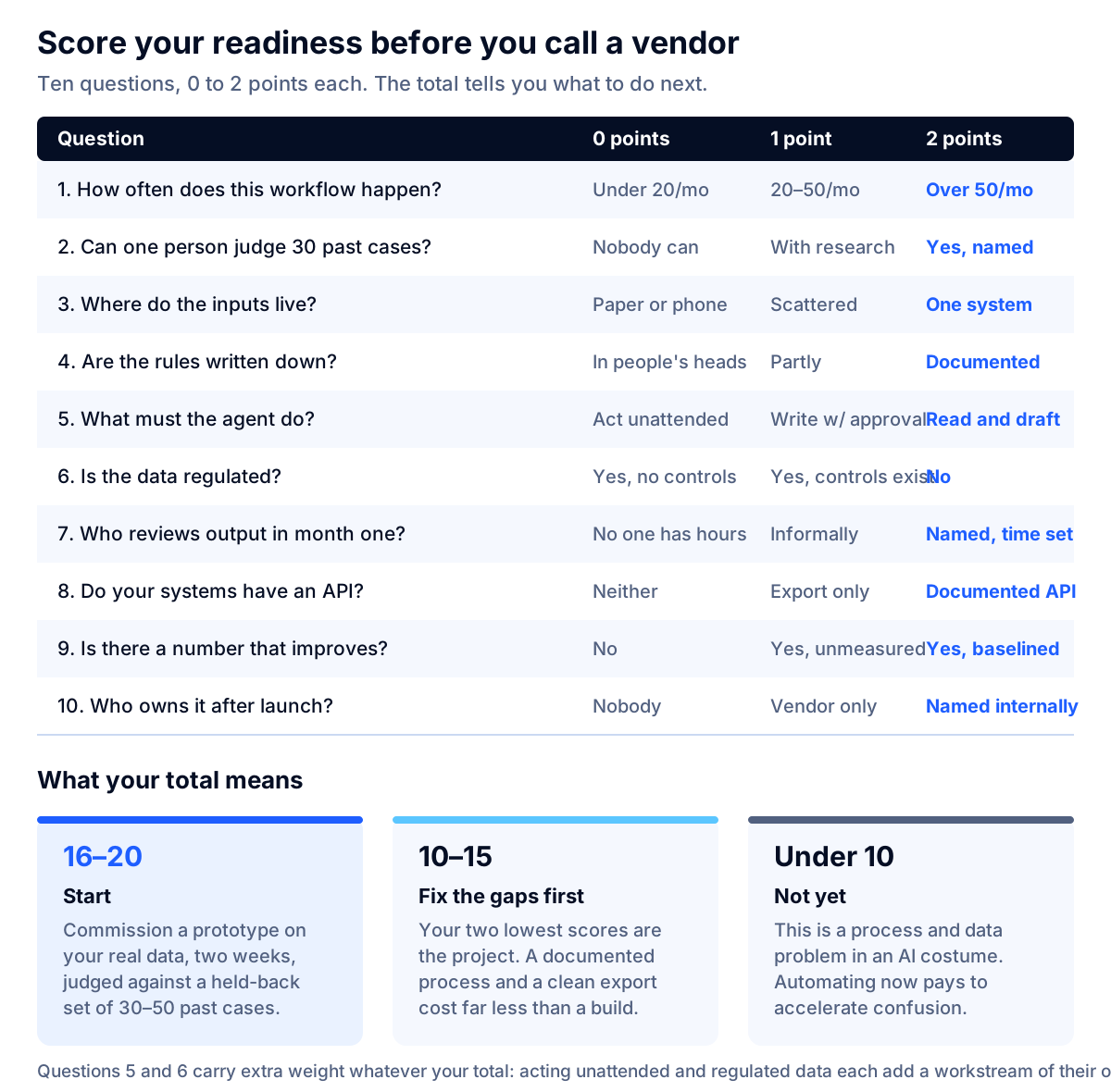
Score your situation before you talk to anyone. Each question scores 0, 1 or 2. Be honest; the point of the test is to find the gap that will sink the project, not to pass.
| # | Question | 0 points | 1 point | 2 points |
|---|---|---|---|---|
| 1 | How often does this one workflow happen? | Fewer than 20 times a month | 20–50 times | More than 50 times |
| 2 | Can one person judge 30 past examples as right or wrong? | Nobody can | Only after research | Yes, and they are named |
| 3 | Where do the inputs live? | On paper or in phone calls | Scattered across tools | In one system |
| 4 | Are the rules for this work written down? | All in people's heads | Partly documented | Documented and current |
| 5 | What must the agent do? | Act unattended in a live system | Write, with approval | Read and draft only |
| 6 | Is the data regulated? | Yes, and controls do not exist | Yes, and controls exist | No regulated data |
| 7 | Who reviews output in month one? | Nobody has the hours | Someone, informally | A named person with time blocked |
| 8 | Do your systems have an API or export? | Neither | Export only | Documented API |
| 9 | Is there a number that improves if this works? | No | Yes, but not measured today | Yes, with a measured baseline |
| 10 | Who owns it after launch? | Nobody | An outside vendor only | A named internal person |
How to read your score.
- 16–20: start. Commission a prototype on your real data, with a two-week limit and a defined test set. Our week-by-week AI agent timeline covers what should happen in each of those weeks.
- 10–15: fix the gaps first. Look at your two lowest scores. They are the project. A documented process and a clean data export are worth more than any model choice, and they cost a fraction of a build.
- Below 10: not yet. This is not an AI problem. It is a process and data problem wearing an AI costume. Automating it now means paying to accelerate confusion.
Questions 5 and 6 deserve extra weight regardless of your total. Moving from read-and-draft to write-to-a-system-of-record roughly doubles the effort and the review burden, and regulated data adds a compliance workstream that is often larger than the build itself.
What to build first: five workflows that pay back for small businesses
These five come up again and again for companies under about 100 people, because they share the same shape: high volume, structured inputs, a cheap failure mode, and a human who stays in the loop at first.
| Workflow | Why it pays | What it touches | How it goes wrong | Measure this |
|---|---|---|---|---|
| Inbound inquiry triage and drafted replies | Highest volume, and a person still presses send | Shared inbox, website form, your FAQ and policy documents | Confidently wrong answers on edge cases; tone that does not sound like you | Minutes per inquiry, share of drafts sent without edits, first-response time |
| Document intake and data extraction | Replaces pure typing with checking | Invoices, purchase orders, forms, your accounting or ops system | Silent field-level errors on unusual layouts | Fields correct per document, rework rate, hours per 100 documents |
| Quote and proposal drafting | Converts a slow task into a reviewed draft | Price list, past proposals, CRM | Stale prices; terms nobody approved | Hours per quote, quote turnaround, win rate held steady or better |
| Scheduling and follow-up chasing | The task everyone forgets, done consistently | Calendar, CRM, email or SMS | Over-messaging; contacting the wrong person | No-show rate, follow-ups actually sent, replies per 100 sent |
| Internal knowledge answers | Stops the same question reaching the same expert | Policies, manuals, past tickets | Answers from outdated documents | Repeat questions to experts, time to find an answer, correction rate |
Three rules make these work.
Start with drafting, not deciding. A draft that a person approves fails safely. An action taken unattended fails expensively, and in a small company the person who cleans it up is usually you.
Pick the workflow with a number already attached. If you cannot state today's baseline, you will never prove the project worked, and you will end up arguing about vibes at renewal time. Question 9 on the test exists for this reason.
Do one, measure it, then do the next. Sequential beats parallel at this size, because you have one person's attention to spend on review, and the second workflow is much cheaper once the first one has proven the plumbing.
If your first candidate is answering questions from your own documents, that is a retrieval system rather than a true agent, and it is priced differently — our RAG chatbot cost breakdown covers that case specifically.
What does an AI agent cost for a small business?
Here are the inputs, so you can check the arithmetic and substitute your own.
- Loaded labor cost. The BLS Employer Costs for Employee Compensation release for June 2026 puts total employer compensation for private-industry workers at $46.89 per hour worked, with wages and salaries averaging $32.82 and accounting for 70.0% of the total. To turn any published wage into an employer cost, divide by 0.70.
- The person doing the work today. BLS reports a median wage for customer service representatives of $21.53 an hour as of May 2025, which loads to about $30.76. For bookkeeping, accounting and auditing clerks the median is $24.36 an hour, or about $34.80 loaded.
- Engineering time. We use $93 an hour as an in-house loaded benchmark and $150 an hour as an illustrative external rate, derived in our AI agent development cost article. The $150 figure is an assumption, not a market statistic.
- Model usage. As of September 2026, Anthropic lists its cheapest current tier at $1 per million input tokens and $5 per million output tokens, with a mid tier at $2 and $10, and states that batch processing saves 50%. At those prices a drafted email reply using roughly 2,000 input and 400 output tokens costs about four tenths of a cent.
That last number surprises people, so it is worth stating plainly: tokens are almost never the expensive part for a small business. Nine hundred drafted replies a month at the cheapest tier is under $4 of model usage. The cost is the build, the review time, and the person who keeps it accurate after launch.
What you would actually pay, by route
| Line item | Configure what you own | Assemble | Build custom |
|---|---|---|---|
| Setup | $0–$3,000 of internal time | $2,000–$15,000 | $30,000–$96,000 |
| Platform or seats | $20–$150 per user per month | $50–$300 per month | $100–$400 per month hosting and tooling |
| Model usage at 900 items a month | Usually included | Included or a few dollars | Under $10 at the cheapest tier |
| Ongoing care | Minutes a month | 1–3 hours a month | 2–6 hours a month of engineering |
| Time to first result | Days | 2–5 weeks | 8–16 weeks |
For published anchors on the "configure" route: Microsoft lists Microsoft 365 Copilot at $30.00 per user per month, paid yearly on an annual subscription. On the customer-support side, Intercom prices its Fin AI agent at $0.99 per resolution, where an outcome counts when a customer confirms their issue is resolved, stops asking for help after Fin responds, or Fin completes a workflow, with seats from $29 to $132 a month depending on plan. Both were checked in September 2026; per-seat and per-outcome prices change, so confirm them before budgeting.
Per-outcome pricing is unusually honest, and it gives you something rare: a clean number to test a build against.
The build-versus-buy break-even, with every assumption stated
Here is the model. Change any input and the crossover moves, which is the point.
Buy. $0.99 per resolution, Intercom's published list price for Fin. Seats are excluded because you need a help desk either way.
Build. A tier-2 production agent for one workflow at $48,000, the midpoint of our external-rate range, amortized straight-line over 36 months at $1,333 a month. Plus $150 a month for hosting, logging and tooling. Plus four hours a month of engineering care at the $93 loaded rate, or $372. Plus model usage of about $0.004 per item at the cheapest published tier.
That gives a monthly build cost of $1,855 plus $0.004 per item, against a buy cost of $0.99 per item. Setting them equal:
Break-even ≈ 1,882 items a month, or roughly 90 a working day.
| Items per month | Buy at $0.99 each | Build, all in | Cheaper option |
|---|---|---|---|
| 250 | $248 | $1,856 | Buy, by $1,608 |
| 500 | $495 | $1,857 | Buy, by $1,362 |
| 1,000 | $990 | $1,859 | Buy, by $869 |
| 1,900 | $1,881 | $1,863 | Even |
| 3,000 | $2,970 | $1,867 | Build, by $1,103 |
| 5,000 | $4,950 | $1,875 | Build, by $3,075 |
| 10,000 | $9,900 | $1,895 | Build, by $8,005 |
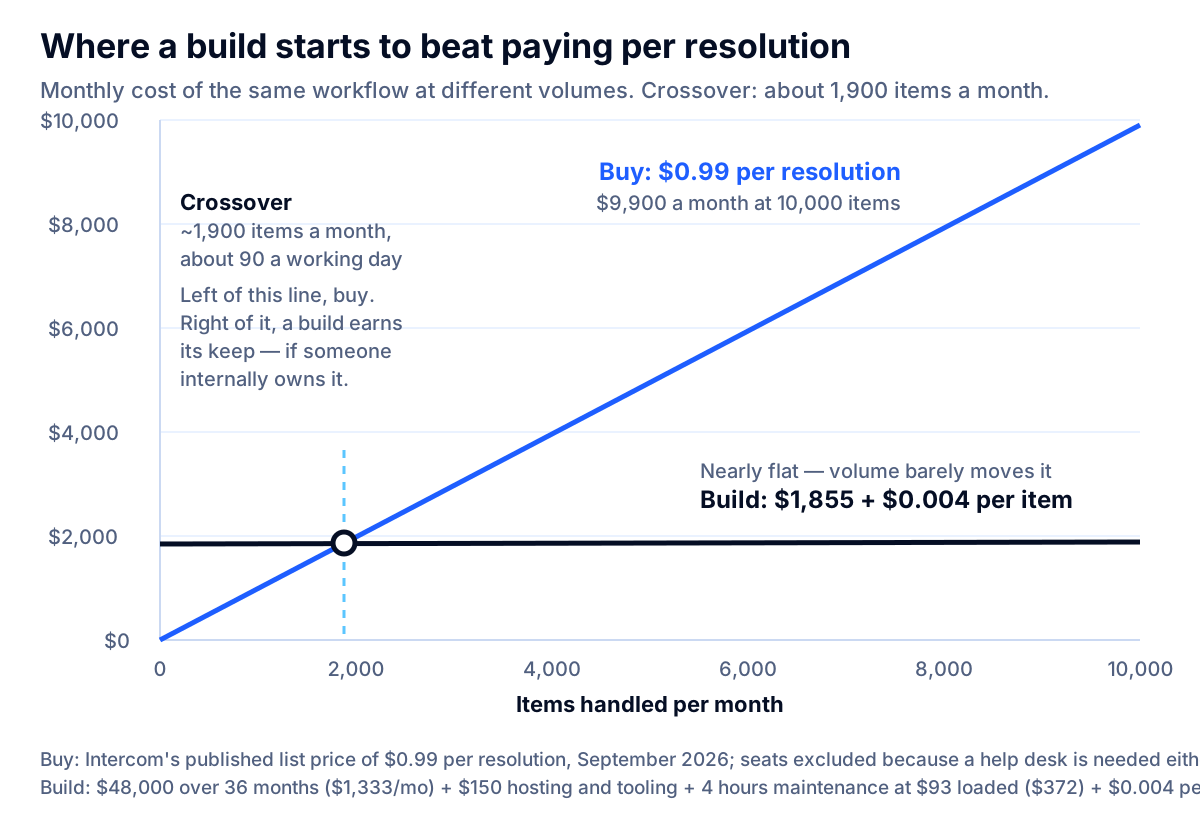
Four honest caveats, because a clean chart invites over-reading.
Volume is not the only axis. A build wins below the crossover when no vendor does what you need, when your data cannot leave your environment, or when the process is genuinely unusual. It loses above the crossover if nobody internally owns it, because an unmaintained agent decays quietly as your documents, prices and policies drift.
The build figure is a range, not a price. Narrow scope, read-only access and one integration push toward the bottom of $30,000–$96,000. Writing to a system of record, regulated data or several integrations push through the top.
Amortizing over 36 months assumes the thing lasts 36 months. Many agents get rebuilt sooner because the underlying tools improve. Shorten the window to 24 months and the monthly build cost rises to $2,189, moving the crossover to about 2,220 items.
Per-outcome pricing can be cheaper than its sticker. If a vendor resolves items your current process escalates, the comparison is not strictly cost-per-item.
Key takeaway: Below roughly 90 items a working day, buy. Above it, a build starts to earn its keep — but only if someone internally owns it after launch.
The payback calculation for a real-sized company
Twelve-person professional services firm. 900 inbound client emails a month, about six minutes each to read, research and answer, so 90 hours of handling time. An assembled agent drafts replies from past tickets and policy documents; a person reviews and sends.
- Time saved at a conservative 40% reduction in handling time: 36 hours a month.
- Value at the loaded customer-service rate of $30.76 an hour: $1,107 a month.
- Run cost: $120 platform, $4 model usage, and two hours of care at $93, so $310 a month.
- Net benefit: about $797 a month.
Against an $8,000 assembly project, payback lands near 10 months. Against a $48,000 custom build, the same net benefit takes about five years — longer than the agent will survive unchanged. At 900 emails a month, the assembled route is simply the right answer, and the break-even table above says the same thing from the other direction.
Run the pessimistic case too. If the agent only cuts handling time 15%, the value falls to $415 a month and the net benefit to $105, which pays back $8,000 in over six years. That is the scenario a two-week prototype is designed to find before you commit.
What not to automate yet
The fastest way to sour an organization on AI is to point it at the wrong thing first.
- Anything that moves money. Payments, refunds, payroll changes and vendor bank details. The failure is unrecoverable and it is a fraud target.
- Final answers on regulated topics. Medical, legal, tax, lending and insurance coverage questions need a qualified human on the record.
- Collections and dunning. Debt-collection communications are regulated, and tone errors here create complaints and legal exposure rather than saved time.
- Hiring and firing decisions. Employment decisions attract scrutiny from several directions at once, and a growing number of states regulate automated decision tools. Confirm specifics with your employment counsel before going near it.
- Anything whose errors stay invisible for months. Bookkeeping categorizations and inventory adjustments can look fine until a year-end reconciliation. If you cannot catch a mistake inside a week, add the checking step before the automation.
- Anything you do fewer than about 20 times a month. The build, review and maintenance overhead will exceed the time saved. Write a good checklist instead.
- The workflow your best person improvises. If success depends on judgment nobody can write down, you are automating the easy 60% and leaving the hard 40% to a person who has now lost the context.
None of these are permanent bans. They are things to reach after you have shipped one boring, high-volume, reviewable workflow and learned what your team will actually tolerate.
How to buy without getting scammed
AI automation has attracted a specific kind of fraud aimed squarely at small business owners and entrepreneurs, and the enforcement record is now detailed enough to learn from.
In September 2024 the FTC announced Operation AI Comply, five cases against companies using AI claims deceptively. Among them: Ascend Ecom, which the FTC alleged defrauded consumers of at least $25 million with claims that AI-powered tools would generate thousands a month from ecommerce storefronts; Ecommerce Empire Builders, which sold training programs for nearly $2,000 and storefronts for tens of thousands on the promise of an "AI-powered Ecommerce Empire"; and FBA Machine, which the FTC alleged cost consumers over $15.9 million. FTC Chair Lina M. Khan's statement is the useful summary: "Using AI tools to trick, mislead, or defraud people is illegal," and "there is no AI exemption from the laws on the books."
The pattern continued. On March 24, 2026 the FTC announced a settlement with Air AI and its owners over charges that the company misled entrepreneurs and small businesses. The FTC alleged the company falsely claimed purchasers "will or are likely to make substantial earnings" and misrepresented refund guarantees for its access card and licenses, and that it violated the Telemarketing Sales Rule and the Business Opportunity Rule. The order carries an $18 million judgment, largely suspended on inability to pay, with $50,000 paid for consumer relief, and bans the company and its owners from marketing any business opportunity.
Two things to take from that. First, the presence of "AI" in a pitch is not a signal of legitimacy; it is a category regulators actively watch. Second, a suspended judgment means the money is usually gone. Due diligence is cheaper than recovery.
Five questions that separate vendors from pitches
- "Show me this running live on inputs I provide, with the logs visible." A recorded demo is a storyboard. Watching it handle five of your real cases, including two awkward ones, tells you more than any deck.
- "What will it get wrong, and how will I know?" A vendor who has shipped this will answer immediately and specifically. A vendor who says it is highly accurate without naming a measurement has not measured it.
- "What happens to my data, and who else can see it?" Where it is stored, whether it trains anything, which subprocessors touch it, and what gets deleted on exit. In writing.
- "What do I own and what do I keep if we stop?" For an assembled solution, that means the automations, prompts and connections in your own accounts. See our guide to hiring an AI development company for the contract terms worth settling before signing.
- "Who maintains this, and what does that cost next year?" Agents drift as your prices, policies and documents change. A proposal with no maintenance line is incomplete, not cheap.
Anyone promising specific earnings, a hands-off business, or a fixed price before looking at your data and systems is telling you what they are. Walk away.
A 90-day plan that fits a small company
This is the sequence that works when nobody involved has a spare day a week.
Days 1–10: pick one workflow and measure it. Score the readiness test. Choose the highest-scoring candidate, not the most exciting one. Count volume, time per item and today's error rate. Write the baseline down; without it, nothing later can be proven.
Days 11–20: exhaust the cheap routes. Check whether the software you already pay for can do most of this. Configure it, give it a week of real use, and re-measure. Plenty of projects end here, successfully.
Days 21–45: assemble a narrow version. Read-and-draft only, one or two connections, a human approving every output. Build a test set of 30 to 50 real past cases, including the awkward ones, and hold it back as the thing you judge against.
Days 46–70: run it alongside the old way. Track the three measures from the table for your workflow. Give the reviewer blocked time; review that nobody has hours for is the most common reason a pilot produces no evidence.
Days 71–90: decide with numbers. Keep it, widen it, or stop it. If the gains are real and volume is above the crossover, this is the moment a custom build becomes a defensible decision rather than an aspiration — and you now have a test set and a baseline, which makes a build far cheaper to scope. If the gains are thin, you have spent weeks instead of a year finding out. If you decide to keep it, the work of taking that AI pilot to production — ownership, access, controls and monitoring — is a separate phase worth planning properly.
Companies that pick a second workflow after this usually find it takes half as long, because the access, review habit and measurement are already in place. That compounding is the real return, and it is the main argument for starting small rather than waiting for a transformation project.
If the project turns out to need custom work, our AI agent development service starts with a free discovery call and a working prototype in one to two weeks, so the decision rests on something you can watch run. When the need is closer to a private model or a document assistant than an agent, custom AI development is the better fit; when the real blocker is that the process lives in spreadsheets, a custom web app usually comes first — our guide to when to replace spreadsheets with custom software scores that decision and prices the four options.
Conclusion
AI agents for small business are worth it when three things are true at once: a workflow runs at real volume, a named person can tell right from wrong, and someone owns the result after launch. Miss any one and the project stalls regardless of budget.
The practical sequence is short. Score the readiness test. Pick the workflow with a number already attached. Exhaust what you already pay for. Assemble a narrow, review-first version and judge it against a test set of real past cases. Only then consider a custom build, and only if your volume clears the break-even you calculated with your own quotes rather than ours.
The federal data says the median small business using AI spends about $30 a month on it today. That is not a ceiling, but it is a useful reminder: the goal is a measured improvement to one workflow, not a transformation. If you want a second opinion on which of your workflows would clear the bar — or a prototype that settles it on your real data — talk to a specialist and bring your volume and baseline numbers.
Frequently asked questions
Does my small business actually need an AI agent?
Only if you have one repetitive workflow that happens more than about 50 times a month, somebody who can judge whether an answer is right, and inputs that are already digital. If any of those three is missing, an agent will amplify the mess rather than fix it. Most small businesses get a bigger return in the first year from configuring AI features inside software they already pay for.
What should a small business automate with AI first?
Inbound inquiry triage with drafted replies is the most common first win: high volume, low risk, and a human still presses send. Document intake and data extraction is a close second when you handle invoices, forms or purchase orders. Start with something that drafts rather than decides, so a mistake costs a correction instead of a customer.
How much does an AI agent cost for a small business?
Three very different numbers. Turning on AI features in software you already buy runs roughly $20–$150 per user per month. Assembling an agent on a no-code or low-code platform typically costs $2,000–$15,000 to set up plus $50–$300 a month. A custom production agent for one workflow is usually $30,000–$96,000 to build, which most small businesses cannot justify at their volume.
When does building a custom agent beat paying per resolution?
In the worked model in this article, the crossover is around 1,900 resolutions a month, or about 90 a working day, comparing a $48,000 build amortized over three years against list pricing of $0.99 per resolution. Below that volume, buying wins clearly. The assumptions are stated so you can swap in your own numbers and quotes.
Do I need an AI consultant, or can my team do this?
If the work is configuring features in tools you already own, your team can usually do it with a few focused days. Bring in outside help when the agent must connect two or more systems, write to a system of record, touch regulated data, or be measured against a test set. Pay for a scoped prototype first rather than a long discovery phase.
What are the warning signs of an AI automation scam?
Earnings promises are the clearest one. In March 2026 the FTC settled with Air AI over claims that buyers would make substantial earnings from a conversational AI product, and the order bans the company and its owners from marketing business opportunities. Treat guaranteed income, a done-for-you business, refund guarantees you cannot read, and a demo video in place of a live run on your data as reasons to walk away.
How long before an AI agent shows a result?
A useful prototype on your real data takes one to two weeks. A production workflow agent with integrations, review steps and monitoring usually takes eight to sixteen weeks. If you are configuring existing software instead, you can see a measurable change inside a month, which is why that route is the right first move for most small firms.
Sources
- Large Firms With at Least 20 Employees Biggest AI Users, U.S. Census Bureau
- Understanding the Use of AI Among Small Businesses, JPMorganChase Institute
- Air AI and its Owners will be Banned from Marketing Business Opportunities to Settle FTC Charges, Federal Trade Commission
- FTC Announces Crackdown on Deceptive AI Claims and Schemes, Federal Trade Commission
- Building Effective AI Agents, Anthropic
- Customer Service Representatives: Occupational Outlook Handbook, U.S. Bureau of Labor Statistics
- Bookkeeping, Accounting, and Auditing Clerks: Occupational Outlook Handbook, U.S. Bureau of Labor Statistics
- Employer Costs for Employee Compensation, June 2026, U.S. Bureau of Labor Statistics
- Intercom Pricing, Intercom
- Microsoft 365 Copilot Plans and Pricing, Microsoft
- Claude Pricing, Anthropic