Cloud Costs
FinOps for AI Workloads: Controlling GPU and Token Spend
FinOps for AI workloads at mid-sized companies: how to allocate GPU and token spend, forecast it, choose commitments and track unit costs that finance trusts.

In this article
- What is FinOps for AI, and why is it harder than cloud FinOps?
- The four buckets of AI spend and where each one shows up
- How do you allocate AI costs to teams, products and customers?
- How do you forecast AI spend when usage is unpredictable?
- GPU cost optimization: utilization comes before discounts
- When should you commit to GPU or model capacity?
- Which metrics belong on an AI unit economics dashboard?
- How do you stop AI cost spikes before they reach the invoice?
- Who should own AI spend at a mid-sized company?
- A 90-day FinOps for AI plan
- When FinOps for AI is overkill
- Where to start
- Frequently asked questions
- Sources
FinOps for AI workloads is the discipline of making GPU, model API and AI software spend visible, assigning it to the teams and products that cause it, forecasting it from usage drivers, and buying capacity only where usage is proven. It works the same way as cloud FinOps, with one big difference: AI spend moves faster, is billed in more ways, and is created by more people than your cloud bill ever was.
The short answer for a mid-sized company is this. Put every AI dollar into one of four buckets. Tag or separate each bucket by team and product from the first day. Forecast from tasks, calls and tokens, not from last month's total. Share and right-size GPUs before you reserve them. Commit only to the baseline a month of real data supports. Then report cost per completed task, not just total spend.
This guide shows how to do each of those steps with the native tools at AWS, Microsoft Azure, Google Cloud and the model providers, with the limits of each. It includes an allocation map, a driver-based forecast you can copy, a commitment decision guide, a KPI set and a 90-day plan. Product details and prices were checked on the vendors' pages in October 2026.
Key takeaway: Most AI cost problems are allocation problems first. If you cannot say which product, team and customer caused a dollar of GPU or token spend, you cannot forecast it, optimize it or prove it was worth it.
What is FinOps for AI, and why is it harder than cloud FinOps?
The FinOps Foundation describes FinOps for AI as managing the cost and usage of AI services, and keeps the familiar equation: price times quantity equals cost. You cut cost by lowering the rate you pay or the amount you consume (FinOps Foundation). What changes is everything around that equation.
The Foundation's working group lists the new difficulties. Cost per token is a new unit, and billed tokens can differ from the prompt you think you sent. Model pricing "may change wildly up or down," with many versions and inconsistent charging. GPU capacity is often scarce, so capacity management has become part of cost management. And spend is now created by product, marketing, sales and leadership teams, not just engineers (FinOps Foundation).
Practitioners have had to catch up quickly. In the Foundation's State of FinOps 2026, 98% of respondents now manage AI spend, up from 63% in 2025 and 31% in 2024. The survey covered 1,192 respondents representing more than $83 billion in annual cloud spend. Among those managing AI costs, the most cited challenges were visibility into AI costs, allocating them to business units, and determining AI value and ROI (FinOps Foundation).
A separate vendor survey shows how wide the gap still is. Harness surveyed 700 engineering leaders and practitioners in five countries in May and June 2026. In that survey, 52% said there is no clear owner of AI costs, 56% said anticipating AI spend is based on guesswork rather than data, 72% reported an unexpected AI cost spike or bill in the past year, and only 20% could identify the reason within hours if spend doubled overnight (Harness). Treat those figures as one vendor's sample, but the pattern matches the Foundation's findings.
For a mid-sized company the practical consequence is simple. Cloud FinOps habits such as tagging, budgets and commitment reviews still apply, but they must be extended to three kinds of spend that the cloud bill handles badly: model APIs billed per token, capacity bought in advance, and AI features sold per seat.
The four buckets of AI spend and where each one shows up
Before you allocate or forecast anything, sort AI spend by how it is billed. Each bucket has a different meter, a different place where the data lives and a different lever.
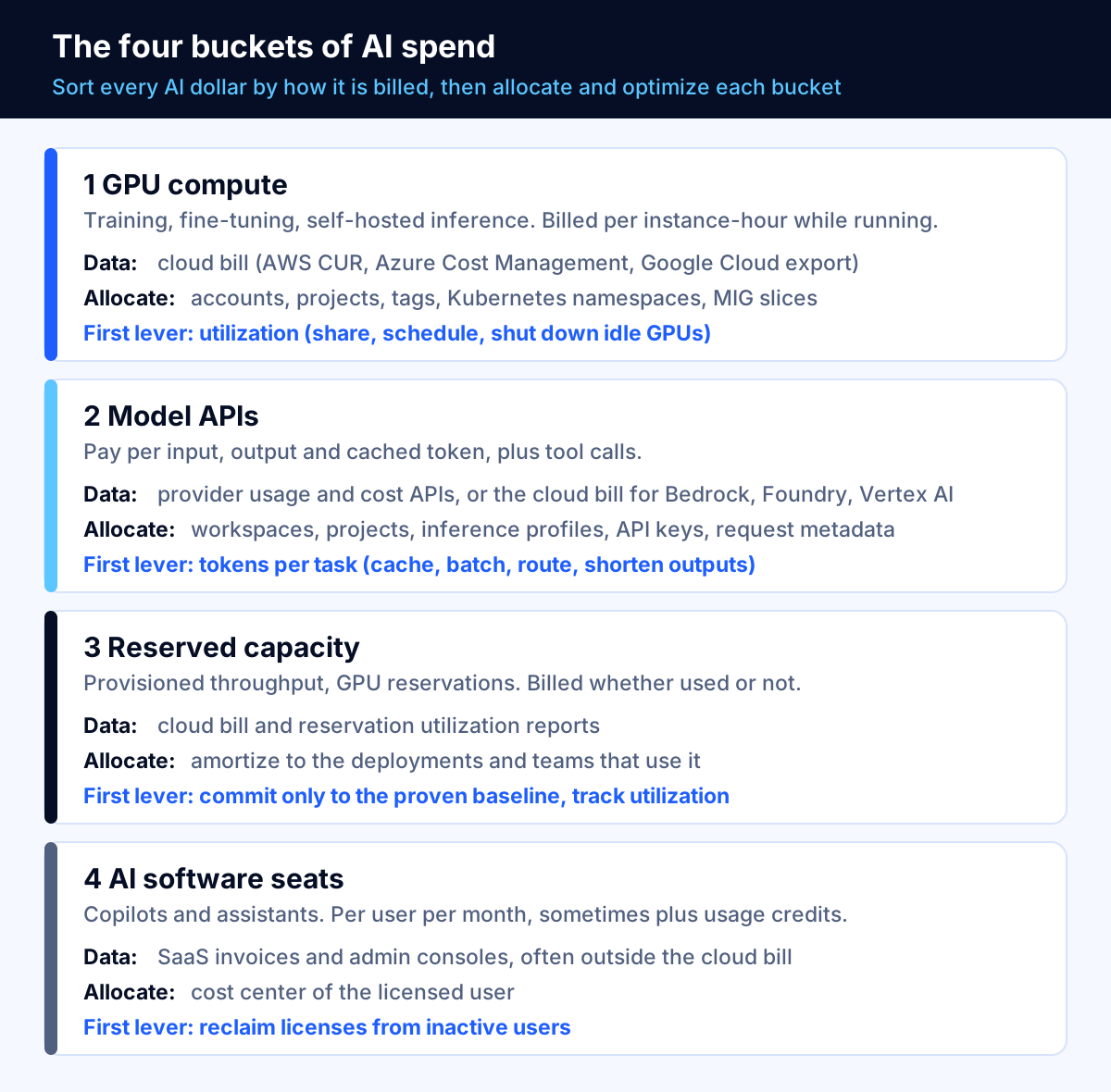
| Bucket | How it is billed | Where cost data lives | Allocation hook | First lever |
|---|---|---|---|---|
| GPU compute (training, fine-tuning, self-hosted inference) | Per instance-hour or per second while running | Cloud bill (AWS CUR, Azure Cost Management, Google Cloud billing export) | Accounts, projects, tags or labels; Kubernetes namespaces | Utilization: share, schedule and shut down idle GPUs |
| Model APIs (pay per token) | Per input, output and cached token, plus tool calls | Provider usage and cost APIs, or the cloud bill for Bedrock, Foundry and Vertex AI | Workspaces, projects, inference profiles, API keys, request metadata | Tokens per task: caching, batching, routing, shorter outputs |
| Reserved capacity (provisioned throughput, GPU reservations) | Per unit per hour or upfront, whether used or not | Cloud bill, reservation utilization reports | Amortize to the deployments or teams that use it | Commitment sizing and utilization |
| AI software seats (copilots and assistants) | Per user per month, sometimes plus usage credits | SaaS invoices, admin consoles | Cost center of the licensed user | License reclamation for inactive users |
Two things in the table matter more than they look.
First, the second bucket often does not appear on the cloud bill at all. If your developers call a model provider directly, the spend arrives as a separate invoice with its own usage data. That is why the Foundation's FOCUS billing standard added support for SaaS and for virtual currencies such as tokens and credits, and why AI workloads lead the list of requested FOCUS expansions in the State of FinOps 2026 (FOCUS, FinOps Foundation).
Second, the fourth bucket is easy to forget because it sits with IT procurement. Seat pricing is simple, but it adds up and often overlaps with what teams also build on APIs. For example, Microsoft lists the Microsoft 365 Copilot Business add-on at $21 per user per month paid yearly, with a $18 promotional price in the first year, and bills some advanced agent features through usage-based Copilot Credits (Microsoft). Seat spend belongs in the same AI cost report as GPU and token spend, or you will never see the full total.
How do you allocate AI costs to teams, products and customers?
Allocation means every AI dollar carries at least three labels: the product or feature, the owning team, and the environment (production, staging, experiment). For customer-facing AI, add the customer or tenant. The Foundation recommends starting with showback, a report that shows each team what it consumed, before you charge anyone (FinOps Foundation).
Model APIs inside your cloud account
Amazon Bedrock is a good example of how granular native allocation has become. Application inference profiles let you attribute Bedrock costs by application, team or workload. You create a profile for a model, attach cost allocation tags and call the profile's ARN instead of the model ID. The tags flow to Cost Explorer and both versions of the Cost and Usage Report (AWS).
The same page documents the limits, and they are the ones that catch teams out:
- Tags take up to 24 hours to appear and are not retroactive. Costs before activation stay untagged, so set this up before launch, not after the first surprising bill.
- Profiles report aggregated daily dollars per usage type, not cost per request. For per-prompt detail, AWS points you to per-request metadata tagging with model invocation logs.
- Each profile is tied to one model, so profile counts multiply with every model version. AWS recommends tagging at team or cost-center level, using IAM principal attribution for per-user cost, and using Projects for the Responses and Chat Completions APIs, which do not support application inference profiles.
Model APIs bought directly from a provider
When you buy directly, separate spend structurally. Anthropic's Usage and Cost Admin API reports token usage in one-minute, one-hour or one-day buckets, grouped by API key, workspace, model, service tier and more, and a cost endpoint reports daily USD cost grouped by workspace. Data typically appears within five minutes. Note the documented gap: Priority Tier costs are not included in the cost endpoint and must be tracked from usage instead (Anthropic).
The practical rule for any provider: one workspace or project per product and environment, one API key per service, and a nightly job that pulls usage into the same warehouse as your cloud bill. Our guide to LLM API cost optimization covers how to log token counts with your own feature and customer IDs so cost per customer becomes a query, not a guess.
Shared GPUs
Shared GPU clusters are the hardest case, because the bill shows a node, not the teams that used it. You have three options, in rising order of precision:
- Dedicated nodes per team. Simple to allocate, usually wasteful.
- Time-sharing. On Google Kubernetes Engine, time-sharing lets several containers take turns on one GPU, and is recommended for bursty and interactive work with idle periods. Google warns it "provides no memory limit enforcement between shared Jobs," so one workload can affect another (Google Cloud).
- Hardware partitioning. NVIDIA Multi-Instance GPU splits supported GPUs, starting with the Ampere generation, into "up to seven separate GPU Instances," each with isolated paths through the memory system (NVIDIA). Each slice has a known share of the card, which turns allocation into arithmetic.
Whatever you choose, split cost by measured usage (GPU-hours or slice-hours per namespace) and post the unused remainder to a shared platform line. Spreading idle capacity silently across teams hides the most important optimization signal you have. The FOCUS specification now defines how providers should present split cost allocation for shared resources, which will help as more billing exports adopt it (FOCUS).
Key takeaway: Tagging is not retroactive on most platforms. Decide the product, team, environment and customer labels before the first AI feature reaches production, and reject deployments that do not carry them.
How do you forecast AI spend when usage is unpredictable?
Forecasting AI spend from the previous month's invoice fails because AI usage does not grow smoothly. A new feature, a longer prompt, a model change or an agent that loops can move the bill by multiples. The Foundation's guidance is to start from your existing cloud forecasting, expect lower predictability while you are early, revise forecasts more often, prefer bottom-up estimates built from per-component usage and vendor pricing, and give pilots flexible budgets (FinOps Foundation).
A driver-based forecast you can copy
Build the forecast from business drivers that a product owner can estimate, then multiply through.
| Line | Driver | Who estimates it |
|---|---|---|
| A | Completed tasks per month (tickets answered, documents processed, calls handled) | Product owner |
| B | Model calls per task, including retries and tool calls | Engineering, from logs |
| C | Average input tokens per call, after caching | Engineering, from usage data |
| D | Average output tokens per call | Engineering, from usage data |
| E | Price per million input, cached input and output tokens for each model used | FinOps, from the provider's pricing page, dated |
| F | Fixed AI costs: provisioned capacity, GPU nodes, vector database, seats | FinOps, from contracts and the cloud bill |
| G | Buffer for growth and anomalies | Agreed with finance |
Monthly forecast = A × B × [(C × input price) + (D × output price)] ÷ 1,000,000 + F + G.
Here is a worked example with deliberately round, illustrative numbers. They are assumptions for the arithmetic, not anyone's actual prices. A support assistant handles 40,000 tasks a month (A) with 3 model calls per task (B), so 120,000 calls. Each call averages 6,000 input tokens (C) and 500 output tokens (D). At an assumed $1 per million input tokens and $5 per million output tokens, input costs 120,000 × 6,000 × $1 ÷ 1,000,000 = $720 and output costs 120,000 × 500 × $5 ÷ 1,000,000 = $300. Variable model cost is $1,020 a month, or about 2.6 cents per task. Add fixed costs and a buffer, and you have a forecast whose every line can be checked against usage data next month.
The value of this format is not the number. It is that when the bill moves, you can see which driver moved: more tasks (good news), more calls per task (an agent loop or a retry storm), more tokens per call (a prompt grew or the cache stopped hitting), or a price change. Our AI agent development cost guide shows how run costs like these fit into a full project budget.
Budget by phase, not by year
The Foundation's Crawl, Walk, Run model sets cost tolerance by maturity: fast, low-cost validation while crawling, and optimization without cutting agreed service levels once running (FinOps Foundation). In practice:
- Pilot: a capped budget with a hard spend limit, reviewed weekly. The goal is a credible cost per task, not a low total.
- Launch: a driver-based forecast like the one above, reviewed monthly, with a variance threshold (for example 20%) that triggers an explanation.
- Scale: a forecast tied to the business plan, with commitment purchases sized from at least a month of steady usage.
GPU cost optimization: utilization comes before discounts
GPU cost optimization starts with a question every finance leader should ask: what share of the GPU hours we paid for did useful work? The Foundation's resource utilization metric is exactly that, actual use divided by provisioned capacity (FinOps Foundation). A discount on capacity nobody uses is still waste.
The utilization levers, roughly in order of effort:
- Shut down idle GPUs. Notebooks and development instances left running overnight and on weekends are the most common GPU waste. Schedule them off by default and require a reason to keep them on.
- Use CPUs where GPUs are not needed. The Foundation explicitly recommends CPUs for lightweight experiments (FinOps Foundation). Small embedding jobs, data preparation and many classical models do not need an accelerator.
- Right-size the GPU. Match memory and compute to the model. A small model served on a top-tier card wastes most of it.
- Share GPUs. Use MIG partitions for steady parallel inference that needs isolation, and time-sharing for bursty development work, as described above. Google recommends combining MIG with time-sharing or NVIDIA MPS to raise utilization further (Google Cloud).
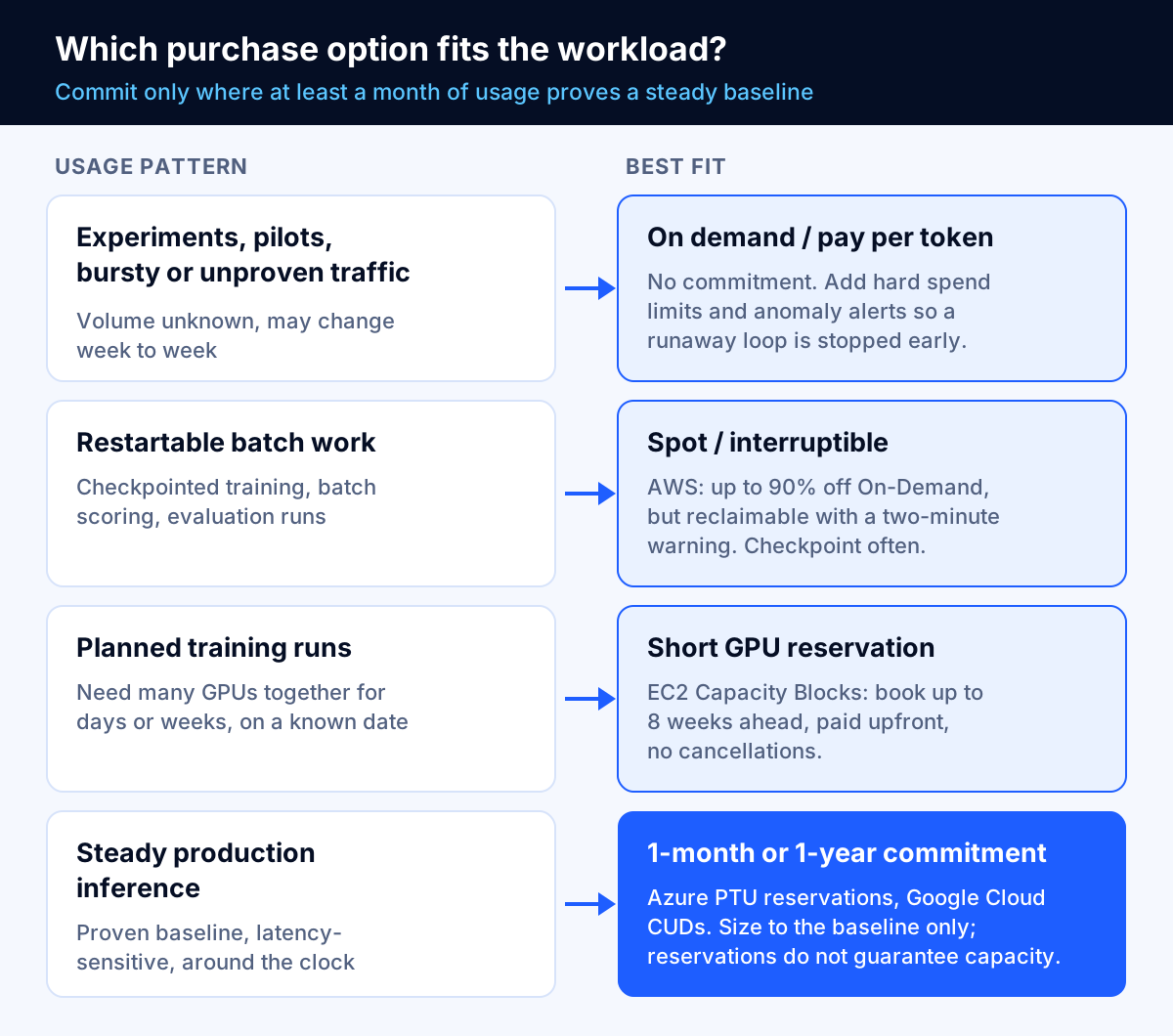
- Use interruptible capacity for work that can restart. AWS advertises Spot Instances at up to 90% off On-Demand prices (AWS), but a Spot Instance can be reclaimed with a two-minute warning (AWS). That suits checkpointed training, batch scoring and evaluation runs, and does not suit a customer-facing endpoint without fallback capacity.
- Shrink the model. Distillation and quantization reduce the compute a model needs, and serverless or pay-per-token endpoints often beat a dedicated GPU for sporadic traffic (FinOps Foundation).
If you run a self-hosted model at sustained volume, the economics change again. Our on-premise LLM deployment cost breakdown compares owned hardware with cloud GPUs and APIs over five years.
When should you commit to GPU or model capacity?
Commitments trade flexibility for a lower rate or guaranteed capacity. The Foundation recommends reservations, savings plans or committed use discounts only for predictable GPU workloads, and reviewing vendor options such as provisioned throughput (FinOps Foundation). The details differ enough by vendor that the fine print decides the answer.
Short GPU reservations for training runs
Amazon EC2 Capacity Blocks for ML reserve GPU instances for a future window, and AWS recommends them when you need GPUs "for days or weeks at a time." You can reserve up to eight weeks ahead, each block holds up to 64 instances, and cancellations aren't allowed (AWS). The reservation fee is charged upfront when you schedule the block. As of October 2026, AWS lists a p5.48xlarge (eight H100 GPUs) in N. Virginia at $47.757 per instance-hour, or $5.970 per accelerator-hour, for the reservation fee, with the operating system fee on top for some Linux distributions (AWS).
The FinOps implication: a Capacity Block converts a variable training cost into a fixed, prepaid one. That is good for budgeting a planned run, and bad if the data is not ready on the start date. Treat the start date as a project milestone with an owner.
Provisioned model throughput
On Microsoft Foundry, provisioned deployments are billed per provisioned throughput unit (PTU) per hour "regardless of the number of tokens consumed," and Azure Reservations give a discounted rate for a one-month or one-year commitment. Microsoft is explicit that reservations "don't guarantee capacity," so you should create the deployment first and then buy the reservation. It also advises against scaling provisioned deployments up and down to stay on hourly billing, because capacity may not be available when you need it back (Microsoft Learn).
Microsoft positions provisioned throughput for predictable, latency-sensitive, production-scale traffic and keeps standard pay-per-token deployments as the better fit for development, testing, low volume or highly variable traffic. Two cost details help: cached tokens do not consume PTU capacity, and spillover can route overflow to a standard deployment so you do not have to size for the peak (Microsoft Learn).
Longer GPU commitments
Google Cloud's resource-based committed use discounts cover hardware including GPUs for one or three years, with a higher discount for three years. Its flexible compute commitments apply to attached GPUs only on the G2 and G4 series; for example, G2's NVIDIA L4 GPUs receive 21% for one year or 43% for three years (Google Cloud). Three years is a long time in a market where GPU generations and model efficiency change quickly, so most mid-sized companies should start with one-year terms on a proven baseline.
A simple commitment rule
- Measure at least a month of real usage, by hour.
- Commit to the level you use almost all the time, not the average and never the peak.
- Leave everything above that baseline on demand, pay per token or Spot.
- Track commitment utilization monthly and assign an owner to every commitment.
Our Azure cost optimization checklist and AWS bill troubleshooting guide cover the general commitment mechanics that apply here too.
Which metrics belong on an AI unit economics dashboard?
Total AI spend tells you almost nothing on its own. A rising bill can be great news if it tracks paying usage. The Foundation proposes a set of AI KPIs with worked formulas, including cost per inference (total inference cost divided by requests), cost per token, resource utilization efficiency, cost per API call, training cost efficiency, ROI, time to business value and time to first prompt (FinOps Foundation).
For a mid-sized company, start with this shortlist and publish it monthly:
| KPI | Formula | Why it matters | Healthy direction |
|---|---|---|---|
| Cost per completed task | AI cost of a feature ÷ tasks it completed successfully | Connects spend to the work the business values | Down, or flat while quality rises |
| Cost per token, by model | Model spend ÷ tokens processed | Catches price changes and cache misses | Down as caching and routing improve |
| GPU utilization | Used GPU-hours ÷ provisioned GPU-hours | The biggest waste signal for self-hosted AI | Up |
| Allocated share | Spend carrying product and team labels ÷ total AI spend | Without this, no other KPI is trustworthy | Up, toward nearly all of it |
| Forecast variance | (Actual − forecast) ÷ forecast | Shows whether the driver model works | Toward zero |
| Commitment utilization | Used reserved hours or PTUs ÷ purchased | Unused commitments are pure waste | Up |
Use "completed" deliberately. A task that failed and was retried, or that a human had to redo, should not count in the denominator. That keeps the metric honest when a cheaper model looks good on cost per call but forces more rework. Our guide on how to evaluate AI chatbot accuracy explains how to measure task success so the denominator means something.
Key takeaway: Report cost per completed task next to a quality measure. Cost per call rewards cheap answers; cost per completed task rewards answers that actually finish the job.
How do you stop AI cost spikes before they reach the invoice?
AI spend spikes for predictable reasons: an agent that loops, a retry storm during a provider outage, a prompt that suddenly includes a whole document, a new feature with more traffic than planned, or a test left running against production keys. The Foundation recommends quotas, throttles and alerts on anomalies such as doubling token use (FinOps Foundation).
Layer the controls:
- Hard limits on model APIs. Use per-project or per-workspace spend limits where the provider supports them, so a runaway process is stopped rather than reported. Our LLM API cost optimization guide lists the provider settings.
- Fast data. Anthropic's usage data typically appears within five minutes and its API supports polling once per minute (Anthropic). Cloud billing exports usually lag further behind; Bedrock cost allocation tags, for example, can take up to 24 hours to appear after activation (AWS). Alert on usage, not on the invoice.
- Anomaly alerts per bucket. Alert on tokens per task, calls per task and GPU-hours per day, not just total dollars, so the alert tells you what broke.
- Application guardrails. Cap steps per agent run, tokens per request and retries per call in code. Budget alerts are the safety net, not the design.
- A runbook. Decide in advance who gets paged, who can switch a feature to a cheaper model or pause it, and how fast.
Who should own AI spend at a mid-sized company?
Harness found that 52% of organizations say no one clearly owns AI costs (Harness). Ownership does not require a new department. It requires named people for four jobs:
| Job | Typical owner | Responsibilities |
|---|---|---|
| Accountable for each AI feature's cost | Product owner of that feature | Approves the forecast, explains variance, decides trade-offs between cost and quality |
| Data and reporting | FinOps lead, cloud engineer or finance analyst | Allocation rules, the monthly KPI report, commitment tracking |
| Technical levers | Engineering lead | Caching, routing, GPU sharing, guardrails, labels on every deployment |
| Purchasing and contracts | Finance or procurement with IT | Commitments, seat licenses, provider contracts, renewal dates |
A monthly 30-minute review with those four people, looking at the six KPIs above, is enough for most companies with AI spend in the thousands or tens of thousands of dollars a month. Weekly reviews make sense during pilots and launches.
A 90-day FinOps for AI plan
| Days | Goal | Actions | Done when |
|---|---|---|---|
| 1–15 | See everything | List every AI cost source across the four buckets: cloud GPU, model APIs, provisioned capacity, seats. Pull usage and cost into one spreadsheet or warehouse. | One monthly AI total that finance agrees with |
| 16–30 | Label it | Define product, team, environment and customer labels. Set up inference profiles, workspaces or projects per product. Separate API keys per service. | Most AI spend is allocated, and every new deployment must carry the labels |
| 31–45 | Contain it | Set hard spend limits on pilots, anomaly alerts on usage, and agent step and retry caps in code. Schedule idle GPUs off. | A runaway test cannot exceed its budget |
| 46–60 | Forecast it | Build the driver-based forecast for each production AI feature. Agree variance thresholds with finance. | Next month's forecast has a driver behind every line |
| 61–75 | Optimize it | Apply caching, batching and model routing to APIs; share and right-size GPUs; reclaim unused seats. | Cost per completed task is falling without quality loss |
| 76–90 | Commit wisely | Review a month or more of hourly usage. Commit only to the proven baseline. Assign an owner to every commitment. | Commitment utilization is tracked monthly |
When FinOps for AI is overkill
Not every company needs a program. If your AI spend is a few hundred dollars a month on one provider and a handful of seats, a monthly look at the provider dashboard and a hard spend limit are enough. Spend your effort on making the AI feature useful.
The program becomes worth building when any of these is true: AI spend is growing faster than revenue from the features that use it; more than one team or provider is involved; you sell an AI feature to customers and need to price it; you are considering a GPU or throughput commitment; or someone has already been surprised by a bill. Those are also the points where an outside review can pay for itself, which is why cloud cost optimization engagements increasingly include AI spend alongside the classic cloud bill.
It is also worth being honest about tools. A FinOps platform helps once you have several providers, but it cannot fix missing labels or decide which model is good enough. Our analysis of whether cloud cost optimization tools work applies to AI spend too: the tool detects, people fix.
Where to start
FinOps for AI workloads comes down to a few habits. Sort spend into GPU compute, model APIs, reserved capacity and seats. Label every dollar by product, team, environment and customer before launch, because tags rarely work backward. Forecast from tasks, calls and tokens. Raise GPU utilization before buying discounts. Commit only to proven baselines, read the cancellation terms, and report cost per completed task beside a quality measure.
If you want help setting this up, Fleurant AI's cloud cost optimization team works across AWS, Azure and Google Cloud with certified engineers, and our AI agent development team designs agents with cost guardrails built in. A free discovery call is a good place to map your four buckets and find the first fix. You can also explore all of our services.
Frequently asked questions
What is FinOps for AI?
It is the practice of managing the cost and usage of AI services with the same discipline FinOps applies to cloud: make spend visible, allocate it to the teams and products that cause it, forecast it and optimize it against business value. The FinOps Foundation keeps the familiar equation, price times quantity equals cost, but notes new metrics such as cost per token, volatile pricing, GPU scarcity and a wider group of people who now create spend.
Can you forecast AI token spend?
Yes, if you forecast from drivers rather than from last month's invoice. Multiply expected tasks per month by the model calls per task, the tokens per call and the price per token, then add a buffer for retries and growth. Expect lower accuracy early on: the FinOps Foundation advises revising AI forecasts more often than cloud forecasts and giving pilots flexible budgets because consumption is hard to predict.
How do you allocate shared GPU costs to teams?
Measure who used the GPU, then split the cost by that usage. On Kubernetes, partitioning helps: NVIDIA Multi-Instance GPU splits supported GPUs into up to seven isolated instances, which makes each slice easy to attribute. Time-sharing is cheaper to set up but enforces no memory limits between workloads. Charge the idle capacity that nobody used to a shared platform line so it stays visible instead of hiding inside team budgets.
Should we buy reserved GPU capacity or stay on demand?
Commit only to the baseline you can prove from at least a month of real usage. Amazon EC2 Capacity Blocks suit training runs of days or weeks: you pay the reservation fee upfront and cancellations are not allowed. Azure provisioned throughput reservations run one month or one year and do not guarantee capacity, so deploy first and reserve second. Keep bursty and experimental work on demand or on interruptible capacity.
What KPIs should an AI cost dashboard show?
Start with cost per completed task or per inference, cost per token by model, GPU utilization (used hours divided by provisioned hours), the share of AI spend that is allocated, forecast variance, and commitment utilization. The FinOps Foundation also lists cost per training run, anomaly detection and time to business value. Pick five, publish them monthly and tie at least one to a business outcome.
Do we need a FinOps platform to manage AI spend?
Not at first. The native tools go a long way: Amazon Bedrock application inference profiles and cost allocation tags, Anthropic's Usage and Cost Admin API grouped by workspace, Azure Cost Management for PTU reservations, and Kubernetes GPU metrics. A platform starts to pay off when you run several providers and need one view, which ranks among the top three requested tool capabilities in the State of FinOps 2026.
Sources
- FinOps for AI Overview, FinOps Foundation
- State of FinOps 2026, FinOps Foundation
- FOCUS Specification, FinOps Foundation (FOCUS project)
- New Harness Report Reveals Enterprise AI Spend Has Outgrown the Systems Built to Track It, Harness
- Application inference profiles, Amazon Web Services (Amazon Bedrock User Guide)
- Usage and Cost API, Anthropic (Claude Developer Platform)
- Capacity Blocks for ML, Amazon Web Services (Amazon EC2 User Guide)
- Amazon EC2 Capacity Blocks for ML pricing, Amazon Web Services
- Amazon EC2 Spot Instances, Amazon Web Services
- Spot Instance interruption notices, Amazon Web Services (Amazon EC2 User Guide)
- Provisioned throughput for Foundry Models, Microsoft Learn
- Committed use discounts overview, Google Cloud
- About GPU time-sharing on GKE, Google Cloud
- MIG User Guide: Introduction, NVIDIA
- Microsoft 365 Copilot plans and pricing, Microsoft


