Cloud Costs
Do Cloud Cost Optimization Tools Work? Where the Savings Go
Do cloud cost optimization tools work? Yes, but promised savings shrink before they reach the bill. Six leaks, what tools cost, and when people matter more.

In this article
- Do cloud cost optimization tools work? The short answer
- Why the savings a tool promised don't show up on the bill
- The savings leakage waterfall: how a dashboard number shrinks
- What the free native tools already do
- What paid cost tools add, and how they charge
- Where tools stop and people and process take over
- How to measure realized savings instead of promised ones
- Tool, consultant or both? A decision matrix
- Questions to ask a cost tool vendor before you buy
- When not to buy a cloud cost tool
- A 30-day plan to find out whether your tools are working
- The bottom line
- Frequently asked questions
- Sources
Do cloud cost optimization tools work? Yes, at the part they are built for: finding waste. They are much less reliable at the part you are paying for, which is a smaller invoice. The figure on a tool's dashboard is an estimate. It is usually calculated at list prices, from a short window of utilization data, across recommendations that can overlap, and it assumes every change gets made and stays made. By the time it reaches the bill, a large share of that number has leaked away.
That gap is why so many engineers and finance leads ask, after a year of licenses, whether the savings ever showed up. This article explains exactly where the money goes missing, using the cloud providers' own documentation about how their recommendation engines calculate savings. It compares what the free native tools already do with what paid tools add and how they charge. It gives you a simple way to measure realized savings instead of promised ones, and a decision matrix for when a tool is enough, when you need hands-on engineering, and when you need both.
Prices and product behavior below were checked on the vendors' pages in October 2026.
Key takeaway: A cost tool is a detector, not a fix. The savings are created by the engineer who changes the instance size, the Kubernetes request, the retention policy or the commitment, and by the process that makes sure the change sticks.
Do cloud cost optimization tools work? The short answer
They work when three conditions hold, and disappoint when any one is missing.
- The estimate is honest. It uses the prices you actually pay, counts each dollar once, and is based on enough history to capture your real peaks.
- Someone acts on it. A named engineer or team has the time, the authority and the context to make the change in production.
- Someone measures what landed. Savings are checked against a baseline on the invoice, not read off the tool's own dashboard.
The industry data says the problem is still large and the easy part is behind most mature teams. Flexera's 2026 State of the Cloud survey of more than 750 cloud decision-makers estimated that 29% of IaaS and PaaS spend is wasted, a figure that rose for the first time in five years, and 85% of respondents named managing cloud spend as a top challenge (Flexera). Note that the waste figure is respondents' own estimate, not a measurement of invoices.
The FinOps Foundation's State of FinOps 2026, with 1,192 respondents representing more than $83 billion in annual cloud spend, still ranks workload optimization and waste reduction as the single top current priority. But one practitioner in the report describes the shift well: "We have hit the 'big rocks' of waste" and now face many smaller opportunities that take more effort to capture (FinOps Foundation). Tools are good at the big rocks. The long tail is mostly about people and process.
Why the savings a tool promised don't show up on the bill
Most disappointment traces back to six leaks. Each one is documented by the cloud providers themselves or follows directly from how billing works.
1. The estimate was priced at list rates you no longer pay
If you already have Savings Plans, Reserved Instances or a negotiated discount, a recommendation priced at On-Demand rates overstates what you will save.
Microsoft is explicit about this for Azure Advisor. Its documentation says the savings shown for virtual machine recommendations "are based on retail rates" and don't take account of temporary or long-term discounts, so "the listed savings might be higher than actually possible." It adds that Advisor's rightsizing recommendations don't account for existing reservations or savings plans, and that in some cases, such as moving to a different VM series, following the recommendation can actually increase costs (Microsoft Learn).
AWS handles this with a setting. Cost Optimization Hub offers two savings estimation modes: after discounts, which incorporates Reserved Instances and Savings Plans, and before discounts, which uses public On-Demand pricing (AWS). If a report someone shows you came from the before-discounts mode, the headline number is not what will leave your invoice.
2. Two recommendations claimed the same dollars
An oversized idle instance can be rightsized or deleted, not both. A Savings Plan recommendation and a rightsizing recommendation can target the same compute. Add the figures naively and you count the same money twice.
AWS documents that Cost Optimization Hub deduplicates for exactly this reason: it identifies recommended actions that interact, reduces estimated aggregated savings based on the overlap, and for a resource that could be deleted or rightsized it counts only the higher-saving action (AWS). Not every tool or spreadsheet does. When you compare vendors, ask how their total treats overlapping actions.
There is a subtler version of the same leak. AWS also notes that Cost Optimization Hub's commitment recommendations by default favor options with the highest overall savings, which typically means three-year, all-upfront terms. If your finance team will only approve one-year, no-upfront commitments, the headline savings figure assumes a purchase you will never make. You can change those preferences so the dashboard reflects the terms you will actually buy (AWS).
3. Most recommendations were never implemented
This is the largest leak in most companies, and it has nothing to do with the tool's accuracy. The FinOps Foundation's framework states that usage optimization work "is primarily done by Engineering," and that rightsizing typically requires recreating or reconfiguring resources, which can mean service disruption (FinOps Foundation). An engineer with a roadmap has to weigh a disruptive change against feature work, and the feature work usually wins.
The framework describes the least mature state bluntly: recommendations shared informally with engineering teams, with no defined process for tracking action or outcomes. That describes most companies that bought a tool and stopped there.
Microsoft lists legitimate reasons not to act as well: a VM provisioned for upcoming traffic, a constraint the algorithm cannot see, homogeneous SKUs for operational reasons, or a machine kept for disaster recovery (Microsoft Learn). Some recommendations should be dismissed. The problem is that most are simply ignored, which is different.
4. The change was made and then quietly reversed
AWS Compute Optimizer analyzes the last 14 days of CloudWatch metrics by default, or up to 93 days if you turn on its paid enhanced infrastructure metrics (AWS). Azure Advisor's rightsizing analyzes 7 days by default, with lookback options of 7, 14, 21, 30, 60 and 90 days (Microsoft Learn).
A two-week or one-week window does not see month-end batch jobs, quarterly reporting runs or seasonal peaks. Downsize on that evidence, hit the peak, and an on-call engineer scales the resource back up at 2 a.m. The saving disappears and the team becomes wary of the next recommendation. For workloads with monthly or quarterly cycles, a longer lookback is cheap insurance: AWS prices enhanced infrastructure metrics at $0.0003360215 per resource per running hour, about $0.25 for a resource that runs a full 31-day month (AWS).
Infrastructure as code creates a second reversal path. If someone resizes an instance in the console but the Terraform or CloudFormation template still declares the old size, the next deployment puts it back. Changes need to land in the code, not the console.
5. A commitment was sized on a baseline that later shrank
Savings Plans offer discounts of up to 72% in exchange for a commitment to a set amount of compute spend per hour for one or three years (AWS). The commitment is billed every hour of the term. AWS's billing documentation shows the recurring fee for No Upfront and Partial Upfront plans added to the bill every hour, and for All Upfront plans a line item showing the portion of the plan that went unused (AWS).
The trap is ordering. If you buy commitments first and rightsize second, the rightsizing shrinks the usage the commitment was meant to cover. You keep paying the full hourly commitment, the utilization report turns amber, and the rightsizing savings are partly cancelled by unused commitment. Clean up usage first, then commit to the cleaned baseline.
6. Growth absorbed the savings
This is the leak that makes finance think nothing happened. You cut $8,000 a month in waste in the same quarter that traffic grew 20%, and the total bill went up. The saving was real; the total-spend chart cannot show it.
The FinOps Foundation's answer is unit economics: pairing what you spend with the value it creates, so cost changes can be read as economies of scale, productivity gains or runaway cost drivers (FinOps Foundation). Cost per order, per active customer or per thousand API calls shows the improvement that total spend hides.
The savings leakage waterfall: how a dashboard number shrinks
Put the six leaks together and you get the pattern below. The numbers are illustrative, chosen to show the mechanics. They are not measured data, and your own proportions will differ. What is consistent is the direction: every step can only reduce the figure.
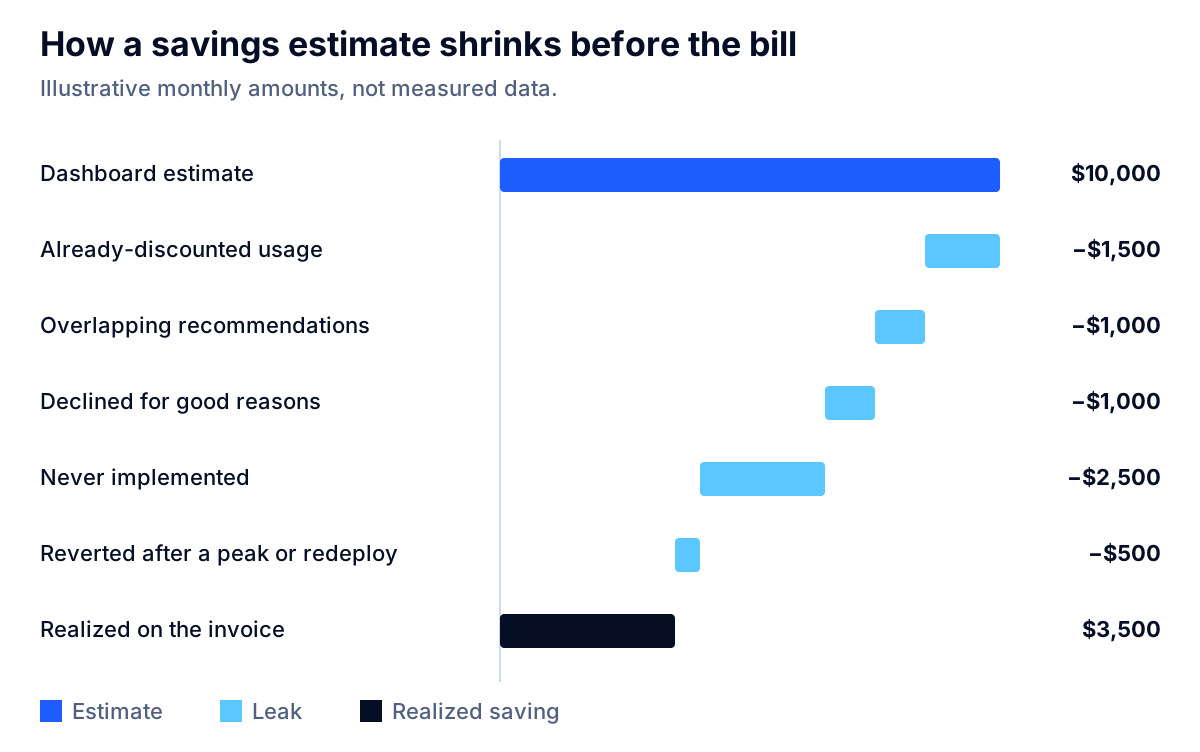
| Step | Illustrative amount per month | What causes it |
|---|---|---|
| Dashboard estimate | $10,000 | Sum of all open recommendations |
| Already-discounted usage | −$1,500 | Estimate priced at On-Demand or retail rates |
| Overlapping recommendations | −$1,000 | Same resource counted by two actions |
| Declined for good reasons | −$1,000 | Planned growth, DR capacity, constraints the tool cannot see |
| Never implemented | −$2,500 | No owner, no time, no process |
| Reverted after a peak or redeploy | −$500 | Short lookback, console-only change |
| Realized on the invoice | $3,500 | Measured against a baseline |
Two lessons come out of this. First, the dashboard number is a ceiling, and you should expect your realized number to be a fraction of it. Second, the biggest single step is usually "never implemented," which no amount of better detection fixes.
Key takeaway: If a vendor reports savings as the sum of recommendations generated, you are looking at the top of the waterfall. Ask for realized savings measured on the invoice.
What the free native tools already do
Before you pay for anything, know what you already have. All three major clouds ship recommendation engines at no additional charge, and they are better than their reputation.
| Capability | AWS | Microsoft Azure | Google Cloud |
|---|---|---|---|
| Rightsizing and idle recommendations | Compute Optimizer: no additional charge; 14-day default lookback, up to 93 days with paid enhanced metrics | Azure Advisor: 7-day default lookback, configurable up to 90 days | Idle VM recommendations: available free of charge |
| How savings are priced | Cost Optimization Hub: choose before or after discounts | Retail rates; ignores reservations and savings plans | Cost projection per recommendation |
| Handling of overlapping actions | Cost Optimization Hub deduplicates and keeps the higher-saving action | Not described in the VM rightsizing documentation | Not described in the idle VM documentation |
| Known blind spots | Short default lookback misses monthly peaks | Listed savings "might be higher than actually possible" | Stopping a VM without deleting its disks still leaves disk charges |
Sources: AWS Compute Optimizer metrics, AWS Compute Optimizer pricing, Azure Advisor cost recommendations, Google Cloud idle VM recommendations.
A few details worth knowing:
- AWS Compute Optimizer uses peaks, not averages. For EC2, Auto Scaling groups, EBS and Lambda, it uses the maximum utilization point within each five-minute interval over the lookback period (AWS). That makes its recommendations more conservative than a simple average would suggest.
- Azure Advisor's thresholds are published. A shutdown recommendation, for example, requires very low CPU and outbound network use over the period, and resize targets are set by percentile for user-facing and non-user-facing workloads (Microsoft Learn). You can read exactly why a VM was flagged.
- Google Cloud reminds you that stopped is not deleted. If you stop an instance but keep its disks, you still pay for the disks (Google Cloud). The same is true on AWS and Azure.
For a company on one cloud with a modest bill, these tools plus a monthly review cover most of the first pass. Our guides to why an AWS bill is higher than expected and the Azure cost optimization checklist walk through that first pass step by step.
What paid cost tools add, and how they charge
Third-party platforms earn their fee in situations the native consoles handle poorly:
- More than one cloud, plus SaaS and AI APIs, in one allocated view. The State of FinOps 2026 lists a "single pane of glass" for different technology spend among practitioners' most-wanted capabilities, alongside granular monitoring of AI spend and pre-deployment architecture costing (FinOps Foundation).
- Allocation and showback to teams, products and customers, including shared costs such as Kubernetes clusters that a provider bill does not split.
- Automated commitment management, which buys and adjusts discount instruments continuously rather than once a year.
- Workflow, such as routing a recommendation to the owning team's ticket queue and tracking whether it was done.
Pricing models differ more than features do, and the model tells you what the vendor is incentivized to do.
| Pricing model | Example (list prices, October 2026) | What it means for you |
|---|---|---|
| Tiered by tracked spend | Vantage: free up to $2,500 of cloud spend; $30 a month up to $7,500; $200 a month up to $20,000; enterprise custom | Cost is predictable; at the top of each tier the fee is roughly 0.4% to 1% of tracked spend |
| Tiered by annual spend | ManageEngine CloudSpend: free up to $3,000 a month; Professional $144 a month, billed annually, for up to $250,000 a year | Low cost for visibility-focused needs |
| Share of realized savings | ProsperOps: a percentage of realized savings for discount management, as recorded by the cloud provider's billing; rate not published | Fee scales with results, so ask exactly how the baseline is defined |
| Custom quote | Many enterprise platforms | Get the pricing model in writing before evaluating features |
Two cautions. A percentage-of-spend fee rises when your bill rises, even if the tool did nothing to cause the increase. A share-of-savings fee is only as fair as its baseline: ask whether savings you would have captured anyway, such as discounts you already held, are included in the calculation. ProsperOps, for example, splits its fee calculation into separate savings categories with their own rates, which is the kind of detail to get in writing from any vendor using this model (ProsperOps).
Where tools stop and people and process take over
The best detection in the world does not change a Kubernetes manifest. Containers are where this shows most clearly.
Datadog's State of Cloud Costs 2024, based on AWS cost data from its customers, found that 83% of container costs were associated with idle resources: about 54% of that wasted spend on cluster idle (overprovisioned cluster infrastructure) and the remaining 29% on workload idle, from containers requesting more than they use (Datadog). The mechanism is in Kubernetes itself. The scheduler uses each container's resource request to decide where to place a Pod, and the kubelet reserves at least the requested amount for that container (Kubernetes). Inflated requests strand capacity whether or not it is used.
A tool can show you which deployments over-request. Fixing it means changing requests in the code of each service, testing under load, and agreeing with each team on a policy. That is engineering and negotiation, not software.
The same Datadog report found other patterns that are about decisions rather than detection: only 29% of organizations bought enough commitment discounts to cover more than half of their eligible spend, and 83% still used previous-generation EC2 instance types (Datadog). Every one of those organizations could see the opportunity in a free console. What they lacked was an owner, a decision and a migration plan.
The State of FinOps 2026 makes the same point about the newest category, AI-assisted FinOps, describing it as "a capability amplifier, not a substitute for FinOps expertise" (FinOps Foundation).
What it costs to act on a recommendation
Every recommendation has an implementation cost, and the small ones often do not pay back. To size that cost, the U.S. Bureau of Labor Statistics reports a median annual wage of $135,980 for software developers in May 2025 (BLS). Divided by 2,080 working hours, that is about $65.38 an hour in wages alone, before benefits, overhead or opportunity cost.
| Change | Engineer hours (assumption) | Wage cost at $65.38/hour | Monthly saving (assumption) | Payback |
|---|---|---|---|---|
| Delete unattached volumes and old snapshots | 2 | $130.77 | $50 | 2.6 months |
| Rightsize a group of VMs, update infrastructure code, load test | 16 | $1,046.15 | $200 | 5.2 months |
| Migrate a service to a newer instance family | 40 | $2,615.38 | $300 | 8.7 months |
| Re-architect a data path to stop cross-zone or NAT traffic | 80 | $5,230.77 | $2,000 | 2.6 months |
Hours and savings are illustrative assumptions; the wage is the BLS median. Real paybacks are longer once benefits and overhead are added.
The lesson is counterintuitive: the large architectural fixes often pay back as fast as the trivial ones, while mid-sized rightsizing work is the slowest. Tools tend to surface hundreds of mid-sized items, which is one reason backlogs stall. Prioritize by payback, not by the size of the number on the dashboard.
How to measure realized savings instead of promised ones
If you measure only one thing, measure what landed. The FinOps Foundation's framework asks practitioners to establish a consistent process for tracking optimization recommendations and to measure actual impact against estimates (FinOps Foundation). Here is a lightweight way to do it without new software.
The realized savings ledger
Keep one row per change, in a shared spreadsheet or your ticketing system:
| Field | Example |
|---|---|
| Change ID and owner | COST-114, payments team |
| Resource or scope | Three API servers in production |
| Baseline cost | Average daily cost for the 14 days before the change, from the billing export |
| Estimated monthly saving | From the recommendation, after discounts |
| Date shipped | Date the infrastructure code change merged |
| Measured monthly saving | Average daily cost for the 14 to 30 days after, times 30, compared with the baseline |
| Still in place at 90 days? | Yes or no |
| Unit metric impact | Cost per 1,000 requests before and after |
Three rules make the ledger trustworthy:
- Use invoice data, not dashboard data. Pull costs from your billing export, net of discounts.
- Separate realized savings from cost avoidance. Choosing a smaller instance for a new service avoids cost but cannot be measured against a prior bill. The State of FinOps 2026 calls measuring this kind of avoided cost one of the discipline's most important unsolved challenges (FinOps Foundation). Track avoidance in its own column so nobody can accuse the program of inflating results.
- Check at 90 days. A saving that was reversed is not a saving. The 90-day column catches leak number four.
Then report two numbers to leadership each month: realized savings this month, and the unit cost trend. Together they answer the question total spend cannot.
Tool, consultant or both? A decision matrix
The right answer depends on what is actually blocking you. Most companies have one dominant problem: they cannot see the spend, or they can see it and cannot act on it.
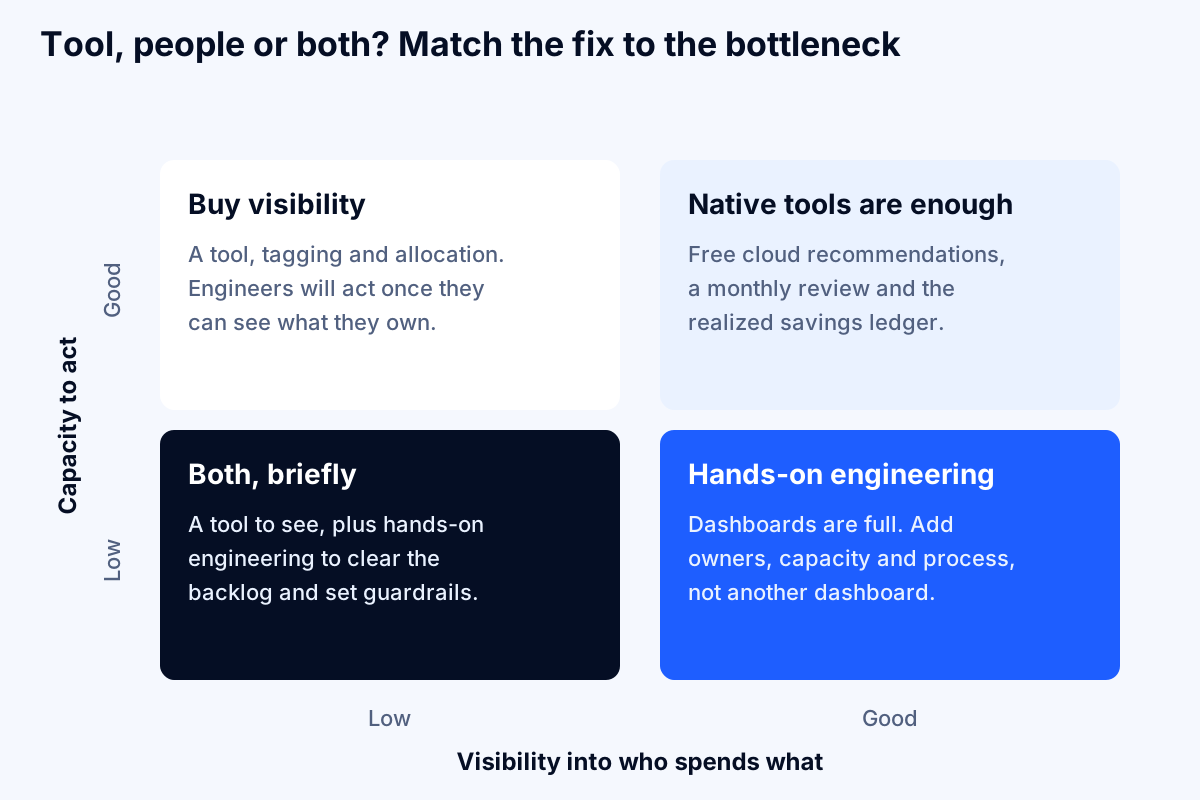
| Your situation | Likely bottleneck | What usually works |
|---|---|---|
| One cloud, spend under a few hundred thousand dollars a year, engineers with spare capacity | Neither | Native tools, a monthly 60-minute review, the realized savings ledger |
| Several clouds or many accounts, and nobody can say which team spends what | Visibility | A paid allocation tool, plus tagging and account structure |
| Clear dashboards, long backlog of open recommendations, no owner | Action | Hands-on engineering to clear the backlog, set guardrails and hand over a process |
| Kubernetes-heavy, high idle share, teams set their own requests | Action and policy | Request rightsizing per service, plus default limits and admission policies |
| Commitments under-used or never bought | Decision | Clean the baseline, then a commitment strategy, managed in-house or by a share-of-savings service |
| Fast-growing AI or LLM API spend | Visibility and architecture | Per-feature cost attribution and model and caching choices; see LLM API cost optimization and FinOps for AI workloads |
Key takeaway: Buying a tool to fix an action problem is the most common mistake in cloud cost management. If your dashboards are already full of recommendations nobody implements, another dashboard will not help.
Questions to ask a cost tool vendor before you buy
Use these in any demo. A good vendor will answer them in specifics.
- Are savings estimates calculated before or after my existing discounts? Ask to see the setting.
- How do you handle overlapping recommendations? If a resource can be deleted or rightsized, which is counted?
- What lookback period do rightsizing recommendations use, and can I change it? Ask how month-end and quarterly peaks are handled.
- How do you report realized savings? Ask for a sample report that reconciles to an invoice.
- What does the tool change automatically, and what can it never change? Know the IAM permissions it requires and whether it can make production changes.
- How does your fee scale? Ask what happens to the fee if the bill grows for reasons unrelated to the tool, and, for share-of-savings models, exactly how the baseline is defined.
- Does it understand Kubernetes requests, not just node costs? Container idle is where much of the waste sits.
- Can it price an architecture before deployment? This "shift-left" costing is one of the capabilities practitioners most want and say commercial tooling has not yet caught up on (FinOps Foundation).
When not to buy a cloud cost tool
Sometimes the honest answer is that you do not need one yet.
- Your bill is small and on one cloud. Below a few thousand dollars a month, the free tiers of paid tools and the native consoles give you the same answers, and the engineering hours matter more than the license.
- You have not opened the native recommendations. If nobody has looked at Compute Optimizer, Cost Optimization Hub or Azure Advisor, start there. It costs nothing, and the first pass is usually the cheapest one.
- Your waste is architectural. Data transfer, NAT gateway processing, chatty microservices across zones and over-retained logs are design decisions. A tool will flag the line item; only a design change fixes it.
- Nobody owns cost. Without a named owner and a monthly review, a tool becomes a dashboard nobody opens. Fix the ownership first.
The reverse is also true. If you run several clouds, have dozens of teams, or need to allocate shared costs to customers, spreadsheets and native consoles will cost more in people time than a tool costs in fees.
A 30-day plan to find out whether your tools are working
Week 1: establish the truth. Export the last three months of billing data net of discounts. Pick two or three unit metrics that matter to the business, such as cost per order or per active customer. Switch AWS Cost Optimization Hub to after-discounts mode and set commitment preferences to the terms your finance team would actually approve.
Week 2: triage the backlog. Pull every open recommendation from your native or paid tool. Mark each as act, dismiss with a reason, or defer. Estimate engineer hours and compute payback using the table above. Sort by payback.
Week 3: ship and record. Implement the top ten by payback through infrastructure code, not the console. Add each to the realized savings ledger with its baseline. Hold commitment purchases until usage changes settle.
Week 4: measure and decide. Compare measured savings with estimates. If more than half of the recommendations were never implemented, your bottleneck is action, and the answer is engineering time and process, not another tool. If you could not even tell which team owned each resource, your bottleneck is visibility, and a better tool or better tagging is justified.
The bottom line
Do cloud cost optimization tools work? They work as detectors, and the native ones are free and better than most people assume. They do not, by themselves, make a bill smaller. Estimates priced at list rates, double-counted actions, short lookbacks, unimplemented recommendations, commitment mistakes and growth all stand between a dashboard and an invoice. The companies that see real reductions treat the tool as the start of a process: an owner, a prioritized backlog, changes shipped in code, savings measured on the invoice, and guardrails that stop waste being created in the first place.
If you already have the dashboards and the backlog keeps growing, that is a capacity problem we can help with. Fleurant AI's cloud cost optimization team includes AWS, Azure and Google Cloud certified engineers who can clear the backlog and leave a process behind, and you can learn more about how we work on our home page. If you want a second opinion on what your tools are telling you, talk to a specialist.
Frequently asked questions
Do cloud cost optimization tools actually save money?
They find savings reliably, but they only save money when someone acts on the findings and the change sticks. A tool's dashboard figure is an estimate built from list prices, short lookback windows and recommendations that may overlap. The amount that reaches the invoice depends on your discounts, how many changes engineers actually ship, and whether those changes are reverted. Measure realized savings against a baseline rather than trusting the dashboard total.
Why don't the savings a cost tool promised show up on my bill?
Usually for one of six reasons: the estimate used On-Demand prices you no longer pay, two recommendations claimed the same dollars, most recommendations were never implemented, a rightsized resource was scaled back up, a commitment was sized on a baseline that later shrank, or growth in usage absorbed the savings. Microsoft states plainly that Azure Advisor's listed savings can be higher than actually possible because they use retail rates and ignore reservations.
Are the native AWS, Azure and Google Cloud cost tools good enough?
For most companies spending under a few hundred thousand dollars a year, they cover the first pass. AWS Compute Optimizer has no additional charge, Cost Optimization Hub deduplicates overlapping recommendations, Azure Advisor's cost recommendations are built in, and Google Cloud's idle VM recommendations are free. Paid tools add multi-cloud views, allocation, automation and commitment management, which matter more as spend and team count grow.
How much do cloud cost management tools cost?
Pricing models vary. As of October 2026, Vantage lists a free plan for up to $2,500 of tracked monthly cloud spend, $30 a month for up to $7,500 and $200 a month for up to $20,000. ManageEngine CloudSpend is free up to $3,000 a month of spend. ProsperOps charges a share of realized savings for discount management and does not publish the rate. Many enterprise tools quote privately.
Should I hire a FinOps consultant or buy a tool?
Buy or switch on a tool when the problem is visibility: you cannot see who spends what. Bring in hands-on help when the problem is action: recommendations pile up and nobody has time or authority to change architecture, Kubernetes requests or commitments. Many teams need both briefly: a tool to see and track, and a few weeks of engineering effort to clear the backlog and set up the process. See our cloud cost optimization service.
Why does cloud waste never seem to go down?
Because waste is created continuously. New services launch with generous defaults, Kubernetes pods request more than they use, and teams buy for peak. Flexera's 2026 survey put self-estimated waste at 29% of IaaS and PaaS spend, the first rise in five years, which it linked to AI workloads. Waste only falls when guardrails stop it at deployment, not just when someone cleans it up afterward.
Sources
- Flexera Finds Cloud Value is Rising While AI Waste Grows (2026 State of the Cloud Report), Flexera
- State of FinOps 2026, FinOps Foundation
- FinOps Framework: Usage Optimization, FinOps Foundation
- FinOps Framework: Unit Economics, FinOps Foundation
- Viewing your savings opportunities (Cost Optimization Hub), Amazon Web Services
- Customizing your Cost Optimization Hub preferences, Amazon Web Services
- Metrics analyzed by AWS Compute Optimizer, Amazon Web Services
- AWS Compute Optimizer pricing, Amazon Web Services
- What are Savings Plans?, Amazon Web Services
- Understanding Savings Plans (AWS Data Exports), Amazon Web Services
- Optimize VM or VMSS spend by resizing or shutting down underutilized instances, Microsoft Learn
- View and apply idle VM recommendations, Google Cloud
- State of Cloud Costs 2024, Datadog
- Resource Management for Pods and Containers, Kubernetes
- Vantage pricing, Vantage
- CloudSpend pricing, ManageEngine
- ProsperOps pricing, ProsperOps
- Software Developers: Occupational Outlook Handbook, U.S. Bureau of Labor Statistics


