Cloud Costs
AWS Savings Plans vs Reserved Instances: Which to Buy, How Much
AWS Savings Plans vs Reserved Instances: list rates now match to the cent, so the choice is about flexibility. Break-even math, sizing rules and exit options.

In this article
- AWS Savings Plans vs Reserved Instances at a glance
- Do Savings Plans and Reserved Instances cost the same?
- What each option actually discounts
- How AWS applies Savings Plans and Reserved Instances each hour
- What happens when your usage changes: a worked migration example
- How much should you commit? A sizing method you can run in a day
- When Reserved Instances are still the better choice
- Getting out: returns, the RI Marketplace and exchanges
- A decision guide for small and mid-sized companies
- How to tell whether your commitments are working
- Common mistakes, and how to avoid each one
- What to do this week
- Frequently asked questions
- Sources
The short answer to AWS Savings Plans vs Reserved Instances: at list price there is no difference. In AWS's own price files, published November 10, 2026, an EC2 Instance Savings Plan costs exactly what a Standard Reserved Instance costs for the same instance, term and payment option, and a Compute Savings Plan costs exactly what a Convertible Reserved Instance costs. So the decision is not about the discount. It is about what happens when your usage changes, and how you get out if you guessed wrong.
For most small and mid-sized companies, that points to one default: a 1-year, No Upfront Compute Savings Plan sized to the lowest hourly usage you have in nearly every hour of the month. AWS's EC2 documentation says the same thing in plain words: "We recommend Savings Plans over Reserved Instances." Reserved Instances still win in three places: databases and other services Savings Plans do not cover well, EC2 instances that need a zonal capacity reservation, and fleets so stable that the resale option of a Standard RI is worth having.
This guide gives you the verified rates for a common instance, the break-even utilization for every option, a worked example of what a family migration does to each choice, a sizing method you can run in Cost Explorer, and the exit rules (return window, marketplace fees, exchanges) that most comparisons leave out.
AWS Savings Plans vs Reserved Instances at a glance
Savings Plans are a dollar-per-hour spending commitment; Reserved Instances are a commitment to a specific instance configuration. Both run one or three years, both offer No Upfront, Partial Upfront and All Upfront payment, and neither can be canceled after purchase except in the narrow cases below.
| Compute Savings Plan | EC2 Instance Savings Plan | Standard RI (EC2) | Convertible RI (EC2) | |
|---|---|---|---|---|
| What you commit to | $ per hour of compute spend | $ per hour within one instance family in one Region | One instance type, Region (or AZ), OS, tenancy | One instance configuration, exchangeable |
| Maximum discount AWS states | Up to 66% | Up to 72% | Up to 72% | Up to 66% |
| List rate for the same usage | Equals Convertible RI | Equals Standard RI | Equals EC2 Instance SP | Equals Compute SP |
| Covers | EC2 in any family, size, Region, OS, tenancy; Fargate; Lambda | EC2 in one family and Region, any size, AZ, OS, tenancy | Matching EC2 usage; size flexibility only for regional Linux/Unix, default tenancy | Matching EC2 usage |
| Capacity reservation | No | No | Only when zonal | Only when zonal |
| Change after purchase | No | No | Modify AZ, size (Linux), network type | Exchange for equal or greater value |
| Get out early | Return within 7 days if ≤ $100/hour | Return within 7 days if ≤ $100/hour | Sell in RI Marketplace (12% fee on upfront price) | Cannot be sold; exchange only |
| Best default when | Usage will move between families, Regions or services | Family and Region are fixed for the term | Family fixed and you want a resale exit | You want RI mechanics with Compute SP flexibility |
Sources: Savings Plans FAQs, EC2 Reserved Instances, RI scope and RI Marketplace rules, checked November 11, 2026.
Key takeaway: The "Savings Plans save more" and "RIs save more" claims you will read are both wrong at list price. Pick on flexibility and exit options, then size the commitment carefully, because sizing is where the real money is won or lost.
Do Savings Plans and Reserved Instances cost the same?
Yes. For the same usage, AWS prices the pairs identically, down to the fifth decimal place. We pulled the November 10, 2026 Compute Savings Plans offer file and the Reserved Instance price data behind the EC2 Reserved Instances pricing page for three common Linux instances in US East (N. Virginia):
| Instance | On-Demand | Standard RI = EC2 Instance SP (1-yr No Upfront) | Convertible RI = Compute SP (1-yr No Upfront) |
|---|---|---|---|
| m7i.xlarge (4 vCPU, 16 GiB) | $0.2016/hr | $0.13336/hr | $0.14811/hr |
| r7i.xlarge (4 vCPU, 32 GiB) | $0.2646/hr | $0.17503/hr | $0.19170/hr |
| m8g.xlarge (Graviton, 4 vCPU, 16 GiB) | $0.17952/hr | $0.11875/hr | $0.13189/hr |
The match holds for 3-year terms too. A 3-year No Upfront Standard RI and EC2 Instance Savings Plan for m7i.xlarge are both $0.09145 an hour. All Upfront prices line up as well: a 1-year Standard RI costs $1,090 upfront, and an EC2 Instance Savings Plan at $0.12447 an hour comes to $1,090.36 over 8,760 hours.
Two consequences follow. First, any article or tool that shows a price advantage for one model over the other at list price is comparing different things, usually a Compute Savings Plan against a Standard RI. Second, the real price of flexibility is the gap between the two columns. On m7i.xlarge, the Compute Savings Plan rate is 11% higher than the EC2 Instance Savings Plan rate. That premium is what you pay for the right to change instance family, Region or service without stranding the commitment.
Key takeaway: The choice inside each pair (Standard RI vs EC2 Instance SP, Convertible RI vs Compute SP) is not about price. The choice between pairs is: roughly 11% more for full flexibility on this instance.
What each option actually discounts
Actual discounts on common instances are well below the headline percentages. AWS advertises up to 72% for Standard RIs and EC2 Instance Savings Plans, and up to 66% for Compute Savings Plans. The EC2 Reserved Instances page also gives averages: 40% (1 year) and 60% (3 years) for Standard RIs, and 31% and 54% for Convertible RIs. Here is what the m7i.xlarge Linux instance in US East (N. Virginia) actually gets, as of November 10, 2026:
| Option for m7i.xlarge | Effective hourly rate | Cost per year (8,760 hours) | Discount vs On-Demand | Break-even utilization |
|---|---|---|---|---|
| On-Demand | $0.2016 | $1,766.02 | — | — |
| Compute SP / Convertible RI, 1-yr No Upfront | $0.14811 | $1,297.44 | 26.5% | 73.5% |
| EC2 Instance SP / Standard RI, 1-yr No Upfront | $0.13336 | $1,168.23 | 33.8% | 66.2% |
| Compute SP / Convertible RI, 1-yr All Upfront | $0.13824 | $1,210.98 | 31.4% | 68.6% |
| EC2 Instance SP / Standard RI, 1-yr All Upfront | $0.12447 | $1,090.36 | 38.3% | 61.7% |
| Compute SP / Convertible RI, 3-yr No Upfront | $0.10224 | $895.62 | 49.3% | 50.7% |
| EC2 Instance SP / Standard RI, 3-yr No Upfront | $0.09145 | $801.10 | 54.6% | 45.4% |
| Compute SP / Convertible RI, 3-yr All Upfront | $0.09277 | $812.67 | 54.0% | 46.0% |
| EC2 Instance SP / Standard RI, 3-yr All Upfront | $0.07959 | $697.21 | 60.5% | 39.5% |
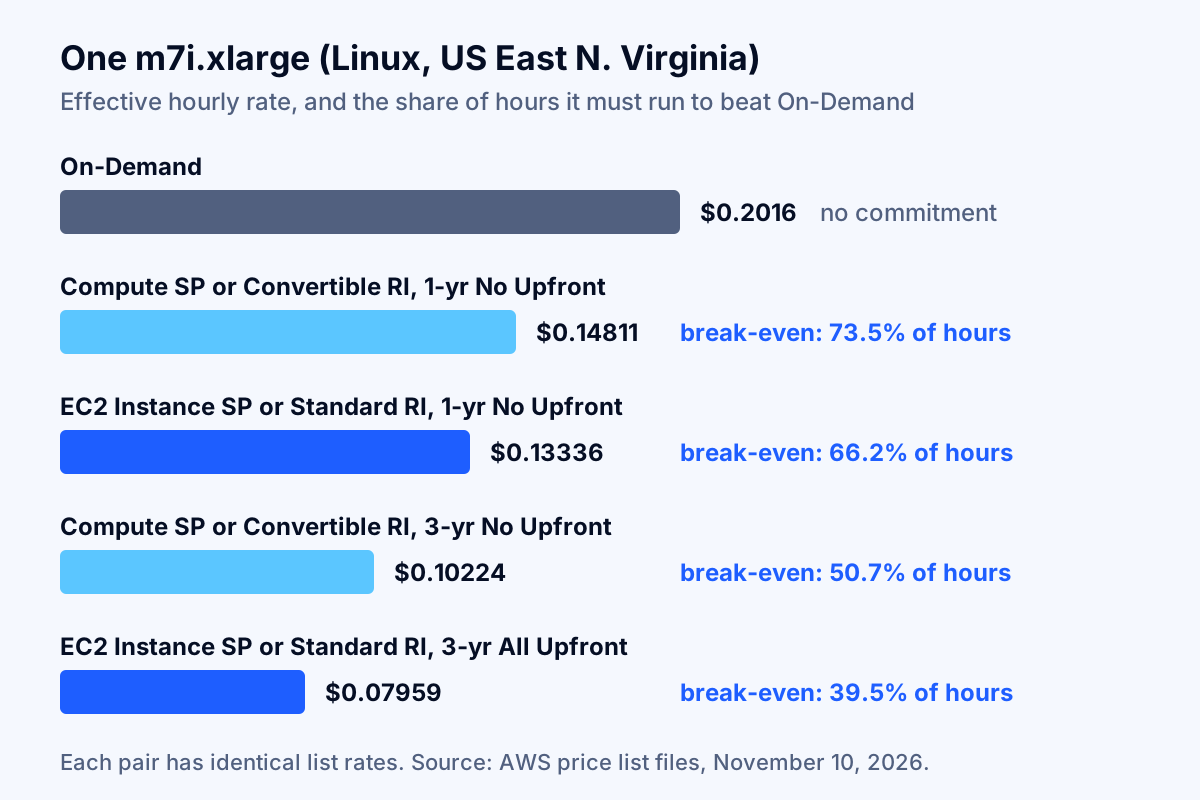
Break-even utilization is the commitment rate divided by the On-Demand rate. It answers one question: what share of hours must this usage run for the commitment to beat On-Demand? A 1-year No Upfront Compute Savings Plan on m7i pays off only for usage that runs at least 73.5% of the hours in the year. A development server that is switched off nights and weekends runs about 30% of hours, so committing to it costs more than leaving it On-Demand. This is why scheduling and right-sizing come before any purchase, a sequence we also lay out in our guide to why an AWS bill is so high.
The upfront options save more, but the gain is modest at 1 year: All Upfront saves an extra 4.9 percentage points on the Compute Savings Plan, in exchange for paying $1,210.98 on day one per instance-equivalent. Whether that is worth it depends on your cost of capital, not on AWS.
How AWS applies Savings Plans and Reserved Instances each hour
Every hour, AWS applies Reserved Instances first, then EC2 Instance Savings Plans, then Compute Savings Plans, and any commitment not used in that hour is lost. The Savings Plans User Guide states that Savings Plans "apply to your usage after the Amazon EC2 Reserved Instances (RI) are applied," that EC2 Instance Savings Plans go before Compute Savings Plans "because Compute Savings Plans have broader applicability," and that "each hour's commitment can only be used within that hour and cannot be carried over."
Within a plan, AWS applies the commitment to the usage with the highest savings percentage first. In AWS's own illustration, a Compute Savings Plan covers r5 instances (30% savings) before Fargate (25%) before Lambda duration (15%). Three practical points follow:
- Hourly, not monthly. A plan sized to your monthly average will be under-used at night and over-run at midday. The unused night-time commitment is simply billed.
- Layering works. Because RIs and EC2 Instance Savings Plans apply before Compute Savings Plans, you can cover a rock-solid core with the cheaper, narrower commitment and let a Compute Savings Plan absorb the rest.
- Sharing across accounts depends on a setting. In a consolidated billing family, plans apply first to the purchasing account, then to other accounts when discount sharing is enabled. Recommendations follow the same sharing setting, so check it before you buy from the management account.
What happens when your usage changes: a worked migration example
Flexibility is worth the most in the year you change instance family, and the math can turn a "cheaper" commitment into the most expensive option. Take 10 m7i.xlarge Linux instances running around the clock in US East (N. Virginia). Six months into the year, the team moves them to 10 Graviton m8g.xlarge instances, which have a lower On-Demand rate ($0.17952 an hour). All prices are AWS list prices as of November 10, 2026; each half-year is 4,380 hours.
| Option bought at the start of the year | Months 1–6 (m7i) | Months 7–12 (m8g) | Total for the year |
|---|---|---|---|
| No commitment (On-Demand) | $8,830.08 | $7,862.98 | $16,693.06 |
| EC2 Instance SP for the m7i family, $1.3336/hr, 1-yr No Upfront | $5,841.17 (commitment) | $5,841.17 unused commitment + $7,862.98 On-Demand for m8g | $19,545.31 |
| Compute SP, $1.4811/hr, 1-yr No Upfront | $6,487.22 (commitment) | $6,487.22 (commitment covers m8g at $1.3189/hr) | $12,974.44 |
The EC2 Instance Savings Plan that would have saved $1,292 against the Compute Savings Plan in a stable year ends up $2,852 worse than buying nothing, because its commitment only applies to the m7i family. The Compute Savings Plan follows the workload to Graviton and still saves $3,719, or 22%, against On-Demand. It even leaves $0.16 an hour of commitment free for other compute such as Fargate or Lambda.
A Standard RI bought for m7i would have the same problem as the EC2 Instance Savings Plan, with one extra exit: it could be listed on the Reserved Instance Marketplace after 30 days. A Convertible RI could be exchanged for m8g Convertible RIs, provided the new reservation is of equal or greater value.
The decision rule: buy the narrower, cheaper commitment only for usage whose instance family and Region you are confident will not change during the term. If a Graviton migration, a right-sizing project or a move to containers is on the roadmap, the 11% premium for a Compute Savings Plan is cheap insurance. For teams running Kubernetes, the same logic applies to node families; see our Kubernetes cost optimization checklist for the node-level side.
How much should you commit? A sizing method you can run in a day
Commit to your hourly floor first, then add commitment above the floor only where the extra usage clears the break-even line. This avoids the most common and most expensive mistake: buying a commitment sized to an average that includes usage you are about to remove.
Step 1: clean up before you measure. Delete idle resources, schedule non-production off-hours, and finish right-sizing. A commitment locks in today's shape of usage for one or three years. The FinOps Foundation puts it bluntly: commitment discounts "are not resources. They are similar to coupons," and if nothing matching is running, "the organization still pays."
Step 2: find the hourly floor. In Cost Explorer, chart EC2, Fargate and Lambda usage at hourly granularity (unblended On-Demand cost, existing commitments excluded) for the last 30 to 60 days. The floor is the On-Demand spend you have in almost every hour: nights, weekends and holidays included. Ignore one-off spikes such as a migration weekend.
Step 3: convert the floor to a commitment. A Savings Plan commitment is stated in Savings Plan dollars, not On-Demand dollars. Multiply the floor by the rate ratio for your mix. For m7i on a 1-year No Upfront Compute Savings Plan, the ratio is 0.7347 ($0.14811 / $0.2016), so a $10.00 per hour On-Demand floor becomes a commitment of about $7.35 per hour. Ratios differ by instance family and service, which is why the next step matters.
Step 4: compare with AWS's recommendation. Open Savings Plans > Recommendations in the Billing and Cost Management console and choose a lookback of 7, 30 or 60 days. Per AWS's documentation, the recommendation is the commitment that "will result in the largest savings" over that lookback, and it does not forecast: "Recommendations are based on your historical usage over the selected lookback period." It also notes that Compute and EC2 Instance Savings Plan recommendations "are not meant to be taken together." If AWS recommends much more than your floor, it is betting that your past peaks will repeat.
Step 5: apply the break-even test to anything above the floor. Each extra dollar of commitment pays off only if the usage it covers exists in more than the break-even share of hours: 73.5% for a 1-year No Upfront Compute Savings Plan on m7i. Usage that runs on weekdays only (about 71% of hours) does not clear that bar on its own. Usage that runs every day from 6 a.m. to midnight (75%) barely does.
Step 6: buy in tranches. Instead of one large purchase, buy a portion now and add more each quarter as usage proves itself. Tranches also stagger expiry dates, so your coverage never falls off a cliff on a single day.
Key takeaway: Size from the floor up, not from the average down. Under-buying costs you a few points of discount on the uncovered hours; over-buying costs you the full commitment for hours with nothing to cover.
When Reserved Instances are still the better choice
Reserved Instances remain the right tool in four situations: services that Savings Plans cover weakly or not at all, workloads that need guaranteed capacity, very stable fleets where a resale exit has value, and existing RI portfolios you can extend at no extra risk.
Databases: RDS Reserved Instances vs Database Savings Plans
For databases, the trade-off is real because the discounts differ. AWS announced Database Savings Plans on December 2, 2025: up to 35% savings on a 1-year, no-upfront commitment that follows usage "regardless of engine, instance family, size, deployment option, or AWS Region" across Aurora, RDS, DynamoDB, ElastiCache, DocumentDB, Neptune, Keyspaces, Timestream and AWS Database Migration Service. The Savings Plans FAQ adds OpenSearch Service, limits coverage to Generation 7 and newer instances, limits ElastiCache to Valkey, and states that Database Savings Plans cannot be combined with RIs or DynamoDB reserved capacity on the same workload.
RDS Reserved Instances, by contrast, save "up to 69%" in steady state, with size flexibility for Aurora, MySQL, MariaDB, PostgreSQL, Db2 and BYOL Oracle (not SQL Server or License Included Oracle). No Upfront RDS RIs are available only on a one-year term and offer up to 30%.
| Database situation | Better fit (as of November 2026) |
|---|---|
| One production PostgreSQL or MySQL instance, same engine and family for years | RDS Reserved Instance, 3-year All Upfront or Partial Upfront |
| Fleet moving to a new generation, between engines, or to Aurora Serverless | Database Savings Plan |
| DynamoDB on-demand tables | Database Savings Plan (reserved capacity applies to provisioned mode) |
| SQL Server on RDS | Either; the Database Savings Plan discount covers only the instance price, and Windows and SQL Server licensing stay at on-demand rates |
| Instances older than Generation 7 | RDS Reserved Instance (not eligible for Database Savings Plans) |
AWS's own FAQ recommends moving from RIs to Database Savings Plans as RIs expire. That is reasonable for changing fleets; for a stable database, the deeper RI discount is worth keeping.
EC2 instances that need guaranteed capacity
Savings Plans never reserve capacity. A zonal Reserved Instance does, in one Availability Zone. The more flexible route is to separate the two jobs: an On-Demand Capacity Reservation holds the capacity with no term commitment, and a Savings Plan or regional RI discounts it. One trap: AWS states that "Zonal Reserved Instance billing discounts do not apply to Capacity Reservations," so do not stack a zonal RI on top of a Capacity Reservation and expect a discount. Future-dated Capacity Reservations require at least 32 vCPUs and are limited to the C, G, I, M, R, T, U and X families.
Services with no Savings Plan
Some services still only offer reservations. Amazon Redshift, for example, is not in the Database Savings Plans service list in the November 2026 FAQ, so reserved nodes remain its commitment option. SageMaker has its own SageMaker Savings Plans (up to 64%), which do not cover EC2.
Getting out: returns, the RI Marketplace and exchanges
The exit options differ more than the prices, and you should know them before you buy, not after. Neither model can be canceled outright.
Savings Plans: a seven-day return window. Per AWS's return rules, "any Savings Plan with an hourly commitment of $100 or less that has been purchased in the last seven days and in the same calendar month can be returned," subject to a return limit per consolidated billing family. Upfront charges are refunded in full. A plan bought on the 28th of a month therefore has only a few days of return window, not seven. After the window closes, the commitment runs to the end of the term; there is no marketplace for Savings Plans.
Standard RIs: the Reserved Instance Marketplace. Only EC2 Standard RIs can be sold; AWS's seller rules exclude Convertible RIs and RIs for RDS, ElastiCache and other services. The RI must have been active for at least 30 days with at least one month left in its term. AWS charges a 12% service fee on the upfront price you set, the seller's bank must have a US address, and there is a lifetime limit of $50,000 in sales and 5,000 RIs per account. RIs bought with a volume discount cannot be sold. A sale is not guaranteed: someone has to buy it.
Convertible RIs: exchanges. A Convertible RI can be exchanged for another Convertible RI with a different instance family, operating system, tenancy or payment option, "as long as the exchange results in the creation of Reserved Instances of equal or greater value." You can trade up, never down.
Standard RIs and EC2 Instance Savings Plans: limited reshaping. A Standard RI can be modified (Availability Zone, size for Linux, network type) but not exchanged. Regional Linux RIs and EC2 Instance Savings Plans already flex across sizes within a family, which covers most right-sizing within the same family.
| If this happens mid-term | Compute SP | EC2 Instance SP | Standard RI | Convertible RI |
|---|---|---|---|---|
| Right-size within the family | Covered | Covered | Covered (regional Linux) | Covered (regional Linux) |
| Move to Graviton or another family | Covered | Stranded | Sell on Marketplace | Exchange |
| Move workload to another Region | Covered | Stranded | Sell on Marketplace | Exchange |
| Move from EC2 to Fargate or Lambda | Covered | Stranded | Sell on Marketplace | Not possible |
| Shut the workload down | Pay to term end | Pay to term end | Sell on Marketplace | Pay to term end |
A decision guide for small and mid-sized companies
For most companies spending a few thousand to a few hundred thousand dollars a month on AWS, the decision comes down to four questions asked in order.
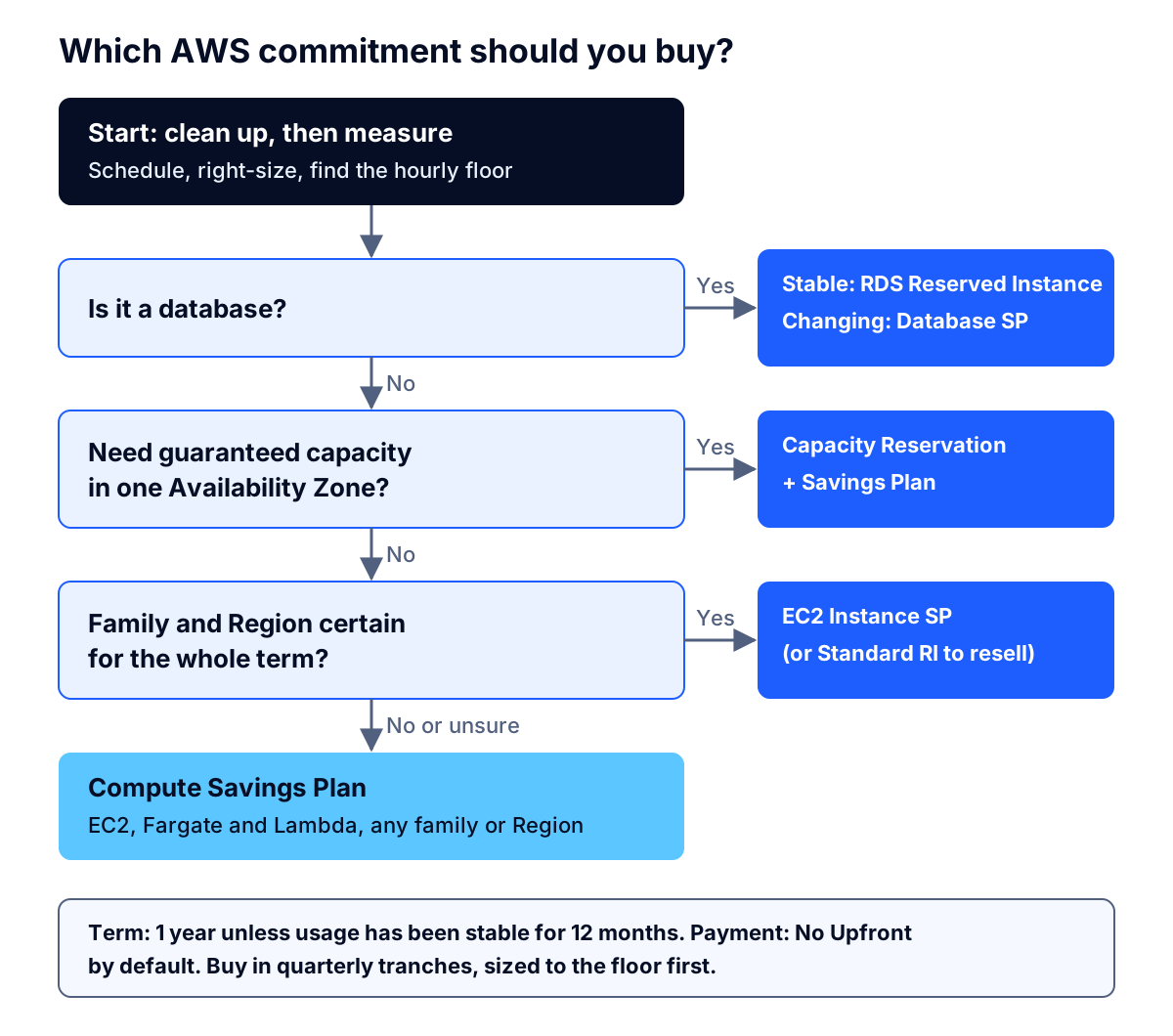
- Is the usage already cleaned up and steady? If not, wait. A month of scheduling and right-sizing typically changes the floor more than any discount choice.
- Is it a database? Use RDS Reserved Instances for stable, long-lived databases, and Database Savings Plans for changing fleets and serverless.
- Does it need guaranteed capacity in one Availability Zone? Use an On-Demand Capacity Reservation discounted by a Savings Plan, or a zonal Standard RI if you prefer a single instrument.
- Will the instance family and Region stay the same for the whole term? If you are certain, use an EC2 Instance Savings Plan (or a Standard RI if a resale exit matters to you). If not, use a Compute Savings Plan.
On term length: choose 1 year unless the workload has been stable for at least 12 months and nothing on the roadmap changes it. The 3-year discounts are large (54.6% against 33.8% for EC2 Instance Savings Plans on m7i), but so is the risk. On payment: No Upfront keeps cash and the return window simple; All Upfront adds roughly five percentage points at 1 year.
Renewals are part of the plan. Reserved Instances "do not renew automatically," and usage returns to On-Demand rates the moment they expire. Savings Plans can be queued up to three years ahead, with charges starting only on the start date, so you can schedule the replacement before the old plan ends. Regional RIs can be queued too; zonal RIs cannot.
How to tell whether your commitments are working
Track two numbers monthly: utilization (how much of what you bought you actually used) and effective savings rate (what you saved across all spend). Coverage alone is misleading, because you can raise coverage by over-buying.
- Utilization. The FinOps Foundation's Commitment Utilization Score is used commitment divided by total commitment. Values well below 100% mean you are paying for coupons with nothing to cover.
- Effective savings rate (ESR). The FinOps Foundation defines one version as 1 minus (actual spend with discounts / equivalent On-Demand spend). It is the one number that captures both under-buying and over-buying, and it is how you compare this year's portfolio with last year's.
- Coverage. The share of eligible usage covered by commitments. Use it to find the next tranche to buy, not as a target on its own.
- Expiry calendar. List every commitment with its end date. Anything expiring in the next 60 days needs a decision: renew, resize or let it lapse.
Put these in the same monthly 30-minute review as budgets and anomalies. Commitments also change what an anomaly looks like: an expiring RI shows up as a sudden On-Demand jump, which a good cloud cost anomaly detection setup should flag as expected, not as an incident. If you also run Azure, the Azure cost optimization checklist applies the same break-even method to Azure reservations and savings plans.
Common mistakes, and how to avoid each one
These five mistakes account for most wasted commitment spend, and each has a simple fix.
- Buying before cleaning up. A commitment bought for idle or oversized instances locks in waste. Fix: finish scheduling and right-sizing first, then measure for at least two weeks.
- Sizing to the average. The average includes peak hours that a commitment will cover and night hours it will not. Fix: size to the hourly floor and apply the break-even test to anything above it.
- Taking the Compute and EC2 Instance recommendations together. AWS computes both from the same usage. Fix: pick one, buy it, refresh recommendations, then look again.
- Buying a narrow commitment before a migration. An EC2 Instance Savings Plan or Standard RI bought months before a Graviton or container move can cost more than On-Demand, as the worked example shows. Fix: check the roadmap with engineering before every purchase.
- Forgetting the return window ends with the month. A plan bought late in a month can only be returned until month-end. Fix: make large purchases early in the month, and double-check the commitment amount before submitting.
Third-party tools that automate commitment buying can help large, changing fleets, but read the fee model closely: many charge a share of savings, and some sell Convertible RIs as lower lock-in than Savings Plans. Our article on whether cloud cost optimization tools work covers how to evaluate those claims.
What to do this week
The right answer to Savings Plans vs Reserved Instances is usually "Compute Savings Plan for most EC2, Fargate and Lambda; Reserved Instances or Database Savings Plans for databases; Capacity Reservations where capacity matters." The money is in the sizing, not the label.
- Export 60 days of hourly compute usage from Cost Explorer and find your floor.
- List every RI and Savings Plan you hold, with utilization and expiry date.
- Ask engineering what will change in the next 12 months: instance families, Regions, containers, serverless.
- Buy a first tranche of a 1-year No Upfront Compute Savings Plan at or below the floor, early in the month.
- Review utilization and ESR monthly, and add tranches quarterly.
If you want a second opinion on your commitment portfolio or a plan that ties commitments to an actual roadmap, our a stack audit team can review it with you; you can also talk to a specialist or browse what else Fleurant AI does.
If you'd like one clear, practical take on AI, software and cloud decisions each month, subscribe to the Fleurant AI Briefing: one email a month, unsubscribe any time.
Frequently asked questions
Are AWS Savings Plans cheaper than Reserved Instances?
No, not at list price. In AWS's November 2026 price files, an EC2 Instance Savings Plan and a Standard Reserved Instance for the same instance, term and payment option have the same effective rate, and a Compute Savings Plan matches a Convertible Reserved Instance. For an m7i.xlarge Linux instance in US East (N. Virginia), both 1-year No Upfront options cost $0.13336 an hour, against $0.2016 On-Demand. The difference is flexibility and exit options, not price.
Should a small company buy a Compute Savings Plan or Reserved Instances?
Most small and mid-sized companies should start with a 1-year No Upfront Compute Savings Plan sized to their lowest steady hourly usage. It applies across instance families, Regions, Fargate and Lambda, so right-sizing or a move to Graviton does not strand it. AWS itself recommends Savings Plans over Reserved Instances for EC2. Reserved Instances still make sense for RDS databases, Redshift, and EC2 instances that need a zonal capacity reservation.
How much of our baseline should we commit to a Savings Plan?
Commit to the hourly floor first: the On-Demand spend you have in nearly every hour of the last 30 to 60 days, converted to Savings Plan rates. Each extra dollar of commitment above that floor pays off only if the usage it covers runs more than the plan's break-even share of hours, about 74% for a 1-year No Upfront Compute Savings Plan on m7i instances. Buy in quarterly tranches rather than all at once.
Can you cancel or sell an AWS Savings Plan?
Only within a narrow window. AWS lets you return a Savings Plan with an hourly commitment of $100 or less if you bought it in the last seven days and in the same calendar month, with a full refund of upfront charges. After that the commitment runs to the end of its term. Savings Plans cannot be listed in the Reserved Instance Marketplace; only EC2 Standard Reserved Instances can be sold there.
What is the break-even utilization for a Savings Plan or Reserved Instance?
Divide the commitment's hourly rate by the On-Demand rate. For m7i.xlarge Linux in US East (N. Virginia), as of November 2026, a 1-year No Upfront Compute Savings Plan breaks even at 73.5% of hours, an EC2 Instance Savings Plan or Standard RI at 66.2%, and a 3-year All Upfront EC2 Instance Savings Plan at 39.5%. Below that share, staying On-Demand is cheaper.
Should we replace RDS Reserved Instances with Database Savings Plans?
Not automatically. Database Savings Plans, launched December 2, 2025, save up to 35% on a 1-year, no-upfront commitment and follow usage across engines, instance families, Regions and serverless. RDS Reserved Instances can save up to 69% but lock an engine, family and Region. Keep reservations for stable databases you will not change; consider Database Savings Plans for fleets that are moving to new generations or serverless. The two cannot cover the same workload.
Sources
- Savings Plans FAQs, Amazon Web Services
- Understanding how Savings Plans apply to your usage, AWS Savings Plans User Guide
- Understanding your recommendation calculations, AWS Savings Plans User Guide
- Returning a purchased Savings Plan, AWS Savings Plans User Guide
- Queuing a Savings Plan purchase, AWS Savings Plans User Guide
- Reserved Instances for Amazon EC2 overview, Amazon EC2 User Guide
- Regional and zonal Reserved Instances (scope), Amazon EC2 User Guide
- Sell Reserved Instances for Amazon EC2 in the Reserved Instance Marketplace, Amazon EC2 User Guide
- Reserve compute capacity with EC2 On-Demand Capacity Reservations, Amazon EC2 User Guide
- Amazon EC2 Reserved Instances Pricing, Amazon Web Services
- Amazon EC2 Reserved Instances, Amazon Web Services
- Compute Savings Plans offer file (AWS Price List Bulk API, region index), Amazon Web Services
- Announcing Database Savings Plans with up to 35% savings, Amazon Web Services
- Database Savings Plans pricing, Amazon Web Services
- Amazon RDS Reserved Instances, Amazon Web Services
- Rate Optimization FinOps Framework Capability, FinOps Foundation
- AWS Savings Plans vs. Reserved Instances, ProsperOps