Cloud Costs
Kubernetes Cost Optimization Checklist: 22 Checks, Real Prices
A Kubernetes cost optimization checklist for EKS, AKS and GKE: 22 checks in the right order, with November 2026 control plane, node and Autopilot prices.

In this article
- Why Kubernetes clusters cost more than the workloads inside them
- What a cluster costs before it runs a single pod
- Phase 1: see the cost before you change anything (checks 1–4)
- Phase 2: delete what nobody needs (checks 5–9)
- Phase 3: right-size what pods ask for (checks 10–14)
- A worked example: what right-sizing is worth on a 10-node cluster
- Phase 4: shrink and reshape the nodes (checks 15–18)
- Phase 5: buy cheaper capacity for what is left (checks 19–22)
- The complete Kubernetes cost optimization checklist
- When this checklist is not enough
- Next steps
- Frequently asked questions
- Sources
Short answer: a Kubernetes cost optimization checklist only works in the right order. First make cluster cost visible by namespace and owner, and delete what nobody needs: idle clusters, dev environments running at night, orphaned volumes, one load balancer per service and control planes paying extended support fees. Then right-size pod resource requests, because the scheduler reserves node capacity based on requests, not on what pods actually use. Only then let node autoscaling shrink the cluster, move tolerant workloads to Spot, and buy commitments sized to what is left. This guide gives you that order as 22 checks for Amazon EKS, Azure AKS and Google GKE, each with the November 2026 list price that makes it matter.
It is written for CTOs, platform leads and operations leaders at small and mid-sized US companies running one to a few dozen clusters, who want to know where the Kubernetes money goes before anyone sells them a tool. Prices are list prices in US dollars as of November 2026 (AWS US East, N. Virginia; Google Cloud us-central1), with a month counted as 730 hours.
If you are working on the wider cloud bill, the same method appears in our Google Cloud cost optimization checklist, our Azure cost optimization checklist and our guide to why AWS bills run high.
Why Kubernetes clusters cost more than the workloads inside them
Kubernetes clusters cost more than their workloads because you pay for nodes, while the scheduler fills those nodes based on what pods request, and requests are usually set high and never revisited. The Kubernetes documentation is explicit: the scheduler ensures that the sum of the resource requests of scheduled containers is less than the node's capacity, and even when actual CPU or memory usage on a node is very low, it still refuses to place a pod if that check fails (Kubernetes resource management). A cluster can look "full" to the scheduler while its CPUs sit mostly idle.
The scale of the gap is well measured. Datadog's State of Cloud Costs 2024, based on hundreds of organizations using its cost tool on AWS, found that 83% of container costs were associated with idle resources: 54% was cluster idle (node capacity no pod requested) and 29% was workload idle (capacity requested by pods but not used). Only about 17% paid for work actually done.
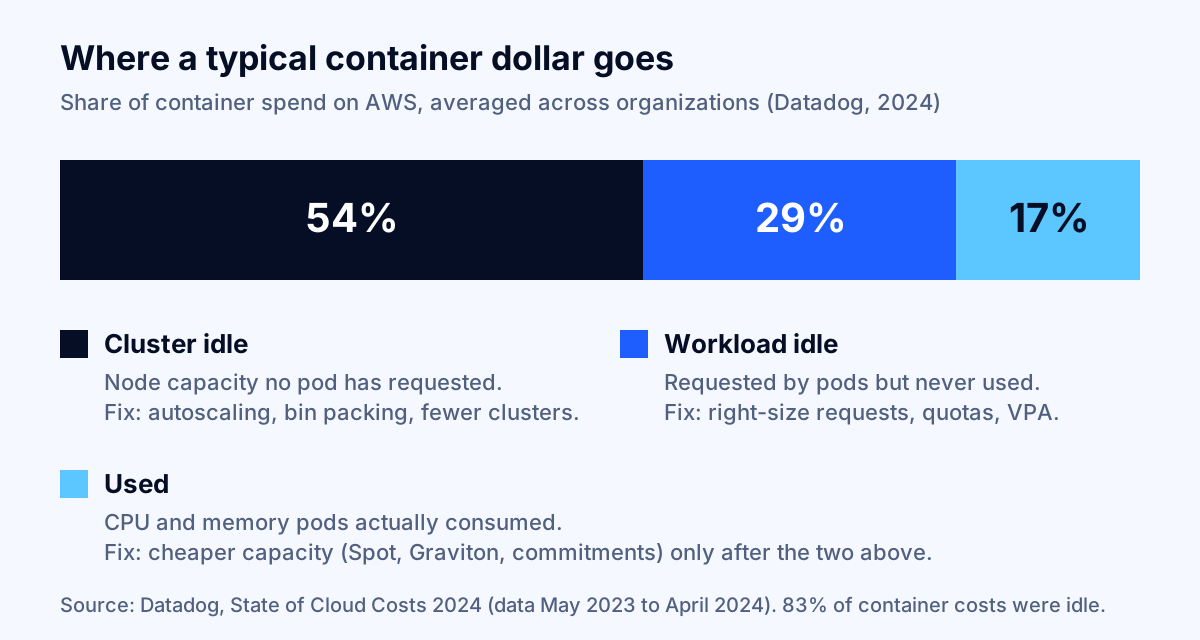
Survey data points the same way. In the CNCF's Cloud Native FinOps microsurvey (just over 100 respondents, June to November 2023), 49% said Kubernetes had increased their cloud spend, 70% named overprovisioning as a cause of overspend, 43% cited resources not deactivated after use, and 38% had no Kubernetes cost monitoring at all (CNCF). The sample is small, so treat the percentages as direction, not precision.
Key takeaway: Kubernetes waste has two layers. Workload idle is fixed by right-sizing requests; cluster idle is fixed by letting the nodes shrink afterward. Doing only one of them saves little.
What a cluster costs before it runs a single pod
Every managed Kubernetes cluster carries a fixed control plane fee plus a minimum set of nodes and network resources, and that floor is why extra clusters are expensive. The control plane fees as of November 2026:
| Platform | Standard control plane | Extended or long-term support | Free allowance | Source |
|---|---|---|---|---|
| Amazon EKS | $0.10 per cluster-hour (about $73/month) | $0.60 per cluster-hour (about $438/month) | None | EKS pricing |
| Google GKE | $0.10 per cluster-hour, any mode | Extra $0.50 per hour in the extended period ($0.60 total) | $74.40/month credit per billing account (one zonal or Autopilot cluster) | GKE pricing |
| Azure AKS | Free tier: $0; Standard tier: $73/month | Premium tier with LTS: $438/month | Free tier has no financially backed SLA | AKS pricing |
The managed "hands-off" modes add their own charges. EKS Auto Mode adds a management fee per instance on top of the EC2 price; in AWS's own example, a c6a.2xlarge at $0.306 an hour carries a $0.03672 fee, which is 12% more. AKS Automatic lists a hosted component at $116.80 per cluster per month plus a per-vCPU charge, $7.05 per general-purpose vCPU per month. GKE Autopilot bills pods rather than nodes, covered in check 19.
Now add the floor of nodes. A small production node in this guide's examples is an m7i.xlarge on EC2 (4 vCPU, 16 GiB), listed at $0.2016 an hour in US East, or $147.17 a month on demand (EC2 on-demand pricing). An "empty" EKS cluster with two such nodes and one Network Load Balancer ($0.0225 an hour, $16.43 a month before capacity units, per Elastic Load Balancing pricing) costs about $383.76 a month before it serves a single request. Multiply that by every forgotten test and demo cluster.
Phase 1: see the cost before you change anything (checks 1–4)
The first phase makes cost visible by namespace, team and cluster using the native tools each cloud now provides at little or no extra charge. Without it, every later decision is a guess.
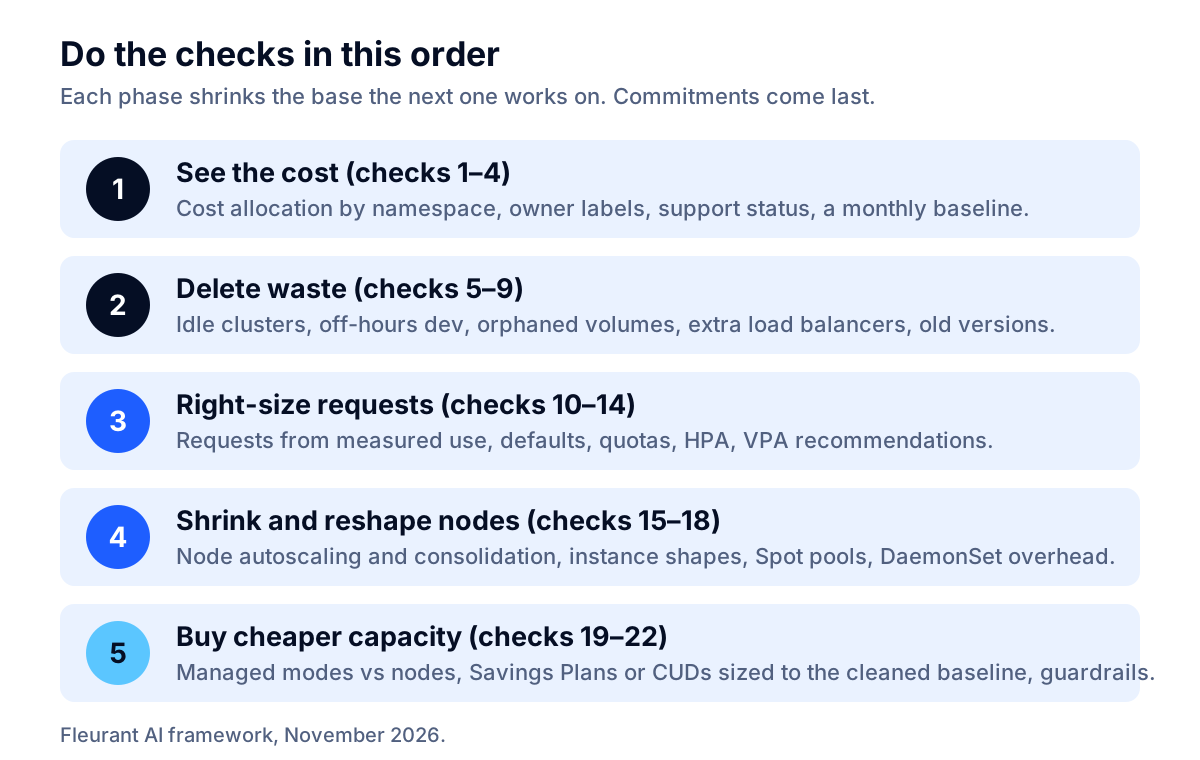
1. Turn on native cost allocation for every cluster
Each provider can now split node costs down to namespaces and workloads in its own billing data:
- EKS: split cost allocation data in the AWS Cost and Usage Report adds pod-level records, allocating each instance's amortized cost by the share of CPU and memory the pods used, and creates cost allocation tags such as
aws:eks:namespace,aws:eks:deploymentandaws:eks:workload-name(AWS documentation). Expect a much larger report: AWS's own formula gives 48,000 new rows a day for 1,000 short-lived pods an hour. - GKE: cost allocation puts the cluster and namespace into the labels of the billing export to BigQuery. It is based on resource requests, not usage, does not backfill, can take up to three days to appear, and can add BigQuery storage and query cost (GKE documentation).
- AKS: the cost analysis add-on, built on the CNCF OpenCost project, shows namespace costs plus idle, system, service and unallocated charges in Microsoft Cost Management. It requires the Standard or Premium tier, and the Kubernetes views are available only for Enterprise Agreement and Microsoft Customer Agreement subscriptions (Microsoft Learn).
On any cloud, or on-premises, OpenCost is the vendor-neutral option; it moved to the CNCF Incubating level on October 25, 2024.
2. Require owner and environment labels on every namespace
Cost allocation is only useful if each namespace maps to a person or team who can act. Require team, env and cost-center labels on namespaces (and on workloads, where your allocation tool reads them), and reject unlabeled deployments in CI or with an admission policy. Google's GKE guidance recommends gating noncompliant manifests in the CI/CD pipeline for the same reason (GKE cost optimization best practices).
3. Record a baseline: cost per cluster, per namespace and per unit of work
Write down one month's cost per cluster, the top ten namespaces, and the share that is idle. Then pick one business unit metric, such as cost per thousand requests or per active customer. That is how you will prove each later check worked, and how you will spot drift. Our guide to cloud cost anomaly detection covers alerting on the daily numbers.
4. List every cluster's Kubernetes version and support status
Version status is now a cost line. On EKS, a minor version gets 14 months of standard support, then 12 months of extended support at the higher rate, and extended support is enabled by default for new and existing clusters (EKS version lifecycle). Run aws eks describe-cluster-versions or check the console for each cluster, and do the same on GKE (Extended channel) and AKS (Premium tier with LTS). Check 9 turns this list into savings.
Phase 2: delete what nobody needs (checks 5–9)
The second phase removes resources that cost money and deliver nothing. None of it needs a tuning project, and it shrinks the base that every later check works on.
5. Consolidate or delete idle clusters
Every cluster carries its control plane fee plus a minimum node group, so the cheapest cluster is the one you delete. Look for clusters with no deployments changed in 60 days, clusters for finished projects, and one-cluster-per-developer setups. Where teams need isolation, namespaces with quotas (check 12) and network policies inside one shared non-production cluster usually suffice. On GKE, keep in mind that the $74.40 monthly credit covers only one zonal or Autopilot cluster per billing account; regional clusters do not use it.
6. Scale non-production node pools down outside working hours
Dev, test and staging pools rarely need to run 168 hours a week. A pool that runs 12 hours a day on weekdays runs 60 hours, so scaling it to zero (or to a minimum) the rest of the time removes about 64% of its node-hours. Use your node autoscaler's minimum settings with a scheduled job, or scale deployments to zero and let the autoscaler remove the empty nodes. Keep the control plane up; it is the cheap part.
7. Find and delete orphaned persistent volumes
Persistent volumes can outlive the apps that used them. Dynamically provisioned volumes inherit the reclaim policy of their StorageClass, which defaults to Delete, but with a Retain policy the volume still exists after its claim is deleted and has to be cleaned up by hand (Kubernetes persistent volumes). Run kubectl get pv and look for volumes in the Released state, then check the cloud console for disks not attached to any node. On AWS, gp3 storage is priced at $0.08 per GB-month in the example on the EBS pricing page, so 2 TB of forgotten volumes costs about $160 a month. Snapshot anything you are unsure about before deleting.
8. Replace per-service load balancers with one shared entry point
Each Kubernetes Service of type LoadBalancer usually creates its own cloud load balancer. On AWS, an Application or Network Load Balancer costs $0.0225 an hour before capacity units, about $16.43 a month each, so 20 services exposed this way pay roughly $329 a month in hourly charges alone. Route HTTP traffic through one ingress controller or Gateway API implementation instead, and cap new load balancers per namespace with the services.loadbalancers field of a ResourceQuota (Kubernetes resource quotas).
9. Get every cluster out of paid extended support
Extended support multiplies the control plane fee by six. An EKS cluster in extended support pays $0.60 an hour instead of $0.10, an extra $365 a month or $4,380 a year per cluster, and GKE's extended period adds the same $0.50 an hour. The dates matter right now: on EKS, version 1.34 leaves standard support on December 2, 2026, and 1.31 reaches the end of extended support on November 26, 2026, after which EKS upgrades the control plane automatically at a time it does not announce (EKS release calendar). Upgrading is the real fix. You can switch the upgrade policy to STANDARD to avoid the fee, but then the cluster is auto-upgraded at the end of standard support, so plan and test the upgrade rather than letting it happen to you.
Key takeaway: three clusters (dev, staging, production) that slip into EKS extended support cost about $13,140 more per year in control plane fees alone, before any engineering time.
Phase 3: right-size what pods ask for (checks 10–14)
Right-sizing resource requests is the single largest lever, because requests decide how many nodes you need. The goal is requests that match measured use plus deliberate headroom, enforced so they stay that way.
10. Set requests from measured usage, not from guesses
Pull two to four weeks of CPU and memory usage per container from your metrics stack, then set the CPU request near the 90th to 95th percentile of usage and the memory request near the observed peak plus a margin. Memory is the stricter resource: a container that exceeds its memory limit may be killed by the kernel, while a container that exceeds its CPU limit is throttled (Kubernetes resource management). Change one service at a time and watch error rates and latency for a few days.
11. Give every namespace defaults with a LimitRange
A pod with no request is invisible to capacity planning, and if you set only a limit, Kubernetes copies the limit into the request. Both distort cost. A LimitRange sets default requests and limits and enforces minimum and maximum values per pod or container in a namespace (Kubernetes limit ranges), so a developer who forgets the resources block gets a sane default instead of an unbounded pod or an oversized one.
12. Cap each namespace with a ResourceQuota
A ResourceQuota limits the total requests.cpu, requests.memory, storage, number of persistent volume claims and number of load balancers a namespace can claim (Kubernetes resource quotas). Google's GKE guidance recommends quotas in multi-tenant clusters so one team cannot deploy workloads that create unexpected charges. Set each quota slightly above the namespace's right-sized total, and treat a request to raise it as a cost conversation, not a ticket.
13. Scale replicas with demand using the Horizontal Pod Autoscaler
Running peak-hour replica counts all day is a quiet form of workload idle. The Horizontal Pod Autoscaler adds and removes replicas based on metrics such as CPU utilization, measured as a percentage of each container's request, so it only works well once requests are realistic; containers without the relevant request set break utilization-based scaling (Kubernetes HPA documentation). Set a sensible minimum for availability and let the maximum follow real traffic.
14. Use vertical recommendations, now with in-place resize
The Vertical Pod Autoscaler recommends requests from observed usage, which turns check 10 into a continuous process. Since Kubernetes 1.35 (December 2025), in-place pod resize is stable, so CPU and memory requests and limits can change on a running pod, usually without restarting the container, and VPA's InPlaceOrRecreate update mode reached beta in that release (Kubernetes blog). Start in recommendation-only mode, review the suggestions for a couple of weeks, and do not let VPA and an HPA both act on CPU for the same workload.
A worked example: what right-sizing is worth on a 10-node cluster
Right-sizing requests and then letting nodes consolidate can roughly halve the node bill of a typical overprovisioned cluster. Here is the arithmetic with stated assumptions, so you can rerun it with your own numbers.
Assumptions: an EKS cluster with 10 m7i.xlarge nodes (40 vCPU, 160 GiB in total) at the on-demand price of $147.17 per node-month; CPU is the binding resource; pods request 34 vCPU in total, so the scheduler sees the cluster as 85% full; measured 95th-percentile usage is 12 vCPU; new requests are set at usage plus 25% headroom; after consolidation, nodes are packed to 75% of capacity.
| Step | Before | After right-sizing |
|---|---|---|
| Total CPU requests | 34 vCPU | 15 vCPU (12 × 1.25) |
| Node capacity needed at 75% packing | 40 vCPU (10 nodes) | 20 vCPU (5 nodes) |
| Monthly node cost (on demand) | $1,471.68 | $735.84 |
| EKS control plane (standard support) | $73.00 | $73.00 |
| Monthly total | $1,544.68 | $808.84 |
That is $735.84 a month, or about $8,830 a year, from one cluster, before Spot or commitments. The saving appears only if the node autoscaler actually removes the freed nodes (Phase 4); lowering requests on a cluster with a fixed node count saves nothing. Your numbers will differ: memory-bound clusters, DaemonSet overhead and pods with anti-affinity rules all reduce how tightly nodes can be packed.
Phase 4: shrink and reshape the nodes (checks 15–18)
The fourth phase turns smaller requests into fewer, better-shaped nodes. Cluster Autoscaler and Karpenter are the two node autoscalers currently sponsored by the Kubernetes autoscaling special interest group (SIG Autoscaling) (Kubernetes node autoscaling); each provider's managed mode wraps one of them.
15. Turn on node autoscaling with consolidation
Node autoscaling should both add nodes for pending pods and remove nodes whose pods fit elsewhere. Karpenter calls the second part consolidation: a node can be deleted when all its pods fit on other nodes' free capacity, or replaced by a single cheaper node. Its consolidationPolicy can be WhenEmpty (most conservative) or WhenEmptyOrUnderutilized, and without an explicit disruption budget it limits voluntary disruption to 10% of nodes at a time (Karpenter documentation). Cluster Autoscaler offers comparable scale-down settings. Protect pods that must not move with PodDisruptionBudgets, or with Karpenter's karpenter.sh/do-not-disrupt annotation, rather than turning consolidation off.
16. Pick node shapes that fit your pods
Node shape decides how much capacity is stranded. If your pods need 4 GiB of memory per vCPU and your nodes offer 2 GiB per vCPU, CPU sits idle while memory runs out. Compare the CPU-to-memory ratio of your total requests with your instance families, prefer a few larger nodes over many tiny ones (fixed per-node overhead from DaemonSets and system reservations shrinks as a share), and let Karpenter or a node pool with several instance types choose from a broader list. On AWS, Arm-based Graviton families are often cheaper per vCPU: an m7g.xlarge lists at $0.1632 an hour against $0.2016 for the m7i.xlarge in US East, about 19% less, provided your container images are built for Arm.
17. Run interruption-tolerant workloads on Spot capacity
Spot capacity is the deepest discount available for Kubernetes nodes. AWS advertises savings of up to 90% off on-demand prices for EC2 Spot (AWS), with a two-minute warning before an interruption (EC2 documentation). On GKE, pods on Spot VMs get a 30-second graceful termination period by default, and Google recommends keeping at least one node pool of standard VMs for critical system components like DNS (GKE Spot VMs). Good candidates are stateless web replicas behind a load balancer, CI runners, batch jobs and queue workers. Use taints and tolerations to keep databases and singletons off Spot, and spread Spot pools across several instance types.
18. Audit DaemonSets and system overhead
Every DaemonSet runs one pod on every node, so its requests multiply with node count. Logging agents, security scanners, service mesh sidecars and monitoring exporters often request more than they use, and three or four of them can claim a noticeable share of a small node before your workloads start. List them with kubectl get daemonsets -A, right-size their requests like any other workload, and remove duplicates (two log shippers is common after a tool migration). Sidecar-based meshes add a proxy to every pod; count that cost before adopting one.
Phase 5: buy cheaper capacity for what is left (checks 19–22)
The last phase changes the price you pay for the capacity that remains. Doing it last matters, because commitments are sized to today's usage and most cannot be canceled.
19. Compare managed per-pod modes with node-based pricing
Per-pod billing removes cluster idle but charges a higher unit price, so it wins when your nodes are poorly packed. GKE Autopilot bills the CPU, memory and ephemeral storage your pods request, and the underlying node size or count does not matter for billing (GKE pricing). In us-central1 the default rates are $0.0445 per vCPU-hour and $0.0049225 per GiB-hour, so a 4 vCPU, 16 GiB block of requests costs about $187.43 a month. A GKE Standard node of the same size costs $97.84 a month as an e2-standard-4 or $141.79 as an n2-standard-4 on demand (general purpose VM pricing).
| Comparison (us-central1, on demand) | Monthly cost of 4 vCPU / 16 GiB | Autopilot is cheaper when Standard nodes are requested below |
|---|---|---|
| Autopilot pod requests | $187.43 | Not applicable |
| GKE Standard, e2-standard-4 node | $97.84 | about 52% |
| GKE Standard, n2-standard-4 node | $141.79 | about 76% |
The break-even ignores node system reservations and Standard-mode sustained use discounts, so treat it as a first screen. The same logic applies to EKS Fargate and to AKS Automatic's per-vCPU charge: pay-per-pod suits spiky, small or poorly packed workloads; well-packed steady clusters are usually cheaper on nodes.
20. Buy commitments sized to the cleaned baseline
Once Phases 2 to 4 have shrunk the cluster, commit to the steady floor. On AWS, Compute Savings Plans apply to EC2 instances regardless of family, size or region, and also to Fargate, with savings of up to 66%; EC2 Instance Savings Plans go up to 72% for a fixed family in one region (Savings Plans FAQ). Spot usage is not covered by Savings Plans and does not count toward them. On GKE, Autopilot pods and nodes can use compute flexible or Kubernetes Engine committed use discounts; for example, the Autopilot vCPU rate drops from $0.0445 to $0.0356 an hour with a 1-year Kubernetes Engine commitment. Commit to the overnight and weekend floor, not the weekday peak, and keep Spot for the variable top. For choosing between Compute Savings Plans, EC2 Instance Savings Plans and Reserved Instances on AWS, see AWS Savings Plans vs Reserved Instances.
21. Put guardrails in the delivery pipeline
Cost drifts back unless the pipeline stops it. Fail builds that ship pods without requests, enforce the namespace labels from check 2 with an admission policy, cap load balancers and storage with quotas, and post a cost estimate for large changes in the pull request. These are cheap to add and stop the most common regressions: a new service with no requests, a copy-pasted LoadBalancer Service, and a forgotten preview environment.
22. Review monthly with the teams who own the namespaces
Make a 30-minute monthly review part of the operating rhythm: top namespaces by cost, idle share by cluster, the biggest changes since last month, version status and the commitment coverage rate. Compare against the baseline from check 3. Our article on FinOps for AI workloads covers the same rhythm for GPU and model costs, which increasingly run on the same clusters.
The complete Kubernetes cost optimization checklist
Use this table as the working list. Each row is one owner and one decision.
| # | Check | Phase | Typical saving lever |
|---|---|---|---|
| 1 | Native cost allocation on every cluster (EKS split cost data, GKE cost allocation, AKS cost analysis or OpenCost) | See | Visibility |
| 2 | Owner, environment and cost-center labels enforced | See | Accountability |
| 3 | Baseline: cost per cluster, top namespaces, idle share, unit cost | See | Measurement |
| 4 | Version and support status for every cluster | See | Avoids extended support fees |
| 5 | Idle clusters consolidated or deleted | Delete | Control plane plus minimum nodes |
| 6 | Non-production pools scaled down off hours | Delete | About 64% of those node-hours |
| 7 | Released and unattached volumes removed | Delete | Storage per GB-month |
| 8 | One ingress or gateway instead of per-service load balancers | Delete | About $16 per load balancer per month on AWS |
| 9 | No cluster in paid extended support | Delete | $365 per cluster per month on EKS |
| 10 | Requests set from measured usage | Right-size | Workload idle |
| 11 | LimitRange defaults in every namespace | Right-size | Stops unbounded and oversized pods |
| 12 | ResourceQuota on every namespace | Right-size | Caps requests, volumes, load balancers |
| 13 | HPA on variable-traffic services | Right-size | Off-peak replicas |
| 14 | VPA recommendations, in-place resize where supported | Right-size | Keeps requests current |
| 15 | Node autoscaling with consolidation | Shrink | Cluster idle |
| 16 | Node shapes matched to request ratios; Arm where possible | Shrink | Stranded capacity, unit price |
| 17 | Spot pools for tolerant workloads | Shrink | Up to 90% off on AWS |
| 18 | DaemonSet and sidecar overhead audited | Shrink | Per-node overhead |
| 19 | Per-pod managed modes compared with node pricing | Buy | Removes cluster idle where packing is poor |
| 20 | Commitments sized to the cleaned floor | Buy | Up to 66–72% on AWS Savings Plans |
| 21 | Cost guardrails in CI/CD and admission | Govern | Prevents regressions |
| 22 | Monthly review with namespace owners | Govern | Keeps savings |
When this checklist is not enough
Some Kubernetes cost problems are architectural, and no amount of request tuning fixes them. Three patterns are common. Data transfer between availability zones, regions or out to the internet can outgrow compute in chatty microservice designs. GPU nodes for AI inference are expensive enough that one idle GPU node can cost more than the rest of a small cluster; they need their own scheduling, scale-to-zero and sharing strategy. And some workloads simply do not belong on Kubernetes: a handful of low-traffic services may be cheaper on a serverless container platform than on a cluster with a control plane and a node floor.
Paid cost tools are worth evaluating once native allocation works and you can measure their effect. Our article on whether cloud cost optimization tools actually work explains what to ask a vendor and how to check its savings claims. If you would rather have a team do the analysis, Fleurant AI's stack audit starts with a free discovery call, and you can talk to a specialist about your clusters.
Next steps
Start this week with checks 1, 4 and 9: turn on cost allocation, list every cluster's version, and schedule upgrades for anything in or near extended support before the December 2, 2026 EKS date. Next month, work through Phase 2 and right-size your top five namespaces by cost. Buy commitments only after the cluster has shrunk, and review the numbers monthly so the savings stay. For more on how we approach cloud and AI cost work, see the Fleurant AI home page.
If you'd like one clear, practical take on AI, software and cloud decisions each month, subscribe to the Fleurant AI Briefing: one email a month, unsubscribe any time.
Frequently asked questions
What is the biggest source of wasted Kubernetes spend?
Capacity nobody uses. In Datadog's State of Cloud Costs 2024, 83% of container costs on AWS were tied to idle resources: 54% was cluster idle (node capacity no pod requested) and 29% was workload idle (requested by pods but never used). Fix both with right-sized resource requests first, then node autoscaling and consolidation so the cluster shrinks to fit the smaller requests. Buying discounts before that just locks in the waste at a lower price.
How much does a Kubernetes control plane cost on EKS, AKS and GKE?
As of November 2026, EKS charges $0.10 per cluster per hour (about $73 a month) in standard support and $0.60 ($438 a month) in extended support. GKE charges the same $0.10 per hour, with a $74.40 monthly credit that covers one zonal or Autopilot cluster per billing account, plus $0.50 an hour for versions in extended support. AKS is free on the Free tier, $73 a month on Standard and $438 a month on Premium with long-term support.
How do I stop paying EKS extended support fees?
Upgrade the cluster to a Kubernetes version in standard support, which on EKS lasts 14 months from release. As of November 2026 that means 1.34 or newer, and 1.34 itself leaves standard support on December 2, 2026. You can also set the cluster upgrade policy to STANDARD to disable extended support, but then EKS upgrades the control plane automatically at the end of standard support, so plan and test upgrades instead of relying on that.
Should I set CPU limits on every Kubernetes pod?
Set CPU requests on every pod; be deliberate about CPU limits. The scheduler places pods by their requests, so requests drive cost. CPU limits are enforced by throttling, which can slow latency-sensitive services even when the node has idle CPU. Memory is different: a container that exceeds its memory limit may be killed, so set memory limits close to the request for predictable behavior. Test the policy on one service before rolling it out.
Is GKE Autopilot cheaper than GKE Standard?
It depends on how full your nodes are. Autopilot bills the CPU and memory your pods request, so you never pay for empty nodes, but the unit price is higher. In us-central1 a 4 vCPU, 16 GiB block of Autopilot requests costs about $187 a month, against $97.84 for an e2-standard-4 node and $141.79 for an n2-standard-4 on demand. If your Standard nodes are less than roughly 52% (E2) to 76% (N2) requested, Autopilot is likely cheaper.
Do I need a paid Kubernetes cost tool?
Not to start. EKS split cost allocation data, GKE cost allocation and the AKS cost analysis add-on (built on the open-source OpenCost project) show cost by namespace with native billing data. Paid tools earn their fee with automated right-sizing, Spot orchestration and multi-cloud reporting at scale. Get the native allocation working first, so you can measure what any tool actually saves before you sign a contract.
Sources
- Amazon EKS pricing, Amazon Web Services
- Understand the Kubernetes version lifecycle on EKS, Amazon EKS User Guide
- Google Kubernetes Engine pricing, Google Cloud
- Azure Kubernetes Service (AKS) pricing, Microsoft Azure
- AKS Free, Standard, and Premium pricing tiers, Microsoft Learn
- Resource Management for Pods and Containers, Kubernetes documentation
- Resource Quotas, Kubernetes documentation
- Limit Ranges, Kubernetes documentation
- Horizontal Pod Autoscaling, Kubernetes documentation
- Node Autoscaling, Kubernetes documentation
- Persistent Volumes, Kubernetes documentation
- Kubernetes 1.35: In-Place Pod Resize Graduates to Stable, Kubernetes blog
- Disruption (consolidation), Karpenter documentation
- Understanding split cost allocation data, AWS Data Exports User Guide
- Get GKE cluster usage and cost allocation data, Google Cloud GKE documentation
- Azure Kubernetes Service (AKS) cost analysis, Microsoft Learn
- OpenCost project page, Cloud Native Computing Foundation
- State of Cloud Costs 2024, Datadog
- Kubernetes and unexpected cloud spend (Cloud Native FinOps microsurvey), Cloud Native Computing Foundation
- Amazon EC2 On-Demand pricing, Amazon Web Services
- Spot Instances, Amazon EC2 User Guide
- Amazon EC2 Spot Instances, Amazon Web Services
- Spot VMs (GKE), Google Cloud GKE documentation
- General purpose VM pricing, Google Cloud
- Elastic Load Balancing pricing, Amazon Web Services
- Amazon EBS pricing, Amazon Web Services
- Savings Plans FAQ, Amazon Web Services
- Best practices for running cost-optimized Kubernetes applications on GKE, Google Cloud GKE documentation