Software Costs
Jobber vs Housecall Pro vs ServiceTitan: Cost at 10, 25, 50 Staff
Jobber vs Housecall Pro vs ServiceTitan: annual cost at 10, 25 and 50 people from each vendor's pricing page, and what each tier forces you to buy.

In this article
- How much do Jobber, Housecall Pro and ServiceTitan cost at 10, 25 and 50 people?
- What does Jobber cost, and when does it stop being cheap?
- What does Housecall Pro cost, and what does each tier force you to add?
- What does ServiceTitan cost, and why can't you compare it directly?
- Which platform is cheapest at 25 employees?
- What do the tiers cost once you add what you actually need?
- Where does a per-user price stop making sense?
- What goes wrong when you switch field service software?
- How do you get your own numbers before you decide?
- Conclusion: pick the tier, not the brand
- Frequently asked questions
- Sources
Short answer: in a Jobber vs Housecall Pro vs ServiceTitan comparison on published prices, a 25-person contractor pays roughly $8,300 to $10,700 a year for Jobber or Housecall Pro, and a third-party estimate puts ServiceTitan at $45,000 to $90,000 for the same company. That is a gap of four to ten times, and it is mostly not a pricing trick: ServiceTitan is a deeper product sold by quote, and the other two are cheaper products sold by list price. The useful question is not which of the three is cheapest. It is which tier of each one has the features you use, and what that tier costs at your headcount.
This article works that out from the vendors' own pricing pages, read on November 24, 2026. You will get:
- the annual cost of Jobber, Housecall Pro and ServiceTitan at 10, 25 and 50 people, with every assumption written down;
- the point where each platform changes tier, and what the tier forces you to buy;
- where the published prices end, so you know which numbers are quotes and which are our arithmetic;
- how to decide between staying, switching and connecting what you already have.
We do not sell any of these three, we have no client yet, and we are not paid by any of them. Every price below is linked to its source, and prices on these pages change often, so check the date.
How much do Jobber, Housecall Pro and ServiceTitan cost at 10, 25 and 50 people?
At 10 people the three cost $3,600 to $36,000 a year, at 25 people $8,300 to $90,000, and at 50 people $17,000 to $180,000. The low end of each range is Jobber or Housecall Pro; the high end is the ServiceTitan estimate.
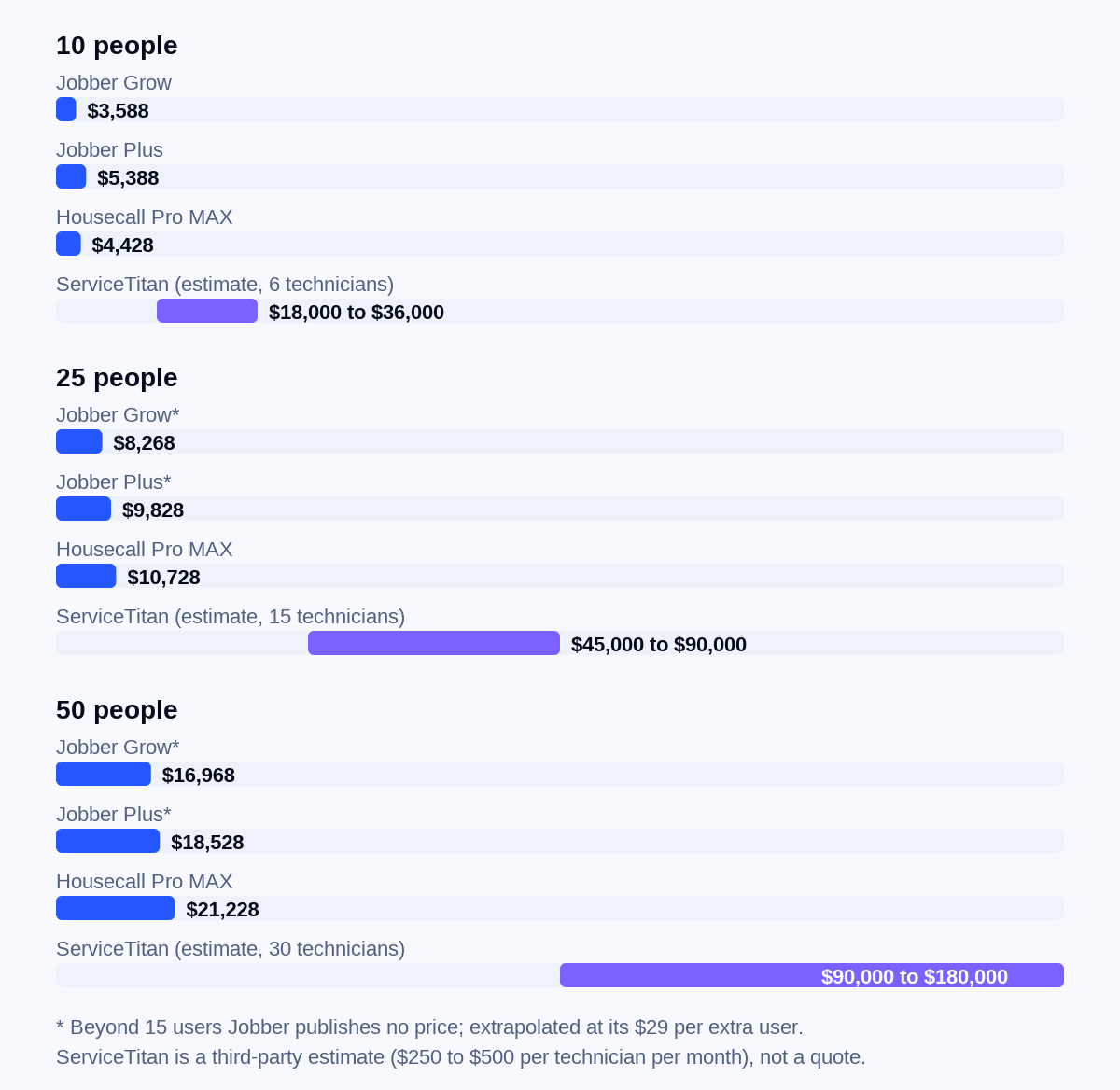
| People | Jobber Grow | Jobber Plus | Housecall Pro MAX | ServiceTitan (estimate) |
|---|---|---|---|---|
| 10 | $3,588 | $5,388 | $4,428 | $18,000 to $36,000 (6 technicians) |
| 25 | $8,268 * | $9,828 * | $10,728 | $45,000 to $90,000 (15 technicians) |
| 50 | $16,968 * | $18,528 * | $21,228 | $90,000 to $180,000 (30 technicians) |
* Jobber publishes no price above 15 users. These are our extrapolation using its stated $29 a month for each extra user.
How we built the table, so you can replace our inputs with yours:
- Jobber and Housecall Pro: every person counts as a user. That overstates the bill if some staff never log in, and understates it if you need more than one account type. Prices are the annual-billing prices after the first-year promotion, because that is what you pay in year two. Both vendors run larger promotions in the first months (Jobber's page says "Save up to 50%" until November 30, 2026, and Housecall Pro's says 50% off the first three months), so year one can be lower.
- ServiceTitan: we assumed 60% of your people are technicians, which is our assumption, not a ServiceTitan figure. We applied $250 to $500 per technician per month, the range in Projul's 2026 analysis. Projul sells competing software and attributes those numbers to other third parties. We covered what is and is not verified about ServiceTitan in our ServiceTitan pricing article; the short version is that its annual report confirms pricing is "partially based on the number of technicians" and gives no rate.
- Excluded from every column: onboarding, card processing, phone and marketing add-ons, and your own time. They are real, and the later sections price what can be priced.
Key takeaway: the two list-price platforms cost a bit more than $30 per person per month at 50 people. The ServiceTitan estimate is four to nine times that per person. You are comparing different products, so the price gap tells you what to ask, not what to buy.
What does Jobber cost, and when does it stop being cheap?
Jobber is the cheapest of the three at every size we modeled, and it stops publishing a price at 16 people. As of November 24, 2026, its pricing page offers four plans (Core, Connect, Grow and Plus), with the team-size selector running from "Just me" through 2-5, 6-10, 11-15 and "16 or more". At 16 or more, every plan shows "Let's chat" and a Contact Sales button instead of a price.
The prices for the sizes that do have a price, on annual prepaid billing and after the first-year promotion, are:
| Plan | 10 users | 15 users | What it adds |
|---|---|---|---|
| Connect | $229 a month | $299 a month | Automated reminders, automatic payment collection, checklists, quote and invoice follow-ups, QuickBooks Online sync |
| Grow | $299 a month | $399 a month | Connect plus job costing, automatic time tracking, two-way SMS, custom workflow automations, quote upsells |
| Plus | $449 a month | $529 a month | Grow plus unlimited photos and videos, crew scheduling, custom reports, expense capture, Pipeline, Marketing Suite, AI Receptionist, dedicated onboarding and premium support |
Each plan lists extra users at $29 a month. Paying monthly instead of annually raises the list price substantially: Plus at 10 users is $599 a month on monthly billing against $449 on annual prepaid. The page's FAQ says annual plans are billed in full at the start, that a cancelled annual plan runs to the end of its term with no refund of the first payment, and that all subscriptions renew automatically unless set to non-renew.
Three things make Jobber cheap and three make it stop being cheap.
Why it stays cheap. The seat price is low ($29 a month for each extra user), there is no onboarding fee on the page, and the published tiers cover companies up to 15 people. A 10-person shop on Grow pays $3,588 a year.
Where it stops being cheap:
- Plus is a different product. Crew scheduling, custom reports and unlimited photos and videos are only on Plus. For an established contractor with multi-person crews and a photo-heavy workflow, Plus is the plan being compared, and Grow-versus-Plus at 10 users is $1,800 a year. The Plus button is Contact Sales, not a free trial, so the price is the start of a conversation.
- The add-ons are priced separately below Plus. The page sells Marketing Suite at $99 a month, the AI Receptionist at $99 and Pipeline at $49, a total of $247 a month. Plus includes all three. If you want them, Plus at $449 can be cheaper than Grow at $299 plus $247; if you do not, you are paying for features you will not use.
- Above 15 people you negotiate. Our $29-per-extra-user extrapolation gives a number, but it is not a quote. A page that says "Let's chat" at 16 people is telling you that larger shops are priced by a conversation, as ServiceTitan's are.
What does Housecall Pro cost, and what does each tier force you to add?
Housecall Pro is slightly more expensive than Jobber at every size we modeled, with three tiers that each unlock specific features. As of November 24, 2026, its pricing page lists:
| Plan | Annual billing | Monthly billing | Users included | Features the page names |
|---|---|---|---|---|
| Basic | $59 a month | $79 a month | 1 | Online booking, scheduling and dispatch, estimates and invoicing, payments and financing, price book, job costing, review management |
| Essentials | $149 a month | $189 a month | 5 | Basic plus routes, flat-rate pricing, checklist automations, photo reports and annotations, employee GPS tracking, commissions, QuickBooks Online sync |
| MAX | $299 a month | $329 a month | 8 | Essentials plus a sales proposal tool, recurring service plans, route optimization, open API access, a dedicated onboarding specialist and escalated phone support |
The page states $35 a month for each additional user on MAX. It does not state an extra-user price for Basic or Essentials, so we modeled only MAX beyond eight users. The pricing page's FAQ says there is no long-term contract and that you can upgrade or downgrade at any time, with a downgrade taking effect at the end of the billing period. It also says that MAX is the plan with access to Zapier and the open API.
At the size of company this blog writes for, the tier is not a choice. An established contractor with a service agreement book needs recurring service plans, and the page lists those only on MAX. A dispatcher who plans a day around drive times needs route optimization, also MAX. A company that wants its own tools to talk to the platform needs the open API, also MAX. That makes MAX the realistic comparison at 10 people and above, and its cost is $299 for the first 8 users plus $35 for each one after.
Two cost lines are not on the plan table. The page includes a "Get more done" list (CSR AI, Pipeline, Payroll, Accounting, Voice, Campaigns, vehicle GPS and dashcams, Websites) with no prices, so each is a separate conversation. And the page says card processing rates start "as low as 2.59%", which is a floor, not what you will pay.
What does ServiceTitan cost, and why can't you compare it directly?
ServiceTitan publishes package names and no prices, so any figure beside it is an estimate, and it should be labeled that way in every table. As of November 24, 2026, its pricing page lists Core, Demand AI, Field AI and MAX, with "Get Pricing" and "Get Demo" as the only calls to action. The most useful verified facts come from the company's annual report filed with the SEC: pricing is "partially based on the number of technicians" you employ, new customers typically sign contracts of 12 to 36 months that renew automatically, and professional services are invoiced separately at the start. We covered each in detail in the ServiceTitan pricing guide.
The estimates are the part to treat carefully. The range we used, $250 to $500 per technician per month, is from a competing vendor's analysis, which in turn attributes it to other third parties. Onboarding estimates of $5,000 to $50,000 come from the same place. If you have a real quote, it replaces our column. If you do not, the most important thing the estimate tells you is the shape: the bill rises with each technician, like the other two, but from a base several times higher.
What you are buying at that price is not the same product. The three platforms overlap on scheduling, dispatch, invoicing and a mobile app. ServiceTitan's page describes a platform with a price book, call booking, memberships, commission tracking, payroll configuration and a long list of add-on products, aimed at larger operations. A 10-truck HVAC shop with a dispatcher, a call booker and a service-agreement book may use most of that; a landscaping company with crew-based routes may use a small part. The honest test is a list of features you used last month, not features on a sales page.
Which platform is cheapest at 25 employees?
At 25 people, Jobber Grow is cheapest on paper at about $8,300 a year, Jobber Plus $9,800 and Housecall Pro MAX $10,700, and the three are within $2,500 of each other. ServiceTitan's estimate is $45,000 to $90,000. But "cheapest" only holds if the cheaper plan has what you use.
The table below is the one we would build for a real shop. For each feature an established contractor tends to depend on, it shows the cheapest plan on each platform that has it, per the vendor pages above:
| Feature | Jobber | Housecall Pro |
|---|---|---|
| QuickBooks Online sync | Connect | Essentials |
| Job costing | Grow | Basic |
| Photo reports and annotations | Plus (unlimited photos and videos) | Essentials |
| Crew scheduling | Plus | Not listed on the page |
| Custom reports | Plus | Not listed on the page by that name |
| Recurring service plans | Not listed on the page by that name | MAX |
| Route optimization | Not listed on the page | MAX (routes on Essentials) |
| Open API access | Not listed on the page | MAX |
| Dedicated onboarding | Plus | MAX |
"Not listed on the page" does not mean the platform lacks it; it means the pricing page does not name it, so you must ask. That is the point of the table: each vendor's tiers are built around a different feature line. Jobber's Plus is where crews and reports live; Housecall Pro's MAX is where service plans and the API live. A company that needs both crew scheduling and recurring agreements needs to check each against the other's page before accepting a price.
Notice what the table does to the headline numbers. The price you compare should be the price of the cheapest tier with every feature you use, which for an established shop is usually Jobber Plus or Housecall Pro MAX, not the entry tiers that show up in "starting at" headlines. The older roundups that rank for this keyword show the entry price: one 2026 guide says Jobber runs "roughly $25 to $249 per month" and Housecall Pro "from about $49", figures that do not match the pages as we read them, where Jobber's cheapest 10-user plan is $229 a month and Housecall Pro's Essentials, which includes 5 users, is $149.
What do the tiers cost once you add what you actually need?
Adding the add-ons you would otherwise buy separately changes the ranking by a few thousand dollars, and it never closes the gap with the ServiceTitan estimate. Here is a worked example for a 25-person contractor, using only prices on the vendor pages:
| Item | Jobber | Housecall Pro |
|---|---|---|
| Plan at 25 users, annual billing | Plus: $819 a month ($529 for 15 users, plus 10 at $29) | MAX: $894 a month ($299 for 8 users, plus 17 at $35) |
| Annual subscription | $9,828 | $10,728 |
| Marketing, call answering and pipeline | Included in Plus (priced at $247 a month if bought alone) | Priced separately and not shown on the page |
| Onboarding | Included in Plus | Included in MAX |
| QuickBooks sync | Included | Included |
| Card processing | Separate, rate not on the pricing page | Separate, "as low as 2.59%" |
At 25 people the difference between the two list-price platforms is $900 a year before you price anything either one sells separately. What actually moves the answer is which platform's tier fits the way you work, and whether the thing you need is on the page at all.
Where does a per-user price stop making sense?
A per-user price grows in a straight line with every hire, and the line is steeper than most owners notice because it counts the office as well as the trucks. At Jobber's $29 and Housecall Pro's $35 per extra user, the bill rises about $350 to $420 a year for each person you add. ServiceTitan's per-technician estimate rises by $3,000 to $6,000 a year for each technician added. None of those is large next to what a technician earns. It is large next to what the software does for the person who is not using it every day: the part-time dispatcher, the estimator who looks at the schedule twice a week, the manager who wants a report.
The arithmetic that matters is not the seat price, it is the total software bill. The field service platform is one line. Most established contractors also pay for accounting, payroll, payment processing, a call answering or reputation tool, a website, a marketing platform and several smaller subscriptions, and the field service platform often ends up sitting between them with a person re-typing data across the gaps. The question for a 25-person shop is therefore not "which of these three is cheapest?" but "what does my whole stack cost, and which part of it is duplicated?"
Here is the honest version of what Fleurant AI sells against that question, using only published prices. An Operations Stack is $18,000 to build for three modules and $2,000 a month for companies up to 30 employees, which is $24,000 a year to run, after the $18,000 build. A Jobber Plus subscription for 25 people is $9,828 a year. On a field service platform alone, at Jobber or Housecall Pro prices, replacing it with a built stack costs more, not less. At a ServiceTitan-sized bill ($45,000 to $90,000 a year for 15 technicians, on the estimate), it can be cheaper. In between, it depends entirely on what else you pay for and how many tools the stack would replace.
If that is the situation you are in, the right move is probably not a replacement at all:
- Stay and choose the right tier. If your whole software bill is under about $1,500 a month, a list-price platform is likely your cheapest option, and the $2,500 audit is not worth buying.
- Connect what you have. A Connector is $7,500 to build and $750 a month, and it makes your platform, accounting and other tools pass jobs and invoices to each other without anyone re-typing them. It makes sense when the cost is in the gaps rather than the subscriptions.
- Replace when the field service platform is the biggest line in a stack of ten or more tools, and the per-user growth is what bothers you. The band on an Operations Stack is set by company size ($2,000 up to 30 employees, $2,750 for 31 to 60, $3,500 for 61 to 100), reviewed once a year at renewal and never mid-term, so a new hire never changes the invoice.
We would rather you stay on Jobber at $9,828 a year than pay us $24,000 to replace it. If the whole stack is large, the arithmetic changes, and the build-versus-buy article shows how to run it without taking our word for it.
What goes wrong when you switch field service software?
The risk in switching is not the subscription; it is the six weeks when dispatch runs on two systems. There are four common failure points, and none of them is on a pricing page.
- The price book does not move cleanly. Item codes, flat-rate prices and tax settings must be rebuilt or imported, and a mismatch shows up as wrong invoices.
- Open jobs and agreements straddle the cutover. Recurring service agreements and jobs booked for next month have to land in the new system on the right dates, or your maintenance revenue slips.
- The field app changes for every technician. Your technicians are the people least willing to relearn a tool, and a bad first week costs more than a year of seat price. Do the field app last, not first.
- Accounting sync is rebuilt. QuickBooks Online sync is a named feature on both platforms, but a new sync means new mappings and an awkward month of reconciling.
The time to plan around these is before you sign, and above all around your peak season. The cost of a switch is hours of your office team's time, and you pay it whether the new platform costs $10,000 or $100,000 a year. If a replacement you build is on the table, see what custom field service software costs. The same switching logic applies: modules go in one at a time, and each runs alongside the old tool for two weeks before anything is cancelled.
How do you get your own numbers before you decide?
You can get a rough answer in an afternoon with a spreadsheet. A Stack Audit is the same exercise done for you and for the whole stack: $2,500, one to two weeks, credited in full against a build started within 90 days.
Do this yourself first:
- List every subscription you pay for, with seats, monthly cost, annual cost and contract end date. Include the field service platform, accounting, payroll, call answering, marketing, estimating, e-signature and any reporting tool.
- Mark the features you used in the last 30 days. Not the ones on the sales page: the ones someone on your team opened. Crew scheduling, recurring agreements, route optimization and the API are the ones that decide the tier.
- Price the cheapest tier with every feature you marked on each vendor's pricing page, at your real headcount, and write down the date.
- Add the lines the sticker leaves out: card processing at your actual rate, onboarding, add-ons and the hours your office spends re-typing between systems.
- Ask each vendor for a written quote that states the plan, the user count, the term, the renewal price and the notice period for cancelling. Put the notice date in your calendar the day you sign.
If the result is that one of the list-price platforms fits, buy it and stop. If the result shows a field service platform that costs a lot, a stack of other subscriptions that overlap it, and an office that spends hours re-typing, that is the situation an audit is built for. The audit produces your own numbers rather than a vendor's headline price, which is also why we do not quote anyone else's savings: we do not have a client yet, and you should not buy on a stranger's percentage.
Since the same pattern shows up in other places, our write-ups on what a custom CRM costs, replacing spreadsheets with custom software and the customer portal you may already own may help.
Conclusion: pick the tier, not the brand
Jobber and Housecall Pro cost roughly $8,300 to $10,700 a year at 25 people, and ServiceTitan is a quote that estimates put at four to ten times that. The three are not the same product, so the price comparison that helps is the cheapest tier that has the features you use, priced at your headcount, on the date you read the page.
What to do next:
- Write down the five features your office and crews used last month.
- Price the cheapest tier on each platform that includes them, using the links above.
- Add processing, onboarding and add-ons, and ask for a written quote on any figure that says "contact sales".
- If your whole stack is larger than one platform, book a Stack Audit or talk to a specialist.
For the rest of the stack, we modeled what each hire adds to a per-seat software bill, from 9 to 25 employees.
If you'd like one clear, practical take on the software that runs your business each month, subscribe to the Fleurant AI Briefing: one email a month, unsubscribe any time.
Frequently asked questions
Which is cheapest at 25 employees: Jobber, Housecall Pro or ServiceTitan?
On published prices, Jobber Grow is cheapest at about $8,300 a year for 25 users, Jobber Plus about $9,800 and Housecall Pro MAX about $10,700. ServiceTitan does not publish a price; a third-party estimate for 15 technicians is $45,000 to $90,000. The Jobber figure is our extrapolation, because Jobber publishes no price above 15 users.
When does Jobber stop being the cheap option?
Jobber stops publishing a price at 16 or more people, where its page says to contact sales. The plan that matters to a larger shop is Plus, which is the only one with crew scheduling, custom reports and unlimited job photos. At 10 users Plus costs $150 a month more than Grow, so the real step up is in the tier, not the headcount.
Does Housecall Pro charge per user?
Yes, past the users each plan includes. As of November 24, 2026 its page lists Basic with 1 user, Essentials with 5 and MAX with 8, and states $35 a month for each additional user on MAX. The page does not state an extra-user price for Basic or Essentials, so ask before assuming one.
Does the Jobber or Housecall Pro price include payment processing?
No. Both platforms sell card processing separately, and the rate is a cost line of its own. Housecall Pro's page says processing rates start 'as low as 2.59%'. If most of your revenue is card payments, the processing rate can matter more than the monthly subscription, so ask each vendor for the rate you would actually pay.
Can a 25-person contractor run on Jobber or Housecall Pro?
Many do, and the published prices make it the low-cost choice. The question is whether the plan you need has the features you use: crew scheduling and custom reports on Jobber Plus, or recurring service plans, route optimization and API access on Housecall Pro MAX. Price the tier with those features, not the cheapest one.
How do I get my real numbers before switching?
List every subscription with its seats, monthly cost and contract end date, then price each platform at the tier that has the features you actually use. A Stack Audit does this for your whole software stack, not just the field service platform, so you see your own total rather than a vendor's headline price.
Sources
- Jobber pricing, Jobber
- Housecall Pro pricing, Housecall Pro
- ServiceTitan packages, ServiceTitan
- ServiceTitan, Inc. Form 10-K for the fiscal year ended January 31, 2026, U.S. Securities and Exchange Commission
- ServiceTitan pricing analysis 2026, Projul (a competing vendor)
- Jobber vs. Housecall Pro vs. ServiceTitan: Which Field Service Software Fits Your Business Size?, Beancount.io