Web & Software Development
Customer Portal Development Cost: Custom vs Off-the-Shelf
Customer portal development cost by tier: 516 to 1,908 engineering hours, $21,000 to $191,000 by team rate, plus off-the-shelf prices and a 3-year break-even.

In this article
- What is a customer portal, and what are you actually paying for?
- Customer portal development cost by tier
- What drives the cost: a work-package estimate
- Off-the-shelf customer portal software: what it costs
- Custom vs off-the-shelf: a three-year cost model
- Buy, configure or build: three questions to decide
- The hidden costs in a customer portal project
- What does a customer portal cost to run each month?
- How long does it take to build a customer portal?
- How to get an accurate customer portal quote
- Putting it together
- Frequently asked questions
- Sources
The short answer on customer portal development cost: a custom portal takes 516 to 1,208 engineering hours if customers only view information from one system, 656 to 1,568 hours if they also pay invoices and submit requests across two systems, and 776 to 1,908 hours if they place orders or approve quotes with enterprise sign-on. At a $75-an-hour team rate, that is roughly $39,000 to $91,000, $49,000 to $118,000 and $58,000 to $143,000.
Off-the-shelf portal software costs far less to start, from under $100 a month for a small client portal product to per-user pricing that grows with every customer who logs in. Which one is cheaper depends mostly on two things: how many people will log in each month, and whether your workflow fits the shape of a packaged product.
This guide shows its work. You get a work-package hour model with written assumptions, priced at rates derived from federal wage data and published market rates; current list prices for the main off-the-shelf options as of October 2026; a three-year cost model that finds the break-even point; the hidden costs that turn up in integrations, security and accessibility; and a three-question test for deciding whether to buy, configure or build.
Key takeaway: Most of the money in a customer portal is not in the screens. It is in connecting to the systems where the data actually lives, and in making sure every customer sees only their own records. Price those two things carefully and the rest of the estimate is predictable.
What is a customer portal, and what are you actually paying for?
A customer portal is a secure, logged-in website where your customers do things they would otherwise phone or email you about: check an order or job status, download invoices, pay a bill, upload documents, open a support request or reorder. B2B companies often call it a client portal or partner portal; utilities and insurers call it a self-service portal. The technology is the same.
What makes portals different from a marketing website, and from many internal tools, is that they sit between your customers and your systems of record. The portal rarely owns the important data. Orders live in the ERP, invoices in the accounting system, cases in the help desk, contracts in a document store. So a portal project is really three projects:
- A front end your customers find easy to use, on phones as well as desktops.
- An identity and permissions layer that knows which person belongs to which customer company, what role they have, and which records they may see.
- Integrations that read from, and sometimes write back to, the systems where the data lives.
Off-the-shelf products bundle the first two and offer connectors for the third. Custom builds give you full control over all three, at the price of building and maintaining them.
Customer portal development cost by tier
Hours are the stable unit for estimating, because rates vary by a factor of three depending on who does the work. Here are three tiers that cover most portals we see requested by US small and mid-sized companies.
| Tier | What customers can do | Systems connected | Hours | At $40/hr | At $75/hr | At $100/hr |
|---|---|---|---|---|---|---|
| 1. View-only portal | Log in, see account status, orders or jobs, download documents and invoices | One (for example the ERP or accounting system) | 516–1,208 | $21,000–$48,000 | $39,000–$91,000 | $52,000–$121,000 |
| 2. Transactional portal | Everything in tier 1, plus pay invoices online and submit and track support requests | Two (for example ERP plus help desk) | 656–1,568 | $26,000–$63,000 | $49,000–$118,000 | $66,000–$157,000 |
| 3. Workflow portal | Everything in tier 2, plus place orders, request quotes or approve work, with enterprise sign-on and parent/child accounts | Two or more, with write-back | 776–1,908 | $31,000–$76,000 | $58,000–$143,000 | $78,000–$191,000 |
Dollar figures are rounded to the nearest thousand.
Where the rates come from
The three rate columns are planning rates, not quotes.
- $40 an hour reflects marketplace freelancers and offshore firms. Clutch's software development pricing guide reports that most companies listed on its platform charge $25 to $49 an hour.
- $75 an hour reflects a US small development firm. Clutch lists $50 to $99 an hour for firms in the United States.
- $100 an hour reflects a US agency or your own in-house team, once benefits and non-productive time are counted. The BLS Occupational Outlook Handbook puts the median annual wage for web developers at $92,650 in May 2025, and for software developers at $135,980. Wages were 70.0 percent of private-industry employer compensation costs in June 2026, according to the BLS Employer Costs for Employee Compensation release. Gross those wages up, divide by about 1,414 productive hours a year, and you get roughly $94 an hour for a median web developer and $137 for a median software developer. $100 is a fair midpoint.
The productive-hours assumption (2,080 paid hours minus time off, meetings and administration) is worked through in our guide on how to hire a web app developer.
For context, Clutch reports that the most common custom software project on its platform costs $10,000 to $49,999 and the average is about $132,480 over roughly 13 months. That spread brackets the tiers above: a tightly scoped view-only portal at lower rates sits in the common band, and a workflow portal with its first year of changes looks like the average.
What drives the cost: a work-package estimate
Here is how the hours break down. These are Fleurant AI planning ranges for a senior-led team building a responsive web portal (not native mobile apps) on managed services for login, hosting, email and payments.
| Work package | Hours | Tier | What pushes it to the high end |
|---|---|---|---|
| Discovery and workflow mapping | 40–80 | All | Several customer types; undocumented processes; regulated data |
| UX and UI design | 60–140 | All | Data-heavy screens; custom design system; customer testing rounds |
| Project setup, environments, CI/CD | 24–48 | All | Infrastructure as code; strict change control |
| Login, invitations, password reset, MFA | 24–60 | All | Migrating existing users; custom sign-up approval |
| Company accounts, roles, data isolation | 60–120 | All | Many roles; per-record sharing; customers with several locations |
| Integration with system of record 1 | 80–200 | All | Old or on-premise ERP; no API; poor data quality |
| Documents and file sharing | 24–60 | All | Large files; virus scanning; retention rules |
| Email notifications | 16–40 | All | Many templates; digest emails; preference center |
| Staff admin console | 32–80 | All | Impersonation, audit views, manual overrides |
| Accessibility testing and fixes (WCAG 2.2 AA) | 24–60 | All | Complex tables and forms; document accessibility |
| Security baseline and access-control tests | 32–60 | All | External penetration test; security questionnaires |
| QA and automated tests | 60–160 | All | Broad end-to-end coverage; many browsers |
| Project management, data migration, launch | 40–100 | All | Inviting thousands of users; staged rollout |
| Tier 1 subtotal | 516–1,208 | ||
| Invoice payment | 40–100 | 2, 3 | Partial payments; ACH; multiple entities |
| Support requests and tracking | 40–100 | 2, 3 | Two-way sync with the help desk; attachments; SLAs shown to customers |
| Integration with system 2 | 60–160 | 2, 3 | Conflicting records between systems |
| Tier 2 subtotal | 656–1,568 | ||
| Orders, quotes or approvals (the core workflow) | 80–240 | 3 | Pricing rules; customer-specific catalogs; write-back to ERP |
| Enterprise sign-on and parent/child accounts | 40–100 | 3 | Several identity providers; delegated administration |
| Tier 3 total | 776–1,908 |
The assumptions behind the model
The ranges hold only if these are true:
- A senior engineer makes the architecture decisions. Cheaper junior-only teams bill less per hour but tend to need more hours and more rework, especially on permissions and integrations.
- Login, hosting, email and payments come from managed services. Building any of them yourself adds weeks and risk without adding anything your customers notice.
- The systems you integrate with have documented APIs and you can get a test environment. If your ERP has no API, add a middleware or file-transfer project before the portal.
- One web application that works well on phones. Native iOS and Android apps are a separate budget, often 400 hours or more.
- Someone on your side answers questions within a day and owns decisions about what customers may see.
Why integrations and permissions dominate
Two lines in that table carry most of the uncertainty: the integrations and the company-accounts-and-roles work. Together they are roughly 30 percent of the hours in a tier 2 portal, at both ends of the range, and most of the reason the range is wide.
Integrations are uncertain because you do not control the other system. Field names do not match, the API does not return what the documentation says, or the test environment has no realistic data. The single most useful thing you can do before requesting quotes is to list, for each screen in the portal, which system each piece of data comes from and whether the portal only reads it or also writes it back.
Permissions are uncertain because B2B customers are not single users. A distributor's customer might have a buyer, an accounts-payable clerk and an owner, each needing different access, across several ship-to locations. Write down your roles and what each can see. That page narrows quotes more than any feature list.
Off-the-shelf customer portal software: what it costs
Packaged portals fall into three groups. Prices below are list prices from each vendor's pricing page as of October 2026; check them before you budget, because they change.
| Option | Example | Listed price (as of October 2026) | Best fit |
|---|---|---|---|
| Client portal software for service firms | SuiteDash | $19, $49 or $99 a month (or $180, $480 or $960 a year), with unlimited clients and staff on all plans | Agencies, accountants, consultants sharing files, invoices and messages |
| Help desk with a customer portal | HubSpot Service Hub Professional | From $90 per seat per month, plus a required $1,500 onboarding fee; Enterprise from $150 per seat with $3,500 onboarding | Support-led portals: tickets, status, knowledge base |
| Help desk with a help center | Zendesk Suite | Team $55 and Professional $115 per agent per month billed annually | Help center and request submission |
| Low-code portal platform | Microsoft Power Pages | $200 per 100 authenticated users per site per month, paid yearly | Companies already on Dynamics 365 or Dataverse |
| CRM portal platform | Salesforce Experience Cloud | Not listed on Salesforce's pricing page; Salesforce directs buyers to sales | Companies already running Salesforce |
A few details from those pages matter more than the headline prices.
Check which plan actually includes the portal. HubSpot's help article on setting up a customer portal lists Service Hub Professional or Enterprise as the required subscriptions; the portal is described as a login-protected space where customers can access and manage their support tickets. Zendesk's pricing comparison lists a separate "customer portal" feature, described as a dedicated space for customers to manage their support requests, and marks it as not included in Suite Team or Suite Professional. Read the comparison table, not the marketing page.
Per-user pricing scales with success. Power Pages sells authenticated-user capacity in packs of 100 per website, and Microsoft notes that users who need several Power Pages sites need capacity for each one. At $2 per user per month, 1,000 monthly users is $24,000 a year; 5,000 is $120,000 a year. That is fine for a portal with a few hundred users and a strong reason to look harder at custom for a portal with thousands.
Help desk portals are priced per agent, not per customer. That makes them cheap for large customer bases with small support teams. The trade-off is scope: they are built around tickets and articles, not orders, invoices or approvals.
Configuration is not free. Platforms like Power Pages and Experience Cloud still need someone to model your data, configure permissions, build pages and connect your ERP. Budget implementation hours even when the license looks modest. For the model below, we assume 200 to 500 hours.
Custom vs off-the-shelf: a three-year cost model
The fairest way to compare a custom portal with a subscription is over three years, including running costs. Here is an illustrative model for a B2B company building a tier 2 transactional portal, priced at $75 an hour. Every input is either a published list price or a stated planning assumption.
Custom portal, three years:
| Line | Assumption | Three-year cost |
|---|---|---|
| Build (tier 2) | 656–1,568 hours at $75 | $49,200–$117,600 |
| Maintenance and small changes | 20–40 hours a month at $75 | $54,000–$108,000 |
| Customer login service | Microsoft Entra External ID: core features free for the first 50,000 monthly active users (Microsoft); or Auth0 B2B Essentials at 1,000 users, $3,300 a year billed yearly (Auth0) | $0–$9,900 |
| Hosting, database, monitoring | Planning assumption of $100–$500 a month | $3,600–$18,000 |
| Total | about $107,000–$254,000 |
Per-user platform, three years: implementation of 200 to 500 hours at $75 ($15,000 to $37,500, midpoint $26,250), plus Power Pages-style licensing at $2 per authenticated user per month, which is $72 per user over three years.
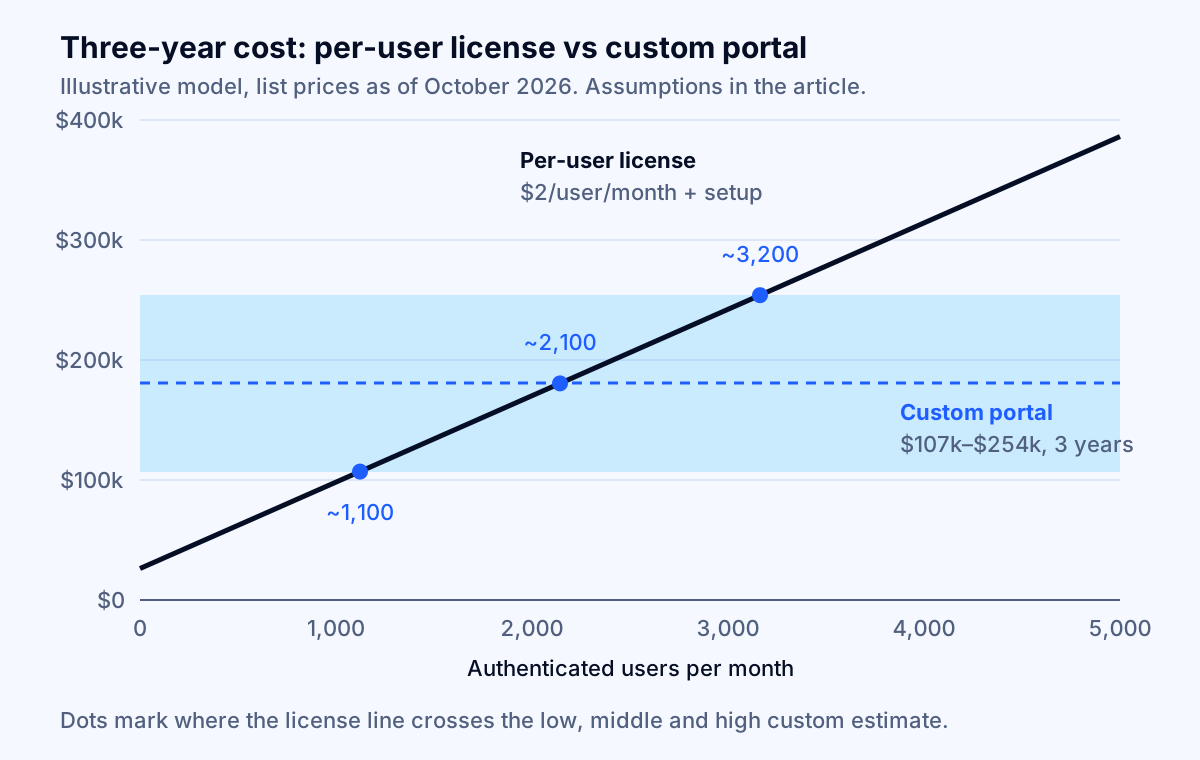
The lines cross at about 1,100 monthly users if the custom build lands at the low end, about 2,100 at the midpoint, and about 3,200 at the high end. Below roughly 1,000 users, the per-user platform is almost always cheaper. Above roughly 3,000, custom is almost always cheaper, and the gap widens every year.
Three cautions keep this model honest:
- It favors the platform slightly. We counted maintenance for custom but not ongoing configuration work for the platform, which is real but smaller.
- It ignores fit. If the platform cannot model your workflow, the license price is irrelevant. If your workflow is simple, a $49-a-month client portal product may beat both.
- It ignores existing licenses. If you already pay for Salesforce or Dynamics 365 and your data lives there, the integration line shrinks dramatically, which changes the answer.
Key takeaway: Per-user portal pricing is cheap at hundreds of users and expensive at thousands. If you expect your portal to be used by most of your customers' staff every month, run this arithmetic with your own user count before signing a multi-year contract.
Buy, configure or build: three questions to decide
Most companies do not need to model every option. Three questions, asked in order, settle most decisions.
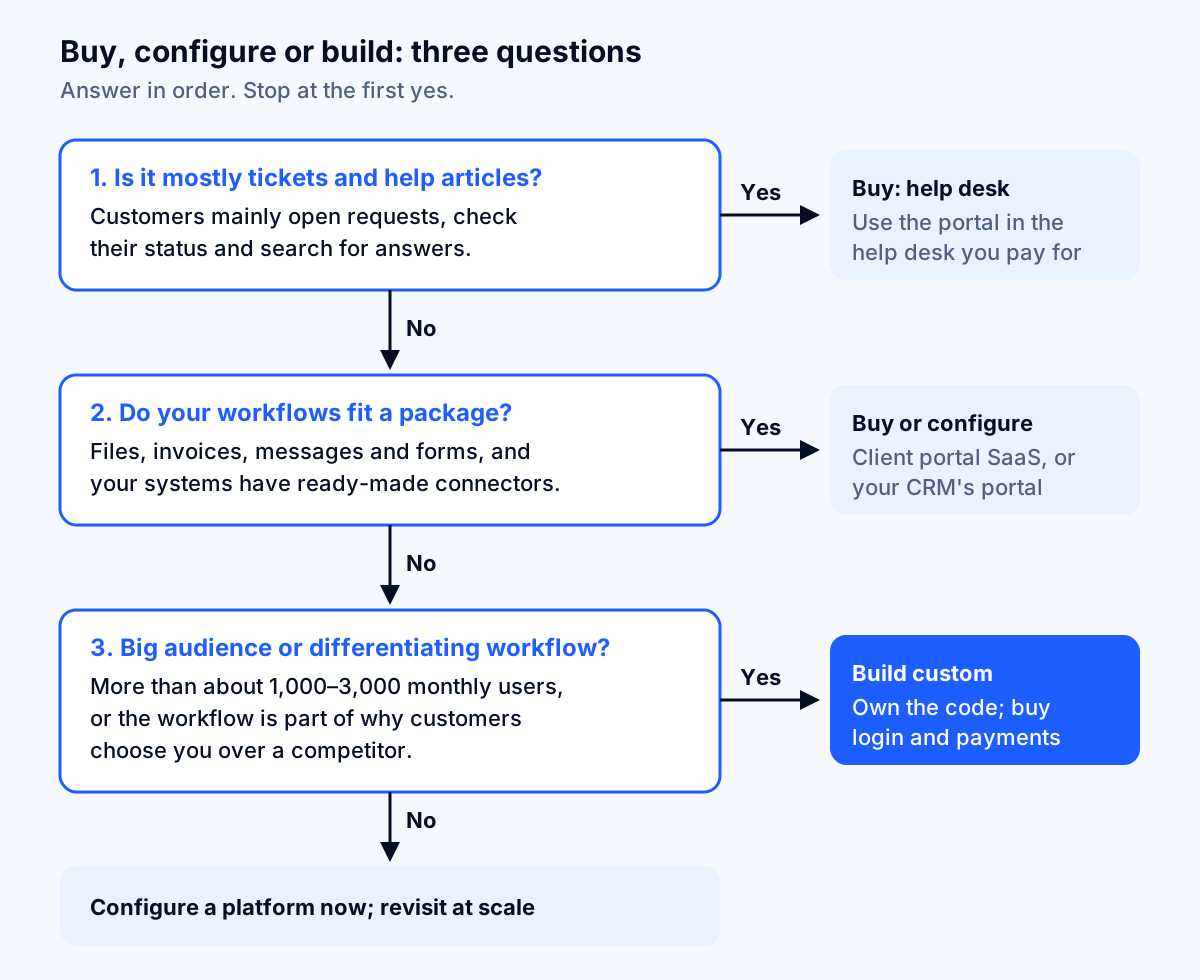
- Is the portal mostly support tickets and help articles? If customers mainly open requests, check their status and search for answers, use the portal in the help desk you already pay for, or choose one. Do not build a ticketing system.
- Do your workflows fit a packaged product, and do your systems have ready-made connectors? File sharing, invoices, messages and forms are well served by client portal products. If you already run Salesforce or Dynamics 365 and the data lives there, configuring their portal is usually the shortest path.
- Will more than about 1,000 to 3,000 people log in each month, or is the workflow part of why customers choose you? If yes, build custom. Ordering with customer-specific pricing, approving engineering changes, or tracking a multi-step job are examples where a better experience than your competitors' is worth owning. If no, configure a platform now and revisit when usage grows.
There is a middle path that often works well: build the portal front end and permissions yourself, and buy the commodity pieces. Use a managed login service, use your payment provider's hosted billing pages, and keep tickets in your help desk. You own the experience and the data model without rebuilding what vendors already do well. Our article on when to replace spreadsheets with custom software applies the same buy-the-commodity, build-the-differentiator logic to internal tools.
The hidden costs in a customer portal project
These are the lines that most often surprise companies after the contract is signed.
Integration platform fees
Your ERP or accounting vendor may charge for API access. Intuit is a current example. Under the Intuit App Partner Program, every QuickBooks Online app starts in a free Builder tier, and the Intuit FAQ says that tier is capped at 500,000 CorePlus API calls per calendar month. CorePlus calls cover most data-out operations, such as reading accounts and fetching reports, and calls above the cap are blocked rather than billed. Paid tiers add a flat monthly program fee and charges for usage above each tier's credits. Metering began on November 3, 2025, for partners in the US, Canada (excluding Quebec), the UK and Australia.
For a portal, the lesson is architectural. A portal that queries the accounting system live on every page view burns through API calls as usage grows. A portal that syncs changes into its own database on a schedule, and reads from there, uses far fewer calls and is faster. Ask your vendor which approach they propose, and check your ERP vendor's API terms before you approve the design.
Payments: do not build what your processor already offers
If customers pay you by card or bank debit, your payment processor may already provide hosted pages for much of the billing experience. Stripe's customer portal, for example, lets customers update billing information and payment methods, change or cancel subscriptions, and pay, view and download invoices, with your branding. It has limits worth knowing: it cannot be displayed inside an iframe, and customers can cancel but not update subscriptions that use multiple products or usage-based billing. Linking out to a processor's hosted page for payments usually costs a fraction of building payment screens and keeps card data off your servers.
Data isolation between customers
This is the costliest mistake a portal can make, and it is common. OWASP's Top 10:2025 ranks broken access control as the top web application risk and reports that 100 percent of the applications tested had some form of it. Its first example scenario is exactly the portal failure: an attacker changes an account number in the URL and sees someone else's account.
In a portal, that means Company A changing an invoice number in the address bar and downloading Company B's invoice. Budget for access checks on every request at the server, not just hidden buttons in the interface, and for automated tests that log in as one customer and try to read another's records. That is the "security baseline and access-control tests" line in the estimate, and it is not optional.
Login done to current standards
Customer logins are a support cost as well as a security control. NIST's current authentication guideline, SP 800-63B-4 (August 2025), requires passwords used as the only factor to be at least 15 characters, allows a minimum of 8 when used with another factor, prohibits composition rules such as mandatory symbols, says verifiers shall not force periodic password changes, and requires checking new passwords against a blocklist of common or compromised ones. A managed login service handles most of this for you, which is one reason the login line in the estimate is small. Offering passkeys or email sign-in links reduces password-reset tickets too.
Accessibility
The Department of Justice's guidance on web accessibility (March 18, 2022) says Title III of the ADA prohibits discrimination by businesses open to the public and that its requirements apply to the goods and services businesses offer on the web. DOJ notes it has no regulation setting detailed web standards for businesses, and points to the Web Content Accessibility Guidelines as helpful existing technical standards. Many teams design to WCAG 2.2 Level AA, the current W3C Recommendation.
Accessibility costs little when it is designed in and a lot when it is retrofitted, especially in data tables, forms and downloadable documents. Keep it as a named line item with its own testing. This is not legal advice; confirm your obligations with your counsel.
Adoption and content
A portal nobody uses saves nothing. Gartner's survey of 5,728 customers, published in August 2024, found that only 14 percent of customer service issues were fully resolved in self-service, and only 36 percent even of issues customers described as very simple. The most common reason for failure, in 43 percent of cases, was that customers could not find content relevant to their issue.
Budget for the unglamorous work: inviting users in batches, a short onboarding email sequence, help text written by someone who talks to customers, and reports that show which tasks people start in the portal and abandon.
What does a customer portal cost to run each month?
Running costs are modest next to the build. The larger recurring line is engineering time.
| Line | Typical range (as of October 2026) | Notes |
|---|---|---|
| Customer login | $0 up to 50,000 monthly active users on Microsoft Entra External ID core features; Auth0 B2B Essentials from $150 a month at 500 users and $300 at 1,000 | Auth0's free plan covers up to 25,000 monthly active users with one enterprise connection |
| Enterprise sign-on connections | Auth0 B2B Essentials includes 3; additional connections are $100 a month each | Matters when large customers want to sign in with their own identity provider |
| Hosting, database, file storage, monitoring | Planning assumption of $100–$500 a month for a typical mid-market portal | Grows with file storage and traffic |
| Payment processing | Your processor's standard rates | Usually larger than every software line combined |
| Maintenance and small changes | 20–40 engineering hours a month ($1,500–$3,000 at $75) | Security patches, dependency updates, integration changes |
Sources: Microsoft Entra pricing, Microsoft Learn on External ID billing, Auth0 pricing.
Two notes on login pricing. Microsoft's External ID uses monthly active users, meaning unique external users who authenticate in a calendar month, and charges separately for premium add-ons such as SMS phone authentication. Auth0's tiers step up: if usage falls between tiers, the next tier applies, so check where your expected user count lands. If your portal runs on a cloud you already use, a broader review of that bill can pay for the portal's hosting several times over; our guide to why AWS bills get so high covers the usual causes.
How long does it take to build a customer portal?
One full-time engineer delivers about 118 productive hours a month (1,414 a year divided by 12). Two deliver about 236.
| Tier | Hours | 2 engineers + part-time designer | 3 engineers + designer + project lead |
|---|---|---|---|
| 1. View-only | 516–1,208 | ~2–5 months | ~1.5–3.5 months |
| 2. Transactional | 656–1,568 | ~3–7 months | ~2–4.5 months |
| 3. Workflow | 776–1,908 | ~3.5–8 months | ~2–5.5 months |
These include discovery and launch. In practice, the calendar is set by integrations more than by team size: getting API credentials, a test environment with realistic data, and answers from whoever owns the ERP can take weeks. Start those conversations in the first week, and ask for read-only access first so the team can build against real data shapes early.
A phased release is usually wiser than a big launch. Ship tier 1 to a handful of friendly customers, watch what they try to do, then add payments and requests. You learn which tasks matter while spending a third of the budget.
How to get an accurate customer portal quote
The quality of a quote depends on the quality of the brief. Before asking anyone for a price, prepare:
- The top tasks: the five reasons customers phone or email you most, with rough monthly volumes if you have them.
- A data map: for each task, which system holds the data, and whether the portal reads it or writes it back.
- Roles: who at a customer company logs in, what each role can see and do, and how multi-location customers are structured.
- Expected users: how many people will log in each month in year one and year three. This drives both platform pricing and architecture.
- Constraints: regulated data (health, financial or payment card data), accessibility expectations, required launch date and budget ceiling.
Then judge quotes on their structure:
- Good sign: integrations and permissions priced as separate line items, with assumptions about API access stated.
- Good sign: a paid, fixed-price discovery phase that produces a written scope and data map you own, whether or not you continue with that vendor.
- Good sign: security tests, accessibility testing and launch support listed explicitly.
- Red flag: a single number with no breakdown, or a quote far below the others for the same scope.
- Red flag: the vendor plans to own the code repository, the cloud accounts or the domain.
- Red flag: live queries to your ERP on every page view, with no discussion of API limits or caching.
If you are also considering an AI assistant inside the portal, to answer account questions or draft support replies, price it separately and test its accuracy before launch. Our guides to RAG chatbot development cost and how to evaluate AI chatbot accuracy cover both, and AI agent development is the service for agents that act on customers' behalf. If the portal is the first step toward a product you will sell, our SaaS MVP development cost guide covers multi-tenant billing and the foundations not to cut.
Putting it together
A realistic customer portal development cost is 516 to 1,208 engineering hours for a view-only portal, 656 to 1,568 for a transactional portal and 776 to 1,908 for a workflow portal, multiplied by the rate of whoever builds it. At $75 an hour, that is roughly $39,000 to $91,000, $49,000 to $118,000 and $58,000 to $143,000. Integrations and permissions carry most of the uncertainty, so a written data map and role list are the cheapest way to tighten any quote.
Off-the-shelf portals win when the job is mostly tickets, when your workflow fits a package, or when only a few hundred people will log in. Custom wins when thousands of users will log in each month or when the workflow is part of why customers pick you; in our illustrative model, the three-year break-even sits between about 1,100 and 3,200 monthly users against per-user platform pricing. Either way, buy the commodities (login, payments, tickets), protect every customer's data with server-side access checks, and design for accessibility from the start.
If you would like a second opinion on a portal scope or a vendor's quote, Fleurant AI's web app development team builds customer portals and internal software for US companies, and a specialist replies within one business day. You can talk to a specialist, or see everything we do on the home page.
Frequently asked questions
How much does it cost to build a custom customer portal?
Plan on 516 to 1,208 engineering hours for a view-only portal connected to one system, 656 to 1,568 hours for a transactional portal with payments, support requests and two integrations, and 776 to 1,908 hours for a workflow portal with orders or quotes and enterprise sign-on. At $75 an hour that is roughly $39,000 to $91,000, $49,000 to $118,000 and $58,000 to $143,000.
Is it cheaper to buy customer portal software than to build one?
Usually, at first. A small client portal product can cost under $100 a month, and help desk portals are bundled into plans such as HubSpot Service Hub Professional. Per-user platforms get expensive as you grow: Microsoft Power Pages lists $200 per 100 authenticated users per site per month. In our illustrative model, custom breaks even somewhere between about 1,100 and 3,200 monthly users.
How long does it take to build a customer portal?
With two full-time engineers delivering about 236 productive hours a month, a view-only portal takes roughly two to five months and a transactional portal three to seven months, including discovery and launch. Integrations with your ERP or accounting system are the usual source of delay, because access, test data and field mapping depend on people outside the project team.
What features should a customer portal include first?
Start with the two or three tasks that generate the most phone calls and emails today, such as checking an order or job status, downloading invoices and paying them, and submitting a request. Add secure login with invitations, company accounts with at least two roles, email notifications and an admin view for your staff. Leave custom dashboards, mobile apps and chat until usage data shows demand.
Does a customer portal reduce support costs?
It can, but only when customers can finish the task in the portal. Gartner's 2024 survey of 5,728 customers found that only 14% of service issues were fully resolved in self-service, and 43% of failures happened because customers could not find relevant content. Measure deflection on specific tasks rather than assuming it.
Does a customer portal need to be ADA accessible?
The Department of Justice says the ADA's Title III applies to the goods and services businesses offer on the web, and its 2022 guidance points to the Web Content Accessibility Guidelines as helpful technical standards. Many teams design to WCAG 2.2 Level AA. Confirm your specific obligations with your counsel, and budget accessibility testing as a line item.
What does a customer portal cost to run each month?
For a custom portal, plan on hosting, a login service and maintenance. Microsoft Entra External ID's core features are free for the first 50,000 monthly active users, while Auth0's B2B Essentials plan lists $300 a month at 1,000 users. Maintenance is the larger line: 20 to 40 engineering hours a month, or $1,500 to $3,000 at $75 an hour.
Sources
- Power Pages pricing, Microsoft
- Service Hub pricing, HubSpot
- Set up a customer portal, HubSpot Knowledge Base
- Zendesk pricing, Zendesk
- Pricing, SuiteDash
- Auth0 pricing, Auth0 by Okta
- Microsoft Entra plans and pricing, Microsoft
- External ID pricing, Microsoft Learn
- Provide a customer portal to your customers, Stripe Documentation
- Intuit App Partner Program FAQ, Intuit Developer
- A01:2025 Broken Access Control, OWASP Top 10:2025
- NIST SP 800-63B-4: Digital Identity Guidelines, Authentication and Authenticator Management, National Institute of Standards and Technology
- Guidance on Web Accessibility and the ADA, U.S. Department of Justice, Civil Rights Division
- Web Content Accessibility Guidelines (WCAG) 2.2, W3C
- Gartner Survey Finds Only 14% of Customer Service Issues Are Fully Resolved in Self-Service, Gartner
- Web Developers and Digital Designers: Occupational Outlook Handbook, U.S. Bureau of Labor Statistics
- Software Developers, Quality Assurance Analysts, and Testers: Occupational Outlook Handbook, U.S. Bureau of Labor Statistics
- Employer Costs for Employee Compensation, June 2026, U.S. Bureau of Labor Statistics
- Software Development Pricing Guide, Clutch


