Software Costs
Per Seat Software Pricing: What Each Hire Costs a Small Business
Per seat software pricing, modeled for a contractor going from 9 to 25 people: $8,808 to $23,628 a year, what each hire adds and how to cap it.

In this article
- What per seat software pricing costs a small business as it grows
- What does each new hire cost you in software?
- Why did one hire push you into a bigger plan?
- Why does the price per seat rise even when you hire nobody?
- Why can't you shrink the bill when you shrink the crew?
- How many of your seats are actually being used?
- Is per-seat pricing always the wrong deal?
- How do you cap per-seat costs?
- When does owning your stack beat renting seats?
- How do you run this on your own numbers?
- Conclusion: count the next hire before you make it
- Frequently asked questions
- Sources
This is a guide to per seat software pricing small business owners can check against their own invoices. The short answer: your bill grows with your crew because most of your tools charge for each person, and some of them also jump to a higher plan when you cross a user limit. In the stack we modeled from published prices, a contractor going from 9 to 25 people goes from $8,808 to $23,628 a year, without buying a single new product.
Below you will find:
- what each new technician and office hire adds, line by line;
- the user limits that turn one hire into a much bigger step;
- why you often cannot shrink the bill as fast as you can shrink the crew;
- a method for running the same numbers on your own company, and the ways to cap them.
Prices come from each vendor's own page, read on November 26, 2026. They change often, and promotions come and go, so check the date before you rely on any figure. We sell none of these products and are not paid by any of the vendors.
What per seat software pricing costs a small business as it grows
A six-product stack costs about $734 a month at 9 people, $1,092 at 14 and $1,969 at 25. Headcount rises 178% between the first and last of those, and the software bill rises 168%, so the bill tracks the crew almost one for one.
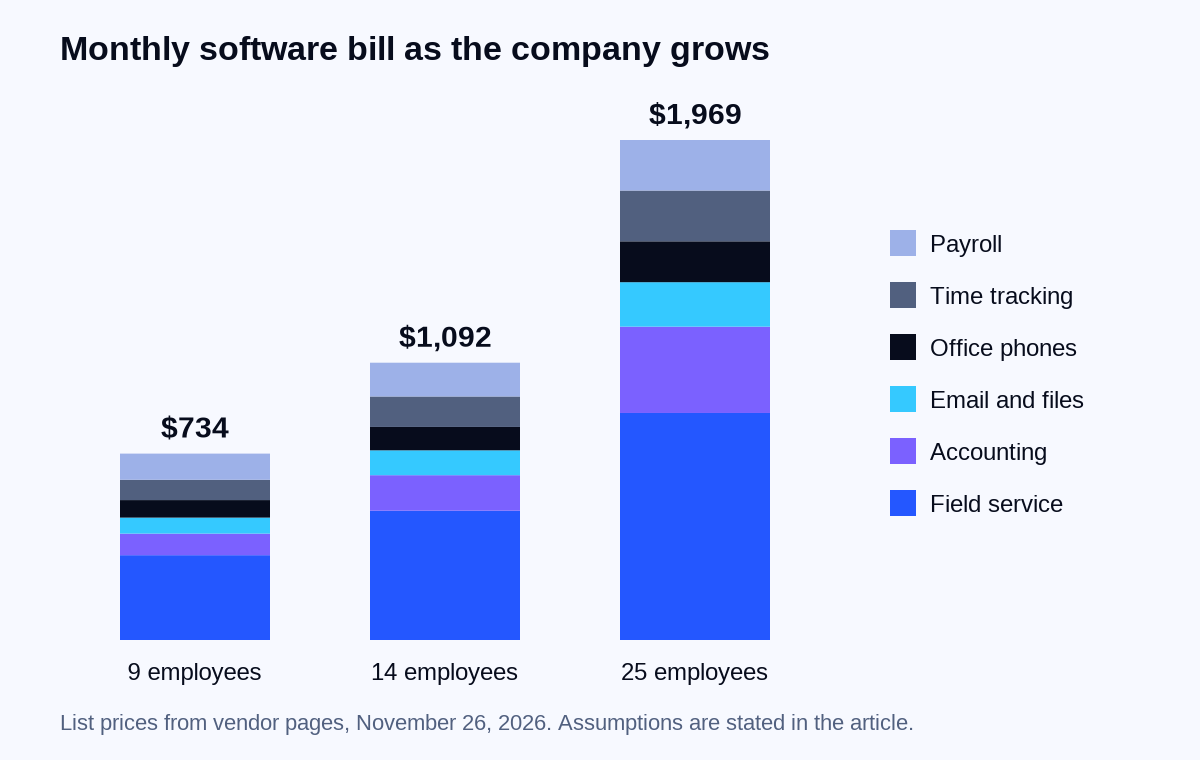
The company we modeled is a service contractor with a dispatcher, a growing field team and a small office:
| Headcount | Technicians | Office staff | Accounting logins we assumed |
|---|---|---|---|
| 9 | 6 | 3 | 3 |
| 14 | 10 | 4 | 5 |
| 25 | 18 | 7 | 6 |
And this is the bill, product by product, in dollars per month:
| Product and plan | How it charges | 9 people | 14 people | 25 people |
|---|---|---|---|---|
| Housecall Pro MAX (field service, annual billing) | $299 includes 8 users, then $35 each | $334 | $509 | $894 |
| QuickBooks Online (accounting) | Plan tier set by number of users | $85 | $140 | $340 |
| Microsoft 365 Business Basic (email, files) | $7 per user | $63 | $98 | $175 |
| Quo Business, annual rate (office phones) | $23 per user | $69 | $92 | $161 |
| QuickBooks Time Premium (technician time) | $20 base plus $10 per user | $80 | $120 | $200 |
| Gusto Simple (payroll) | $49 base plus $6 per person | $103 | $133 | $199 |
| Total per month | $734 | $1,092 | $1,969 | |
| Total per year | $8,808 | $13,104 | $23,628 | |
| Per employee per month | about $82 | about $78 | about $79 |
The assumptions matter, so here they are. Every employee gets a field service login, an email account and a place on payroll. Only office staff get a business phone line. Only technicians are time-tracked. All prices are list prices without introductory discounts, because discounts end and the list price is what you pay in year two. Taxes, card processing, onboarding fees and add-ons are left out.
Two of the choices make the bill look smaller than many real ones. Microsoft 365 Business Basic is the cheapest business plan on Microsoft's page at $7 per user per month, paid yearly, while Business Standard with Copilot is listed at $23.50. And a six-product stack is lean: many contractors also pay for fleet tracking, a call answering service, review software, estimating, e-signature and marketing tools.
Key takeaway: the bill per employee barely moves as you grow, about $78 to $82 a month here. Growth does not make software cheaper per person unless you change how you are charged.
What does each new hire cost you in software?
In this stack one more technician adds $58 a month, or $696 a year, and one more office person adds $71 a month, or $852 a year. Those are the costs before any plan upgrade, and before the person earns a dollar.
| Line | New technician | New office person |
|---|---|---|
| Field service login | $35 | $35 |
| Email and files | $7 | $7 |
| Time tracking | $10 | none |
| Business phone line | none | $23 |
| Payroll | $6 | $6 |
| Added per month | $58 | $71 |
| Added per year | $696 | $852 |
The field service line only applies past the eighth user, because the $299 MAX price on Housecall Pro's pricing page includes eight. The page states $35 a month for each additional user.
The table explains the jump from 9 to 14 people exactly. Four technicians at $58 and one office person at $71 add $303 a month. QuickBooks moves up one tier, adding $55. The total is $358, which is the difference between $734 and $1,092.
From 14 to 25 people, eight technicians add $464 and three office staff add $213. QuickBooks moves up again, adding $200. The total is $877 a month, or about $10,500 a year, for a growth step that probably felt like ordinary hiring at the time.
Nobody sends you one invoice showing this. Six vendors send six, on different dates, some monthly and some annually, which is why owners usually notice the total long after it has changed.
Why did one hire push you into a bigger plan?
Some tools charge by tier, and each tier has a user ceiling. Cross the ceiling by one person and you pay for the next tier in full.
QuickBooks Online is the clearest example because the limits are printed on the pricing page. As of November 26, 2026, the list prices and user counts are:
| Plan | List price per month | Users | Accountant access |
|---|---|---|---|
| Simple Start | $38 | 1 | 2 accountants |
| Essentials | $85 | 3 | 2 accountants |
| Plus | $140 | 5 | 2 accountants |
| Advanced | $340 | 25 | 3 accountants |
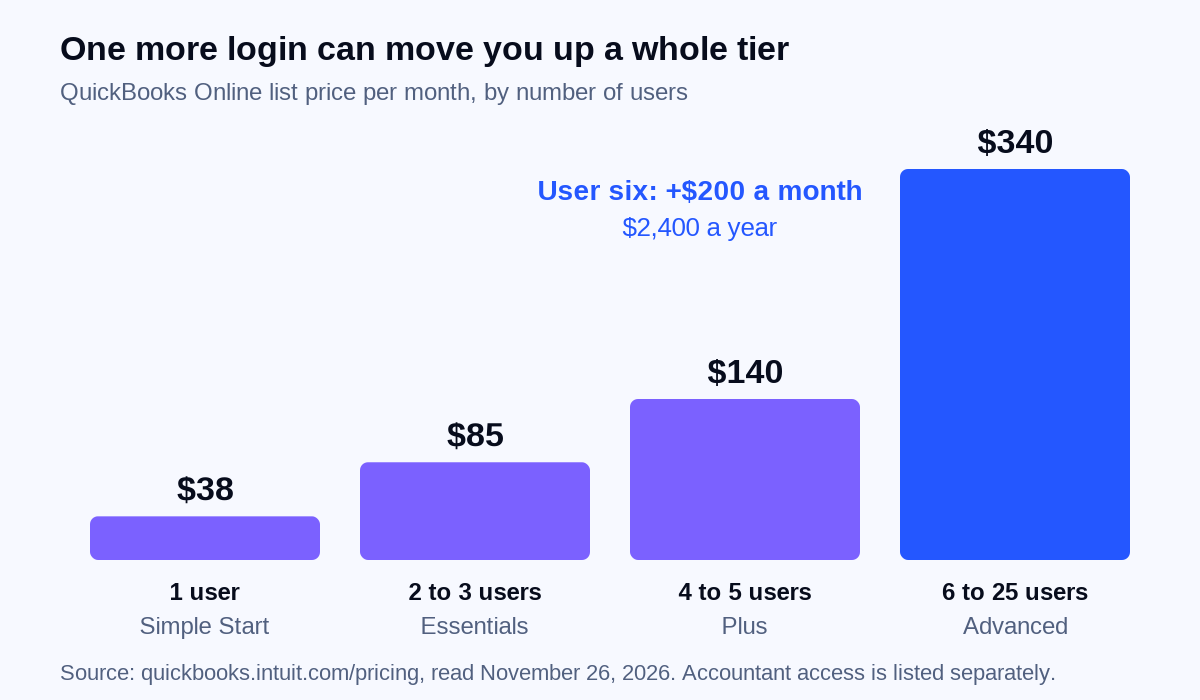
The step from five users to six costs $200 a month, or $2,400 a year. If the sixth person only needs to look at a report once a week, that is an expensive report. Advanced includes other features that you may well want, but the question is whether you are buying them or just buying a sixth login.
The same shape appears in field service software. Housecall Pro lists Basic with 1 user, Essentials with 5 and MAX with 8. Its $35 extra-user price is stated for MAX, so a company that outgrows Essentials should ask what the sixth user costs before assuming. Jobber's plans work differently again: we priced its tiers in our Jobber, Housecall Pro and ServiceTitan comparison, including the point where its published prices stop.
Before you add anyone, check three things for each tool:
- Is there a user ceiling on the current plan? If you are one below it, the next hire is not a normal hire.
- What exactly counts as a user? Some products count anyone who logs in, including a part-time bookkeeper.
- What is the price of the next tier, and what else does it force on you? The step is often larger than the seat.
Why does the price per seat rise even when you hire nobody?
Because the list price itself changes, and a per-seat model multiplies every change by your headcount. A $2 rise on a $7 seat costs a 25-person company $600 a year.
Intuit announced that the monthly prices for QuickBooks Online Essentials, Plus and Advanced would change for renewals on or after August 1, 2026, with Simple Start unchanged. Its announcement ties the change to new features, including some added to Advanced. Whether you wanted those features is not part of the invoice.
Two habits make price changes visible. First, keep a one-page record of each tool's price per seat and per tier with the date you read it, and compare it at every renewal. Second, read the renewal notice when it arrives instead of filing it, since it is usually the only warning you get.
Some vendors also price the whole platform around your crew. ServiceTitan publishes no price, but its annual report filed with the SEC says the pricing of its subscription platform is "partially based on the number of technicians" its customers employ. The same filing says new customers primarily sign annual or multi-year agreements, typically 12 to 36 months. We pulled together what else is and is not public in the ServiceTitan pricing article.
Why can't you shrink the bill when you shrink the crew?
Seats are easy to add and often slow to remove. Many agreements let you buy more at any moment but only reduce at renewal or inside a short window.
Microsoft is explicit about it. Its license documentation says that on a Microsoft Customer Agreement billing account you can buy more licenses at any time, but you can only remove them within seven days of buying or renewing the subscription. If you buy mid-period, you have seven days from that purchase to undo it. Other billing arrangements have their own windows, so check yours.
Housecall Pro's pricing FAQ says it requires no long-term contract and that you can downgrade at any time, with the change taking effect at the end of your current billing period. On annual billing, that period can be most of a year away.
This matters most for seasonal trades. A landscaping, HVAC or pest control company that adds six people for summer may carry their seats into winter. Before the season, write down for each tool:
- the shortest term you can buy a seat for;
- the date by which you must ask to reduce;
- whether a departed employee's seat can be reassigned to the next hire.
Reassigning is usually the cheapest answer. Keep one seat attached to the role, remove the departed person's access the same day, and give it to the replacement. Do not share one login between people to avoid a seat. Check your terms, since you also lose the record of who did what.
How many of your seats are actually being used?
Probably fewer than you pay for, and you can check in an hour. The largest published measurement is about enterprises rather than contractors: Zylo's 2026 SaaS Management Index reports that organizations leave an average of 36% of their software licenses unused, measured against industry-recommended utilization levels. Treat that as a reason to look, not as your number.
Here is the hour:
- Open the user list in each product's admin screen and export it or copy it into a spreadsheet.
- Compare it with your current payroll list. Anyone on a user list and not on payroll is a seat to remove, except your accountant and other outside people you chose to include.
- Sort by last sign-in where the product shows it. A seat with no sign-in in 60 days needs a reason to exist.
- Mark people who only view. A weekly report, forwarded by email, may replace a full login.
- Note each renewal date next to the seats you want to remove.
Our model has an obvious place to look: the field service login for every employee. An owner or bookkeeper who never opens the dispatch board does not need one. Three unused logins at $35 are $1,260 a year.
Is per-seat pricing always the wrong deal?
No. Per-seat pricing is fair and often cheap when you are small, when most staff do not need the tool and when headcount is steady. It turns expensive when a company is hiring, because the vendor's revenue grows with your payroll even if your use of the product does not change.
The alternative is a flat price. Service Fusion's pricing page lists unlimited users on each plan: $220 a month for Starter, $339 for Plus and $552 for Pro when billed annually, with higher figures on monthly billing. Compared with Housecall Pro MAX at $299 plus $35 per user past eight:
| Users | Housecall Pro MAX | Service Fusion Plus (flat) | Service Fusion Pro (flat) |
|---|---|---|---|
| 8 | $299 | $339 | $552 |
| 10 | $369 | $339 | $552 |
| 15 | $544 | $339 | $552 |
| 16 | $579 | $339 | $552 |
| 25 | $894 | $339 | $552 |
Plus is cheaper than MAX from 10 users, and Pro from 16. At 25 users the list-price gap between MAX and Plus is $555 a month, or $6,660 a year.
Do not move on that table alone. The plans are not the same product. Service Fusion's page lists job photo uploads and job costing as add-ons on Starter, and a customer web portal and recurring invoicing as add-ons on Starter and Plus. A flat price on a plan that lacks something your crews use is not a saving. Moving also costs office time, retraining and a risky few weeks, which we cover in the comparison article.
How do you cap per-seat costs?
You cap them by controlling who gets a seat, when seats can be reduced and which tools charge by the head at all. These are in order of effort.
1. Make seats a hiring and leaving step
Add "which logins does this role need?" to the hiring checklist and "remove or reassign every login" to the leaving checklist. Name one person who owns both. This costs nothing and stops the most common waste.
2. Give viewers something other than a seat
Schedule the report to email, export the weekly numbers, or give one manager the login. Check that the tool does not offer a cheaper view-only role before buying a full one.
3. Put every renewal date on one calendar
Include the notice period, set a reminder 45 days ahead, and review the seat count before it. With annual licenses, this is the moment you can reduce them.
4. Stay under a user ceiling on purpose
If you are one login short of a more expensive tier, ask whether an existing user can be removed first. A QuickBooks company at five users can compare $140 against $340 before adding the sixth.
5. Ask for a cap in writing
At renewal, ask for a multi-year rate lock, a limit on annual increases, or a price band that covers a range of users. Vendors do not always agree, but a larger account has more room to ask than a one-truck shop. Get whatever they offer into the order form, not an email.
6. Compare one flat-price product
Price one flat or unlimited-user alternative for your most expensive per-seat tool, at your headcount two years from now, with the add-ons you need.
7. Stop paying per head for the part you can own
This is the last option, not the first. It means replacing some of the rented tools with software built for your business, charged on a band instead of per person. The next section shows when that is and is not worth it.
When does owning your stack beat renting seats?
For the stack in this article it does not. We would rather say so than sell you a build.
Fleurant AI never replaces accounting, payroll, payment processing or anything with a regulatory filing. That leaves the field service platform and time tracking as the replaceable lines here: $894 plus $200, or $1,094 a month at 25 people, about $13,128 a year. An Operations Stack is $18,000 to build for three modules and $2,000 a month for companies up to 30 employees, which is $24,000 a year to run. Keeping your subscriptions is clearly cheaper.
The arithmetic changes when the replaceable bills are much larger, for example a platform priced per technician at several times these figures, or a stack of many overlapping tools. What custom field service software costs has the break-even table. Two features of the Fleurant AI price are worth knowing because they are the opposite of per-seat billing: the monthly fee is set by company size ($2,000 up to 30 employees, $2,750 for 31 to 60, $3,500 for 61 to 100), and the band is reviewed once a year at renewal, never mid-term, so a new hire never changes the invoice. You own your data and your instance of the software; you rent the agent fleet that operates it.
There is a middle option. If your problem is that people re-type the same job into two systems, a Connector is $7,500 to build and $750 a month. It does not reduce seat counts. It is worth it only when the hours lost in the office are worth more than that.
How do you run this on your own numbers?
List every tool, split each price into a fixed part and a per-person part, then project your headcount. It takes an afternoon with your card statements.
| Column to fill in | What to write |
|---|---|
| Tool and plan | Name, plan, billing term |
| Fixed monthly part | The base fee, or the whole tier price |
| Per-person part | Price per extra user, if any |
| Who counts | Everyone, office only, technicians only |
| User ceiling | The most users the current plan allows |
| Renewal and notice date | When you can reduce seats |
Then do three calculations:
- Today's bill: fixed parts plus per-person parts times the people who count.
- Cost of the next hire: add only the per-person parts that apply to that role, then check every ceiling.
- The bill in two years: repeat step 1 with your planned headcount, and add the difference between tiers wherever a ceiling is crossed.
Here is what that third step shows in our model. If the company stayed at 9 people for three years, it would pay $26,424. If it grows to 14 in year two and 25 in year three, it pays $45,540 over the same three years, $19,116 more, before any price increase. That figure belongs in your hiring plan next to wages and vehicles.
To build that list properly, follow our software stack audit checklist, which adds seat counts, notice periods and renewal dates.
If your list shows many tools, overlapping features and no one sure what they cost together, that is what a Stack Audit does: $2,500, one to two weeks, credited in full against a build started within 90 days. You get your own totals, seat by seat, whether or not the answer is to change anything. Fleurant AI has no client results to show you yet, so judge it on your own numbers.
Conclusion: count the next hire before you make it
Per-seat pricing is not hidden, it is scattered. In our model a technician carries $696 a year of software and an office hire $852, one tier change adds $2,400 a year, and growing from 9 to 25 people takes the annual bill from $8,808 to $23,628.
Do these this week:
- Pull the user list from each tool and remove anyone who has left.
- Write the next user ceiling and the renewal notice date beside each tool.
- Work out your own cost per technician and per office hire.
- If the total surprises you, talk to a specialist or book a Stack Audit.
If you'd like one clear, practical take on the software that runs your business each month, subscribe to the Fleurant AI Briefing: one email a month, unsubscribe any time.
Frequently asked questions
What does each new hire cost me in software?
In the six-product stack we modeled from list prices on November 26, 2026, one more technician adds $58 a month ($696 a year) and one more office person with a phone line adds $71 a month ($852 a year), before any plan upgrade. Your stack will differ, so add up only the per-person lines on your own invoices.
Why did my software bill jump after one hire?
Usually a plan limit. QuickBooks Online lists 5 users on Plus and 25 on Advanced, so a sixth accounting login moves a company from $140 to $340 a month, which is $2,400 a year for one person. Check every tool for a user ceiling before you create the account.
How do I cap what per-seat software costs?
Give logins only to people who need them, remove them the week someone leaves, check each renewal date before reducing licenses, compare one flat-price product against your per-user one, and ask vendors for a written ceiling or multi-year rate. None of this removes per-user growth, but it stops paying for seats nobody uses.
Can I remove licenses when a seasonal worker leaves?
Not always. Microsoft's documentation says that on a Microsoft Customer Agreement billing account you can remove licenses only within seven days of buying or renewing. Housecall Pro's page says a downgrade takes effect at the end of your billing period. Read each vendor's terms before a seasonal hire, not after.
Is flat-rate field service software cheaper than per-user pricing?
Only past a certain size, and only if it has the features you use. Comparing published annual-billing prices, Service Fusion's $339 Plus plan costs less than Housecall Pro MAX from 10 users, and its $552 Pro plan from 16. Feature sets differ, so price the plan that has what your crews use.
Does replacing per-seat software save money for a 25-person company?
Not for the stack in our model. The parts that could be replaced cost about $13,128 a year, while a Fleurant AI Operations Stack at that size is $24,000 a year after an $18,000 build. Replacement starts to make sense only when the replaceable bills are much larger than that.
Sources
- Housecall Pro pricing, Housecall Pro
- QuickBooks Online pricing, Intuit
- QuickBooks Online August pricing changes and product updates, Intuit
- QuickBooks Time pricing, Intuit
- Microsoft 365 for business plans and pricing, Microsoft
- Buy or remove licenses for a Microsoft business subscription, Microsoft Learn
- Quo pricing, Quo
- Gusto pricing, Gusto
- Service Fusion pricing, Service Fusion
- ServiceTitan, Inc. Form 10-K for the fiscal year ended January 31, 2026, U.S. Securities and Exchange Commission
- Zylo 2026 SaaS Management Index announcement, Zylo