Operations
Software Stack Audit Checklist for Home Services Companies
A software stack audit checklist for contractors: find every subscription, count real seats, spot overlap, log re-typing and learn what you can cut today.

In this article
- Software stack audit checklist: the six steps at a glance
- Before you start: who runs it and what to gather
- Step 1: How do you find every subscription you pay for?
- Step 2: Build one software register
- Step 3: How do you find unused seats?
- Step 4: Find the overlap and the re-typing
- Step 5: Read the renewal and cancellation terms
- Step 6: Give every line a verdict
- A worked example: a 24-person contractor
- What should you not cut?
- When does an audit point to switching or building?
- Keep it current: the 20-minute monthly check
- Doing it yourself or having it done
- Frequently asked questions
- Sources
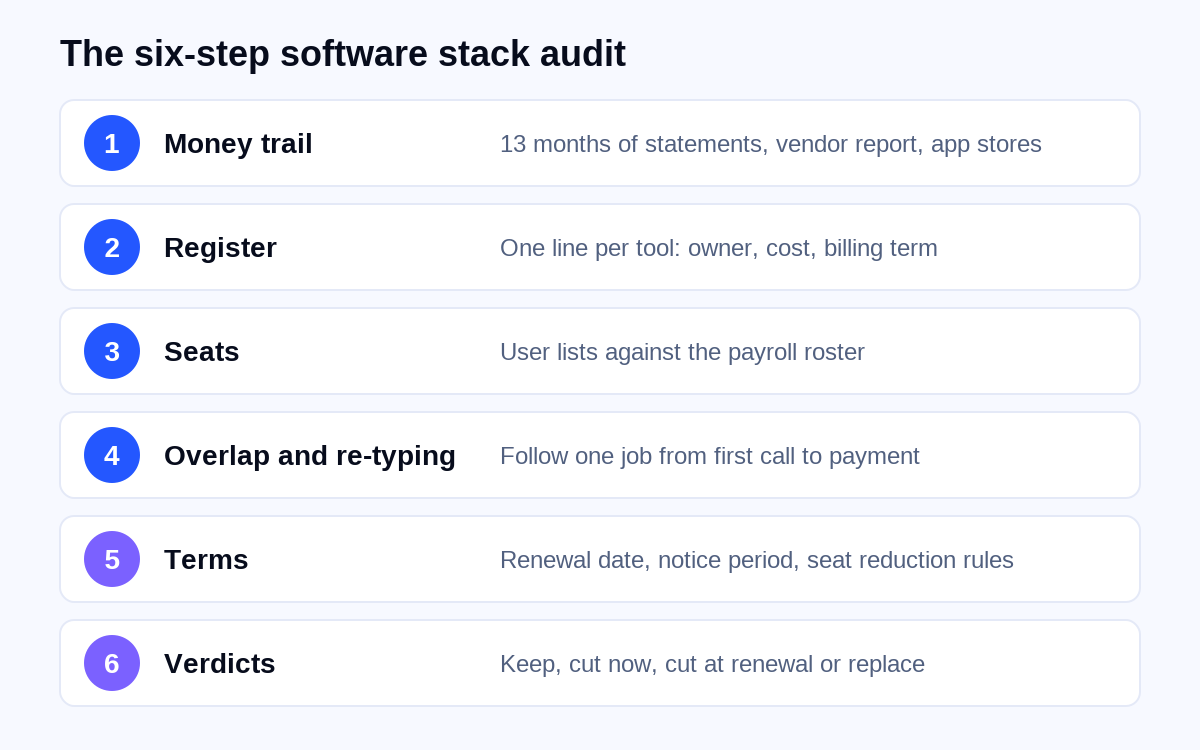
A software stack audit checklist is a list of every subscription your business pays for, matched against who actually uses it, what it overlaps with and when you are allowed to cancel it. For a home services company with 10 to 100 employees, the whole job has six steps: pull the money trail, build one register, count real seats, find overlap and re-typing, read the renewal terms, and give every line a verdict with a date.
The part most guides skip is the last two. Finding a seat nobody uses is easy. Getting it off the bill may have to wait for a renewal date, a 30-day notice window or the end of an annual commitment. This guide gives you the full method, a register you can copy, the cancellation rules we read in vendor terms in November 2026, and a worked example with the arithmetic shown. You can run all of it yourself.
Software stack audit checklist: the six steps at a glance
The audit takes about two weeks of part-time work for one organized office person, with an owner or general manager making the decisions at the end. The hour estimates below are our planning assumptions, not a survey.
| Step | What you do | Output | Time (estimate) |
|---|---|---|---|
| 1. Money trail | Collect every recurring software charge from 13 months of records | Raw list of vendors and amounts | 2 to 3 hours |
| 2. Register | Put each tool on one line with owner, cost, billing term and purpose | The software register | 1 to 2 hours |
| 3. Seats | Compare each tool's user list with your payroll roster | Paid seats against used seats | 2 to 3 hours |
| 4. Overlap and re-typing | Follow one job from first call to paid invoice | Duplicate features and manual copying | 2 to 3 hours |
| 5. Terms | Find renewal date, notice period and seat reduction rules | Renewal calendar | 1 to 3 hours |
| 6. Verdicts | Mark each line keep, cut now, cut at renewal or replace | Action list with dates and owners | 1 hour meeting |
Key takeaway: an audit is finished only when every line has a verdict, a person responsible and a date. A spreadsheet of costs with no dates changes nothing.
Before you start: who runs it and what to gather
One person should own the audit, and it should be someone who can see the money. In most contracting businesses that is the office manager or controller. The owner or general manager makes the cut or keep calls, and one dispatcher and one lead technician check the answers against how work really happens.
Gather these before you begin:
- 13 months of statements for every business bank account and company card, plus any personal card that gets reimbursed for software.
- Access to your accounting system.
- Admin logins for your field service platform, email suite, phone system and any tool that bills per user.
- A current payroll roster with start and termination dates for the last year.
- Signed order forms, quotes and renewal emails for anything on an annual contract.
If nobody knows who holds an admin login, write that down. It is a finding, and often a more urgent one than any cost.
NIST's small business quick-start guide for its Cybersecurity Framework 2.0 asks for much the same thing for security reasons: an inventory of hardware, software, systems and services, with each one's official use, an administrator or owner, the sensitive data it can reach and whether it requires multi-factor authentication. Add those four columns to your register and the cost audit doubles as a security check.
Step 1: How do you find every subscription you pay for?
Follow the money, not your memory. Ask someone to list your software from memory and you will get the big platforms and miss the $29 charges that have been running for two years.
Work through these places in order:
Bank and card statements
Export 13 months, not 12, so an annual charge that posted late still shows up. Sort by description and mark anything that repeats monthly, quarterly or yearly. Card descriptors are often cryptic, so keep an "unknown" tab and resolve each one. An unknown recurring charge is never safe to ignore.
Your accounting system
In QuickBooks Online, Intuit's steps are Reports, then Standard reports, then Expenses by Vendor Summary, with a date range you choose. Run it for the last 13 months. Software is often coded to several accounts (office expense, marketing, vehicle, dues), so read the whole vendor list rather than only the account labeled software.
App stores and company phones
A subscription bought with an app from the App Store can be easy to miss, because you manage it through Apple and not on the app maker's billing page. Apple's instructions are to open Settings, tap your name, then tap Subscriptions. Check company-owned phones and tablets, and ask staff who expense app purchases to check theirs. If you issue Android devices, check the subscriptions on their app store accounts too.
Bundles hidden inside other bills
Several charges never appear as their own line:
- Add-ons inside your field service platform invoice (marketing, phones, booking, price book, reporting).
- Software fees on a payment processing statement.
- Tracking, dash camera or fleet software bundled with a telematics or phone carrier bill.
- Tools your marketing agency or IT provider buys and rebills.
- Website, domain, hosting and email charges paid annually.
Open the actual invoice, not just the statement total, for your three largest software vendors.
Ask the people who use it
Send each office lead and crew lead one question: "What do you log into or open in a normal week to get your work done?" Include spreadsheets, shared drives and group texts. Free tools do not cost money, but they show where the paid tools are not doing the job.
Step 2: Build one software register
The register is a single sheet with one line per tool, and every later step fills in more columns. Copy this layout:
| Column | What goes in it |
|---|---|
| Tool and vendor | Name as billed, plus the product name staff use |
| Job it does | One plain sentence: "sends appointment reminders" |
| Business owner | The person who decides about it |
| Admin | The person who can add and remove users |
| Monthly cost | Annual and quarterly charges converted to monthly |
| Billing term | Monthly, annual paid up front, or annual paid monthly |
| Seats paid | From the invoice |
| Seats used | From step 3 |
| Renewal date | From the contract or billing page |
| Notice required | Days, and the method (email, button, phone) |
| Overlaps with | Other tools doing part of the same job |
| Data inside | Job history, photos, customer contacts, pricing, call recordings |
| Verdict and date | Filled in at step 6 |
Keep "annual paid monthly" separate from "monthly". They look identical on a card statement and behave very differently when you try to cancel, as step 5 shows.
Where a price depends on usage (texting, card processing, AI features, storage), record the average of the last three months and note the busy-season peak. A July bill and a January bill can differ widely in a seasonal trade.
Step 3: How do you find unused seats?
Export the user list from every per-user tool and compare it with the payroll roster, name by name. This is the step that most reliably finds waste, because joiners get added quickly and leavers rarely get removed.
Mark each user with one of five tags:
- Active: current employee, used the tool in the last 30 days.
- Gone: left the company but still has an account.
- Suspended or disabled: cannot log in, but may still be licensed.
- Quiet: current employee with no activity for 90 days.
- Shared or generic: "office", "tablet 3", "tech2". Find out who really uses it.
Two billing traps are worth checking by name.
Suspending is not the same as removing. Google states that suspended users are charged the same as active users in Google Workspace. Its Admin console lets you filter the user list by status to find them. Other vendors have their own rules, so check each one rather than assuming a disabled login is free.
Unassigning is not the same as reducing. In Microsoft 365, removing a license from a person leaves the license on your subscription until you also reduce the quantity. Microsoft says you must unassign licenses first and then remove them from the subscription.
For activity data, Microsoft 365 has an active users report covering the last 7, 30, 90 or 180 days. Many other tools show a last login date on the user list. Where a tool shows neither, ask the person's supervisor.
A quiet seat is not automatically a wasted seat. A seasonal installer, an owner who only reads reports or a bookkeeper who logs in at month end may all be legitimate. Note the reason and move on. Before removing anyone, check what happens to their data: job notes, photos, mailbox and files should be transferred or exported first.
Departed staff are also a security problem, whatever they cost. Disable access the same day you find it, even if the billing change has to wait.
Step 4: Find the overlap and the re-typing
Take one real job and follow it from the first phone call to the payment landing in the bank. Write down every system it touches and every time a person types something that already exists somewhere else.
A typical path looks like this: call answered, customer looked up, job booked, technician notified, reminder texted, arrival tracked, estimate built, approval signed, photos taken, parts ordered, invoice sent, payment collected, books updated, review requested. At each point ask two questions:
- Which tool does this, and is there a second one that also does it?
- Did anyone copy information by hand to make it happen?
Common overlaps to check in a trades business:
| Function | Often paid for twice in |
|---|---|
| Customer texting and reminders | Field service platform and a separate texting tool |
| Phones and call recording | Phone system and a platform phone add-on |
| Review requests | Platform marketing add-on and a review service |
| Job photos and forms | Platform field app and a photo or forms app |
| GPS and time tracking | Fleet tracking, a time clock app and the platform |
| E-signatures and proposals | Platform estimates and a signature or proposal tool |
| File storage | Email suite storage and a second storage service |
An overlap is not always waste. If the platform's version of a feature is weak enough that crews avoid it, the second tool is doing real work. Test it with the people who use it before you decide.
Put a number on the re-typing
Re-typing costs money even though it never appears on an invoice. Count the minutes per job, multiply by jobs per week, and price the hours.
The Bureau of Labor Statistics puts median pay for general office clerks at $21.64 an hour in 2025. Its June 2026 compensation data shows wages are 70.0% of what private employers pay per hour once benefits are counted. Dividing $21.64 by 0.70 gives a loaded cost of about $30.91 an hour. Use your own payroll figure if you have it.
An example with assumed inputs: 120 jobs a week, 3 minutes of copying per job, equals 6 hours a week, or 312 hours a year. At $30.91 that is about $9,600 a year. Be careful what you claim from it. Removing the copying frees those hours; it only saves money if you stop paying for them, or avoid a hire you would otherwise have made. Our guide to double data entry in a home services business traces every re-typing point and shows what the common QuickBooks syncs leave out.
If the re-typing is between two systems you want to keep, such as the field app and accounting, the fix may be an integration between the tools you already have rather than a switch.
Step 5: Read the renewal and cancellation terms
For every line over a threshold you choose (we would use $100 a month), find the renewal date, the notice period, the way notice must be given and whether seats can be reduced mid-term. This step decides when any savings actually arrive.
Here is what several vendors' own documents said when we read them in late November 2026. Your signed order form or quote may say something different, and it usually controls.
| Vendor | Renewal and cancellation | Seat or plan changes |
|---|---|---|
| ServiceTitan | Without an order form setting the term: monthly, renews unless 30 days' written notice; email to billing@servicetitan.com counts | Seats removed mid-period do not reduce that period's bill |
| Jobber | Renews automatically; annual plans need cancellation at least 30 days before renewal; fees non-refundable | "Annual billed monthly" cannot be downgraded before the year ends |
| Housecall Pro | All subscriptions renew for an equal period unless ended first; no fee refunds | Check your plan and any agreement you signed |
| Google Workspace | Annual plan is a yearly commitment, even if billed monthly | Annual plan licenses can only be reduced at renewal |
| Microsoft 365 | Depends on billing account type and term | On Microsoft Customer Agreement accounts, licenses can only be removed within seven days of buying or renewing |
Details worth reading in full:
- ServiceTitan. The public Terms of Use say that if you end an agreement before its term is over, you owe a termination fee equal to all remaining payments, with limited exceptions. They also say that customers without a minimum subscription level may see pricing increased if their field user count falls over time. Ask what removing seats will do to your rate before you remove them. Our ServiceTitan pricing guide covers the cost side.
- Jobber. The terms of service describe the annual-billed-monthly option as a one-year commitment paid in twelve installments: cancel early and you still owe the remaining payments. The renewal wording in Section 3 is dense, so check the end-of-term date shown in your account and give notice well ahead of it. Jobber's help center also says that once access ends you lose access to your account data, including clients, jobs and invoices.
- Housecall Pro. The terms of service say every subscription renews automatically for a period equal to the original one, and give an email address, cancellations@housecallpro.com, for cancelling.
- Google Workspace. Google's billing page says that on the Annual plan you can only reduce licenses when it is time to renew. On the Flexible plan you can add and remove users at any time, at a higher per-user price: Business Starter was $8.40 a user a month Flexible and $7 on the annual commitment when we checked.
- Microsoft 365. Microsoft's page explains that removal is limited to a window after buying or renewing, and that outside it the admin center shows the date a change takes effect.
Ask about your data before you give notice
Export first, cancel second. ServiceTitan's terms say it will make reasonable efforts to export your data after termination, that service fees may apply, that completeness is not guaranteed, and that it has no obligation to keep the data longer than 60 days. Whatever the vendor, list what lives only in that tool, run a test export, open the file and confirm that job history, photos and custom fields are really in it.
Build the renewal calendar
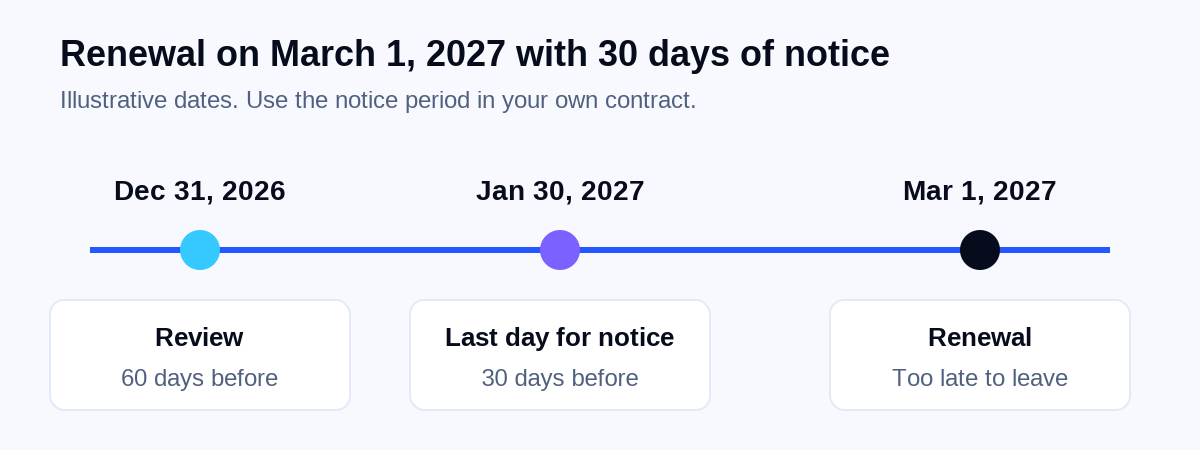
For each contract, enter three dates: a review date 60 days before renewal, the last day to give notice, and the renewal itself. Put them on a shared calendar with a named person on each.
Worked example: a contract renews on March 1, 2027 and requires 30 days' notice. The last safe day to send notice is January 30, which is a Saturday, so send it the week before. The review date is December 31, 2026. Miss January 30 and the decision may be made for you for another year.
Step 6: Give every line a verdict
Each tool gets exactly one of four verdicts, with a name and a date. "Keep an eye on it" is not a verdict.
| Verdict | Use it when | Next action |
|---|---|---|
| Keep | Used, needed, priced reasonably | Note the renewal date and move on |
| Cut now | Unused or duplicated, no commitment, data exported | Cancel this week and check next statement |
| Cut at renewal | Unused or duplicated, but contracted | Send notice early; confirm in writing |
| Replace or consolidate | Needed, but costly, weak or the cause of re-typing | Plan it as a project, outside busy season |
Run the verdicts in this order of questions: Is anyone using it? Does something else we already pay for do the same job well enough? Can we leave now? What would we lose if we did?
A worked example: a 24-person contractor
The register below is invented to show the arithmetic. It is not a client and not a benchmark. Only the email suite price is a real list price (Google Workspace Business Starter, Flexible plan, as above).
| Tool | Monthly | Finding | Verdict |
|---|---|---|---|
| Field service platform, annual | $2,400.00 | 22 seats paid, 17 used | Negotiate at renewal |
| Email suite, 24 users at $8.40 | $201.60 | 3 departed users still suspended | Cut 3 now: $25.20 |
| Phone system, monthly | $420.00 | All lines in use | Keep |
| Separate texting tool, monthly | $99.00 | Platform already texts customers | Cut now |
| GPS tracking, 11 units, monthly | $330.00 | 2 units on sold trucks | Cut 2 now: $60.00 |
| Photo and forms app, monthly | $270.00 | 4 of 18 users active | Replace with platform forms |
| Review request tool, monthly | $199.00 | Owner unsure it adds reviews | Keep for 60 days, measure |
| Total | $3,919.60 |
The total is $47,035 a year. What can be cut this week is $25.20 plus $99 plus $60, which is $184.20 a month or about $2,210 a year. The forms app adds $270 a month, or $3,240 a year, but only after forms are rebuilt and crews are trained. The five unused platform seats are not counted at all, because nobody knows what the vendor will take off until it is asked in writing.
That is the honest shape of most audit results: a small amount you can bank immediately, a larger amount that needs a project, and one or two numbers that depend on a negotiation. An audit that reports all of it as "savings" on day one is overstating the result.
What should you not cut?
Leave alone anything where an error is expensive or a regulator is involved, unless your accountant or advisor leads the change. That includes accounting, payroll, payment processing and anything that produces a tax or regulatory filing.
Also be slow to cut:
- Backup and security tools, which look idle when they are working.
- Software required by a manufacturer, warranty program or commercial customer's portal.
- A tool one key person depends on, until you have seen how they use it.
- Anything holding records you are required to keep, until the export is verified. Ask your accountant or attorney how long that is.
- The field app in the middle of your busiest months.
Per-user pricing deserves its own look even when every seat is used, because the bill rises with each hire. We modeled that in why your software bill grows faster than your crew does.
When does an audit point to switching or building?
Switching is worth examining when the register shows that most of the money goes to one platform your team works around, or that several tools exist only to patch the gaps in it. It is not worth examining because of one unused add-on.
Compare three paths on the same three-year basis:
- Tidy up. Cut the waste, fix integrations, keep the platform. Cheapest and lowest risk, and often the right answer.
- Switch platforms. Compare total cost including setup, add-ons and retraining. Our Jobber vs Housecall Pro vs ServiceTitan cost comparison shows how the totals move at 10, 25 and 50 employees.
- Replace rented tools with software built for your business. This only pays back above a certain level of replaced spend; see what custom field service software costs, including the cases where renting wins. If spreadsheets are carrying real work, start with replacing spreadsheets with custom software.
Whatever you choose, do not start a migration in peak season, and do not give notice on the old system until the new one has run real jobs.
Keep it current: the 20-minute monthly check
A yearly audit goes stale within months unless someone keeps it up. Put a recurring 20-minute block on the office manager's calendar:
- New recurring charges on last month's statements.
- Anyone hired or gone, matched against user lists.
- Renewal and notice dates in the next 90 days.
- Any price increase emails.
- Any tool someone signed up for without telling anyone.
Two rules stop most new waste. Every new subscription needs a named business owner and a renewal date in the register before it is paid for. Every employee exit includes a software access checklist built from the register, completed the same day.
Doing it yourself or having it done
Do it yourself if your software list is short, one person can see all the money and you have a couple of weeks without a crisis. The steps above are the whole method, and most of the value comes from doing the seat count and the contract dates carefully.
Get help when nobody has time, the contracts are complicated, or the question is bigger than waste: whether to replace the stack at all. Fleurant AI's Stack Audit is $2,500, takes one to two weeks and is credited in full against a build started within 90 days; it adds a costed replacement plan to the register, and if the plan is to build, the Operations Stack page explains what that involves. You can also talk to a specialist about whether an audit is worth it for your situation.
Either way, start this week with step 1 and the renewal dates. The charges you cannot name and the notice deadline you did not know about are the two findings that cannot wait.
If you'd like one clear, practical take on the software that runs your business each month, subscribe to the Fleurant AI Briefing: one email a month, unsubscribe any time.
Frequently asked questions
How do I find every software subscription my company pays for?
Work from money, not memory. Pull 13 months of bank and card statements so annual charges appear, run an expenses-by-vendor report in your accounting software, check app store subscriptions on company phones, look for deductions inside payment processing and phone bills, and ask each office lead what they log into during a normal week.
How do I know which software seats are unused?
Export the user list from each tool and compare it with this month's payroll roster. Flag anyone who has left, anyone suspended but still licensed, and anyone with no activity for 90 days. Then check the contract, because removing a user does not always reduce the bill until renewal.
How long does a software stack audit take?
For a company with 10 to 100 employees, plan on 8 to 14 hours of office time spread over two weeks: a few hours collecting charges, a few exporting user lists, an hour or two reading contract terms and a meeting to decide. The hours are our estimate, not a measured average.
How often should we audit our software?
Do the full audit once a year, timed at least 90 days before your largest contract renews. Between audits, run a 20-minute monthly check: new charges on the card statement, people who left, and any renewal or notice deadline falling in the next 90 days.
Can we cancel unused seats immediately?
It depends on the agreement. Google says its Annual Plan licenses can only be reduced at renewal, and Microsoft limits removal on some billing accounts to seven days after purchase or renewal. ServiceTitan's public terms say seats removed mid-period do not reduce that period's bill. Read your own order form.
What does a paid software stack audit cost?
Prices vary by firm and scope. Fleurant AI's Stack Audit is $2,500, takes one to two weeks and is credited in full against a build started within 90 days. You can run the checklist in this article yourself for the cost of your office staff's time.
Sources
- NIST Cybersecurity Framework 2.0: Small Business Quick-Start Guide (SP 1300), National Institute of Standards and Technology
- I got charged for too many users, Google Workspace Help
- Understand Google Workspace bills and charges, Google Workspace Help
- Buy or remove licenses for a Microsoft business subscription, Microsoft Learn
- Microsoft 365 Apps active users report, Microsoft Learn
- ServiceTitan Terms of Use (last updated September 16, 2026), ServiceTitan
- Jobber Terms of Service (last updated September 22, 2026), Jobber
- How to cancel your Jobber subscription, Jobber Help Center
- Housecall Pro Terms of Service (last modified July 1, 2026), Housecall Pro
- Cancel a subscription from Apple, Apple Support
- Run a report with vendor totals, Intuit QuickBooks
- General Office Clerks, Occupational Outlook Handbook, U.S. Bureau of Labor Statistics
- Employer Costs for Employee Compensation, U.S. Bureau of Labor Statistics