Operations
Double Data Entry in Home Services: What It Costs, 3 Fixes
Double data entry in home services: find every re-typed step, price the office hours with BLS wage data, and see what Jobber, HCP and ServiceTitan sync.

In this article
- Where double data entry happens in a home services business
- How much double data entry costs your office
- What the QuickBooks syncs actually carry across
- Why re-typing creates errors you cannot see
- Fix 1: discipline, one place for each fact
- Fix 2: connect the tools you keep
- Fix 3: replace the tools that cause the typing
- A worked example: a 30-person plumbing and HVAC company
- A 30-day plan to cut double data entry
- Questions to ask before you pay for an integration
- The short version
- Frequently asked questions
- Sources
The double data entry home services companies live with is any fact a person types a second time because two systems do not share it: a customer's address, a job's line items, a payment, a part on a supplier bill. To find what yours costs, count the minutes of re-typing per job, multiply by jobs per week, and price the hours at a loaded wage. At 150 jobs a week and 6 minutes a job, that is 15 hours a week, about $24,100 a year on our assumptions.
This article walks a job from the first call to the paid invoice, marks every place data gets typed again, shows what the three big field service platforms actually pass to QuickBooks Online (from their own help pages, read in November 2026), and sets out three fixes with their honest limits. The worked numbers are assumptions you should swap for your own.
Where double data entry happens in a home services business
Most re-typing happens at the handoffs between the phone, the field app and accounting, not inside any one tool. A job passes through about eight stages, and each handoff is a chance for someone to type the same fact again.
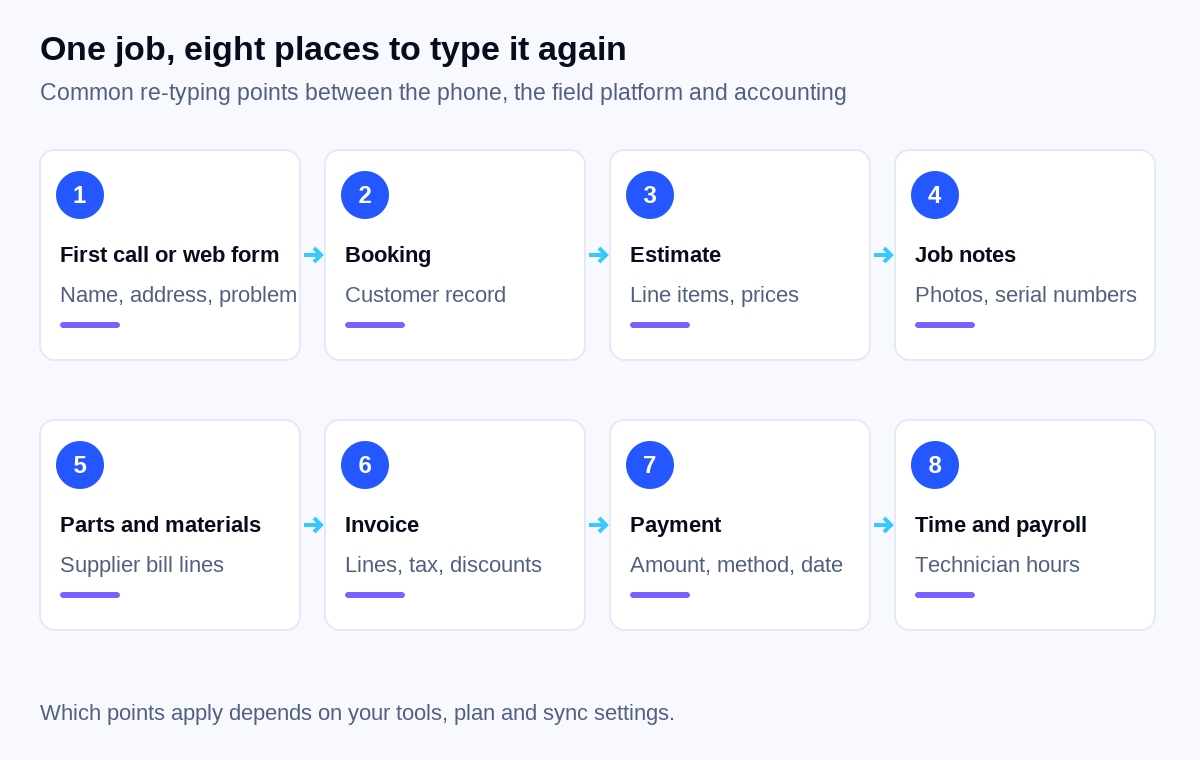
| Stage | What commonly gets typed again | Why it happens |
|---|---|---|
| First call or web form | Name, address, phone, problem | The lead arrives in a call tool, inbox or website form that does not write to the job system |
| Booking | The same customer, again | Duplicate records because search missed an earlier one |
| Estimate | Line items and prices | Estimates built in a separate tool, a spreadsheet or a PDF |
| Job notes and photos | Notes, model and serial numbers | Techs text photos to the office, which files them by hand |
| Parts and materials | Supplier invoice lines | Purchases live in email or paper, not in the job |
| Invoicing | Line items, taxes, discounts | The invoice is rebuilt in accounting, or edited in one place only |
| Payment | Amount, method, date | A check is entered in accounting but not on the job, or the reverse |
| Time and payroll | Hours by technician | Timesheets are copied from the field app into payroll |
Not every company has all eight. A shop whose field platform handles booking, estimates and invoicing with a working accounting sync may have three. A shop with a separate estimating tool, a call center and a spreadsheet for purchasing may have all of them.
Key takeaway: Count handoffs, not tools. A company with six well-connected tools can have less re-typing than a company with two that do not talk.
It is not the same as "double entry" in research
If you search the phrase, much of what you find is about a deliberate practice: typing a data set twice and comparing the two copies to catch mistakes. That is a quality control method. The problem in this article is different. Re-typing a job into a second system is not checked against anything. The two copies simply drift apart until someone notices, often when a customer disputes a bill.
How much double data entry costs your office
The cost is minutes per job times jobs per week times a loaded hourly rate. The formula is simple; the work is measuring the minutes honestly.
The rate. The U.S. Bureau of Labor Statistics put the median wage for general office clerks at $21.64 an hour in May 2025, and for bookkeeping, accounting and auditing clerks at $24.36. Wages are not the whole cost. In June 2026, wages and salaries were 70.0 percent of private employers' compensation cost, with benefits the other 30 percent. Dividing the wage by 0.70 gives a loaded rate of about $30.91 for a general office clerk and $34.80 for a bookkeeping clerk.
Two cautions. The 70 percent figure is an average across all private industry, not home services. And your own wages may be higher or lower than the national median. Use your payroll numbers if you have them.
The table. Annual cost at $30.91 an hour, 52 weeks:
| Jobs per week | 3 minutes per job | 6 minutes per job | 12 minutes per job |
|---|---|---|---|
| 50 | 2.5 h/week, about $4,000 a year | 5 h/week, about $8,000 | 10 h/week, about $16,100 |
| 150 | 7.5 h/week, about $12,100 | 15 h/week, about $24,100 | 30 h/week, about $48,200 |
| 300 | 15 h/week, about $24,100 | 30 h/week, about $48,200 | 60 h/week, about $96,500 |
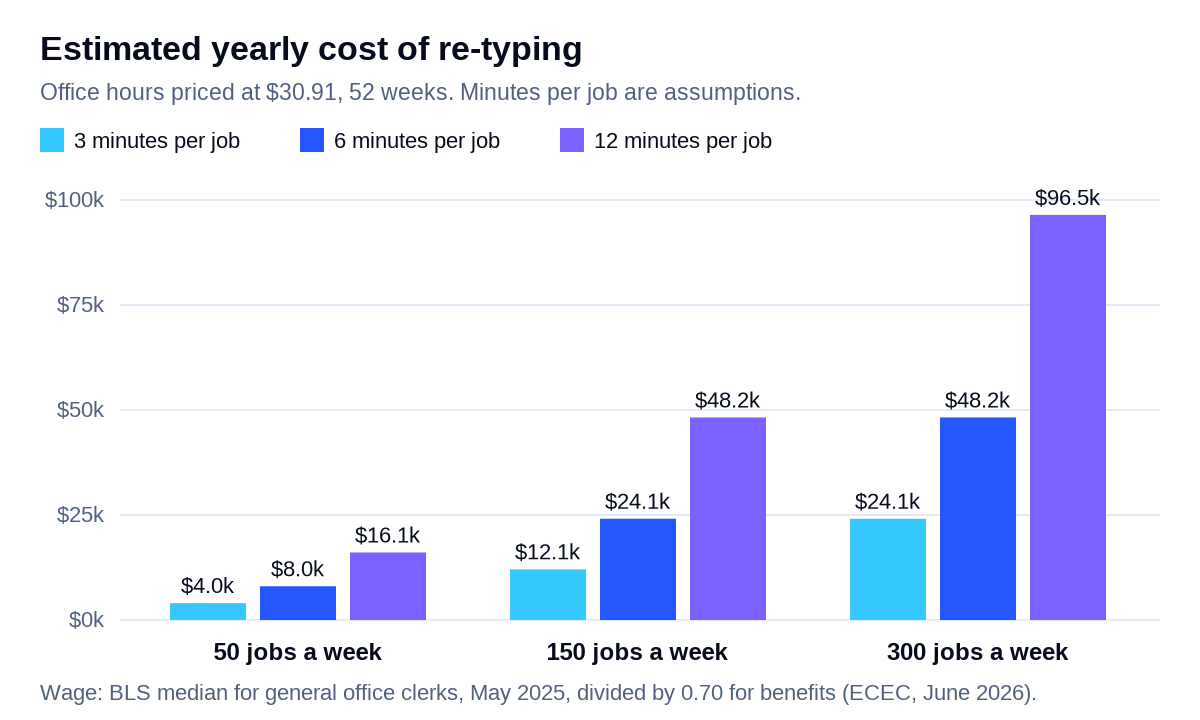
What the table does not say. It prices hours, not savings. If your office manager gets 15 hours a week back and nothing changes in who you hire or what work gets done, your bank balance does not move. The money is real only when the hours let you delay a hire, cut overtime, invoice sooner or answer more calls. Treat the figure as the ceiling, and be sceptical of any vendor, including us, who presents it as guaranteed savings.
Measure your minutes in one week
Pick five jobs of different types: a repair, a replacement, a maintenance visit, a commercial job with a purchase order and a job with a return visit. For each, have the person who handles it write down every time they type something that already exists somewhere. Time it with a phone timer. Note the system it came from and the system it went to.
Then multiply the average by your weekly job count. Add the weekly time spent reconciling: matching deposits, chasing invoices that did not sync, and fixing duplicate customers. That line often surprises owners more than the per-job minutes. Our software stack audit checklist covers the same walk-through as part of a wider review of what you pay for.
What the QuickBooks syncs actually carry across
A native sync removes a lot of typing, but every one we checked is mostly one-way and leaves some cases to a person. These are the facts from the vendors' own help centers as of November 2026. Settings and plans differ, so read the article for your account.
| Jobber (new sync) | Housecall Pro | ServiceTitan | |
|---|---|---|---|
| Direction | One-way, Jobber to QuickBooks | Typically one-way, HCP to QuickBooks Online | You export batches from ServiceTitan |
| Carries | Clients, products and services, invoices, payments, timesheets | Invoices, payments, new customers, new price book items | Invoices, payments, vendor bills, inventory transactions and more |
| Estimates | Not on the vendor's list of synced items | Do not push to QuickBooks | Not on the listed batch transaction types |
| Edits after sync | Make them in Jobber | Line item, price and description changes need a manual re-sync | Exported batch items are locked unless the batch is unposted |
| Plan limits | Connect, Grow and Plus plans (US and Canada) | Essentials or MAX | Enabled through your account manager |
Jobber
Jobber's sync article for its new QuickBooks integration, which it says is being rolled out gradually to select accounts, lists clients, products and services, invoices and payments flowing one way from Jobber, and the new integration's FAQ adds timesheets. Three details matter for double entry.
First, "paid" status on invoices no longer syncs back to Jobber. If your bookkeeper records a check in QuickBooks, someone must also mark it in Jobber, or the office may chase a customer who has already paid. The clean rule is to record every payment in Jobber and let it flow across.
Second, Jobber can add or change a client's details in QuickBooks but cannot delete them. Removing a phone number or address in Jobber means removing it in QuickBooks too.
Third, the same FAQ says Jobber does not sync to QuickBooks Desktop. If your books are on Desktop, the native route is closed, and client lists move only by manual import.
Housecall Pro
Housecall Pro's syncing article says the connection typically works one way into QuickBooks Online, triggered when a job is finished, an invoice is sent or a job is marked paid. The edge cases are where the re-typing creeps back:
- Estimates do not push to QuickBooks Online.
- Changes to line items, quantities, prices or descriptions after the first sync do not update the QuickBooks invoice until you push it again.
- Deleted or canceled invoices have to be deleted or canceled by hand in QuickBooks.
- Labor and materials are not separated when price book items sync, so if you cost them separately you may need to edit the item types in QuickBooks.
- A payment entered directly in QuickBooks can be pulled into Housecall Pro, but only manually.
Housecall Pro's onboarding guide says connecting requires the Essentials or MAX plan. If you are on a lower tier, the sync is not available, which is a line to check when comparing plans; we cover what each tier costs in Jobber vs Housecall Pro vs ServiceTitan.
ServiceTitan
ServiceTitan's route is an export you run, not a background sync you can forget. Its batch, post and export article says to audit invoices before batching, recommends doing it daily, and notes that invoices appear in the Accounting tab only after the job is completed. A job left open never reaches the books, which is one of the quieter causes of finished work that has not been billed.
Two gaps are documented. Shipping or freight on bills does not export to QuickBooks Online, nor do business units as classes, so someone adds them by hand or you set up a workaround item. And refunds are not applied to invoices automatically: the balance has to be reconciled manually.
Key takeaway: "Integrates with QuickBooks" is a starting point for your questions. Ask what does not sync, what happens when you edit after sync, and who gets told when it fails.
Why re-typing creates errors you cannot see
Re-typed data is unverified data, and checking it by eye is weaker than people expect. In a 2011 study by Barchard and Pace, 195 undergraduates were randomly assigned to enter data by typing it once, checking it visually or typing it twice and comparing. Visual checking produced 2,958 percent more errors than double entry, roughly thirty times as many, and was not significantly better than typing it once.
The limits of that study are worth saying plainly. It used students and research data sheets, not office staff and invoices, and your error rate will differ. What carries over is the direction: a quick look at the screen is not much of a control.
In a contracting office the errors tend to show up as:
- A wrong unit number or street that sends a truck to the wrong door.
- A line item left off the accounting invoice, so you bill less than you did the work for.
- A payment recorded in one system only, so a paid customer gets a reminder.
- Two customer records, so history, warranties and service agreements are split.
- A price that changed in the price book but not in the estimating tool.
None of these appear on a software bill. They appear as callbacks, write-offs, awkward phone calls and a month-end close that takes days.
Fix 1: discipline, one place for each fact
The cheapest fix is a written rule that each kind of record is entered once, in one named system. It costs nothing but a meeting and some follow-through, and it often removes the worst re-typing in a week.
Write a one-page table for your own company:
| Record | Entered in | Flows to | Who owns exceptions |
|---|---|---|---|
| Customer and address | Field platform | Accounting | Dispatch lead |
| Estimate and job | Field platform | Nowhere until invoiced | Estimator |
| Invoice and discounts | Field platform | Accounting | Office manager |
| Payment | Field platform | Accounting | Bookkeeper |
| Supplier bills | Accounting or purchasing tool | Job cost report | Bookkeeper |
| Technician hours | Field app | Payroll | Office manager |
The names in the table are examples. What matters is that every row has exactly one entry point and one person who chases failures.
Add three habits. Search before creating a customer. Correct invoices in the source system and re-push them, never only in accounting. And review the sync error list on a fixed day. Jobber, for example, shows errors and warnings on a sync dashboard, and its help center says errors must be resolved for items to sync.
Where discipline fails: it depends on people remembering during the busiest week of the year. If your measured re-typing is mostly caused by tools that cannot pass data, a rule cannot create the connection.
Fix 2: connect the tools you keep
A connector moves data between systems automatically, so the fact typed once appears where it is needed. It is the middle path: keep the tools your team knows and remove the typing between them.
There are three levels, in rising cost and flexibility.
Turn on what you already pay for. Check whether your platform has a native integration you never set up, or one set up to sync the wrong trigger. Housecall Pro, for instance, lets you choose what triggers a sync. This is hours of work, not a project.
Use an automation service. Zapier and similar tools run "when this happens, do that" workflows. Zapier's pricing page listed a free plan and paid plans starting from $19.99 a month on annual billing in November 2026, with usage counted in tasks, one for each successful action. A flow with four actions per job at 150 jobs a week is about 2,600 tasks a month (150 × 4 × 4.33), so check the task tier your volume needs before assuming the starting price. Someone also has to notice when a flow breaks. Our comparison of n8n, Zapier and a custom agent goes through the trade-offs.
Build a custom connector. When the logic is specific, such as deposits, partial payments, job costing codes or multiple locations, a built connection with its own error handling is often more reliable than a chain of generic steps. Fleurant AI's Connector is $7,500 to build and $750 a month, live in two to four weeks.
When does a $750 a month connector pay back?
At our loaded rate of $30.91 an hour, a $750 monthly fee equals about 291 hours a year, or 5.6 hours of re-typing a week. Spread the $7,500 build fee over three years as well and the average yearly cost is $11,500, equal to about 372 hours a year, or 7.2 hours a week.
| Your measured re-typing | What the arithmetic suggests |
|---|---|
| Under 5 hours a week | Fix it with discipline and the native sync. A paid connector will not pay back on hours alone. |
| 5 to 8 hours a week | Marginal. Look at error costs and billing delay before deciding. |
| Over 8 hours a week | A connector is worth pricing, provided those hours get used for something else. |
The comparison assumes the connector removes essentially all the measured hours, which it rarely will. Count only the hours a specific flow would remove. It also ignores errors avoided and faster invoicing, which are real but hard to price in advance.
What breaks connectors
Connections fail quietly. Plan for these before you build:
- Duplicates. Two systems with slightly different customer names create two records.
- Edits after sync. A one-way flow does not know the invoice changed downstream.
- Deletions. Many syncs add and update but do not delete.
- Mapping drift. A new price book item or tax code with no matching account stops a record.
- Silent failures. If errors go to a dashboard nobody opens, the gap grows until month end.
Ask any provider, including a freelancer, where errors appear, who gets alerted and how a failed record is re-sent.
Fix 3: replace the tools that cause the typing
Replacement makes sense when the re-typing comes from the tools themselves: when the platform cannot hold the data your jobs need, so staff keep it in spreadsheets and text threads. It is the most expensive and disruptive fix, and it should be the last one considered.
Signs that connecting will not be enough:
- The same spreadsheet exists because the platform has no place for the field you need.
- You pay for several tools that each hold part of the customer record.
- Your per-seat bill climbs with every technician hired, and the tool still does not fit.
- The vendor's export or API does not give you the data you need to connect.
Before replacing anything, price what you have with our guides to per-seat pricing and replacing spreadsheets. If you do replace, accounting, payroll and payment processing stay: keep QuickBooks or whatever your accountant uses and connect to it. An Operations Stack is Fleurant AI's version of this, priced at $18,000 for three modules or $32,000 for five or more, plus a monthly fee set by company size, not by seats: $2,000 up to 30 employees, $2,750 for 31 to 60 and $3,500 for 61 to 100, reviewed once a year at renewal. Our custom field service software cost guide shows the break-even.
A worked example: a 30-person plumbing and HVAC company
This company is invented to show the arithmetic. Assume 12 trucks, 150 completed jobs a week, QuickBooks Online and a field platform with its native sync switched on.
Measured over five sample jobs, the office finds:
| Task | Minutes per job (averaged across all jobs) | Weekly hours at 150 jobs |
|---|---|---|
| Re-entering web and phone leads into the platform | 1.5 | 3.75 |
| Re-pushing or fixing edited invoices | 0.5 | 1.25 |
| Typing supplier invoice lines onto jobs | 2.0 | 5.0 |
| Copying hours into payroll | 1.0 | 2.5 |
| Matching payments recorded in one system only | 0.5 | 1.25 |
| Total | 5.5 | 13.75 |
At $30.91 an hour, 13.75 hours a week is about $22,100 a year.
Now take the fixes in order. A rule that all payments are recorded in the platform, plus a weekly sync review, might remove the payment matching and some invoice fixes, call it 1.5 of the 13.75 hours, at no cost. Connecting the web form and phone tool to the platform would target the 3.75 lead hours. Supplier lines (5 hours) and payroll copying (2.5 hours) depend on what the supplier and payroll tools will exchange, which has to be checked, not assumed.
If a connector removed the lead, payroll and supplier lines, 11.25 hours a week would go, about $18,100 a year, against a three-year average cost of $11,500. If the supplier tool turns out to offer no way in, only 6.25 hours go, about $10,000 a year, and the case no longer works on hours alone. That single unknown decides it, which is why the check comes before the contract.
A 30-day plan to cut double data entry
You can learn most of what you need in a month, without buying anything.
- Week 1: measure. Time five jobs end to end and list every re-typed field. Record reconciliation hours.
- Week 2: write the one-place rule. Fill in the record table above and tell the team. Check that the native sync is on and set to the right trigger.
- Week 3: clean and test. Merge duplicate customers, run a test job through every stage and see what arrives in accounting. Note what did not.
- Week 4: decide. For each remaining gap, choose: live with it, connect it, or flag it as a reason to review the platform. Attach the weekly hours to each.
Avoid changing anything structural during your peak season. If your busy period is summer cooling or winter heating, run the measurement then, when the numbers are most honest, and make changes in the shoulder months.
Questions to ask before you pay for an integration
Ask these of any vendor, and get the answers in writing:
- Which fields sync, in which direction, and which do not?
- What happens when an invoice is edited, voided or refunded after it syncs?
- Are deletions passed on?
- How are failed records reported, and to whom?
- Which plan or add-on includes it, and what does it cost at our job volume?
- If we leave, can we export the mapping and our data?
If a salesperson answers "it integrates with QuickBooks" and stops, ask for the help article that lists what syncs. The limits in the tables above came from exactly that kind of page.
The short version
Double data entry costs hours at the handoffs between your phone, field platform and accounting, plus errors that are hard to spot until a customer does. Measure it for a week before spending anything. Fix the easy part with one entry point per record, connect what remains if the measured hours justify the fee, and replace tools only when they cannot hold the data your work needs.
If you want someone to trace your jobs from call to cash and put numbers on every re-typed step, a Stack Audit is $2,500, takes one to two weeks and is credited in full against a build started within 90 days. You can also talk to a specialist about a single gap you have already found.
If you'd like one clear, practical take on the software that runs your business each month, subscribe to the Fleurant AI Briefing: one email a month, unsubscribe any time.
Frequently asked questions
How much does double data entry cost a home services company?
Multiply minutes of re-typing per job by jobs per week, then by a loaded hourly rate. At 150 jobs a week and 6 minutes a job, that is 15 hours a week, or about $24,100 a year at $30.91 an hour, our estimate of a loaded general office clerk cost from BLS data.
Does a QuickBooks integration stop double entry?
It removes some of it. Jobber's new sync and Housecall Pro's typical sync run one way into QuickBooks Online, and each leaves cases to handle by hand, such as invoice edits, deletions or estimates in Housecall Pro. Check the vendor's sync article for your plan before assuming the re-typing is gone.
Can I fix double entry without switching software?
Often, yes. Start by choosing one system as the place each fact is entered, then turn on or correct the native sync, then add a connector for the gaps the sync does not cover. Replacing the platform is the last option, not the first.
Is having someone double-check the entries enough?
Probably not on its own. In a 2011 lab study of 195 undergraduates, visual checking produced far more errors than typing the data twice and comparing it, and was not significantly better than typing it once. That is research data, not invoices, but it is a reason not to rely on a glance.
Which system should be the source of truth?
Usually the field service platform for customers, jobs, estimates and invoices, and the accounting system for the ledger, bills and payroll. Write it down for each type of record. Jobber's help center says Jobber is the source of truth for clients and products in its new QuickBooks sync.
What does it cost to connect the tools we already have?
It depends on the gap. Zapier's paid plans start from $19.99 a month on annual billing, as listed in November 2026, plus someone's time to build and watch the workflows. Fleurant AI's Connector is $7,500 to build and $750 a month.
Sources
- Preventing human error: The impact of data entry methods on data accuracy and statistical results (Barchard and Pace, Computers in Human Behavior, 2011), Elsevier
- General Office Clerks, Occupational Outlook Handbook, U.S. Bureau of Labor Statistics
- Bookkeeping, Accounting, and Auditing Clerks, Occupational Outlook Handbook, U.S. Bureau of Labor Statistics
- Employer Costs for Employee Compensation, June 2026, U.S. Bureau of Labor Statistics
- How items sync between Jobber and QuickBooks Online: New QuickBooks integration, Jobber Help Center
- QuickBooks integration FAQs: New QuickBooks integration, Jobber Help Center
- QuickBooks Online: Syncing Information from Housecall Pro (September 3, 2026), Housecall Pro Help Center
- QuickBooks Online: Integration Onboarding Guide, Housecall Pro Help Center
- Batch, post, and export transactions, ServiceTitan Help
- Export bills to QuickBooks Online, ServiceTitan Help
- Refunds don't change the invoice balance after exporting to QuickBooks Online, ServiceTitan Help
- Plans and Pricing, Zapier