AI Agents
n8n vs Zapier vs Custom AI Agent: When No-Code Hits Its Limits
n8n vs Zapier vs custom AI agent, compared on October 2026 pricing, AI billing, security and control, with a cost model and seven signs it is time to go custom.

In this article
- Workflow automation or AI agent: what are you actually building?
- How Zapier handles AI agents in 2026
- How n8n handles AI agents in 2026
- What a custom AI agent gives you that the platforms do not
- n8n vs Zapier vs custom AI agent: side-by-side comparison
- What each option costs at 3,000 agent runs a month
- Seven signs no-code automation is not enough
- When staying on Zapier or n8n is the right answer
- The hybrid path: keep the platform, own the agent
- A 10-question scorecard for choosing
- How to move from a platform to a custom agent without a rewrite
- Putting it together
- Frequently asked questions
- Sources
Short answer: In the n8n vs Zapier vs custom AI agent decision, choose Zapier when a non-technical team needs simple, mostly linear automations across popular SaaS apps at modest volume. Choose n8n when your agents call several tools per run, you want to bring your own model, or you need to self-host. Build a custom AI agent when the agent faces customers, carries regulated data, needs audit-grade logging and testing, or has become core to how you compete. Many companies end up with a hybrid: a custom agent for the reasoning, with a platform handling the long tail of app connections.
The deciding factor in 2026 is usually not features. It is how each option bills for AI work. Zapier now charges tasks per AI tool call, at up to five times the normal rate. n8n charges per workflow run no matter how many steps it takes. A custom build costs real money up front and very little per run.
This guide gives you the October 2026 pricing rules for both platforms checked on their own pages, a worked cost model at 3,000 agent runs a month, seven signs that no-code automation is no longer enough, the licensing and security fine print most comparisons skip, and a scorecard you can fill in with your team in 15 minutes.
Workflow automation or AI agent: what are you actually building?
Before comparing tools, name the kind of system you need. Anthropic's engineering guide Building effective agents draws the line clearly. Workflows are systems where language models and tools follow "predefined code paths." Agents are systems where the model dynamically directs its own process and decides which tools to use.
That distinction maps neatly onto these three options:
- A deterministic automation ("when a form is submitted, create a CRM contact and post to Slack") needs no AI at all. Zapier and n8n both handle this well and cheaply.
- An AI-assisted workflow puts one model call inside fixed steps: classify an email, extract fields from an invoice, draft a reply for a person to approve. Both platforms do this, and it is usually the right first step.
- An AI agent lets the model loop: read the request, decide to look up the order, check the refund policy, call the billing system, then decide whether to escalate. This is where costs, risk and platform limits start to bite.
Anthropic's advice is to find "the simplest solution possible" and add multi-step agentic behavior only when simpler approaches fall short, because agents trade latency and cost for better task performance. That is good advice for platform choice too. If an AI-assisted workflow solves the problem, you probably do not need a custom agent, and you may not need anything more than the tool you already pay for.
Key takeaway: Most "AI agent" requests are really AI-assisted workflows. Start there. Move to a true agent, and possibly to custom code, only when the workflow cannot handle the variety of real cases.
If you are weighing whether to buy a ready-made agent product instead, our build vs buy guide for AI agents covers packaged vendors. This article focuses on the middle ground: general automation platforms against your own code.
How Zapier handles AI agents in 2026
Zapier's strength is reach and ease. A marketer or operations manager can build a working automation in an afternoon, and an AI copilot in the editor helps write the steps. The question is what AI work costs once it runs at volume.
Tasks are the unit of billing
As of October 2026, Zapier's pricing page defines a task as a unit of work Zapier completes successfully. Each standard action step uses one task. Triggers, polling and built-in tools such as Filter, Paths, Formatter, Delay, Looping and Storage are free, and failed actions are not counted.
The Professional plan starts at $19.99 a month on annual billing for 750 tasks ($29.99 month to month). Prices then climb by task tier. A few reference points, all on annual billing:
| Monthly tasks | Professional | Team |
|---|---|---|
| 2,000 | $49 | $69 |
| 10,000 | $129 | $169 |
| 50,000 | $289 | $399 |
| 100,000 | $489 | $599 |
| 500,000 | $1,499 | $1,799 |
If you enable pay-per-task overage, Zapier charges 2.5 times the base rate on monthly plans and 1.25 times on annual plans, and usage stops at three times your subscribed tasks until the next cycle.
AI steps are charged per model tier and per tool call
This is the change that matters most for agent builders. Since June 15, 2026, AI by Zapier steps use model-based pricing. The help center, updated October 28, 2026, lists four options:
| Model tier | Task multiplier | Can call tools |
|---|---|---|
| Standard | 1x | No |
| Advanced | 3x | Yes |
| Premium | 5x | Yes (default for new steps) |
| Bring your own key | 1x | Only with Advanced or Premium models |
The formula is tasks per run = (1 × model rate) + (number of tool calls × model rate). Zapier's own example: a Premium step that makes two tool calls uses 15 tasks. A tool call is any successful use of an app action or knowledge source during the run. AI by Zapier is not available to publish on the Free plan.
Two practical consequences follow. First, the default tier is the most expensive one, so a team that never changes it pays five times the Standard rate. Second, a step that behaves like an agent, calling several tools per run, multiplies the bill with every tool it decides to use. That is a reasonable price for occasional use and an unpredictable one at scale, because the model, not you, decides how many tools it calls.
Zapier Agents run on a separate meter
Zapier also sells Agents, a separate add-on for AI assistants that take actions in your apps, billed outside your task allowance. According to Zapier's article on how Agents usage is measured, each trigger, knowledge source lookup, action, web page visit, web search and Chrome extension message counts as one activity. The Free plan includes 400 activities a month with a cap of 10 per run. Pro includes 1,500 a month with a cap of 40 per run, and starts at about $33.33 a month on annual billing. Enterprise limits are custom.
When you hit the limit, agents stop running until the next billing date or an upgrade. On Team and Enterprise accounts, all users share one activity pool. The published allowances suit an assistant that helps a few people. They do not suit an agent handling thousands of customer requests a month.
Security and data handling
Zapier's security and compliance page states that it is SOC 2 Type II and SOC 3 certified, and that it does not train on the data running through your workflows on any plan. Enterprise accounts are also automatically opted out of AI model training, while other plans opt out through a form. Single sign-on (SAML) and SCIM provisioning are Enterprise features, and data is stored on AWS in the United States. The page does not mention HIPAA or business associate agreements, so if you handle protected health information, get a written answer from Zapier before any PHI touches a Zap.
How n8n handles AI agents in 2026
n8n is a workflow automation platform aimed at technical teams. It looks like Zapier on the surface, a canvas of connected nodes, but it lets you write code in any step, run it on your own servers and bring your own model keys.
Executions, not steps, are the unit of billing
n8n's pricing page says pricing is based on monthly workflow executions "regardless of complexity." One execution is one full run of a workflow, whether it has three nodes or thirty, and whether the AI agent inside it calls one tool or eight. As of October 2026, n8n lists its cloud plans in euros on annual billing:
| Plan | Price | Executions per month | Concurrent executions | Max run time | Execution log retention |
|---|---|---|---|---|---|
| Starter | €20/month | 2,500 | 5 | 5 minutes | 7 days |
| Pro | €50/month | 10,000 | Up to 50 | 40 minutes | 30 days |
| Business (self-hosted) | €667/month | 40,000 | Not listed | Not listed | Not listed |
| Enterprise | Custom | Custom | 200+ | 40 minutes | Unlimited |
n8n says reaching a limit does not stop workflows from running, though Business and Enterprise customers may pay overage if they do not move up a tier. You pay the model provider directly for tokens, which keeps AI costs transparent and lets you pick a cheaper model for simple steps.
Built-in agent features
n8n's AI documentation describes agents built on LangChain concepts, with tools, memory, vector stores, connections to MCP servers and an evaluation feature for testing AI workflows. One feature matters a great deal for business use: human-in-the-loop for AI tool calls. You can require approval before the agent runs specific tools. The workflow pauses, a reviewer sees which tool the agent wants to use and with what parameters, and approves or denies. Approvals can go to Slack, Microsoft Teams, Gmail, Outlook, Telegram, Discord, WhatsApp Business Cloud, Google Chat or n8n's own chat.
That makes n8n the stronger platform for agents that take real actions, such as issuing a credit or changing an order, where a person should confirm before money or data moves.
Self-hosting and the license fine print
The self-hosted Community edition is free to download, but it is not open source in the traditional sense. It runs under n8n's Sustainable Use License, and the license FAQ is specific about the limits:
- Allowed: using n8n to help run your business, building automations for clients as long as they cannot create or edit them, and charging for workflow setup and maintenance.
- Not allowed: hosting n8n as a service where clients build workflows, letting external end users build or configure workflows through your product, forking n8n to launch your own automation product, white-labeling it, or using license-key features without an Enterprise license.
This matters if you are a software company thinking of embedding n8n inside your product so customers can configure automations. That use needs an Enterprise license. If the automation is internal, or customers only see the results, the Community edition is allowed. Confirm your specific case with n8n or your counsel.
Self-hosting also means you run the servers. The n8n hosting docs recommend Docker Compose for production. At higher volume, queue mode splits n8n into a main instance, Redis as a message broker, a PostgreSQL database and separate worker processes, and the docs advise against SQLite for that setup. Several high-availability features, such as running multiple main instances, are listed for self-hosted Enterprise. None of this is hard for an engineer, but it is not a job for a marketing team.
What a custom AI agent gives you that the platforms do not
A custom agent is your own code, usually a service that calls a model API, defines tools as functions, stores conversation state and logs every step. It can be built directly on a provider's API or with an agent framework. Anthropic's guide recommends starting with model APIs directly, since many patterns take only a few lines of code, and warns that frameworks can add layers that make prompts and responses harder to debug.
What you gain:
- Control over the reasoning loop. You decide how many steps the agent may take, which tools it may call in which order, when to stop and when to hand off to a person. Platform agents expose some of these settings; your code exposes all of them.
- Real software practices. Prompts, tools and policies live in version control. Changes go through code review, automated evaluation against a test set and a staged rollout. Our guide to evaluating AI chatbot accuracy explains what that test set should contain.
- Your data boundary. The agent runs in your cloud account, under your access controls, with your retention rules. Regulated data never passes through a third-party automation platform.
- Audit-grade logs. You decide what to record for each decision, for how long, and in what format. Compare that with seven days of execution history on n8n Starter or 30 days on Pro. Our article on AI audit trail requirements covers what regulators and auditors look for.
- Unit economics. At volume, a run costs the model tokens plus a sliver of hosting. There is no per-task markup.
What you give up is speed to first version and a large library of prebuilt app connectors. Every integration is code you write or a connector you adopt, and someone has to maintain it.
What a custom agent costs to build
Our detailed AI agent development cost guide prices builds from US Bureau of Labor Statistics wage data. The BLS reports a median software developer wage of $135,980 a year as of May 2025, which comes to about $93 an hour once employer benefit costs are added. In that guide, a production agent for one workflow typically needs 8 to 16 person-weeks, roughly $30,000 to $60,000 at that in-house rate, more with an external team. A focused prototype on real data takes 2 to 4 person-weeks.
Running costs are the model tokens, hosting and maintenance time. For model pricing, see Anthropic's pricing page. As of October 2026, Claude Haiku 5.5 lists at $0.10 per million input tokens and $0.50 per million output tokens for prompts up to 100,000 tokens, and Claude Sonnet 5.5 at $2 and $10. Our LLM API cost optimization guide shows how caching, batching and model routing cut those figures further.
n8n vs Zapier vs custom AI agent: side-by-side comparison
| Question | Zapier | n8n | Custom AI agent |
|---|---|---|---|
| Who builds it | Business users | Technical operators, developers | Software engineers |
| Billing unit | Tasks per action; AI steps 1x–5x per tool call | Executions per workflow run | Model tokens plus hosting |
| Bring your own model key | Yes, at 1x (Advanced or Premium models for tools) | Yes, always | Yes, always |
| Human approval before actions | Agents pause for input at the per-run cap; other approvals you design yourself | Built-in per-tool review | Whatever you build |
| Self-hosting | No | Yes (Community edition or Business/Enterprise) | Yes, in your cloud |
| Execution history | Plan-dependent; custom retention on Enterprise | 7 days (Starter) to unlimited (Enterprise) | You decide |
| Testing and versioning | Platform history | Built-in evaluations feature | Full CI/CD and test suites |
| Time to first version | Hours to days | Days | 1–2 weeks for a working prototype |
| Main lock-in risk | Zaps and Agents run only on Zapier's platform | License limits on embedding; self-hosting burden | Dependence on the team that wrote it |
Read the table by row, not by column. Whichever row describes your hardest requirement usually decides the answer.
What each option costs at 3,000 agent runs a month
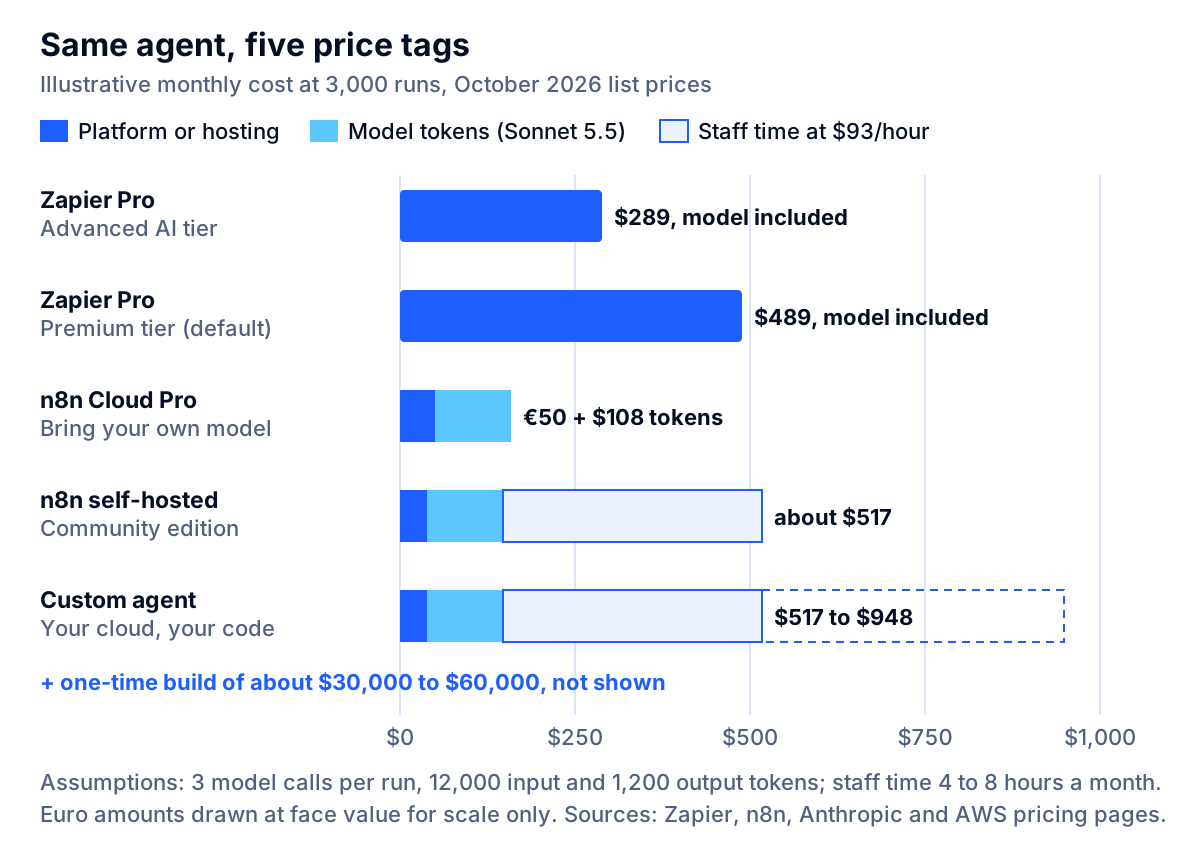
Platform pricing pages make it hard to compare these options, because each one bills a different unit. The model below puts them side by side for one realistic workflow. All numbers use list prices checked in October 2026. Workload and token figures are illustrative assumptions: replace them with your own.
The workflow: an inbound support or sales triage agent. A new email or form submission triggers it. The model reads the message, makes two tool calls (look up the customer in the CRM and check order status), then the workflow writes a summary back to the CRM and posts to a Slack channel. It runs 3,000 times a month.
Token assumption: three model calls per run (one per reasoning step), each with about 4,000 input tokens and 400 output tokens, so 12,000 input and 1,200 output tokens per run.
Zapier
Per run: the trigger is free, the AI step with two tool calls costs (1 + 2) × the tier rate, and the two app actions cost one task each.
- Advanced tier (3x): 9 + 2 = 11 tasks per run, or 33,000 tasks a month. That fits the 50,000-task tier: $289 a month on Professional or $399 on Team, annual billing.
- Premium tier (5x, the default): 15 + 2 = 17 tasks per run, or 51,000 tasks a month. That is just over the 50,000 tier, so you either pay overage or move to the 100,000 tier at $489 a month on Professional or $599 on Team.
The model cost is included in the task price unless you bring your own key. Run the same workflow as a Zapier Agent instead and each run uses about five activities (the trigger, two lookups and two write actions), or 15,000 a month, ten times the Pro allowance of 1,500.
n8n Cloud
3,000 executions exceed Starter's 2,500, so this lands on Pro at €50 a month, which covers up to 10,000 executions. Add model tokens billed by the provider:
- Claude Haiku 5.5: (12,000 × $0.10 + 1,200 × $0.50) ÷ 1,000,000 = $0.0018 per run, or about $5 a month.
- Claude Sonnet 5.5: (12,000 × $2 + 1,200 × $10) ÷ 1,000,000 = $0.036 per run, or about $108 a month.
n8n self-hosted Community edition
The software is free. A small server and database on Amazon Lightsail, a $24 instance with 4 GB of memory plus a $15 managed database, comes to $39 a month plus the same model tokens. The real cost is administration: upgrades, backups, monitoring and security patches. At an illustrative 4 hours a month and $93 an hour, that is about $370 a month of staff time.
Custom AI agent
Run costs are similar to self-hosted n8n: an illustrative $39 to $100 a month of hosting for this volume, plus $5 to $108 of model tokens. The difference is the up-front build, roughly $30,000 to $60,000 for a production agent, and ongoing maintenance, which we assume at an illustrative 4 to 8 hours a month ($370 to $740).
What the numbers say
At 3,000 runs, every option is affordable, and the platform you already use is probably fine. The picture changes in three ways as you grow:
- Volume grows. At 30,000 runs a month, the Premium-tier Zapier workflow needs 510,000 tasks, just above the 500,000 tier ($1,499 a month on Professional annual billing), so it needs overage or the 750,000 tier at $1,999. On n8n, 30,000 executions pass Pro's 10,000 and point to Business (€667 a month, self-hosted, 40,000 executions), Enterprise, or the free Community edition, whose cost does not scale with runs. The custom agent's run cost grows only with tokens.
- The agent does more. Add two more tool calls per run and the Zapier Premium step goes from 15 to 25 tasks. n8n and custom costs barely move.
- Requirements grow. Approval flows, audit logs, data residency and testing are where the hidden cost of each platform shows up, and where custom code starts to pay for itself.
Key takeaway: Platform cost scales with how much the agent does. Custom cost is mostly paid up front. The crossover depends on volume, tool calls per run and the compliance work you would otherwise bolt onto a platform.
Seven signs no-code automation is not enough
These are the patterns we see when a team has outgrown Zapier or n8n for a particular workflow. One sign is a reason to watch. Two or more are a reason to plan the move.
- Your AI bill is unpredictable. If tasks per run swing widely because the model decides how many tools to call, budgeting becomes guesswork. On Zapier, every extra tool call at the Premium tier adds five tasks.
- Someone asks for an audit trail you cannot produce. A compliance officer, auditor or enterprise customer wants to know exactly what the agent saw, decided and did six months ago. Seven or 30 days of execution history will not answer that.
- The data should not leave your environment. Protected health information, nonpublic personal financial information or client-confidential legal material often needs a narrower data path than a multi-tenant automation cloud. Self-hosted n8n or custom code keeps it inside your boundary.
- The automation is becoming part of your product. Customers see it, rely on it or configure it. On n8n, letting external users build or configure workflows needs an Enterprise license. On any platform, customer-facing reliability and latency become your responsibility while the runtime is someone else's.
- You cannot test a change before it goes live. Prompt edits made directly in production, with no test set and no rollback, are fine for an internal helper and dangerous for an agent that issues refunds.
- You are fighting platform limits. Per-run activity caps, five-minute execution limits on n8n Starter, concurrency ceilings or long chains of code steps that exist only to work around the platform are all signs the workflow wants to be software.
- The logic is your advantage. If how the agent qualifies leads, prices quotes or resolves claims is a reason customers choose you, it belongs in code you own, version and can move.
When staying on Zapier or n8n is the right answer
Custom code is not automatically better. Stay on a platform when:
- Volume is low or seasonal. A few hundred runs a month will never repay a $30,000 build.
- The workflow is mostly deterministic. Moving data between apps with one AI classification step is exactly what these platforms are good at.
- The people closest to the process should own it. Operations staff who can change a Zap themselves are faster than a ticket queue to engineering.
- You are still learning what the agent should do. A platform is a cheap way to discover the real process, the edge cases and the value before you commit to a build. Treat it as the prototype.
- You have no one to maintain custom code. An unmaintained custom agent is worse than a well-run Zap. If there is no engineering owner after launch, a platform with a vendor behind it is safer.
Between the two platforms, the choice is usually about the team. Pick Zapier if the builders are business users and the workflows are short. Pick n8n if you have technical staff, your agents call several tools per run, you want to bring your own models, or you need to self-host for data reasons.
The hybrid path: keep the platform, own the agent
The most cost-effective architecture for many mid-sized companies is neither pure platform nor pure custom. It splits the work:
- The custom agent owns the reasoning. Prompts, tool selection, guardrails, evaluation and decision logs live in your code and your cloud.
- The platform owns the long tail of integrations. Instead of writing and maintaining a connector for every app, the agent calls a platform to perform routine actions.
Both platforms support this. Zapier MCP lets an agent that speaks the Model Context Protocol (MCP), an open standard for connecting AI models to tools, call Zapier actions. It supports OAuth and connection-token authentication, operates under Zapier's SOC 2 Type II certification, and charges 2 tasks per successful tool call. n8n workflows can be triggered by webhook calls, so a custom agent can hand routine work to an n8n workflow and get the result back.
The hybrid gives you control where it matters and avoids rebuilding what is commodity. It also gives you a migration path: when an integration becomes critical or expensive, replace that one call with direct code and leave the rest alone. If you need your own tool server rather than a platform's, our guide to MCP server development cost shows what one takes.
A 10-question scorecard for choosing
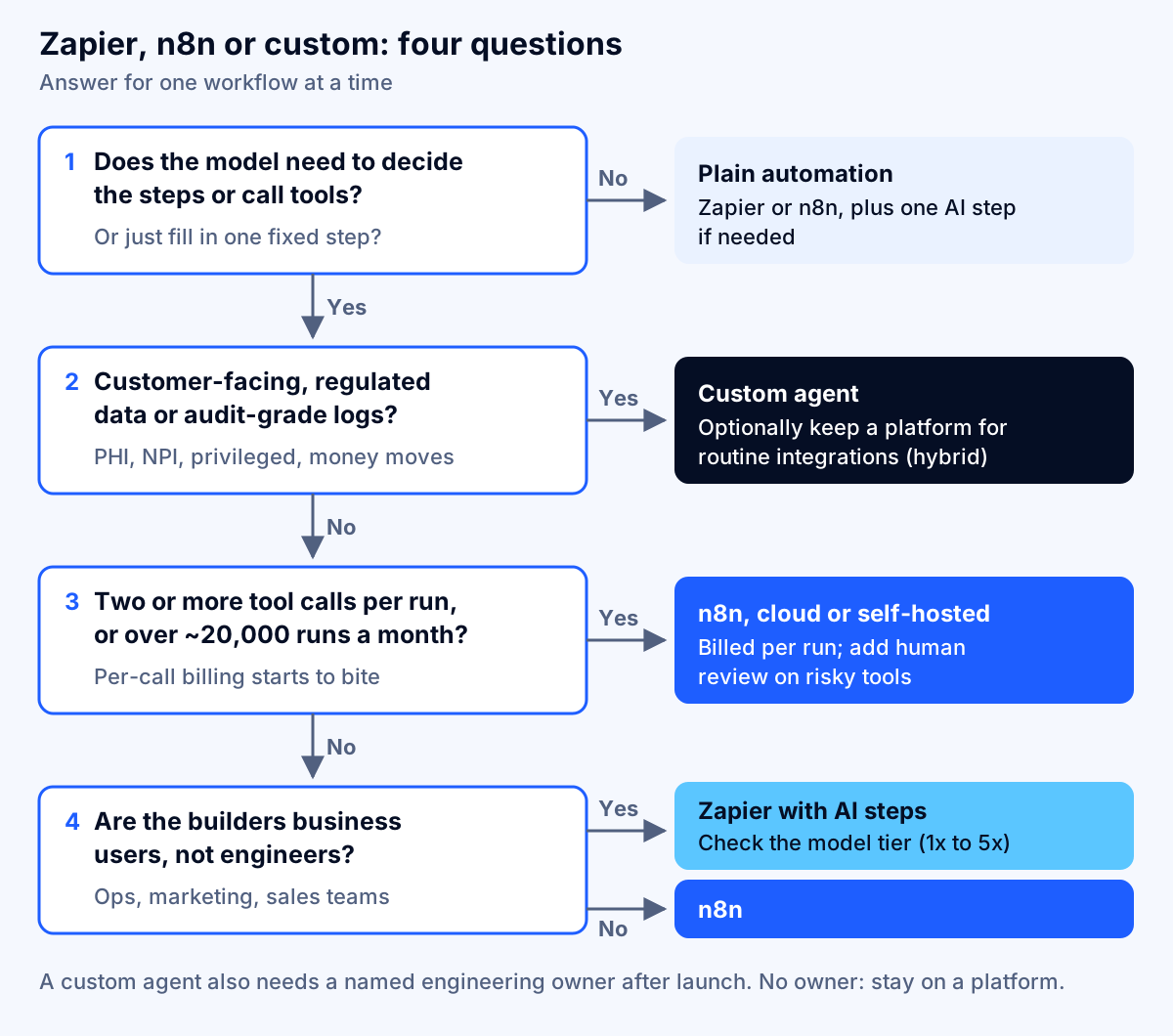
Fill this in for one specific workflow, not for your company as a whole. Different workflows often land in different places, and that is fine. Score each question 0, 1 or 2.
| # | Question | 0 points | 1 point | 2 points |
|---|---|---|---|---|
| 1 | Monthly runs | Under 1,000 | 1,000–20,000 | Over 20,000 |
| 2 | Tool calls per run | 0–1 | 2–3 | 4 or more, or unpredictable |
| 3 | Who sees the output | Internal team | Internal, high stakes | Customers or partners |
| 4 | Data sensitivity | Public or low | Internal confidential | Regulated (PHI, NPI, client privileged) |
| 5 | Audit and retention need | None | Weeks | Months to years |
| 6 | Actions taken | Read and notify | Write to internal systems | Money, contracts or customer records |
| 7 | Testing need | Spot checks | Repeatable test cases | Formal evaluation before each change |
| 8 | Change frequency | Rarely | Monthly | Weekly or more |
| 9 | Competitive value of the logic | Commodity | Useful | A reason customers choose you |
| 10 | Engineering capacity after launch | None | Part-time | A named owner |
How to read the total (our guidance, not an industry standard):
- 0–6: Zapier or n8n. Use whichever your team already knows. Prefer n8n if question 2 scored 2.
- 7–12: n8n, or a hybrid. Keep orchestration on n8n, add human review on risky tools, and consider moving the reasoning into custom code if questions 3, 4 or 5 scored 2.
- 13–20: custom agent, possibly with a platform for integrations. The requirements now look like software, and the per-run economics and compliance needs usually favor owning the code.
Two scores override the total. A 2 on question 4 with no option to self-host rules out the multi-tenant cloud plans until you have confirmed contract terms in writing. A 0 on question 10 rules out custom code until you have someone to own it.
How to move from a platform to a custom agent without a rewrite
If the scorecard points to custom, migrate one workflow at a time:
- Export the truth from the platform. Pull run history, inputs, outputs and failures for the past 30 to 90 days. That is your first test set and your best requirements document.
- Write down the decisions, not the steps. List what the agent must decide, which tools it may use and when a person must approve. This becomes the agent's policy and system prompt.
- Build a prototype against the test set. A working prototype on real data takes 1 to 2 weeks. Measure it against what the platform version does today.
- Run both in parallel. Route a share of traffic to the custom agent, or run it in shadow mode where it proposes and the platform still acts. Compare accuracy, cost per run and escalation rate.
- Keep the platform for the long tail. Move the reasoning and the critical integrations first, and leave low-value app actions on Zapier or n8n through MCP or webhooks.
- Cut over and retire. Switch traffic once the custom agent beats the platform on your agreed measures, then shut down the old workflow so two versions do not drift apart.
Our article on moving AI from pilot to production covers the operational side of that last mile: monitoring, ownership and change control.
Putting it together
The n8n vs Zapier vs custom AI agent choice comes down to three things: how much work each run does, how sensitive the data and actions are, and who will own the system after launch.
- Zapier is the fastest way for business users to automate across apps. In 2026, its AI steps are billed per tool call at up to 5x, with the most expensive tier as the default, so watch the task count as agents grow.
- n8n bills per run regardless of complexity, lets you bring your own model and self-host, and has built-in human approval for agent tools. Its license allows internal use but not embedding it for customers to build workflows without an Enterprise license.
- A custom agent costs roughly $30,000 to $60,000 to build for one production workflow, then little per run. It is the right answer when the agent faces customers, handles regulated data, needs audit-grade records or carries your competitive edge.
Score your workflow, price it at your real volume, and consider the hybrid before a rewrite. If you would like a second opinion, Fleurant AI offers a free discovery call and can build a working AI agent prototype on your real data in 1–2 weeks, so you can compare it with your current automation before committing. Talk to a specialist about your workflow, or see everything we build on the Fleurant AI home page.
Frequently asked questions
Is n8n better than Zapier for AI agents?
For agents that call several tools, usually yes. n8n bills per workflow execution regardless of how many steps or tool calls a run makes, you bring your own model API key, and it has a built-in AI Agent node with per-tool human approval. Zapier is easier for non-technical teams and connects to more apps out of the box, but its AI steps consume tasks per tool call, which gets expensive as agents do more.
How does Zapier charge for AI steps in 2026?
Since June 15, 2026, AI by Zapier steps use model-based pricing. As of October 2026, the Zapier help center lists Standard at 1x tasks, Advanced at 3x and Premium at 5x, with Premium as the default for new steps. Each tool call is charged again at the same rate, so a Premium step that makes two tool calls uses 15 tasks.
Can I use self-hosted n8n for free in my business?
Yes, for internal business use. The self-hosted Community edition runs under n8n's Sustainable Use License, which allows using it to run your business and building automations for clients who only receive results. It does not allow hosting n8n as a service, letting external users build their own workflows in your product, or white-labeling it. Hosting, upgrades and security are then your job. Confirm edge cases with n8n or your counsel.
When should I build a custom AI agent instead of using Zapier or n8n?
When the agent is customer-facing or core to how you compete, when per-run platform costs have passed what a build would cost over two to three years, when regulated data cannot pass through a third-party automation cloud, or when you need evaluation, versioning and audit trails your auditors will accept. If only one of those is true, a hybrid usually works better than a rewrite.
How much does a custom AI agent cost compared with Zapier or n8n?
A custom production agent for one workflow typically takes 8 to 16 person-weeks, roughly $30,000 to $60,000 at an in-house rate of $93 an hour, plus hosting, model usage and maintenance. Zapier and n8n cost little to start but charge per task or execution forever. In our illustrative model of 3,000 agent runs a month, Zapier runs about $289 to $489 a month and n8n Cloud about €50 plus model costs.
Can a custom AI agent still use Zapier or n8n?
Yes, and this hybrid is often the best answer. A custom agent can call Zapier's MCP server to reach app actions without writing each integration, at 2 tasks per successful tool call, or trigger n8n workflows through webhooks. You keep the reasoning, prompts, evaluation and logs in your own code while the platform handles the long tail of app connections.
Sources
- Zapier pricing, Zapier
- AI by Zapier model tier pricing, Zapier Help Center
- How is Zapier Agents usage measured?, Zapier Help Center
- Security and compliance, Zapier
- Zapier MCP security, Zapier Docs
- n8n plans and pricing, n8n
- License FAQ (Sustainable Use License), n8n Docs
- Integrate AI (advanced AI overview), n8n Docs
- Human-in-the-loop for AI tool calls, n8n Docs
- Queue mode, n8n Docs
- Hosting n8n, n8n Docs
- Building effective agents, Anthropic
- Pricing, Claude Platform Docs (Anthropic)
- Software Developers, Quality Assurance Analysts, and Testers: Occupational Outlook Handbook, U.S. Bureau of Labor Statistics
- Amazon Lightsail pricing, Amazon Web Services


