AI Agents
MCP Server Security Best Practices: 12 Controls for Enterprises
MCP server security best practices for enterprises: 12 controls to require before AI agents touch production data, mapped to real incidents and the MCP spec.

In this article
- Why MCP servers are a different security problem
- What has gone wrong so far: five MCP incidents from 2025
- The 12-control checklist for MCP server security
- Govern: control which MCP servers can run at all
- Authenticate: know who is calling and with what rights
- Contain: limit what a compromised session can reach
- Supervise: keep humans and logs in the loop
- Local vs remote MCP servers: which controls apply where
- Where an MCP gateway helps, and where it does not
- A 90-day rollout plan for MCP security
- Questions to ask a vendor or development partner about MCP security
- When not to connect an agent to production data yet
- The bottom line
- Frequently asked questions
- Sources
Short answer: MCP server security best practices come down to four questions you must be able to answer for every server an AI agent can call: which servers are allowed (govern), who is calling and with what rights (authenticate), what the server can reach if things go wrong (contain), and who sees what it did (supervise). In practice that means an approved server list, pinned and reviewed code, OAuth tied to your identity provider with tokens checked for audience, the narrowest possible scopes, sandboxed execution, human approval for high-impact actions, and complete tool-call logs.
The Model Context Protocol (MCP) has become the standard way to plug AI agents into business systems. That is exactly why security teams are nervous: one connector can give a model read and write access to email, code, files or a CRM, and the protocol itself leaves most protections to the people deploying it.
This guide is for the CTO, CISO, IT lead or compliance owner who has to say yes or no to that connector. You get:
- Five real MCP incidents from 2025 and the control that would have stopped each one.
- A 12-control checklist, grouped into four layers, with what to require and how to verify it.
- A 90-day rollout plan and the questions to put to any vendor or development partner.
Why MCP servers are a different security problem
An MCP server is a small service that exposes tools (actions such as "search tickets" or "send email"), resources (data the model can read) and prompts to an AI application, which the protocol calls the client. The model decides which tool to call based on the conversation. That last point is what makes MCP different from a normal API integration.
In a normal integration, a developer writes code that calls an API in a fixed way. With MCP, the model chooses the calls at run time, guided by text: the user's request, tool descriptions written by whoever built the server, and whatever content earlier tool calls returned. Any of that text can contain instructions. So the attack surface includes not just the server's code but every piece of text the model reads.
Three properties follow from this:
- Servers carry the permissions of every tool they expose. A "Gmail" server with send rights is a mail client the model controls.
- Untrusted content flows into trusted sessions. A public GitHub issue, an inbound email or a web page can carry hidden instructions, a pattern OWASP lists first in its Top 10 for LLM applications as indirect prompt injection.
- Security is mostly optional in the protocol. The current MCP authorization specification states that authorization is OPTIONAL for MCP implementations. When it is used over HTTP, it is built on OAuth 2.1. For local servers that talk over standard input and output (stdio), the specification says implementations should not use the OAuth flow and should take credentials from the environment instead.
Independent groups have started codifying the risks. The OWASP MCP Top 10, currently in a beta and pilot-testing phase, lists ten categories ranging from token mismanagement and scope creep to tool poisoning, supply chain attacks, shadow MCP servers and context over-sharing. The Cloud Security Alliance's MCP security guide, a draft dated March 27, 2026, opens with the point this article is built on: no single control is sufficient, so you need defense in depth.
Key takeaway: With MCP, the model picks the actions and reads untrusted text while doing so. Secure the permissions behind each tool as if a stranger could sometimes steer the model, because occasionally one can.
What has gone wrong so far: five MCP incidents from 2025
Abstract threat lists are easy to ignore. These five public incidents are not, and each one maps to a specific control later in this guide.
| Date (2025) | Incident | What happened | Control that addresses it |
|---|---|---|---|
| May | GitHub MCP "toxic agent flow" | A prompt injection in a public issue led an agent to copy private repository data into a public pull request | 7, 9, 10 |
| June | Asana MCP server | A flaw could expose one organization's data to other Asana MCP users; the server was taken offline | 7, 11, 12 |
| June | MCP Inspector, CVE-2025-49596 | A developer tool's local proxy had no authentication, enabling remote code execution through the browser | 2, 8 |
| July | mcp-remote, CVE-2025-6514 | A malicious server could trigger OS command execution through a crafted OAuth URL | 1, 2, 8 |
| September | postmark-mcp npm package | An impostor package quietly blind-copied every email it sent to an outside address | 1, 2, 3 |
GitHub MCP (May 2025). Researchers at Invariant Labs planted instructions in an issue on a public repository. When the repository owner asked their agent to review open issues, the agent read the injected text, pulled data from the owner's private repositories, and published it in a pull request on the public repository. The researchers were explicit that the GitHub server's code was not at fault: the agent combined trusted tools with untrusted input. They also noted that many users approve tool calls with an "always allow" setting, which removed the last human check.
Asana (June 2025). Asana launched its MCP server on May 1, discovered a flaw on June 4, and kept the feature offline from June 5 to June 17, according to The Register. Asana told customers the bug could have exposed information from their domain to other Asana MCP users. There was no indication of exploitation, and Asana reset every MCP connection, forcing customers to reconnect. The lesson for buyers: a vendor's MCP server is new code sitting in front of your data, and tenant isolation must be tested, not assumed.
MCP Inspector, CVE-2025-49596 (June 2025). Oligo Security reported that versions of Anthropic's MCP Inspector developer tool below 0.14.1 ran a local proxy with no authentication between its web interface and the proxy. A malicious website could send requests to it through the browser and launch commands, a flaw rated 9.4 on the CVSS scale. The fix added a session token by default plus origin and host header checks. Developer tools run on engineers' laptops, which hold source code and cloud credentials, so they belong in scope.
mcp-remote, CVE-2025-6514 (July 2025). The GitHub advisory rates this flaw in the mcp-remote package critical (CVSS 9.6). Versions 0.0.5 up to 0.1.16 could execute operating system commands when connecting to an untrusted MCP server, because of a crafted authorization_endpoint value. JFrog, which found it, demonstrated full command execution on Windows. Simply connecting to the wrong server was enough.
postmark-mcp (September 2025). In what The Hacker News described as the first malicious MCP server found in the wild, an npm package imitating a legitimate email connector added a one-line change in version 1.0.16, released September 17, 2025. From then on it blind-copied every email sent through it to an outside address. The package had 1,643 downloads before it was removed. Earlier versions were clean, which is exactly why version pinning and change review matter.
Behind several of these sits a class of attack that Invariant Labs described in April 2025 as tool poisoning: hidden instructions inside a tool's description, which the model reads and the user usually does not. Two variants matter for enterprises. A rug pull is a server that changes a tool description after you approved it. Shadowing is a malicious server whose description changes how the agent uses a different, trusted server's tool, for example redirecting the recipients of a trusted email tool.
The 12-control checklist for MCP server security
The checklist below groups twelve controls into four layers. It draws on the MCP Security Best Practices document, the authorization and tools specifications, the OWASP MCP Top 10 and the CSA guide. Use it as a gate: an MCP server does not reach production data until each control is either in place or formally accepted as a risk by someone with the authority to accept it.
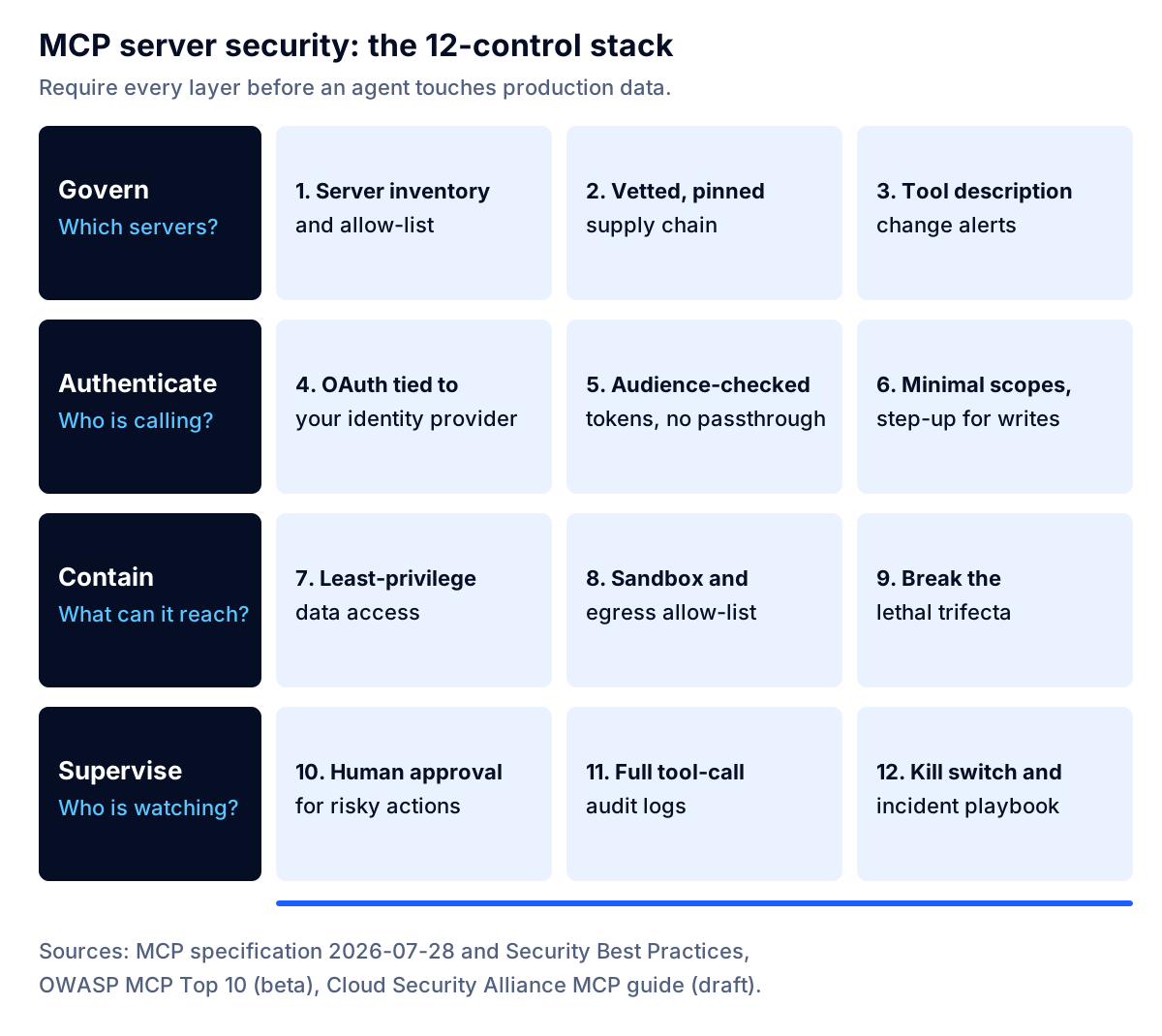
| # | Control | What to require | How to verify |
|---|---|---|---|
| 1 | Server inventory and allow-list | Only approved servers can be connected; one owner per server | Client or gateway config blocks unlisted servers |
| 2 | Vetted, pinned supply chain | Known publisher, code review, pinned version, patch window | Lockfile or image digest; dependency scan results |
| 3 | Tool description change alerts | Approved tool descriptions are hashed; changes need re-approval | Alert fires in a test when a description changes |
| 4 | OAuth tied to your identity provider | Users sign in with company SSO; offboarding removes access | Disabled test user loses access within minutes |
| 5 | Audience-checked tokens, no passthrough | Server only accepts tokens issued for it | Token for another service is rejected with HTTP 401 |
| 6 | Minimal scopes, step-up for writes | Read-only by default; write scopes requested when needed | Scope list review; first write triggers a challenge |
| 7 | Least-privilege data access | Server's downstream account sees only what the use case needs | Service account permission review; tenant isolation test |
| 8 | Sandbox and egress allow-list | Container or VM isolation; outbound traffic only to approved hosts | Attempted call to an unapproved host is blocked |
| 9 | Break the lethal trifecta | No session combines private data, untrusted content and an outbound channel without a gate | Architecture review per agent workflow |
| 10 | Human approval for risky actions | Sends, payments, deletions and external posts need a person | Test run shows approval prompt with full inputs |
| 11 | Full tool-call audit logs | Who, which tool, arguments, result, approval, time | Sample log entry traced end to end |
| 12 | Kill switch and incident playbook | Disable a server or revoke tokens in minutes; named on-call | Tabletop exercise completed |
The sections below explain each layer: what the control means, why it exists, and where teams usually cut corners.
Govern: control which MCP servers can run at all
1. Keep an inventory and enforce an allow-list
OWASP lists shadow MCP servers as one of its ten categories, and for good reason. Any engineer can add a community server to a desktop AI client in a minute. If you do not know which servers are connected, nothing else in this checklist can be enforced.
Require a register that records each server's owner, purpose, publisher, version, where it runs, which systems and data it reaches, and which scopes it holds. Then enforce it technically: managed client configurations on company devices, or a gateway that rejects unlisted servers. The CSA guide's first maturity level starts with exactly this server inventory, alongside authenticated connections and audit logging.
2. Vet, pin and patch the supply chain
The postmark-mcp and mcp-remote incidents were both supply chain problems: code you did not write, updated without your review. Treat every MCP server as a dependency with production access:
- Prefer servers published by the vendor of the underlying system, and verify the package name and publisher. Impostor packages rely on near-identical names.
- Review the code before first use, at least for what it sends over the network.
- Pin exact versions (lockfiles, container image digests) and review the diff before upgrading.
- Set a patch window for critical vulnerabilities and subscribe to advisories for every server you run.
Internal servers count too. A server your own team wrote last quarter needs the same dependency scanning as any other service.
3. Hash tool descriptions and alert on changes
Because a model treats tool descriptions as instructions, a description is effectively code. Invariant Labs recommends pinning and verifying tool descriptions with a hash or checksum so that rug pulls are caught, and the CSA guide calls for verifying descriptions against approved baselines and alerting on changes between sessions.
The tools specification adds a related warning: clients MUST consider tool annotations (hints such as "read-only" or "destructive") untrusted unless they come from trusted servers. Never let a server's own label decide whether an action needs approval.
Authenticate: know who is calling and with what rights
4. Use OAuth tied to your corporate identity provider
For remote servers, the MCP authorization specification builds on OAuth 2.1, with protected resource metadata (RFC 9728) for discovery and PKCE for the authorization code flow. For an enterprise, the important question is whose identity is behind each call.
The answer should be your existing single sign-on. MCP's Enterprise-Managed Authorization extension, listed as stable, lets a client exchange the user's SSO identity for a short-lived assertion from the corporate identity provider and then for an MCP access token. Administrator policies at the identity provider decide which servers each user can reach, and users do not have to authorize every server one by one. Where a server or client does not support it yet, at minimum require that the server's own authorization flow uses your identity provider, so that offboarding a user removes access.
Avoid shared service accounts and long-lived personal access tokens pasted into configuration files. OWASP's first MCP category, token mismanagement and secret exposure, is largely about those tokens.
5. Validate token audience and never pass tokens through
This is the most specific technical requirement in the specification, and the one most often missed in quick builds. MCP servers MUST validate that access tokens were issued specifically for them, and MUST NOT accept or transit any other tokens. Clients must name the intended server in every token request using resource indicators (RFC 8707), which is what makes the audience check possible.
The anti-pattern is token passthrough: a server that takes whatever token the client sends and forwards it to a downstream API. The security best practices document explains the cost: it bypasses rate limits and monitoring keyed to the token, breaks the audit trail because downstream logs show the wrong identity, and lets someone holding a stolen token use your server as a proxy for data exfiltration. The server should hold its own credentials for downstream systems and map each authenticated user to what that user may do.
Servers that proxy a third-party API also face the confused deputy problem, where an attacker reuses a consent cookie to obtain authorization codes without the user approving anything. The specification requires per-client consent stored server-side, exact redirect URI matching and single-use state values. If a vendor builds a proxy server for you, ask how each of these is implemented.
6. Start with minimal scopes and step up for writes
Broad scopes granted up front turn any leaked token into a master key. The specification's recommended pattern is a minimal initial scope set covering low-risk read operations, with step-up authorization: when the agent first attempts a privileged operation, the server answers with an insufficient_scope challenge naming exactly the scopes required, and the user approves the elevation. The best practices document lists the common mistakes to look for in a review: wildcard or omnibus scopes, publishing every possible scope as the default, and bundling unrelated privileges to avoid future prompts.
Contain: limit what a compromised session can reach
7. Give the server least-privilege access to data
Authentication decides who may call a tool. Containment decides how much damage the tool can do. The tools specification states that servers MUST validate all tool inputs, implement proper access controls, rate limit tool invocations and sanitize tool outputs.
In practice:
- Narrow tools beat general ones. A
get_open_invoices_for_customertool is far easier to secure than arun_sqltool. - Scope the downstream account. The database user or API key behind the server should see only the tables, fields and records the use case needs. Invariant's GitHub recommendation was to restrict an agent to one repository per session.
- Enforce tenant and user boundaries in the server, every call. The specification is explicit that possession of a state handle (such as a basket or workflow ID) must not be treated as authentication; bind handles to the authenticated user. Asana's incident shows why multi-tenant servers need isolation tests with canary data.
- Filter what comes back. Return only the fields the agent needs. Every extra field is data that can leak.
If your servers touch regulated data, these choices also determine what your AI audit trail and data-minimization obligations look like.
8. Sandbox servers and restrict outbound traffic
The best practices document is direct about local servers: they run with the same privileges as the client, and a malicious startup command in a configuration file can read SSH keys or delete files. It recommends running servers in a sandbox with minimal default privileges and restricted access to the file system and network. For local servers it recommends the stdio transport, or, if a local server uses HTTP, requiring an authorization token or restricted interprocess communication. That is precisely the gap behind the MCP Inspector flaw.
For remote servers, run each one in its own container or VM with an egress allow-list: outbound connections only to the systems it legitimately calls. That single control would have blocked the postmark-mcp backdoor from reaching its collection address. Clients deployed on servers should also guard against server-side request forgery during OAuth discovery, where a malicious server supplies URLs that point at internal services or the cloud metadata endpoint 169.254.169.254. The specification recommends HTTPS only, blocking private and link-local IP ranges, and routing discovery through an egress proxy.
9. Break the lethal trifecta
In June 2025 Simon Willison named the lethal trifecta: an agent with access to private data, exposure to untrusted content and a way to communicate externally can be tricked into sending that data to an attacker. The GitHub incident had all three: private repositories, a public issue, and the ability to open a public pull request.
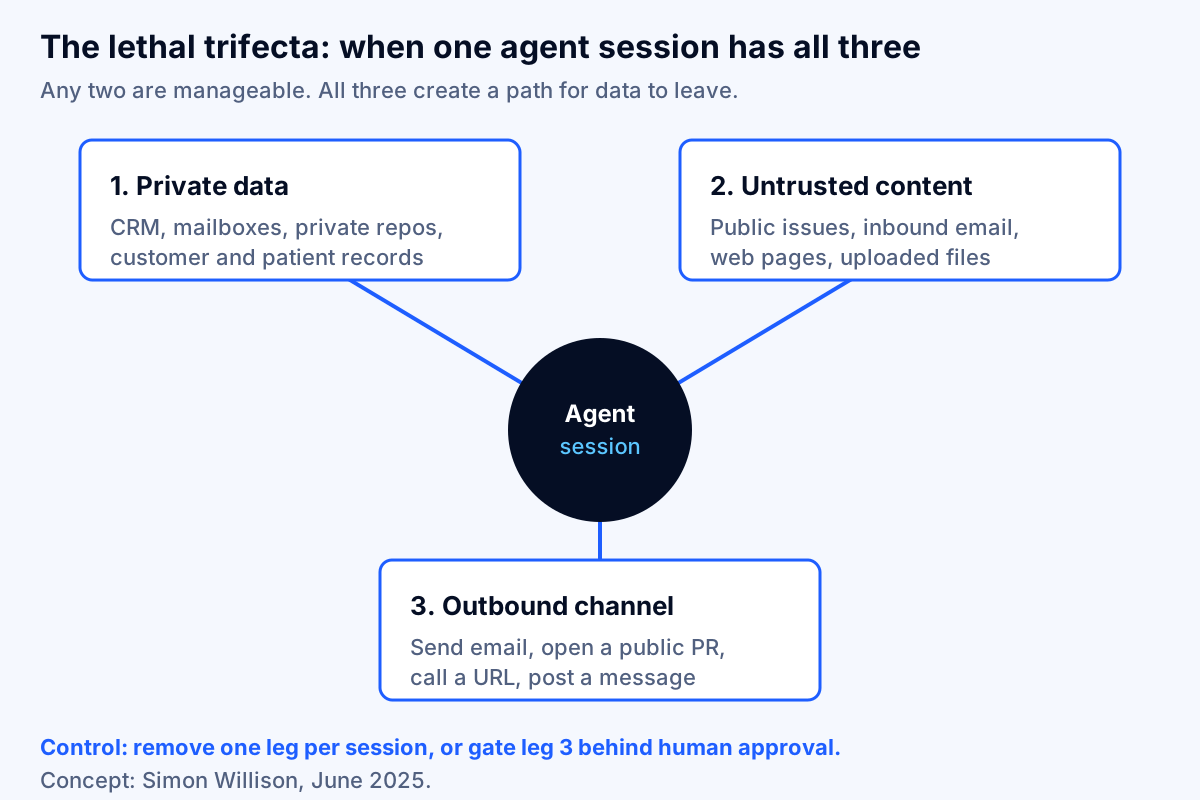
Willison is skeptical that detection filters solve this, noting that a filter that catches most attacks is still a failing grade for security. The dependable control is architectural. For each agent workflow, write down which of the three legs it has. If it has all three, remove one (split the workflow into separate sessions, or strip untrusted content before it reaches the privileged session), or put every outbound action behind human approval. This review takes an hour per workflow and is the highest-value hour in the whole checklist.
Supervise: keep humans and logs in the loop
10. Require human approval for high-impact actions
The tools specification says there SHOULD always be a human in the loop with the ability to deny tool invocations, and that clients should show tool inputs to the user before calling the server to avoid accidental or malicious data exfiltration. OWASP's prompt injection guidance likewise recommends human approval for high-risk operations.
Approval fatigue is the real enemy. Invariant observed users switching to "always allow" in the GitHub case. Make approval meaningful by requiring it only for consequential actions (sending externally, moving money, deleting records, changing permissions, publishing) and by showing the full arguments, not a summary written by the model. Reads of non-sensitive data can usually run without a prompt.
11. Log every tool call, completely
The tools specification recommends that clients log tool usage for audit purposes, and OWASP lists lack of audit and telemetry as an MCP risk category of its own. A useful record captures the authenticated user, the agent and session, the server and tool, the exact arguments, a reference to the result, any approval decision and who made it, the scopes on the token, and timestamps. Stream it to your security information and event management (SIEM) system and alert on unusual patterns: a sudden spike in reads, a new outbound destination, a tool called outside business hours.
Logs are also what auditors and regulators will ask for. Our guide to AI audit trail requirements covers retention and the fields regulated companies need.
12. Prepare a kill switch and an incident playbook
When Asana found its flaw, it took the server offline and reset every connection. You need the same ability: disable a single server, revoke its tokens and pause the agents that depend on it, within minutes, without a code deployment. Write a one-page playbook that names who can pull the switch, how to scope what the server touched (which is where control 11 pays off), and how to notify affected customers. Run a tabletop exercise before launch.
Local vs remote MCP servers: which controls apply where
The same twelve controls apply everywhere, but the emphasis shifts with where the server runs.
| Local server (on a laptop, stdio) | Remote server (hosted, HTTP) | |
|---|---|---|
| Main risk | Malicious or vulnerable code running with the user's privileges | Weak authorization, over-broad data access, tenant leakage |
| Identity | Credentials from the environment, per the spec | OAuth with audience validation and your identity provider |
| Key controls | Allow-list (1), pinning (2), sandbox (8) | Audience checks (5), scopes (6), least privilege (7), logs (11) |
| Typical owner | IT endpoint management | Platform or application team |
| Common gap | Developers installing servers from public registries | Token passthrough and shared service accounts |
For most mid-sized companies, the pragmatic policy is: local servers only from the approved list on managed devices, and anything that touches production data runs as a remote server your team or vendor operates, behind your identity provider.
Where an MCP gateway helps, and where it does not
An MCP gateway sits between clients and servers, much like an API gateway. Cloud platforms now offer this pattern; for example, Azure API Management can front an existing MCP server, and several security vendors sell dedicated gateways.
A gateway is a good place to enforce controls 1, 4, 6 (partly), 10 (for some clients) and 11: one allow-list, one authentication point, tool filtering per user group, rate limits and centralized logs. It becomes worth the cost once you run more than a handful of servers or have more than one team building them.
What a gateway cannot do:
- Fix a server whose downstream account can see too much data (control 7).
- Enforce business rules inside a tool, such as "refunds above a set amount need a manager."
- Decide whether a workflow combines the lethal trifecta (control 9).
- Make an unreviewed community server safe to run on a laptop (controls 2 and 8).
Buy a gateway to make good controls easier to apply consistently, not as a substitute for designing the servers well.
A 90-day rollout plan for MCP security
The CSA guide describes four cumulative maturity levels, from authenticated connections and an inventory at level 1 to per-invocation authorization and hardware-enforced isolation at level 4. Most mid-sized companies should aim for a solid level 2 for production agents. Here is a realistic sequence.
Days 1–30: find and freeze.
- Survey which AI clients and MCP servers are already in use, including on developer laptops.
- Publish an interim policy: approved servers only, no production credentials in local configurations. If you have an AI acceptable use policy, add an MCP section to it.
- Build the inventory (control 1) and remove anything unowned or unreviewed.
- Run the lethal trifecta review (control 9) on every agent workflow that touches customer or financial data.
Days 31–60: identity and containment.
- Put remote servers behind your identity provider (control 4) and verify audience validation with a negative test (control 5).
- Reduce scopes and service-account permissions to what each use case needs (controls 6 and 7).
- Containerize servers and apply egress allow-lists (control 8).
- Pin versions and set up advisory monitoring (control 2).
Days 61–90: supervision and proof.
- Turn on complete tool-call logging and SIEM alerts (control 11).
- Configure approval rules for high-impact tools (control 10) and baseline tool-description hashes (control 3).
- Write the kill-switch playbook and run a tabletop (control 12).
- Commission a penetration test that includes prompt injection payloads planted in the content your agents read.
Moving an agent from demo to production without this work is one of the reasons pilots stall at the security review; our article on getting AI pilots into production covers the other common blockers.
Questions to ask a vendor or development partner about MCP security
Whether you are evaluating a SaaS vendor's MCP server or hiring a team to build yours, these questions separate prepared teams from improvisers:
- Which MCP specification version do you implement, and how do you handle authorization for remote servers?
- Do you validate token audience, and can you show that a token issued for another service is rejected?
- Do you ever forward the client's token to downstream APIs? (The right answer is no.)
- What scopes does the server request by default, and can we restrict it to read-only?
- How do you isolate tenants, and how do you test that isolation?
- Do you support our identity provider, and Enterprise-Managed Authorization where our client supports it?
- How are tool descriptions versioned, and how will we be notified of changes?
- Where does the server run, what can it reach on the network, and what does it log?
- Which tools perform writes or external actions, and how is human approval enforced?
- What is your patch window for critical vulnerabilities, and when was the MCP endpoint last penetration-tested?
For a regulated company, fold these into your third-party risk process. Our AI vendor risk assessment questionnaire and our guide on how to hire an AI agent development company include scoring guidance.
When not to connect an agent to production data yet
Sometimes the right security decision is "not yet." Hold off when:
- The agent reads untrusted content and can act externally, and you cannot add an approval step. That is the full trifecta with no gate.
- The only available server needs an admin-level token. Wait for a scoped option, or build a narrow server yourself.
- Nobody owns the server. An unowned server will not be patched, and its logs will not be read.
- You cannot produce a log of what the agent did yesterday. If you cannot investigate, you cannot operate it in a regulated environment.
- The vendor cannot answer questions 2, 3 and 5 above. Those are basic.
In these cases, start with a read-only server against a copy of the data, or a workflow where the agent drafts and a person executes. You still get most of the productivity benefit while the controls catch up. Building the server yourself costs less than many teams expect; our MCP server development cost guide breaks down the build, hosting and security work.
The bottom line
MCP is now how AI agents reach business systems, and its security is mostly in your hands. The protocol supplies good building blocks (OAuth 2.1, audience-bound tokens, step-up scopes) but makes most of them optional, and the 2025 incidents show the gaps: injected instructions in ordinary content, impostor packages, unauthenticated local tools and multi-tenant isolation bugs.
The twelve controls in this guide close those gaps in four layers: govern which servers run, authenticate every call against your identity provider, contain what each server can reach, and supervise with approvals, logs and a kill switch. Start with the inventory and the lethal trifecta review this month; both are cheap and both change decisions.
If you want help putting this into practice, Fleurant AI's AI agent development team builds MCP servers and agents with these controls designed in, and our AI compliance practice works with regulated companies on the governance side. You can talk to a specialist about your setup. This article is general guidance, not legal advice; confirm specific obligations with your security, compliance and legal teams. For more on our approach, visit the Fleurant AI home page.
Frequently asked questions
Is MCP secure enough for enterprise use?
The protocol can be deployed securely, but it does not make a deployment secure on its own. Authorization is optional in the MCP specification, and most protections depend on how servers and clients are built and configured. Enterprises that pair MCP with their identity provider, least-privilege access, sandboxing, human approval for risky actions and full logging can use it for production work. Teams that install community servers on laptops without review are taking a real risk.
What is MCP tool poisoning?
Tool poisoning hides instructions inside a tool's description, which the AI model reads but the user usually does not see. The model may follow those instructions, for example by reading a sensitive file and passing it to another tool. Related attacks include rug pulls, where a server changes a tool description after you approved it, and shadowing, where one server's description changes how the agent uses another server's tool. Pinning versions and alerting on description changes are the main defenses.
Do local MCP servers need authentication?
A local server that talks to one client over stdio inherits the user's operating system permissions, so the specification says it should take credentials from the environment rather than run an OAuth flow. Local servers that listen over HTTP are different: they should require a token or use restricted interprocess communication, because other processes and even websites can reach localhost. The MCP Inspector flaw CVE-2025-49596 showed what happens when that step is skipped.
Should we use an MCP gateway?
A gateway is worth it once you run more than a handful of servers or have more than one team building them. It gives you one place to enforce the server allow-list, authenticate users, filter tools, rate-limit calls and write logs. It does not fix a server that over-shares data, validate business rules inside a tool, or stop an agent from combining private data with an outbound channel. Treat it as one control in the stack, not the whole stack.
How do we stop prompt injection through MCP tools?
No filter reliably stops it today, so design for containment. Keep untrusted content (public issues, inbound email, web pages) out of sessions that can reach private data and send data out, require human approval before high-impact actions, give tools the narrowest data access possible, and test the agent with planted injection payloads before launch. OWASP's prompt injection guidance recommends the same mix of privilege limits, approval steps and adversarial testing.
What should we ask a vendor that offers an MCP server for its product?
Ask how the server authenticates users and validates token audience, which scopes it requests and whether they can be narrowed, how it isolates tenants, where it runs and what it logs, how tool descriptions are versioned and announced, and how fast it patches vulnerabilities. Ask for a recent penetration test that covered the MCP endpoint. Our AI vendor risk assessment questionnaire includes the full question set.
Sources
- Security Best Practices (Model Context Protocol), Model Context Protocol
- Specification 2026-07-28: Authorization, Model Context Protocol
- Specification 2026-07-28: Tools, Model Context Protocol
- MCP Authorization Extensions (Enterprise-Managed Authorization), Model Context Protocol on GitHub
- OWASP MCP Top 10, OWASP Foundation
- LLM01:2025 Prompt Injection, OWASP Gen AI Security Project
- Agentic MCP Security Best Practices Guide (draft), Cloud Security Alliance
- GitHub MCP Exploited: Accessing private repositories via MCP, Invariant Labs
- MCP Security Notification: Tool Poisoning Attacks, Invariant Labs
- CVE-2025-6514: mcp-remote OS command injection (GHSA-6xpm-ggf7-wc3p), GitHub Advisory Database
- Critical RCE Vulnerability in mcp-remote: CVE-2025-6514, JFrog
- Critical RCE Vulnerability in Anthropic MCP Inspector (CVE-2025-49596), Oligo Security
- First Malicious MCP Server Found Stealing Emails in Rogue Postmark-MCP Package, The Hacker News
- Asana warns MCP AI feature exposed customer data to other orgs, The Register
- Connect and govern an existing MCP server in Azure API Management, Microsoft Learn
- The lethal trifecta for AI agents, Simon Willison


