Custom AI
AI Readiness Assessment Checklist: A 30-Point Scorecard
An AI readiness assessment checklist for mid-sized companies: 30 checks across six dimensions, four hard stops, and what to do at every score.

In this article
- What does an AI readiness assessment actually measure?
- How to run the AI readiness assessment checklist in two weeks
- The 30-point AI readiness checklist, dimension by dimension
- Hard stops: four answers that override any score
- How to score the checklist and what to do at each level
- Why data readiness is the dimension most companies overrate
- Is my company ready for AI if our processes are outdated?
- Security and governance: the fastest gaps to close
- What does an AI readiness assessment cost and how long does it take?
- A worked example: scoring an order-entry assistant
- Mistakes that make readiness assessments useless
- Where this leaves you
- Frequently asked questions
- Sources
An AI readiness assessment checklist should answer one practical question: can this specific AI use case deliver value here, now, without creating risk you cannot manage? The short answer for most mid-sized companies is "yes, for one or two well-chosen workflows, after closing a handful of gaps", and the gaps are almost always in data, process ownership and governance rather than in technology.
This article gives you a working tool, not a maturity model. You get 30 checks across six dimensions (use case, data, process, technology, security and governance, people and budget), each scored 0, 1 or 2 with the evidence that justifies the score. You also get four hard stops that override any total, score bands that tell you what to do next, a two-week process to run it, a realistic estimate of the internal effort, and a worked example. You can run it yourself this month with a spreadsheet and the people who already do the work.
Key takeaway: Readiness belongs to a use case, not to a company. Score one workflow at a time, demand evidence for every answer, and let your weakest dimension, not your total, decide what you do next.
What does an AI readiness assessment actually measure?
Most free readiness quizzes ask whether "your organization has a data strategy" or "leadership supports AI", then award a maturity level. That tells you very little, because the same company can be ready to put an AI assistant on its customer service knowledge base and nowhere near ready to automate credit decisions. The data, the risk, the systems and the people are different for each.
A useful assessment measures whether the conditions for value exist for one named workflow. In practice that means six things:
- Use case and value: a specific job, an owner, a measured baseline and a target.
- Data: the data the job needs exists, you can reach it, you are allowed to use it, and it is good enough.
- Process: the workflow is understood as it really runs, and the team is willing to change it.
- Technology and integration: the systems of record can be connected, and permissions can be enforced.
- Security, risk and governance: you know what data may go where, the vendor terms fit, and someone owns the risk.
- People and budget: a sponsor, expert time, a technical owner and money for running costs, not only the build.
This framing matches the structure of the NIST AI Risk Management Framework, the voluntary US framework released on January 26, 2023, which organizes AI risk work into four functions: Govern, Map, Measure and Manage. The "Map" function, establishing the context and purpose of a specific AI system, is essentially what a good readiness assessment does. NIST's companion AI RMF Playbook is explicit that it is neither a checklist nor a set of steps to follow in full, so you still need a tool sized for a mid-sized company. That is what the checklist below is for.
Why the timing matters now
US adoption is still early and uneven, which is good news if you assess carefully instead of rushing. The Census Bureau's Business Trends and Outlook Survey found that between 17% and 20% of US businesses used AI in any business function from December 2025 to May 2026, with 37% of firms with at least 250 employees and 32% of firms with 100 to 249 employees reporting use. The Census Bureau broadened the question in November 2025 from AI "in producing goods or services" to AI "in any business function", so older and newer figures are not directly comparable.
Among businesses with no plans to adopt, the Federal Reserve Bank of Minneapolis reports that the most common reason is that AI does not apply to their operations, with roughly 20% citing safety concerns and a similar share citing a lack of knowledge about what AI can do. A readiness assessment addresses all three: it tests whether a use case really applies, it surfaces the safety questions early, and it replaces vague expectations with evidence.
How to run the AI readiness assessment checklist in two weeks
You do not need consultants to run a first assessment. You need four or five people, one use case and the discipline to write down evidence. Here is the sequence we recommend for a mid-sized company.
Days 1–2: pick the use case and the team. Choose a workflow with visible volume and a clear cost: inbound order emails, invoice exceptions, support tickets, intake forms, contract review. Name a business owner (the person whose team does the work today), someone from IT, someone from security or compliance, and two people who do the work daily.
Days 3–5: measure the baseline. Count volume per week, time per item, error or rework rate and the cost of an error. Pull these from your systems where you can; where you cannot, time 20 real items. Without a baseline you cannot tell whether AI helped, and that is one of the hard stops below.
Days 4–8: pull a data sample. Export 50 to 100 real records the AI would use, including messy ones. Check them by hand for missing fields, wrong values, duplicates and formats. This is the single most revealing step in the whole assessment.
Days 6–9: map the process as it runs. Sit with the people who do the work and write down every step, system, exception and decision rule. Compare it with the official procedure. The differences are where AI projects get surprised.
Days 8–11: check security, vendor terms and regulation. Classify the data the use case touches, read the terms of the AI services you would use (retention, training on your data, any required agreements), and list the rules that apply in your sector.
Days 12–14: score, decide and write a one-page result. Score each check 0, 1 or 2 with the evidence attached, apply the hard stops, read the band, and write the three to five gaps you will close, with owners and dates.
Key takeaway: The data sample and the process walk-through are the two steps teams skip and regret. Budget most of your time for them.
The 30-point AI readiness checklist, dimension by dimension
Score each check 0 (no, or no evidence), 1 (partly, or true only for some cases) or 2 (yes, with evidence you could show an auditor or a board). Each dimension has five checks, so each scores 0 to 10, and the total runs from 0 to 60. The evidence column is the point: a "2" without evidence is a "0".
1. Use case and value
| # | Check | What a "2" looks like (evidence) |
|---|---|---|
| 1.1 | One named workflow with a business owner who wants it | Owner named in writing; the use case fits in one sentence |
| 1.2 | Baseline measured | Weekly volume, minutes per item, error rate, cost per error |
| 1.3 | Success metric and threshold agreed | For example, "handling time down a third with at least 95% accuracy on our test set" |
| 1.4 | Value exceeds cost at conservative assumptions | A one-page estimate using half the hoped-for benefit |
| 1.5 | You know what a wrong output costs and who catches it | Named review step; worst-case error described |
The trap here is choosing a use case because it is impressive rather than because it is frequent and measurable. High-volume, rules-heavy, text-heavy work with a human already checking the result is the usual sweet spot. If you need help sizing value and cost, our guides to AI agent development cost and what small businesses build first give planning ranges.
2. Data
| # | Check | What a "2" looks like (evidence) |
|---|---|---|
| 2.1 | You know where every data source for this use case lives and who owns it | Source list with system, owner and update frequency |
| 2.2 | The data is reachable by software | API, database view or scheduled export, not screenshots or forwarded PDFs |
| 2.3 | The data is representative | The sample includes normal cases, exceptions, errors and edge cases |
| 2.4 | Quality is measured, not assumed | 50–100 records checked by hand, with the error rate written down |
| 2.5 | You have, or can produce, labeled examples | 50–200 real cases with the correct answer, for testing |
Check 2.3 comes straight from Gartner's definition: AI-ready data must be representative of the use case, including its patterns, errors, outliers and unexpected cases. Check 2.5 matters because the labeled set becomes your evaluation set, which you need before launch to know whether the system works. Our guide on how to evaluate AI chatbot accuracy explains how many test cases you need for a given level of confidence.
3. Process
| # | Check | What a "2" looks like (evidence) |
|---|---|---|
| 3.1 | The process is documented as it really runs | A process map validated by the people who do the work |
| 3.2 | Inputs arrive in a consistent way, and exceptions are counted | Input channels listed; exception rate measured |
| 3.3 | Decision rules are written down, or can be | Rules or examples a new hire could follow |
| 3.4 | There is a clear point for human review | The step where a person approves, edits or rejects is defined |
| 3.5 | The owning team has agreed to change the workflow | Owner signs off on the future-state process, not only the tool |
Process is where "outdated" companies feel least ready, and it is fixable. A process that runs on inboxes and personal spreadsheets can still be a good AI candidate once inputs and rules are made consistent. Sometimes the first step is not AI at all but a small system of record; our article on when to replace spreadsheets with custom software covers that decision.
4. Technology and integration
| # | Check | What a "2" looks like (evidence) |
|---|---|---|
| 4.1 | The systems the AI must read from or write to have supported APIs or connectors | API documentation and access confirmed for each system |
| 4.2 | Identity and permissions can be enforced | Single sign-on and role-based access, so the AI sees only what each user may see |
| 4.3 | You have an approved place to run it | A cloud account or tenant with the AI services you need, approved by IT |
| 4.4 | Logging and monitoring exist for production systems | You can show where logs go and who reviews alerts |
| 4.5 | Someone will maintain the integrations after launch | A named owner, internal or external, with time budgeted |
Technology is rarely the blocker for a first use case. Model access through major cloud platforms is straightforward; our comparison of AWS Bedrock, Azure OpenAI and Google Vertex AI covers the trade-offs. The real questions are integration access to old systems and permissions: an assistant that can read every file in a shared drive will happily show salary data to the wrong person.
5. Security, risk and governance
| # | Check | What a "2" looks like (evidence) |
|---|---|---|
| 5.1 | An AI acceptable use policy exists, and staff know which tools are approved | Published policy; approved tool list; training completion |
| 5.2 | Data is classified for AI use | A short table: which data classes may go to which tools |
| 5.3 | Vendor terms fit the data | Retention, training-on-your-data and required agreements reviewed and signed |
| 5.4 | Someone owns AI risk, with an approval path | Named risk owner; a short intake and approval step for new AI uses |
| 5.5 | The rules that apply in your sector are mapped, and counsel has reviewed | List of applicable laws and guidance, with counsel's notes |
This dimension tends to score lowest and to matter most once something goes wrong. Our AI acceptable use policy template and AI vendor risk assessment questionnaire cover checks 5.1 and 5.3 in depth. For 5.5, the obligations differ by sector (health data, consumer financial data, insurance, lending and state AI laws), so confirm specifics with your counsel or compliance team.
6. People and budget
| # | Check | What a "2" looks like (evidence) |
|---|---|---|
| 6.1 | An executive sponsor who will fund it and remove blockers | Sponsor named; decision rights clear |
| 6.2 | Subject matter experts have time | Two to four hours a week from people who do the work, protected in their calendars |
| 6.3 | A technical owner exists, internal or external | Named person or a budgeted partner |
| 6.4 | Budget covers running and maintaining it, not only building it | Monthly run cost and support hours in next year's budget |
| 6.5 | Users are trained to check outputs | Training planned on what the tool does, where it fails and how to report problems |
Check 6.5 is more important than it looks. In Informatica's 2026 survey of 600 data leaders, 75% said employees need serious upskilling in data literacy and 74% said they need AI literacy. A tool that people trust blindly, or do not trust at all, will not deliver the value in your business case.
Hard stops: four answers that override any score
Some gaps cannot be averaged away by strong scores elsewhere. If any of these four is true for the use case, it is not ready, whatever the total says.
- No business owner. If nobody whose team does the work wants the result and will change the process, the project will produce a demo, not a change. This is the most common way AI pilots die quietly; we covered the pattern in why AI pilots stall before production.
- No right to use the data for this purpose. Contracts, privacy notices, customer agreements or regulation may limit how you use data, even data you hold. Confirm with counsel before you build on it.
- Regulated data with no vendor coverage. If the use case touches data such as protected health information or nonpublic personal financial information, and the AI service you plan to use is not covered by the agreement and configuration your obligations require, stop until it is.
- No baseline. If you cannot measure the current process, you cannot prove the AI helped, and you will not be able to defend the running cost next year.
Key takeaway: Hard stops are not failures. They are the cheapest possible time to find a deal-breaker: before you have paid for a build.
How to score the checklist and what to do at each level
Add up the 30 checks for a total out of 60, and note each dimension's score out of 10. Then read the band using both the total and the weakest dimension. A company with 50 points and a data score of 2 is not "advanced"; it is blocked on data.
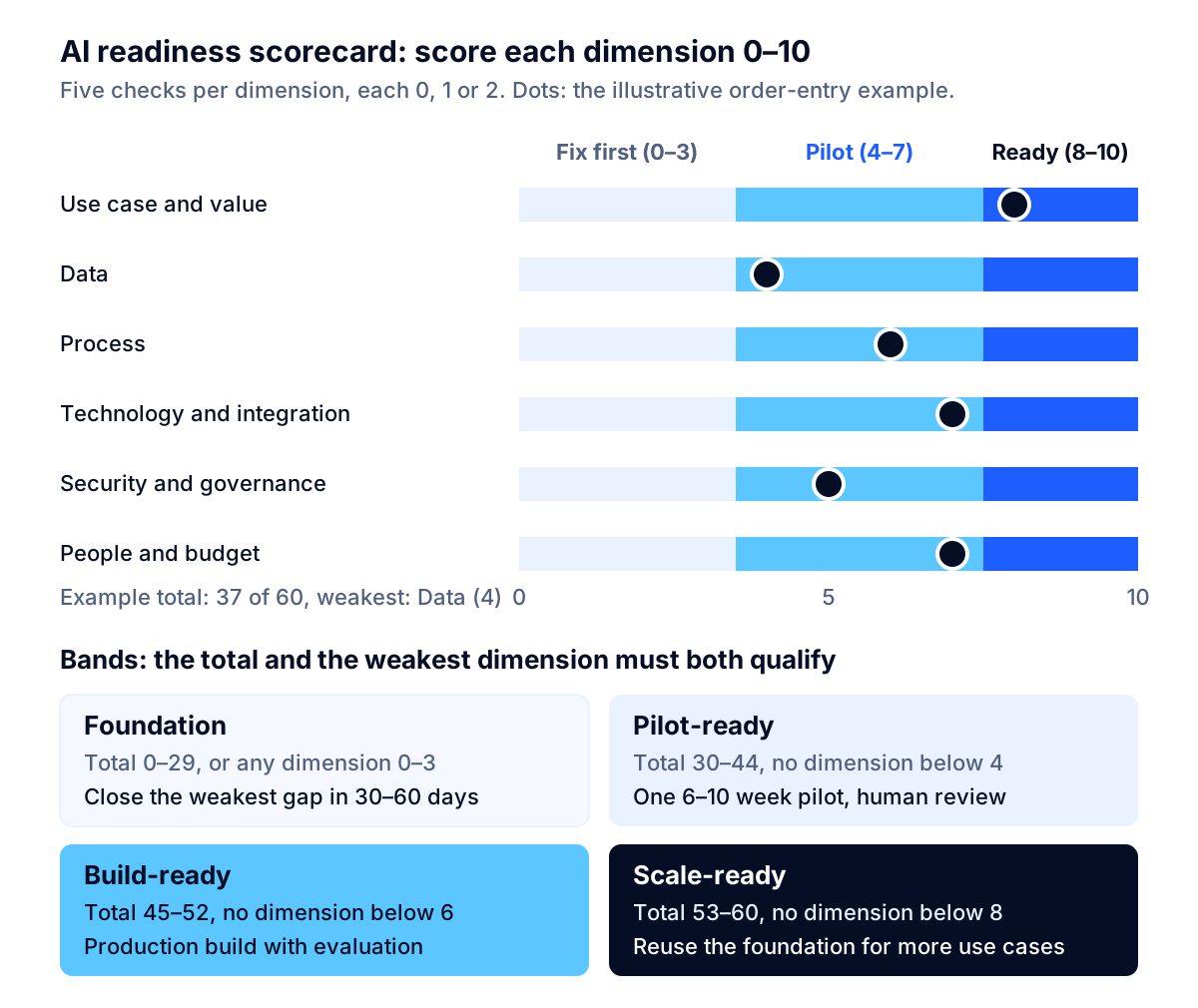
| Band | Total (of 60) | And weakest dimension | What it means | What to do next |
|---|---|---|---|---|
| Foundation | 0–29 | Any dimension at 0–3 | The use case would fail for reasons unrelated to AI | Spend 30–60 days closing the weakest dimension; allow only approved off-the-shelf tools under your use policy |
| Pilot-ready | 30–44 | No dimension below 4 | A scoped test can produce real evidence | Run one 6–10 week pilot with a person reviewing every output and a fixed success threshold |
| Build-ready | 45–52 | No dimension below 6 | Production is realistic for this use case | Build with evaluation, monitoring and the integrations the pilot proved |
| Scale-ready | 53–60 | No dimension below 8 | You can repeat this | Add the second and third use cases on the same data, security and integration foundation |
These bands are our recommendation, calibrated for mid-sized companies doing their first or second AI project. They are not an industry standard, and you should adjust them if your use case is high risk. A use case that affects customers' money, health, employment or legal rights should meet the Build-ready bar in the security and governance dimension before it even enters a pilot with real customers.
What to fix first, by weakest dimension
- Use case and value is weakest: go back to the workflow list and pick something more frequent and measurable. Do not try to rescue a vague idea with better technology.
- Data is weakest: fix access first (an export or API), then quality on the fields the use case needs, not across the whole database.
- Process is weakest: document the real process, count exceptions and write decision rules. This work pays off even if you never deploy AI.
- Technology is weakest: solve identity and permissions before integrations; an AI system that ignores access rights is a security incident waiting to happen.
- Security and governance is weakest: publish an acceptable use policy and an approved tools list within two weeks. It is the fastest gap to close and closes real risk.
- People and budget is weakest: secure a sponsor and protected expert time before spending on software. Unfunded operations are how working pilots fail in month four.
Why data readiness is the dimension most companies overrate
Ask a leadership team whether its data is ready for AI and most will say "mostly". Pull 100 records and the answer usually changes. The research backs this up.
In a Gartner survey of 1,203 data management leaders conducted in July 2024, 63% of organizations either did not have or were unsure whether they had the right data management practices for AI. Gartner predicts that through 2026, organizations will abandon 60% of AI projects unsupported by AI-ready data. Its guidance is blunt: "if the data has issues, then the data is not ready for AI."
The 2026 picture has not changed much. Informatica's CDO Insights 2026 survey found that 57% of data leaders call data reliability a top barrier, and three out of four organizations say their governance has not kept pace with AI adoption.
The 100-record test
You can test data readiness for a use case in an afternoon:
- Pull 100 recent, real records the AI would use, chosen at random rather than hand-picked, plus 10–20 known difficult cases.
- List the fields the use case needs. Ignore the rest of the database.
- Check each record by hand for missing values, wrong values, inconsistent formats, duplicates and information that lives outside the system (in an email or someone's head).
- Count the failures. If more than about one in ten records needs a person to find or fix information, the AI will inherit that problem, and that is a Data score of 0 or 1 on check 2.4.
- Write down where the missing information really lives. That is your fix list, and often the most valuable output of the whole assessment.
Gartner's point that AI-ready data is "not one and done" applies here too: the data that serves a support assistant is not the data that serves a pricing model. Run the test again for each new use case.
Unstructured data needs its own check
For generative AI use cases, the "data" is often documents: policies, contracts, product manuals, past tickets. Readiness checks for documents are different from database checks. Ask whether there is one current version of each document, whether someone owns keeping it current, whether access permissions are recorded, and whether the documents actually contain the answers people ask for. An assistant that retrieves an outdated policy is worse than no assistant. The joint CISA, NSA and FBI guidance on AI data security, published May 22, 2025, also treats the integrity of data across the AI lifecycle as a security question, not only a quality one.
Is my company ready for AI if our processes are outdated?
This is the question decision-makers ask most often in forums and in discovery calls, usually in some form of "we still run on email and spreadsheets; where do we even start?" The honest answer is that outdated processes lower your score in the Process and Data dimensions, but they do not disqualify you. They change what your first project should be.
Three patterns work well for companies in this position:
- Fix the input, then add AI. If orders, requests or claims arrive in ten formats, a structured intake form or a single shared inbox with consistent tagging can raise your Process score by several points in weeks. AI then has a consistent input to work with.
- Use AI to extract, not to decide. Reading documents and emails and filling in structured fields is a well-proven, lower-risk first use, as long as a person checks the result. It also produces the clean data you were missing.
- Build the small system you lack. If the real problem is that your process lives in a spreadsheet nobody trusts, a small custom application may deliver more value than AI, and it makes the next AI project far easier.
What does not work is buying an AI platform in the hope that it will impose order on a disorganized process. AI tools amplify the process they sit in; a messy process produces messy results faster.
Key takeaway: A low Process score is a sequencing signal, not a verdict. Make the workflow consistent first and AI becomes cheaper, safer and easier to measure.
Security and governance: the fastest gaps to close
Your staff are almost certainly using AI already, whether or not you have a policy. Microsoft and LinkedIn's 2024 Work Trend Index, based on about 31,000 knowledge workers in 31 markets, found that 75% of knowledge workers used AI at work and 78% of AI users brought their own AI tools to work, rising to 80% at small and medium-sized companies. The same report found that 60% of leaders worried their organization's leadership lacked a plan and vision to implement AI.
Unsanctioned use has a measurable cost. IBM's Cost of a Data Breach Report 2026, conducted with the Ponemon Institute, put the global average cost of a breach at a record $4.99 million, up 12%. According to Baker Donelson's summary of the report, US breaches averaged $11.5 million, incidents involving employees' shadow AI more than doubled to 43% (from 20% in 2025) and cost $5.39 million on average, 68% of breached organizations lacked AI governance policies, and 92% of organizations that had an AI-related incident lacked proper AI access controls.
Those numbers describe breached organizations, not all companies, so treat them as a picture of what goes wrong rather than a probability for you. The practical lesson is that three of the five Security and governance checks can be closed quickly:
- Publish an acceptable use policy with an approved tools list (check 5.1). Most of the risk from personal AI accounts comes from people not knowing what is allowed.
- Write a one-page data classification for AI (check 5.2): which data may go into which approved tools, and which data never leaves your systems.
- Name a risk owner and a lightweight intake step (check 5.4): a short form for any new AI use, reviewed within a week. This mirrors the NIST "Govern" function without creating a bureaucracy.
The other two checks, vendor terms and the regulatory map, take longer and need legal input, especially in health care, financial services and insurance. If you work in a regulated industry, our AI compliance team can help you map the obligations; your counsel should confirm them. For generative AI specifically, NIST's Generative AI Profile (NIST AI 600-1, released July 26, 2024) lists risks such as confabulation and data privacy alongside suggested actions. NIST has said the AI RMF 1.0 itself is being revised, so check its framework page for the current version before you adopt its language.
What does an AI readiness assessment cost and how long does it take?
For one use case run internally, the main cost is people's time. Based on the two-week process above, we estimate roughly 40 to 80 hours of internal effort in total: the business owner and two practitioners for the baseline and process map, an IT person for data access and the sample, a security or compliance person for classification and vendor terms, and a few hours from the sponsor to review the result.
To put a number on it, the Bureau of Labor Statistics reports a median wage for data scientists of $120,230 a year, or $57.80 an hour, as of May 2025. Using that hourly rate as a rough proxy for the blended cost of the people involved, 40 to 80 hours is about $2,300 to $4,600 in wages, before benefits and overhead. Your real figure depends on who takes part; a team weighted toward executives costs more per hour, one weighted toward operations staff less.
| Approach | Typical elapsed time | Effort | When it fits |
|---|---|---|---|
| Self-run, one use case (this checklist) | About 2 weeks | 40–80 internal hours | First AI project; a team willing to pull data and map the process |
| Self-run, then external review | 2–3 weeks | Same, plus a short review | You want a second opinion on gaps and costs before committing a budget |
| Company-wide assessment | 6–12 weeks | Much higher | Large organizations planning a portfolio; usually less useful for mid-sized firms |
We do not quote prices for external assessments here; they vary widely with scope. The question to ask any provider is whether the output is a decision about specific use cases, with evidence, or a maturity score. Only the first is worth paying for.
Key takeaway: A readiness assessment for one use case costs a few thousand dollars of internal time. A failed pilot on an unready use case costs a quarter or more of a team's attention, plus the build.
A worked example: scoring an order-entry assistant
The following example is illustrative. It describes a hypothetical company to show how the scoring works, not a client.
A distributor with about 200 employees receives several hundred purchase orders a week by email, as PDFs, spreadsheets and plain text. Three customer service staff re-key them into the ERP. The operations director wants an AI assistant that reads each order and drafts the ERP entry for a person to approve.
| Dimension | Score | Why |
|---|---|---|
| Use case and value | 8 | Owner named, volume and minutes per order measured; error cost estimated from credit notes; threshold agreed; value not yet checked at conservative assumptions and the review step only partly defined (1.4 and 1.5 scored 1) |
| Data | 4 | Orders reachable via the shared inbox; ERP has an API; but a 100-order sample showed about one in six orders used customer part numbers not in the ERP (2.4 scored 0); no labeled set yet (2.5 scored 1) |
| Process | 6 | Process mapped; exceptions counted; review step clear; decision rules for substitutions exist only in staff memory (3.3 scored 0) |
| Technology and integration | 7 | ERP API and SSO in place; approved cloud tenant; no one assigned to maintain the integration (4.5 scored 0) |
| Security and governance | 5 | Use policy exists but no approved tools list; customer contracts reviewed; no AI intake step (5.4 scored 0) |
| People and budget | 7 | Sponsor and expert time secured; run costs not yet budgeted (6.4 scored 1) |
| Total | 37 of 60 | Weakest dimension: Data, at 4 |
No hard stops apply. A total of 37 with no dimension below 4 puts this use case in the Pilot-ready band, but only just. The gap list writes itself: build a customer-part-number cross-reference table (which fixes the main data error and is useful on its own), write down the substitution rules, label 150 past orders with the correct ERP entry as the evaluation set, assign an integration owner and add an approved tools list to the policy. With those closed, the pilot can test the real question: can the assistant draft orders accurately enough that approving them is faster than typing them?
Notice what the assessment did not say. It did not say the company is "AI-mature" or "AI-beginner". It said this use case is ready for a careful pilot after five specific fixes, and the most important fix is not AI at all.
Mistakes that make readiness assessments useless
- Scoring the whole company. An average across departments hides the one use case that is ready and the five that are not.
- Accepting answers without evidence. "Our data is pretty clean" is a 0 until someone has looked at a sample.
- Letting the total hide the weakest link. A strong total with one dimension at 2 is a project that will fail at that dimension.
- Assessing technology first. Platform comparisons are the most enjoyable part and the least predictive of success.
- Leaving out the people who do the work. They know where the exceptions are; the official process map does not.
- Treating readiness as permanent. Re-score each use case before you scale it, and re-check vendor terms and regulations at least yearly, because both change.
- Ending with a score instead of a decision. Every assessment should end with "pilot", "build", "fix these gaps first" or "not this use case", with owners and dates.
If you are deciding between configuring an existing AI product and building something custom once a use case is ready, our build vs buy AI agents decision matrix picks up where this checklist ends.
Where this leaves you
An AI readiness assessment is worth doing because it is cheap and because it finds the deal-breakers before you have spent money on a build. Score one workflow at a time on the 30 checks, attach evidence to every answer, apply the four hard stops, and let your weakest dimension decide the next step. For most mid-sized companies the result will be a short gap list in data, process ownership and governance, plus one use case that is ready for a carefully measured pilot.
Run the checklist with your own team first. If you want a second opinion on the scores, the gaps or the business case, talk to a specialist; a free discovery call is a good way to pressure-test a use case before you commit a budget. You can also read how we approach custom AI development and AI agent development, or start from the Fleurant AI home page.
Frequently asked questions
What is an AI readiness assessment?
An AI readiness assessment checks whether the conditions for a specific AI use case to deliver value are in place: a clear business case, usable data, a process that can absorb the change, systems that can be integrated, security and governance controls, and people and budget to run it. It is most useful when it scores one use case at a time and ends with a decision and a short list of gaps to close, not a maturity label.
How long does an AI readiness assessment take?
For one use case at a mid-sized company, about two weeks of elapsed time and roughly 40 to 80 hours of internal effort across the business owner, IT, security and the people who do the work today. Most of that time goes into pulling a data sample, mapping the process as it really runs and checking vendor terms. Company-wide assessments take longer and are usually less useful.
How do I know if my company is ready for AI?
Pick one workflow and score it on the 30 checks in this article. If you hit any of the four hard stops (no business owner, no right to use the data, regulated data without vendor coverage, or no baseline to measure against), you are not ready for that use case yet. Otherwise, a total of 30 or more with no dimension below 4 out of 10 means you are ready for a scoped pilot.
What is the most common reason companies are not ready for AI?
Data. Gartner's survey of 1,203 data management leaders found that 63% of organizations either do not have or are unsure whether they have the right data management practices for AI, and Gartner predicts that organizations will abandon 60% of AI projects unsupported by AI-ready data through 2026. In Informatica's 2026 survey of 600 data leaders, 57% called data reliability a top barrier.
Can a company with outdated processes start using AI?
Yes, but start by fixing or documenting one process, not by buying a platform. AI amplifies whatever process it sits in, so a workflow that lives in inboxes and personal spreadsheets usually needs consistent inputs and written decision rules first. Often the right first project is a small piece of custom software or a cleaned-up data flow, with AI added once the process is stable.
Should we use a free online AI readiness quiz?
A quiz can start a conversation, but most score the whole company on general questions and end with a sales call. A useful assessment scores a specific use case, requires evidence for each answer (a data sample, a process map, a signed vendor agreement), and produces a decision. You can run the checklist in this article yourself, then ask a specialist to pressure-test the gaps.
Sources
- Large Firms With at Least 20 Employees Biggest AI Users, U.S. Census Bureau
- AI adoption in business grows steadily but unevenly, Federal Reserve Bank of Minneapolis
- Lack of AI-Ready Data Puts AI Projects at Risk, Gartner
- CDO Insights 2026: AI adoption accelerates, but trust and governance lag behind, Informatica
- AI at Work Is Here. Now Comes the Hard Part (2024 Work Trend Index), Microsoft and LinkedIn
- Cost of a Data Breach Report 2026, IBM
- Ten Takeaways from IBM's 2026 Cost of a Data Breach Report, Baker Donelson
- AI Risk Management Framework, National Institute of Standards and Technology
- NIST AI RMF Playbook, NIST Trustworthy and Responsible AI Resource Center
- AI Data Security: Best Practices for Securing Data Used to Train and Operate AI Systems, Cybersecurity and Infrastructure Security Agency
- Occupational Outlook Handbook: Data Scientists, U.S. Bureau of Labor Statistics


