Custom AI
AI Receptionist for Small Business: What Works and What It Costs
An honest AI receptionist for small business guide: what callers tolerate, real monthly costs from list prices, the US rules that apply, and a call flow that works.

In this article
- What an AI receptionist actually is (and the four ways to get one)
- What AI receptionists handle well
- Where AI receptionists frustrate callers
- How much does an AI receptionist for small business cost?
- The US rules that apply to AI phone answering
- How to design the call flow so callers don't hang up angry
- Buy a product, assemble a platform, or build custom?
- A 30-day pilot plan and the metrics that matter
- Common mistakes to avoid
- Next steps
- Frequently asked questions
- Sources
Short answer: an AI receptionist for small business is worth it when it does a few things very well and gets out of the way the moment a caller wants a person. Answering hours and location questions, booking and rescheduling, taking detailed messages and covering after-hours calls are the jobs that work today. Anything urgent, emotional, financial or medical should go to a human, fast.
The cost is rarely the problem. At published list prices in October 2026, a packaged AI receptionist costs roughly $79 to $299 a month for most small offices, a live answering service runs $250 to $1,725 a month, and a full-time receptionist costs an employer about $4,500 a month once benefits are included. The real risk is caller experience. Customers punish a bad automated experience quickly, and they remember it.
This guide gives you what most vendor pages leave out: survey data on what callers actually tolerate, a cost comparison built from published prices and federal wage data, the US rules on disclosure, recording, outbound calls and patient data, a call flow you can copy, and a decision matrix for buying a product versus building a custom voice agent.
What an AI receptionist actually is (and the four ways to get one)
An AI receptionist is software that answers your business phone line, understands what the caller says, responds in a synthetic voice, and takes an action: answering a question, booking an appointment, taking a message or transferring the call. Under the hood, it chains speech recognition, a language model that decides what to say and do, and text-to-speech, connected to a phone number and, ideally, to your calendar and customer records.
The market blurs four very different options. Knowing which one a vendor is selling is the first step to comparing prices honestly.
| Option | What you get | How it is priced | Best fit |
|---|---|---|---|
| Packaged AI receptionist | A ready-made assistant you configure with your hours, services and FAQs, usually with calendar integrations | Monthly plan with a call, caller or minute allowance | Most service businesses with standard booking and messages |
| Developer voice platform | Building blocks (telephony, speech, model, voice) that your team or a vendor assembles into an agent | Per minute, by component | Teams that need custom logic or deep integrations |
| Custom voice agent | A purpose-built agent integrated with your systems, evaluated on your real calls, sometimes self-hosted | Build project plus running costs | High volume, unusual workflows, regulated data |
| Human answering service | Live receptionists, often with some automation in front | Monthly plan by minutes or calls | Callers who expect a person, complex or sensitive calls |
Many products now mix these. Some human answering services put an AI layer in front, and some AI products offer paid transfer to a live person. Ask exactly who answers, when, and what you pay when a call moves from one to the other.
Key takeaway: "AI receptionist" can mean a $79-a-month app or a $60,000 custom build. Pin down which one you are being quoted before you compare numbers.
What AI receptionists handle well
The tasks that work share three traits: the caller's goal is clear, the answer comes from a short list of facts or a calendar, and a mistake is easy to catch and cheap to fix.
Answering the same ten questions. Hours, location, parking, services offered, whether you take a particular insurance plan, rough pricing you are willing to publish. These make up a large share of calls at many small businesses, and staff answer them dozens of times a week.
Booking, rescheduling and cancelling. This is where most of the value sits, but only if the assistant writes directly into your real scheduling system. An assistant that takes a "booking request" for staff to re-enter is a message taker with extra steps.
Structured intake. A home services company needs the address, the problem, how urgent it is and a callback number. A law office needs the matter type and conflicts information. An assistant can collect these consistently every time, which humans juggling a busy front desk often do not.
After-hours and overflow coverage. Most of the measurable gain comes from calls that would otherwise go to voicemail: evenings, weekends, lunch breaks and the moments when every line is busy. A caller who reaches something useful at 9 p.m. is better served than one who reaches a full mailbox.
Routing. "Sales, service or billing?" is easy for an assistant when the categories are clear and the transfer targets are reliable.
Notice what is missing from that list: negotiating, diagnosing, handling complaints, collecting payments and giving advice. Those are where things go wrong.
Where AI receptionists frustrate callers
The best evidence on caller tolerance comes from Gartner's survey of 3,566 B2B and B2C customers, conducted in February and March 2026. It found that 87% of customers say it is essential for companies using generative AI to offer a way to reach a human, while 50% said their interactions are easier when companies use it. Among customers unwilling to use AI, the most common thing that would change their mind was the ability to switch to a human when needed.
A second release from the same survey is the one every small business owner should read before launch. While 49% of customers said they would have been willing to use a chatbot, only 7% used one in their most recent service interaction, and only 27% would try a chatbot again after a negative experience. Gartner's advice to service leaders is blunt: "prioritize reliability over reach." Those figures cover chatbots and generative AI service broadly rather than phone assistants alone, but the lesson transfers directly: a caller who has one bad experience with your assistant will route around it next time, often by not calling.
These are the specific failure modes behind those numbers on the phone.
No clear way out
The single most damaging design choice is making the assistant a gate. If a caller says "representative" and gets a menu, or asks for a person and hears "I can help with that," trust is gone. Gartner's analyst guidance is that AI should not be a mandatory first step for every issue, and that when it cannot resolve something with high confidence, it should provide a visible path to a human and pass along the context already collected.
Pauses that feel like a dropped call
Human conversation is fast. A study of ten languages published in the Proceedings of the National Academy of Sciences found that the mean gap between one speaker finishing and the next starting was +208 milliseconds, with an overall mode of 0 ms. Even the slowest language in the sample, Danish, averaged +469 ms. Against that baseline, an assistant that takes two seconds to respond feels broken, and callers start talking over it or say "hello?"
Latency comes from every link in the chain: speech recognition, the model, any lookups in your systems, and voice generation. Ask vendors for measured response times on real phone calls, not demo recordings, and test during your busiest hours.
Mishearing the details that matter
Names, street addresses, email addresses and phone numbers are where voice systems make their most expensive mistakes, because they are unpredictable strings that sound alike over a phone line. A wrong digit in a callback number turns a booked job into a lost customer. The fix is design, not hope: read back every critical detail, spell names letter by letter when needed, and confirm by text message after the call.
Interruptions, noise and accents
Callers interrupt, call from job sites and cars, put the phone on speaker and talk to someone else mid-sentence. Good systems handle being interrupted; weaker ones keep talking over the caller. Test with real recordings from your own customer base, including older callers and people with strong regional or non-native accents, before you put the assistant on your main line.
Older and less confident callers
Owners often ask whether older customers will hate it. There is no reliable public data that isolates older callers' reaction to AI phone assistants specifically, so be wary of anyone who quotes one. The practical answer is the same design rule: if someone sounds confused, repeats themselves or asks for a person, transfer them. Measure hang-ups and transfer requests by caller segment during the pilot rather than guessing.
Emergencies
For a plumber, HVAC company, property manager or medical practice, some calls are emergencies. An assistant that cheerfully books a gas leak for next Tuesday is a liability. Define emergency words and situations explicitly, route them to a live person or an on-call line every time, and test them more than anything else.
Key takeaway: Callers forgive an assistant that is honest about being automated, answers quickly and hands them to a person when asked. They do not forgive one that traps them.
How much does an AI receptionist for small business cost?
Here are the published list prices, all checked in October 2026. Prices change often, so confirm them before you budget.
The inputs
Packaged product (example: Goodcall). Goodcall's pricing page lists Starter at $79 a month for 100 unique customers (about 150 calls), Growth at $129 for 500 unique customers, and Scale at $299 for 2,000, with overage of 79¢, 26¢ and 15¢ per extra customer respectively. Billing is by unique caller, and call length does not affect the bill.
Developer platform (example: Retell AI). Retell's published pricing is by component: $0.055 a minute for its voice infrastructure, $0.015 a minute for standard text-to-speech voices, $0.015 a minute for telephony, and a language-model charge that ranges from $0.008 a minute for a small model to $0.064 a minute for the models it marks as recommended. Retell phone numbers are $2 a month. Add those up and a call minute costs roughly $0.09 to $0.15 before add-ons such as knowledge base access (+$0.005 a minute).
Other developer platforms price similarly. Vapi lists $0.05 a minute for hosting, with transcription, model and voice billed separately by each provider. If you bring your own telephony, Twilio's US voice pricing lists inbound local calls at $0.0085 a minute plus $1.15 a month per number, recording at $0.0025 a minute, and transcription at $0.05 a minute.
Live answering service (example: Ruby). Ruby's pricing page lists $250 a month for 50 receptionist minutes, $395 for 100, $720 for 200 and $1,725 for 500, with larger plans by quote.
Staff receptionist. The Bureau of Labor Statistics reports a median wage of $38,010 a year, or $18.27 an hour, for receptionists as of May 2025. Benefits add more: in the June 2026 Employer Costs for Employee Compensation release, wages made up 70.0% of private-industry employer costs. Dividing $38,010 by 0.70 gives a loaded cost of about $54,300 a year, or roughly $4,525 a month. That share covers all private-industry workers, so treat it as an approximation.
Two worked scenarios
The figure below compares monthly costs for two hypothetical offices. Assumptions: a small office receives 200 calls a month averaging 2.5 minutes (500 minutes) from about 140 distinct callers; a busy office receives 1,500 calls averaging 3 minutes (4,500 minutes) from about 1,000 callers. Developer platform usage is priced at $0.149 a minute ($0.055 infrastructure + $0.015 voice + $0.064 recommended model + $0.015 telephony) plus a $2 number.
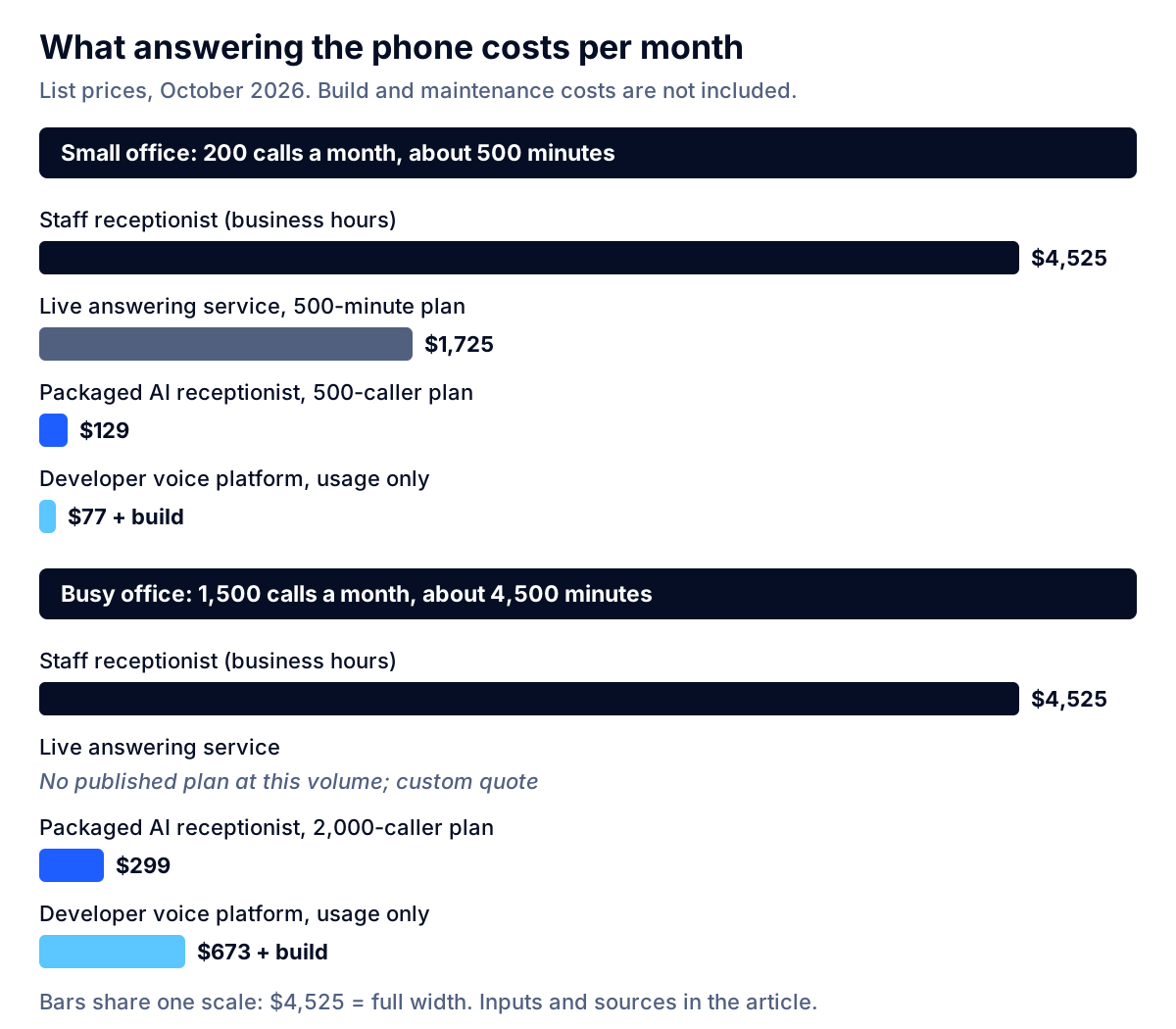
| Option | Small office (200 calls) | Busy office (1,500 calls) | What the number leaves out |
|---|---|---|---|
| Staff receptionist | ~$4,525 | ~$4,525 | Covers about 40 of the week's 168 hours; also does in-person work |
| Live answering service | $1,725 (500-minute plan) | Custom quote | Overage terms; setup fees |
| Packaged AI receptionist | $129 (Growth plan) | $299 (Scale plan) | Your time to configure and review; integration limits |
| Developer voice platform | ~$77 usage | ~$673 usage | Build and maintenance, which dominate the total |
Three things stand out.
First, packaged products are cheaper per call than raw developer platforms at small-business volumes. At 1,500 calls, the per-caller plan costs less than half of the per-minute usage alone, before anyone has written a line of code. Per-minute pricing rewards short calls; per-caller pricing rewards long ones. Model your own call mix both ways.
Second, the AI is not competing with the receptionist on price alone. A person covers business hours, handles walk-ins and does the parts of the job that are not on the phone. The comparison that usually matters is AI versus voicemail after hours, and AI versus a live answering service for overflow.
Third, the hidden cost is your attention. Someone has to write the knowledge the assistant uses, review call logs every day for the first month, fix the answers it gets wrong and keep hours, prices and staff schedules current. Budget two to four hours a week of an owner's or manager's time early on, falling once things settle. That is a planning estimate, not a vendor figure; track your actual time.
What a custom voice agent costs to build
When a packaged product cannot do the job, the cost moves from a subscription to a project. In our AI agent development cost breakdown, a production agent for one workflow with two or three integrations, an evaluation set and monitoring is a planning estimate of 8 to 16 person-weeks, or about $30,000 to $96,000 depending on the rate. A voice receptionist sits in that tier or above it, because voice adds telephony, latency tuning, transfer logic and testing on real audio. Running costs then follow the per-minute figures above.
That is a lot of money for answering the phone. It makes sense when the assistant does real work inside your systems (checking job availability against technician schedules, quoting from your price book, updating a patient or customer record) or when data must stay inside infrastructure you control.
The US rules that apply to AI phone answering
There is no single federal law for AI receptionists, but several existing rules apply, and the states are moving. This is an overview, not legal advice; confirm the specifics for your states and industry with counsel.
Telling callers they are talking to AI
Utah has the most specific statute. Under S.B. 226, which took effect May 7, 2025 (summarized here by Davis Wright Tremaine), a business using generative AI in a consumer transaction must disclose that the person is interacting with AI and not a human if the person asks, and the question must be a "clear and unambiguous request." For licensed regulated occupations, the duty is proactive in high-risk interactions, and the disclosure must be given verbally at the start of a voice interaction. The law includes a safe harbor for AI that clearly and conspicuously discloses, at the outset and throughout, that it is AI and not human. Utah's Artificial Intelligence Policy Act is currently set to expire on July 1, 2027, so watch for changes.
Whatever your state requires, a one-sentence disclosure at the start of the call costs nothing and removes the worst outcome: a caller discovering halfway through that they were not speaking to a person.
Recording and transcription consent
Nearly every AI receptionist records or transcribes calls, because it has to process the audio. Some states require the consent of every party. California Penal Code Section 632 prohibits recording a confidential communication without the consent of all parties, with a fine of up to $2,500 per violation for a first offense.
The AI vendor can be pulled in too. In Taylor v. ConverseNow Technologies, a federal court in the Northern District of California denied a motion to dismiss on August 11, 2025, allowing California Invasion of Privacy Act claims under Sections 631 and 632 to proceed against a company whose AI voice assistant answers restaurant phone orders. The plaintiff alleged her name, address and card details were captured without her knowledge or consent. Those are allegations, not findings, but the case shows plaintiffs' lawyers are testing these systems. Put a clear recording notice at the very start of each call, before processing begins.
Outbound calls: callbacks and reminders
Many AI receptionists also call people back, confirm appointments or chase missed calls. Outbound is where federal law bites hardest. In a Declaratory Ruling adopted February 2, 2024 and released February 8, 2024, the FCC held that the Telephone Consumer Protection Act's restrictions on "artificial or prerecorded voice" calls cover current AI technologies that generate human voices. Such calls need the called party's prior express consent unless an exemption applies, telemarketing calls need prior express written consent, and the FCC said the law does not carve out technologies that claim to be the equivalent of a live agent. Calls must also identify the business responsible at the beginning.
In July 2024 the FCC proposed further rules that would require callers using AI-generated voices to disclose that fact at the beginning of each call. Check the current status with counsel before launching outbound AI calls.
Patient and health information
If you are a HIPAA covered entity, such as a medical, dental or therapy practice, every vendor that touches patient information on your behalf matters. HHS guidance says a covered entity may use a cloud service for electronic protected health information provided it enters into a HIPAA-compliant business associate agreement with that provider. It also says a provider that stores such data is a business associate rather than a mere "conduit," even if it never views the information. In practice, that means a BAA with the AI receptionist vendor and confirmation that its speech, model and telephony subprocessors are covered too. Some platforms charge for this; Vapi listed a HIPAA compliance add-on at $2,000 a month in October 2026. Our HIPAA-compliant AI development checklist covers the rest of the controls.
Payments
Do not let a general-purpose voice assistant take card numbers by voice. Card data in call recordings and transcripts expands your payment security obligations considerably. Send a secure payment link by text instead, or transfer to a payment flow built for the purpose.
Key takeaway: Disclose up front, announce recording before it starts, get consent before any AI callback, and sign a BAA if patient data is involved. Then have counsel check the details for your states.
How to design the call flow so callers don't hang up angry
Most bad AI receptionist experiences are design failures, not technology failures. The flow below puts the handoff checks before automation, so the assistant only handles what it should.
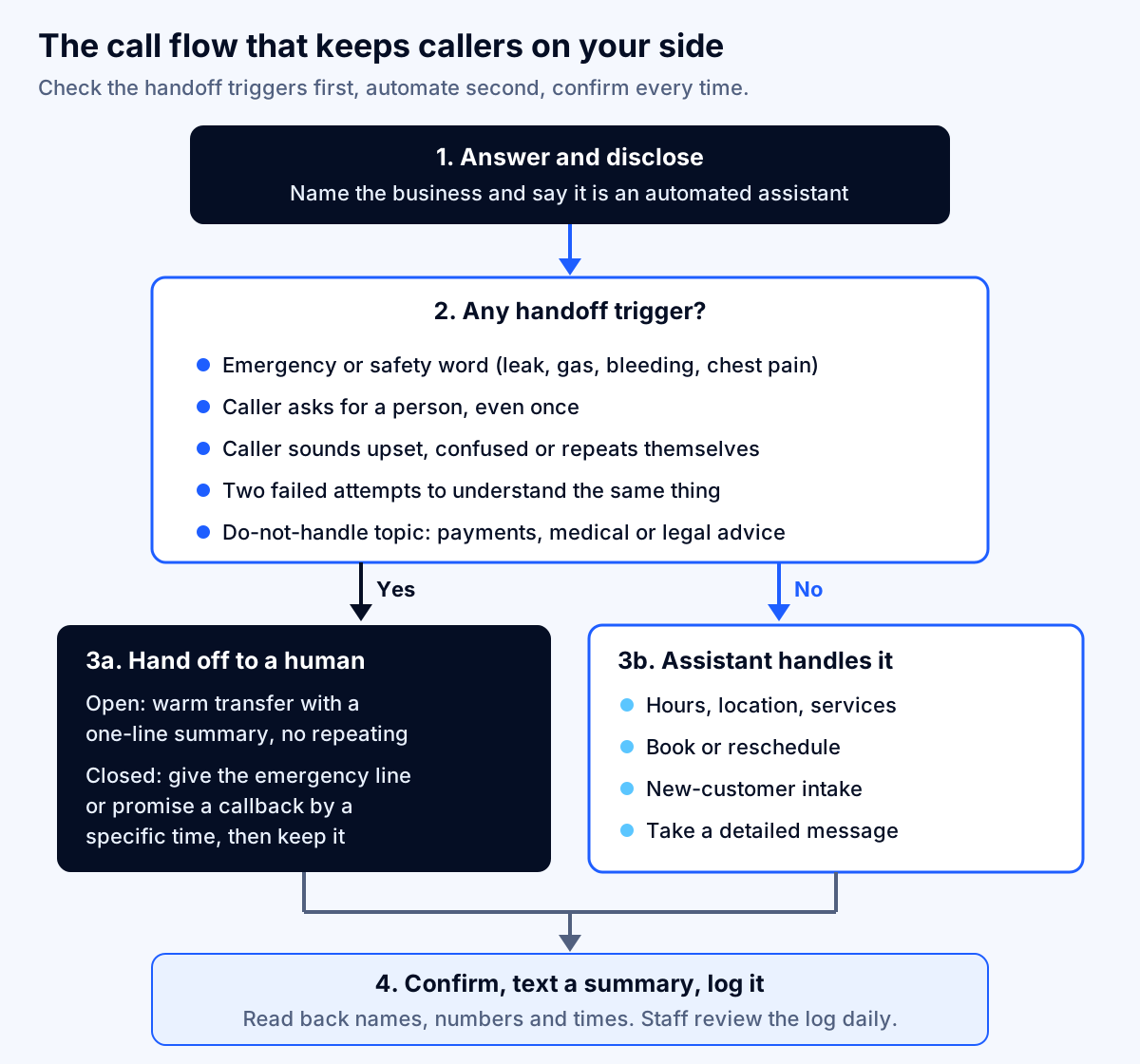
1. Answer and disclose in one breath
Name the business, say the caller is speaking with an automated assistant, mention recording if applicable, and offer a person. For example: "Thanks for calling Riverside Plumbing. You're speaking with our automated assistant, and this call is recorded. I can book a visit or take a message, or connect you with the team." Keep it under about ten seconds.
2. Check the handoff triggers first
Before the assistant tries to help, it should be listening for reasons not to:
- Emergency or safety words specific to your business: leak, flooding, gas, no heat, bleeding, chest pain.
- A request for a person, even once, even politely.
- Signs of distress or confusion: raised voice, repeated statements, long silences.
- Two failed attempts to understand the same detail.
- Do-not-handle topics: payments, complaints, medical or legal advice, anything you have decided only staff should touch.
3a. Transfer warmly, or promise a specific callback
During open hours, transfer to a person with a one-line summary so the caller does not repeat themselves. When nobody is available, say so, give an emergency number if relevant, and promise a callback by a specific time. Then keep that promise; a broken callback promise is worse than voicemail.
3b. Let the assistant handle the routine
Hours, directions, booking, rescheduling, intake and messages. Keep the list short at launch and add tasks only after the existing ones work reliably, which is exactly Gartner's "reliability over reach" advice.
4. Confirm, text and log
Read back names, numbers, addresses and appointment times. Send the caller a text summary. Log every call with the transcript, the outcome and whether a transfer happened, and have someone review the log daily for the first month. If you operate in a regulated industry, our guide to AI audit trail requirements explains what to keep and for how long.
Buy a product, assemble a platform, or build custom?
Use this decision matrix. Score honestly; most small businesses land in the first column.
| Question | Buy a packaged product | Assemble on a developer platform | Build a custom voice agent |
|---|---|---|---|
| Monthly calls | Under ~2,000 | Any | High enough to justify a $30,000+ build |
| Booking system | Supported by the product's integrations | Has an API the product does not support | Custom or legacy system, or several systems |
| Call logic | Standard FAQs, booking, messages | Some custom branching | Quoting, eligibility checks, multi-step workflows |
| Data rules | Vendor's standard terms are acceptable | Need to choose specific model or region | Data must stay in your environment, or strict regulatory controls |
| In-house skills | None needed | Developer time for setup and upkeep | A vendor or team accountable for the full system |
| Time to live | Days | Weeks | A working prototype in 1–2 weeks; production in roughly 2–4 months |
A few practical notes on each route.
Buying is the right first move for most offices. Run it on after-hours calls first, then overflow, then the main line once the numbers look good.
Assembling suits businesses with a developer on staff or on retainer and a requirement the products cannot meet, such as a niche scheduling system. Remember that per-minute usage is only part of the bill; someone has to maintain prompts, integrations and testing.
Building custom is justified when the assistant does work that is specific to how you operate, or when data control is non-negotiable. At Fleurant AI our custom AI development teams have delivered an on-premise voice assistant with responses in under a second, which is the kind of requirement that pushes a project off the shelf. For a broader view of where custom agents pay back, see AI agents for small business.
A 30-day pilot plan and the metrics that matter
Do not judge an AI receptionist by its demo. Run a short, measured pilot.
Week 1: Prepare. Write down your top 20 call reasons from the last month of calls or voicemails. Decide which the assistant will handle and which always go to staff. Write the handoff triggers and the emergency list. Draft the greeting with the disclosure and recording notice, and have counsel review it if you are in a regulated field or an all-party-consent state.
Week 2: Test without customers. Have staff and friends call with real scenarios, including difficult ones: background noise, interruptions, misspelled names, angry callers, emergencies, requests for a person. Fix every failure before going live.
Week 3: After-hours only. Put the assistant on evenings and weekends, where the alternative is voicemail. Review every call log daily.
Week 4: Add overflow. Route calls to the assistant only when staff are busy. Compare results against the after-hours week.
Track these numbers, and decide in advance what "good" looks like:
| Metric | What it tells you | Warning sign |
|---|---|---|
| Task completion rate | Share of calls where the caller's goal was met (booked, answered, message taken) | Falling week over week |
| Transfer and callback requests | How often callers want a person | Rising, or concentrated in one call type |
| Early hang-ups | Callers who leave in the first 15 seconds | Higher than your voicemail abandonment rate |
| Data accuracy | Errors in names, numbers, addresses and times found on review | Any error in callback numbers |
| Callback promises kept | Whether staff follow up when promised | Below 100% |
| Complaints | Direct feedback about the phone experience | Any pattern at all |
Notice that "containment," the share of calls the AI handles without a person, is not on the list as a goal. Pushing containment up is exactly how businesses create the trapped-caller experience that drives customers away. A high transfer rate on the right calls is a sign the system is working.
Common mistakes to avoid
- Launching on the main line first. Start after hours, where you can only improve on voicemail.
- Hiding the human option. If callers have to fight to reach a person, they will stop calling.
- Letting the knowledge go stale. An assistant quoting last year's prices or a former employee's schedule does more harm than voicemail.
- Skipping the read-back. Most costly errors are a wrong digit or a misheard street name.
- Ignoring outbound rules. Turning on automated AI callbacks without consent is the fastest way into TCPA trouble.
- Assuming the vendor covers compliance. A vendor's marketing page is not a BAA, and a "HIPAA-ready" badge is not a signed agreement.
- Measuring the wrong thing. Calls answered by AI is a vanity number. Calls resolved, with happy callers, is the real one.
Next steps
An AI receptionist is one of the most practical uses of AI for a small business, because the alternative is so often voicemail. Start with a packaged product on after-hours calls, design the handoffs before the automation, disclose clearly, and measure what callers actually experience. Move to a custom build only when your workflows, systems or data rules genuinely require it and your volume justifies the cost.
If you are weighing a custom voice agent, or want a second opinion on whether a product will meet your requirements, explore our AI agent development and AI compliance services, or talk to a specialist. We offer a free discovery call, and a specialist replies within one business day.
Frequently asked questions
How much does an AI receptionist cost for a small business?
Packaged AI receptionist products start well under $100 a month at list price. Goodcall, for example, listed plans at $79, $129 and $299 a month in October 2026, billed by unique caller rather than minute. Developer voice platforms bill per minute, about $0.09 to $0.15 a minute on Retell's published component prices, plus the cost of building and maintaining the agent. A live answering service runs $250 to $1,725 a month on Ruby's published plans.
Do AI receptionists annoy customers?
They do when they block access to a person. In a Gartner survey of 3,566 customers in early 2026, 87% said an option to reach a human agent is essential when a company uses generative AI, and only 27% would try a chatbot again after a bad experience. Callers tolerate an assistant that answers fast, handles a narrow set of tasks well, and transfers them the moment they ask.
Can an AI receptionist replace my front desk?
It can replace the phone-answering part of the job, especially after hours and during peaks, but rarely the whole role. A front-desk employee also greets walk-ins, handles paperwork, calms upset customers and fixes the problems the phone system creates. Most small businesses get the best result by letting the assistant take routine and after-hours calls while staff handle exceptions and callbacks.
Do I have to tell callers they are talking to AI?
There is no single federal rule for inbound calls, but some states require it. Utah's law requires disclosure when a caller clearly asks, and requires it at the start of the call for licensed occupations in high-risk interactions. Disclosing up front is also the simplest way to qualify for Utah's safe harbor and to keep caller trust. Confirm the rules for your states with counsel.
Is it legal for an AI receptionist to record calls?
Recording is legal with the right consent, but the consent rules vary by state. California's Penal Code Section 632 prohibits recording a confidential communication without the consent of all parties, with fines of up to $2,500 per violation. A clear notice at the very start of each call, before any recording or transcription begins, is the common safeguard. Have counsel review your greeting.
Can an AI receptionist be HIPAA compliant for a medical or dental office?
It can, but only if every vendor that creates, receives, maintains or transmits patient information on your behalf signs a business associate agreement. HHS guidance says a cloud service storing that data is a business associate even if it never views it. Some voice platforms charge extra for HIPAA support; Vapi listed a $2,000-a-month HIPAA add-on in October 2026.
Should I build a custom AI voice agent or buy a product?
Buy first unless you have a specific reason not to. Packaged products are cheaper per call than raw per-minute platforms at most small-business volumes. Build when the assistant must read and write to your own systems, follow unusual scheduling rules, keep data under your control, or meet a compliance requirement that off-the-shelf products cannot, and when the call volume justifies a build in the $30,000 to $96,000 range.
Sources
- Gartner Survey Finds 87% of Customers Say Companies Using GenAI for Customer Service Must Provide Access to a Human Agent, Gartner
- Gartner Survey Finds Only 27% of Customers Would Try a Chatbot Again After a Negative Experience, Gartner
- Universals and cultural variation in turn-taking in conversation, Proceedings of the National Academy of Sciences (via PubMed Central)
- Receptionists: Occupational Outlook Handbook, U.S. Bureau of Labor Statistics
- Employer Costs for Employee Compensation, June 2026, U.S. Bureau of Labor Statistics
- Declaratory Ruling, CG Docket No. 23-362 (FCC 24-17), Federal Communications Commission
- FCC Makes AI-Generated Voices in Robocalls Illegal, Federal Communications Commission
- Implications of Artificial Intelligence Technologies on Protecting Consumers from Unwanted Robocalls and Robotexts (Fact Sheet), Federal Communications Commission
- Utah Enacts Multiple Laws Amending and Expanding the State's Regulation of the Deployment and Use of Artificial Intelligence, Davis Wright Tremaine
- California Penal Code Section 632, California Legislative Information
- California Court Allows Privacy Claims Against AI Voice Assistant, Duane Morris
- Guidance on HIPAA & Cloud Computing, U.S. Department of Health and Human Services
- Retell AI Pricing, Retell AI
- Vapi Pricing, Vapi
- Programmable Voice Pricing (United States), Twilio
- Goodcall Pricing, Goodcall
- Ruby Pricing, Ruby


