AI Agents
How to Calculate AI Agent ROI: A CFO-Ready Model and Worksheet
How to calculate AI agent ROI your CFO will accept: the formulas, a baseline worksheet, a full cost ledger, risk adjustments and worked payback examples.

In this article
- Why most AI agent ROI estimates fall apart
- How to calculate AI agent ROI: the formula in four lines
- Step 1: Build the baseline before you build the agent
- Step 2: Count the value honestly
- Step 3: Count every cost, including the ones vendors leave out
- Step 4: Risk-adjust the case
- Worked example 1: an accounts payable invoice agent
- Worked example 2: the agent that does not pay
- Which assumptions move AI agent ROI the most?
- How to present AI agent ROI to a CFO
- How to measure ROI after launch
- When the ROI case says do not build
- Your AI agent ROI checklist
- Conclusion
- Frequently asked questions
- Sources
Short answer: Here is how to calculate AI agent ROI: measure what the work costs today, estimate how much of it the agent will fully handle, convert the time saved into cash using a realization rate your finance team agrees with, then subtract every cost: build, model usage, hosting, human review and maintenance. ROI is net benefit divided by total cost over a fixed period (three years is common). Payback is the build cost divided by monthly net benefit. A CFO will also want net present value and a sensitivity table showing which assumption could sink the case.
Most AI agent business cases fail on two inputs, not twenty: the share of items the agent actually resolves, and whether freed hours ever turn into money. Get those two right and the rest is arithmetic.
This guide gives you the formulas, a baseline worksheet you can copy, a cost ledger with the lines most estimates skip, two fully worked examples with every assumption stated, a sensitivity chart that shows which inputs matter, and a one-page format for presenting the case. All example numbers are illustrative. Replace them with your own.
Why most AI agent ROI estimates fall apart
The evidence on AI returns is sobering, and your CFO has probably read it.
In IBM's 2025 CEO study, which surveyed 2,000 CEOs in 33 countries between February and April 2025, CEOs reported that only 25% of AI initiatives had delivered the expected ROI over the previous few years, and only 16% had scaled across the enterprise, according to the IBM press release. Deloitte's survey of 1,854 executives in Europe and the Middle East, fielded in August and September 2025, found most respondents reached satisfactory ROI on a typical AI use case within two to four years, against the seven to 12 months typically expected for technology investments. Only 6% reported payback in under a year, and just 10% said they were realizing significant ROI from agentic AI (Deloitte).
Gartner goes further on agents specifically. In a June 2025 prediction, it said over 40% of agentic AI projects will be canceled by the end of 2027 "due to escalating costs, unclear business value or inadequate risk controls" (Gartner).
None of this means agents do not pay. It means the business cases behind them were weak. The failures we see in ROI models fall into a short list:
- No baseline. Nobody measured what the work cost before the agent, so nobody can prove what changed.
- Time saved counted as cash saved. An analyst who gets back five hours a week still costs the same unless something else changes.
- Optimistic resolution rates. The model assumes the agent handles 80% of items because a demo handled the easy ones.
- Missing costs. Human review, evaluation, monitoring and maintenance are left out because they are not on the vendor quote.
- No adoption ramp. Month one is modeled like month twelve.
- Soft benefits mixed with hard ones. "Better customer experience" gets a dollar value nobody can defend.
Each of these has a fix, and the model below builds them in.
How to calculate AI agent ROI: the formula in four lines
You need four numbers. Each answers a different question a finance team will ask.
Monthly net benefit = realized monthly value − monthly run costs
Payback period (months) = one-time build cost ÷ monthly net benefit
ROI over the period = (total benefits − total costs) ÷ total costs
Net present value (NPV) = sum of each month's net benefit discounted at your hurdle rate − build cost
Payback answers "how long is our money at risk." ROI answers "how much do we get back per dollar." NPV answers "is this better than what else we could do with the cash," because it accounts for the fact that a dollar saved in month 30 is worth less than a dollar spent today. Ask your finance team which discount rate to use; our examples use 10% a year purely for illustration.
The value side has its own formula, and this is where most of the judgment lives:
Realized monthly value = items per month × share the agent fully handles × minutes saved per handled item ÷ 60 × loaded hourly cost × realization rate, plus any measured error, revenue or cost-avoidance gains
Two terms in that line deserve definitions:
- Share the agent fully handles (sometimes called the resolution or straight-through rate) is the fraction of items that need no human work beyond a light review. It is the single most uncertain number in the model.
- Realization rate is the fraction of freed labor value that becomes actual cash or measurable output. It is 100% only when you avoid a hire, cut overtime or contractor spend, or redeploy people to work with a measurable return.
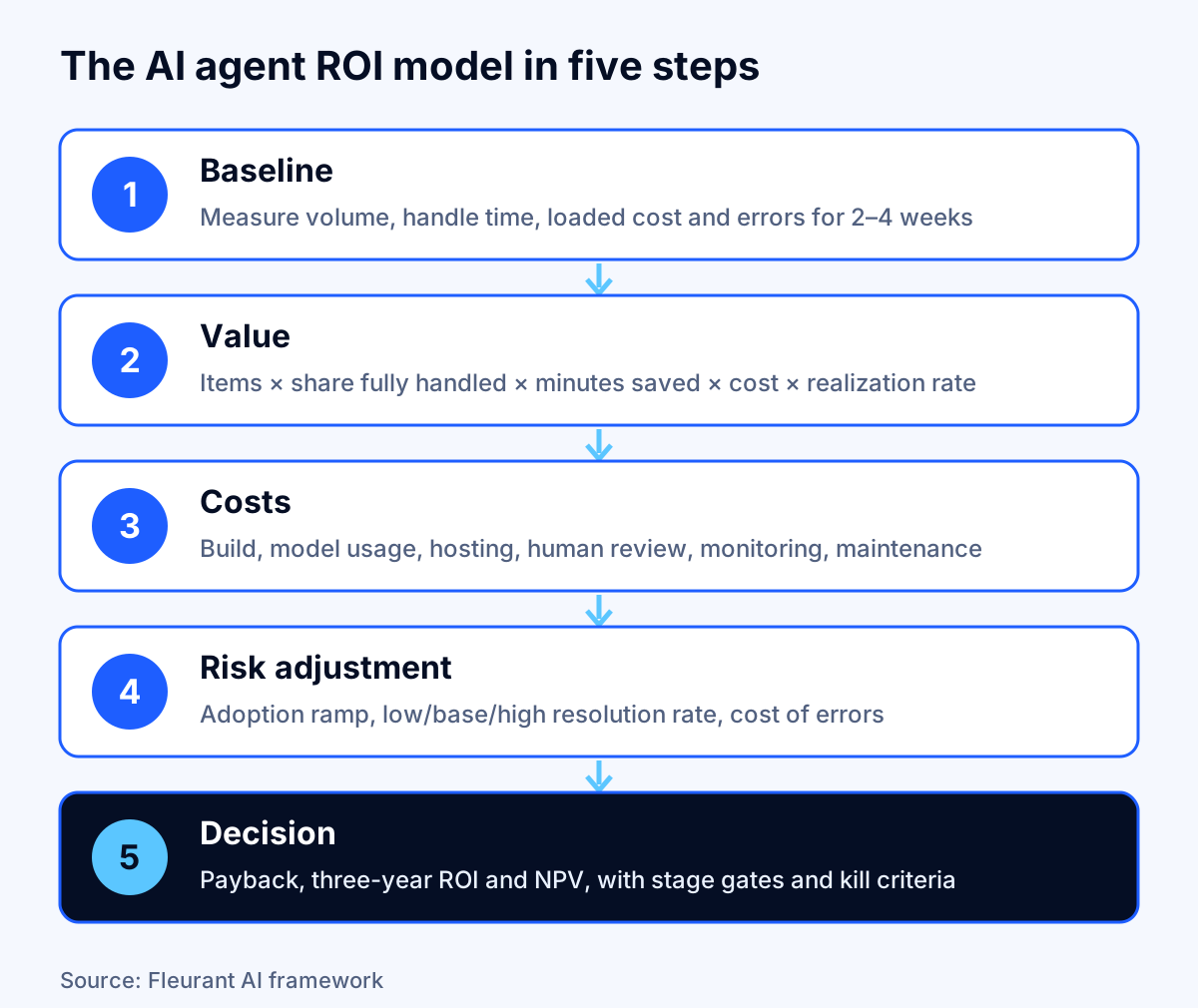
Key takeaway: If your model does not contain a resolution rate and a realization rate as separate, visible inputs, it is not ready for a CFO.
Step 1: Build the baseline before you build the agent
A baseline is a record of what the work costs today, measured the same way you will measure it after launch. Without one, every post-launch claim is an opinion.
Measure for two to four weeks, long enough to catch the normal peaks such as month-end in finance or Monday mornings in support. Use system timestamps wherever you can (ticket open and close, invoice received and posted) and short time studies where you cannot. Do not rely on surveys of how long things take. People are poor judges of their own time, and AI makes that worse, as the next section shows.
The baseline worksheet
| Measure | How to collect it | Example (invoice processing) |
|---|---|---|
| Volume per month, and peak | System counts, last 6–12 months | 3,000 invoices; peak 3,600 at quarter-end |
| Handle time per item | Timestamps or a 50-item time study | 8 minutes |
| Who does the work, and their loaded cost | Payroll or BLS benchmark | Accounts payable clerks, $36.73/hour |
| Error or rework rate | QA samples, correction logs | 2% of invoices reworked |
| Time per rework | Time study | 20 minutes |
| Cycle time | Received to completed | 3.5 business days |
| Escalations or exceptions | Share needing a specialist | 30–40% have a mismatch |
| Cost of an error | Late fees, lost discounts, refunds, credits | Track separately, do not guess |
| Current tooling cost | Licenses, outsourcing | Include if the agent replaces it |
Loaded hourly cost is wages plus benefits, the employer's real cost of an hour worked. If you do not have your own figure, the Bureau of Labor Statistics publishes one. In June 2026, private-industry employers paid an average of $46.89 per hour worked in total compensation, of which wages were $32.82 (70%) and benefits $14.07 (30%), according to the BLS Economics Daily. By occupational group, BLS table 4 shows $36.73 for office and administrative support, $36.34 for sales and office, and $78.88 for management, professional and related occupations.
Use the figure for the people who do the work today, not a blended company average. An agent that saves time for $36-an-hour clerks is worth less per hour than one that saves time for $79-an-hour professionals, even if both save the same hours.
Separate the work into item types
Not every item is equal. Split the baseline into at least three buckets: routine items the agent should handle end to end, items it can prepare for a human to finish, and items that should go straight to a person. A support queue might be 40% password and order-status requests, 35% questions that need account lookups and judgment, and 25% complaints or edge cases. The agent's value comes almost entirely from the first bucket and part of the second.
Step 2: Count the value honestly
An AI agent can create four kinds of value. Only some of them belong in the core ROI calculation.
| Value type | Example | Counts in core ROI when | How to measure |
|---|---|---|---|
| Labor capacity | Clerks spend 195 fewer hours a month on data entry | A hire is avoided, overtime or contractor spend falls, or people move to measurable work | Hours from timestamps × loaded cost × realization rate |
| Error and rework reduction | Fewer duplicate payments or wrong refunds | You can show the error rate and cost per error before and after | QA samples, correction logs |
| Cost avoidance | No need to add a second shift for growth | Growth is forecast and the alternative cost is real | Approved hiring plan or vendor quote |
| Revenue and speed | Faster quote responses lift win rates | You can run a controlled comparison | A/B test or before-after with a control group |
Hours freed are not dollars saved
This is the line that separates a credible case from a hopeful one. If an agent frees 195 hours a month across a team of six, nobody's paycheck changes. The value becomes real only when one of these happens:
- You avoid a hire you would otherwise make. Volume is growing and the agent absorbs it. This is the cleanest case, because the alternative cost is a real, approved budget line.
- You cut variable labor: overtime, temporary staff, outsourcing or contractor hours.
- You redeploy people to work with a measurable return, such as collections calls that recover cash or sales follow-ups that close deals.
- Attrition is not backfilled. Someone leaves and the role stays open because the work is covered.
If none of these will happen, the realization rate is low, and the honest ROI is small even when the agent works perfectly. Agree on a realization rate with finance before launch and write down which of the four mechanisms you expect. Our base example uses 70%: the team is growing and expects to avoid most of one planned hire, but not all freed time will be redeployed.
Do not take productivity studies at face value
Research on AI productivity is useful for setting expectations, but each study measures something specific.
- Controlled field evidence is real but modest. In a study of 5,179 customer support agents, published by NBER and later in the Quarterly Journal of Economics, access to an AI assistant raised issues resolved per hour by 14% on average, with a 34% gain for novice and low-skilled workers and minimal impact on the most experienced. That was an assistant helping people, not an agent replacing tasks, and a 14% average is far from the 70–80% savings some vendor calculators assume.
- Perceived savings can be the opposite of measured savings. In METR's randomized study of 16 experienced open-source developers working 246 real tasks with early-2025 tools, developers expected AI to make them 24% faster and afterward believed it had made them 20% faster. Measured task time rose by 19%. METR has since said those results are out of date and that developers are likely faster with newer tools, while repeating its warning that developers' own estimates of their speedup are unreliable (METR, February 2026).
- Task-level estimates overstate job-level savings. Anthropic's analysis of 100,000 Claude.ai conversations estimated that AI cut individual task time by about 80%, but the authors note it cannot account for time people spend outside the conversation, such as checking the output, so it may overstate real productivity effects (Anthropic).
The lesson for your model: use your own measured handle times, and count the time people spend reviewing the agent's work as a cost, not a rounding error.
Key takeaway: Productivity research tells you what is possible. Only your baseline and a prototype on your own items tell you what is likely.
Step 3: Count every cost, including the ones vendors leave out
The cost side has one-time and recurring lines. Build quotes usually cover the first group and part of the second.
The AI agent cost ledger
| Cost line | One-time or recurring | What it includes | Often missed? |
|---|---|---|---|
| Discovery and design | One-time | Process mapping, item sampling, success criteria | Sometimes |
| Build and integration | One-time | Agent logic, connectors to ERP, CRM or ticketing, permissions | No |
| Evaluation set and testing | One-time, then recurring | Labeled historical cases, accuracy tests, regression runs | Yes |
| Security and compliance review | One-time, then per change | Data flows, access controls, vendor review | Yes |
| Model usage | Recurring | Tokens per item × volume × price | Rarely, but often misestimated |
| Hosting and tooling | Recurring | Compute, logging, observability, vector store | Sometimes |
| Human review | Recurring | Minutes per item to check or approve agent output | Very often |
| Monitoring and maintenance | Recurring | Prompt fixes, connector updates when source systems change, model version upgrades | Very often |
| Change management and training | One-time, some recurring | Process updates, training, new SOPs | Very often |
| Exit and switching | Contingent | Data export, rebuild if a platform changes terms | Almost always |
For typical build ranges by complexity, see our breakdown of AI agent development cost. If you are deciding between building and licensing, build vs buy AI agents compares three-year costs for each route.
Estimating model usage
Model costs are easy to calculate once you know the tokens per item. As of October 2026, Anthropic lists Claude Sonnet 5.5 at $2 per million input tokens and $10 per million output tokens, and Claude Haiku 5.5 at $0.10 and $0.50 for prompts up to 100,000 tokens, with a 50% discount for batch processing (Claude pricing).
Our invoice example assumes each invoice uses about 20,000 input tokens (instructions, tool definitions, the document and lookups) and 2,000 output tokens. On Sonnet 5.5 that is $0.04 plus $0.02, or $0.06 per invoice, and $180 a month at 3,000 invoices. Prompt caching, routing simple items to a smaller model and batching non-urgent work can cut that further; our guide to LLM API cost optimization shows how much each lever saves.
At this scale, model usage is the smallest recurring line. Maintenance and human review are larger. That pattern holds for most small and mid-sized deployments and flips only at very high volumes.
A note for your controller
How build costs are treated on the books affects how the investment looks in year one. Internal-use software costs fall under US GAAP Subtopic 350-40, which the Financial Accounting Standards Board amended in September 2025 with ASU 2025-06, replacing the old project-stage model for when capitalization starts. Whether your agent's build costs are capitalized or expensed is a question for your controller or auditor, not a project team, but it is worth raising before the case goes to the CFO. The cash-based payback and NPV in this guide are the same either way.
Step 4: Risk-adjust the case
A single-point estimate invites a single question: "What if you're wrong?" Answer it in advance with three adjustments.
Model an adoption ramp
Agents rarely reach steady state in month one. People learn to trust the output, edge cases surface, and the team tunes prompts and rules. Our examples assume the agent delivers 25% of its steady-state value in month one, 50% in month two and 75% in month three, then full value from month four. Costs start on day one. That ramp alone adds about three months to payback in the base case.
Run three scenarios on the resolution rate
Use a low, base and high case for the share of items the agent fully handles. If you have prototype results, the base case is the measured rate and the low case is the rate on your hardest month of items. If you do not, keep the base case conservative and treat the whole model as provisional until a prototype measures it.
Price the cost of errors
An agent that resolves 60% of invoices but posts 1% of them to the wrong vendor may cost more than it saves. Track three error rates in testing: wrong actions taken, correct items wrongly escalated, and wrong items wrongly approved. Put a cost on the third. For customer-facing agents, define what an error is before launch and measure it on a held-out set of real cases; our guide to evaluating AI chatbot accuracy covers how to build that test set.
If the cost of an error is high (payments, medical, legal, credit decisions), design for human approval on those actions and include that review time in the cost ledger. The ROI will be lower, and it will be real.
Worked example 1: an accounts payable invoice agent
This example uses the baseline from Step 1. All inputs are illustrative assumptions except the loaded wage, which is the BLS June 2026 figure for office and administrative support, and the model price, which is Anthropic's published Sonnet 5.5 rate.
Inputs
| Input | Value | Basis |
|---|---|---|
| Invoices per month | 3,000 | Baseline |
| Handle time today | 8 minutes | Baseline time study |
| Loaded hourly cost | $36.73 | BLS, office and administrative support, June 2026 |
| Share the agent fully handles | 60% | Assumption (base case) |
| Review time on handled invoices | 1.5 minutes | Assumption: a person spot-checks or approves |
| Exceptions (40%) | Still 8 minutes each | Handled by people as today |
| Realization rate | 70% | Assumption agreed with finance: avoids most of one planned hire |
| Rework today | 2% of invoices at 20 minutes | Baseline |
| Rework reduction | 50% | Assumption |
| Build cost | $45,000 one-time | Assumption, mid-range for one workflow with two integrations |
| Model usage | $180 a month | 3,000 × $0.06 |
| Hosting and tooling | $150 a month | Assumption |
| Monitoring and maintenance | $1,000 a month | Assumption |
| Adoption ramp | 25%, 50%, 75%, then 100% | Assumption |
| Discount rate | 10% a year | Illustration only |
The calculation
Hours today: 3,000 × 8 ÷ 60 = 400 hours a month.
Hours after: handled invoices 3,000 × 60% × 1.5 ÷ 60 = 45 hours, plus exceptions 3,000 × 40% × 8 ÷ 60 = 160 hours, for 205 hours.
Hours freed: 195 a month. At $36.73, that is $7,162 of labor capacity.
Realized labor value: $7,162 × 70% = $5,014 a month.
Rework value: 3,000 × 2% × 20 ÷ 60 = 20 hours of rework, half avoided, at $36.73 = $367 a month.
Gross monthly benefit: $5,381.
Monthly run costs: $180 + $150 + $1,000 = $1,330.
Monthly net benefit at steady state: $4,051.
The results
| Measure | Result |
|---|---|
| Simple payback (no ramp) | 11.1 months |
| Payback with the adoption ramp | 14 months |
| Three-year benefits (with ramp) | $185,643 |
| Three-year costs | $92,880 |
| Three-year ROI | About 100% |
| Three-year NPV at 10% | About $73,400 |
Now the scenarios. Changing only the share of invoices the agent fully handles:
| Scenario | Share fully handled | Monthly net benefit | Payback with ramp | Three-year ROI | Three-year NPV |
|---|---|---|---|---|---|
| Low | 35% | $1,962 | 26 months | 22% | About $11,300 |
| Base | 60% | $4,051 | 14 months | About 100% | About $73,400 |
| High | 75% | $5,304 | 11 months | 146% | About $110,600 |
The low case still returns money over three years, but a 26-month payback is a hard sell next to the seven to 12 months finance teams often expect from technology. That is the argument for a short prototype that measures the real resolution rate before the full build is approved.
Worked example 2: the agent that does not pay
Same assumptions, smaller workload: 400 items a month, 12 minutes each, and the agent fully handles 40%.
- Hours today: 80 a month. Hours freed: 28.
- Realized value: 28 × $36.73 × 70% = $720, plus $49 of rework value, for $769 a month.
- Run costs: $24 of model usage, $150 hosting and $1,000 maintenance, for $1,174 a month.
- Monthly net benefit: minus $405. The agent never pays back, whatever the build cost.
The problem is not the agent. It is the fixed monthly cost of keeping any production system healthy, spread over too little work. In the invoice model, each item the agent touches is worth about $1.73 in realized net value, so the agent needs roughly 660 items a month just to cover its run costs and about 2,800 a month to pay back a $45,000 build in a year.
Key takeaway: Volume is the first filter. Before modeling anything else, divide your monthly run costs by the net value per item. If your volume is below that number, the answer is a cheaper tool, not a better business case.
For low-volume work, off-the-shelf tools or a no-code workflow usually win; AI agents for small business and our comparison of n8n, Zapier and custom agents show where those cheaper options make more sense.
Which assumptions move AI agent ROI the most?
A sensitivity analysis changes one input at a time across a realistic range and shows how far the result moves. It tells you where to spend measurement effort, and it is the chart a CFO will look at first.
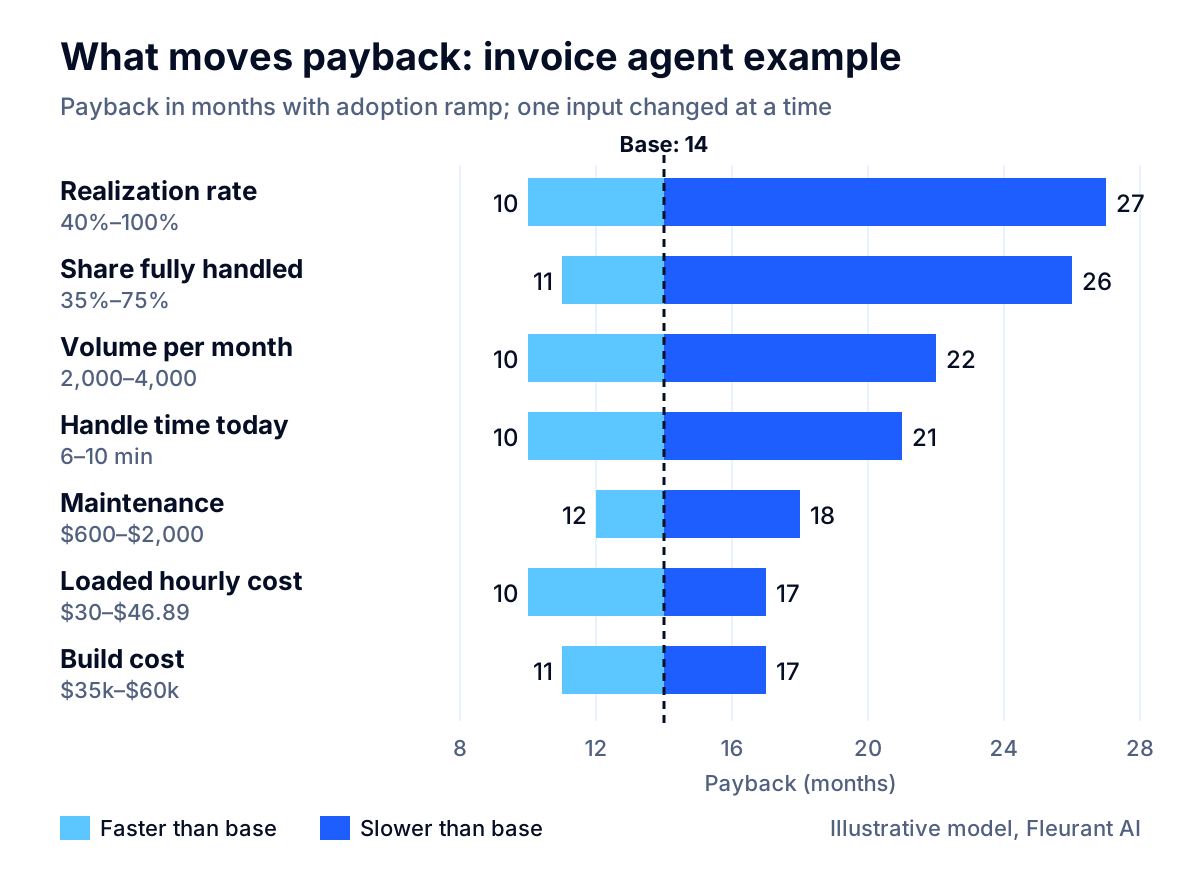
In this model, the two inputs that move payback most are the ones finance has to agree on or a prototype has to measure:
| Input | Range tested | Payback range (months) |
|---|---|---|
| Realization rate | 40% to 100% | 27 to 10 |
| Share fully handled | 35% to 75% | 26 to 11 |
| Volume per month | 2,000 to 4,000 | 22 to 10 |
| Handle time today | 6 to 10 minutes | 21 to 10 |
| Maintenance per month | $600 to $2,000 | 12 to 18 |
| Loaded hourly cost | $30.00 to $46.89 | 17 to 10 |
| Build cost | $35,000 to $60,000 | 11 to 17 |
Build cost, the number buyers negotiate hardest, is among the least sensitive inputs. A $25,000 swing in the build moves payback by about six months. Moving the resolution rate from 35% to 60%, or the realization rate from 40% to 70%, moves it by about a year. Negotiating the quote matters less than measuring the resolution rate and agreeing on how freed time will be used.
How to present AI agent ROI to a CFO
Finance teams approve cases they can audit. Keep the presentation to one page, with the model attached.
The one-page business case
- The problem in numbers: volume, handle time, loaded cost, error rate and current monthly cost, from the baseline.
- The scope: which item types the agent will handle, which it will prepare, and which go to people. Say what it will not do.
- The value mechanism: which of the four realization paths applies (avoided hire, reduced variable labor, redeployment, attrition) and the agreed realization rate.
- The cost ledger: one-time and recurring, with human review and maintenance as separate lines.
- Three scenarios: low, base and high on the resolution rate, each with payback, ROI and NPV.
- The sensitivity table: the top three inputs and how you will measure them.
- Decision gates and kill criteria: what the prototype must show before the full build, and what results after launch would trigger a stop.
- Soft benefits, separately: after-hours coverage, cycle time, customer response time, listed with the metric you will track and no dollar value.
Use stage gates instead of a single approval
Ask for approval in stages, each with a number to hit:
- Gate 1, prototype: build a working prototype for one focused workflow and run the agent on a few hundred real historical items. Measure resolution rate, error rate and review time. Continue only if the measured rate clears the low-case threshold.
- Gate 2, limited production: run on live items for one team or one item type for 30 to 60 days. Measure realized hours and errors against the baseline.
- Gate 3, full rollout: approve the remaining spend on measured results.
This structure reduces the money at risk to the prototype cost and turns the business case from a forecast into a measurement. It is also how we run AI agent projects at Fleurant AI: a working prototype in one to two weeks with a risk-free proof of value, so the full build is approved on your own numbers.
Many pilots that pass Gate 1 stall before Gate 2. Our guide to moving from AI pilot to production covers why, and what to fix before limited production starts.
How to measure ROI after launch
The model is a forecast. After launch, the same inputs become a monthly scorecard. Instrument the agent from day one so every number comes from logs, not estimates.
| Metric | Source | Why it matters |
|---|---|---|
| Items received, handled, escalated | Agent and system logs | Measured resolution rate |
| Review time per handled item | Workflow timestamps | The hidden labor cost |
| Error rate by type | QA sampling, correction logs | Whether savings are real |
| Hours on the work, team level | Timestamps, time tracking | Freed capacity |
| Realization evidence | Hiring plan, overtime, contractor invoices | Whether capacity became cash |
| Model and hosting spend per item | Provider billing, cost allocation tags | Unit economics as volume changes |
| Maintenance hours | Engineering tickets | The cost line that grows quietly |
Review the scorecard monthly for the first quarter and quarterly after that. Recalculate payback with actuals at month three and month six. If the measured resolution rate is drifting down, it usually means the mix of items has changed or a source system has changed format; both are fixable, but only if someone is watching.
Track cost per item, not just total spend. A rising AI bill is good news if it tracks rising volume and falling cost per item. Our guide to FinOps for AI workloads shows how to set up that attribution.
When the ROI case says do not build
A good model tells you when to stop. These results should send you back to the drawing board:
- Volume is below the break-even line. Fixed monthly costs will exceed the value of the work.
- The realization rate is near zero. Nobody will be hired less, no overtime will fall and nobody will be redeployed. The agent may still be worth it for speed or quality, but make that case on those terms.
- The cost of an error is high and the agent cannot be checked cheaply. If review takes almost as long as doing the work, the savings disappear.
- The process itself is broken. Automating an unclear process produces unclear results faster. Fix the process, then re-baseline.
- Payback depends on the high case. If only the best-case resolution rate produces an acceptable payback, you do not have a business case yet. You have a hypothesis for a prototype to test.
A "no" from the model is a useful result. It saves the build cost and often points to a cheaper alternative: a better form, a rule-based automation or an off-the-shelf tool.
Your AI agent ROI checklist
Use this before any AI agent business case goes to finance:
- Baseline measured for two to four weeks from timestamps, not surveys.
- Items split into handle, prepare and route buckets.
- Loaded hourly cost for the people who do the work, with the source stated.
- Resolution rate shown as an explicit input, with low, base and high cases.
- Realization rate agreed with finance, with the mechanism written down.
- Human review time counted as a cost.
- Every line of the cost ledger filled in, including maintenance and evaluation.
- Adoption ramp in the first three months.
- Payback, ROI and NPV all shown, with the discount rate finance chose.
- Sensitivity table for the top inputs.
- Error costs priced, and human approval designed in where errors are expensive.
- Stage gates and kill criteria defined before the build starts.
- Soft benefits listed separately with tracking metrics.
- Post-launch scorecard instrumented from day one.
Conclusion
Calculating AI agent ROI is not hard math. It is honest inputs. Measure the baseline, show the resolution and realization rates as separate assumptions, count review and maintenance as real costs, ramp the benefits, and test the inputs that matter. Then ask for money in stages, so the full build is approved on measured results rather than projections.
If you want a second opinion on a business case, or a prototype that measures your resolution rate on your own data, talk to a specialist. You can also see how we approach AI agent development or browse our other services from the Fleurant AI home page.
Frequently asked questions
What is the formula for AI agent ROI?
ROI equals total benefits minus total costs, divided by total costs, over a fixed period such as three years. Payback in months equals the one-time build cost divided by monthly net benefit. For a CFO, add net present value: discount each month's net benefit at your company's hurdle rate and subtract the build cost. Use all three, because a high ROI with a long payback can still be a poor bet.
What is a good payback period for an AI agent?
There is no universal threshold, but many finance teams expect technology investments to pay back within about a year. Deloitte's October 2025 survey of 1,854 executives cites a typical expectation of seven to 12 months for technology, while most respondents said a typical AI use case reached satisfactory ROI in two to four years. If your model shows payback beyond 24 months, narrow the scope or test the key assumptions first.
How do you measure time saved by an AI agent?
Measure, do not survey. Record handle time per item for two to four weeks before launch from system timestamps or time studies, then measure the same items after launch, including the time people spend reviewing the agent's work. Self-reports are unreliable: in METR's 2025 study, developers believed AI sped them up by 20% when measured task time had risen by 19%.
Are hours saved by AI the same as money saved?
No. Freed hours become cash only when you avoid a hire, cut overtime or contractor spend, or move people to work that brings in measurable revenue. Otherwise the time is absorbed. Apply a realization rate to labor value, and agree on it with finance before launch. In our illustrative model, the realization rate moved payback more than any other input.
What costs do AI agent ROI calculations usually miss?
The common misses are human review of agent output, evaluation and testing, monitoring, prompt and integration fixes as source systems change, change management and training, security and compliance review, and the adoption ramp in the first months. Model usage is often the smallest line. For a small or mid-sized deployment, people usually cost more than tokens.
Should I calculate ROI before building a prototype?
Calculate a rough version before, then a real one after. The pre-build model tells you which assumption matters most, usually the share of items the agent can fully handle. A short prototype run against your real historical cases measures that number. Approve the full build on the measured figure, not on a vendor's projection.
How do you include benefits that are hard to quantify, like customer experience?
Keep them out of the core ROI math and list them separately with how you will track them, for example response time, after-hours coverage or error rates. If a soft benefit is the main reason to build, say so and find a proxy metric you can measure, such as churn or conversion on a test group. Mixing soft and hard benefits makes the whole case easier to dismiss.
Sources
- Employer Costs for Employee Compensation, June 2026 (The Economics Daily), U.S. Bureau of Labor Statistics
- Table 4. Employer costs per hour worked, private industry workers, by occupational group, U.S. Bureau of Labor Statistics
- AI ROI: The paradox of rising investment and elusive returns, Deloitte
- IBM Study: CEOs Double Down on AI While Navigating Enterprise Hurdles, IBM Newsroom
- Gartner Predicts Over 40% of Agentic AI Projects Will Be Canceled by End of 2027, Gartner
- Generative AI at Work (NBER Working Paper 31161), National Bureau of Economic Research
- Measuring the Impact of Early-2025 AI on Experienced Open-Source Developer Productivity, METR
- We are changing our developer productivity experiment design, METR
- Estimating AI productivity gains from Claude conversations, Anthropic
- Pricing, Claude Platform Docs (Anthropic)
- ASU 2025-06: Targeted Improvements to the Accounting for Internal-Use Software, Financial Accounting Standards Board


