Web & Software Development
Legacy Application Modernization Cost: Rehost, Refactor, Rebuild
Legacy application modernization cost by path: rehost from $9k, replatform $30k–$90k, rebuild $188k–$450k at $75/hr, plus a decision tree and 2026 deadlines.

In this article
- What counts as a legacy application, and why modernize now?
- The modernization paths, in plain English
- Legacy application modernization cost by path
- What drives the cost: a work-package estimate
- Rehost, refactor or rebuild: a five-question decision tree
- Why big-bang rewrites fail, and the incremental alternative
- Outgrowing a no-code tool: moving from Bubble or similar to custom code
- Taking over from a previous development agency
- Is it worth it? Comparing modernization with keeping the old app
- Does AI change the cost of legacy modernization?
- How to keep a modernization project on budget
- Conclusion: start with the path, not the price
- Frequently asked questions
- Sources
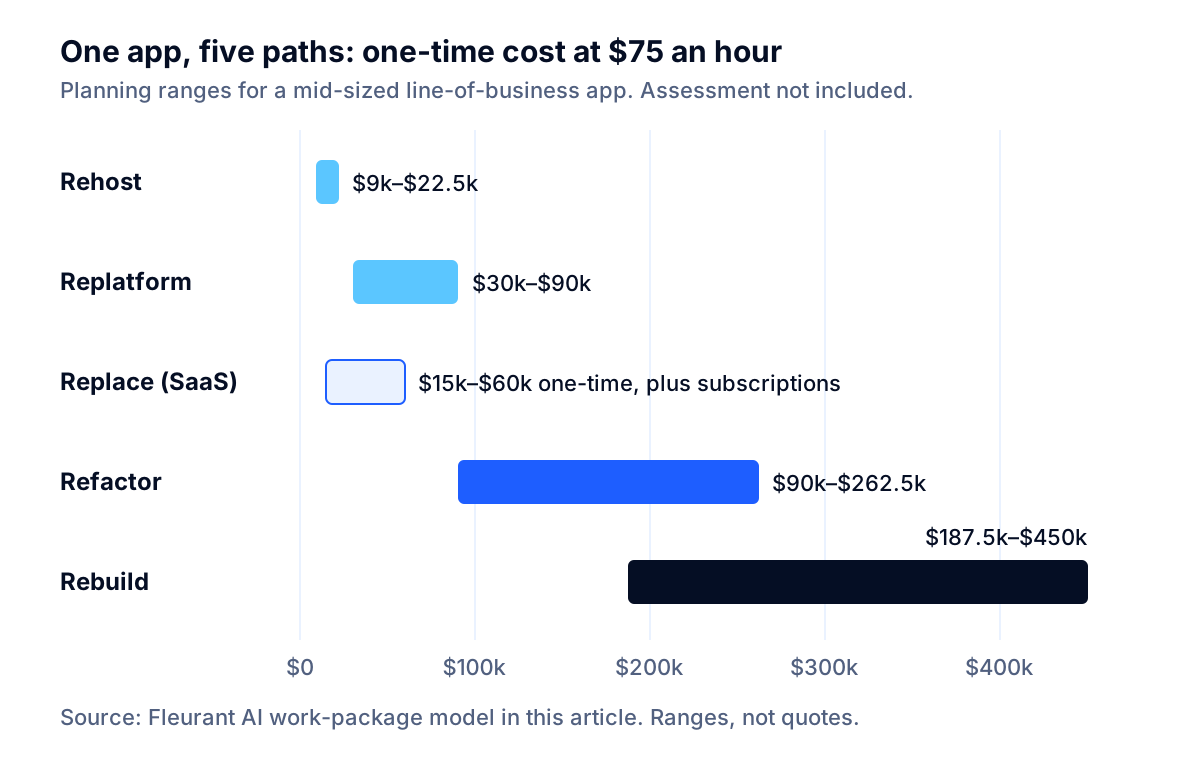
The short answer on legacy application modernization cost: for one mid-sized business application, plan on 120 to 300 engineering hours to rehost it, 400 to 1,200 hours to replatform it, 1,200 to 3,500 hours to refactor it in slices and 2,500 to 6,000 hours to rebuild it from scratch. At a $75-an-hour team rate, that is roughly $9,000 to $22,500, $30,000 to $90,000, $90,000 to $262,500 and $187,500 to $450,000. Replacing the application with a SaaS product costs $15,000 to $60,000 in one-time work, plus the subscriptions.
The path you choose moves the price far more than the technology does. A ten-fold gap between the cheapest and most expensive option for the same application is normal, which is why the first question is never "how much" but "which path, for which part."
This guide gives you the numbers and the reasoning behind them: a work-package hour model with written assumptions, rates derived from federal wage data and published market rates, a five-question decision tree, a list of the support deadlines forcing decisions in late 2026, and specific advice for two situations many smaller companies face: outgrowing a no-code tool, and taking a system back from a development agency.
Key takeaway: Most legacy modernization budgets go wrong in the same place: nobody priced the work of finding out what the old system actually does. Pay for that discovery first, and the rest of the estimate becomes something you can hold a vendor to.
What counts as a legacy application, and why modernize now?
A legacy application is not just an old one. It is software your business still depends on that has become expensive or risky to change: the framework or database is out of support, the original developers are gone, nobody trusts a deployment, or every new feature takes weeks because one change breaks three other things.
For a mid-sized company, it is usually one of these:
- An internal web application built in the 2010s on .NET Framework, PHP or Java, running on a Windows or Linux server in a closet or a colocation rack.
- A Microsoft Access database or spreadsheet system that grew into a department's operating system (we cover that case in when to replace spreadsheets with custom software).
- A customer-facing app built by an agency that no longer supports it.
- An app built on a no-code platform that the business has outgrown.
The cost of leaving these alone is real but quiet. In its July 2025 report on decades-old federal systems, the Government Accountability Office noted that agencies have typically reported spending about 80 percent of their IT budgets on operating and maintaining existing IT, and that only three of ten critical modernizations it flagged in 2019 had been completed by February 2025. Companies are not federal agencies, but the pattern is familiar: keeping old systems running crowds out new work, and modernization keeps getting postponed until a deadline forces it.
The deadlines arriving in late 2026
Vendor support dates are the most common forcing event. These are the ones we see most often in mid-sized companies' applications, as of October 2026:
| Component | Support status | What it means |
|---|---|---|
| .NET 8 and .NET 9 | End of support November 10, 2026, per the .NET team | No more security fixes. Microsoft recommends .NET 10, supported through November 2028 |
| SQL Server 2016 | Extended support ended July 2026, per the Microsoft lifecycle page | Paid Extended Security Updates run in yearly terms through July 2029 |
| Windows Server 2016 | Extended support ends January 2027, per the Microsoft lifecycle page | Plan the operating system move now if the app is tied to the server |
| PHP 8.2 | Security support ends December 31, 2026; 8.1 and older are already unsupported, per php.net | Upgrade to 8.4 or 8.5; older code often needs real changes |
| Python 3.10 | End of life October 2026; 3.9 and older already unsupported, per the Python Developer's Guide | Move to a supported 3.x release and retest dependencies |
An application on .NET 8 that is otherwise healthy is a cheap fix: a replatform measured in weeks. An application on .NET Framework 4.x with business logic in stored procedures and a SQL Server 2016 database is a different conversation. The date is the same; the cost is not.
The modernization paths, in plain English
Cloud providers describe the options as the "Rs." AWS lists seven in its prescriptive guidance and Microsoft's Cloud Adoption Framework lists eight. The labels differ slightly; the ideas are the same. For one business application, six matter:
| Path | What changes | Typical trigger | Main risk |
|---|---|---|---|
| Retire | You switch it off and archive the data | Few or no active users; a newer system already does the job | Someone discovers a monthly report it fed |
| Replace | You buy a SaaS product and migrate the data | The process is standard: accounting, HR, CRM, help desk | Paying to customize a product until it is a worse custom app |
| Rehost | Same code, new servers (often cloud virtual machines) | Data center exit, hardware end of life | Moving the problems with the app, often at a higher monthly bill |
| Replatform | Small code changes to use a supported runtime or managed services | Framework or database out of support; patching burden | Hidden dependencies that break on the new runtime |
| Refactor | The code is restructured, module by module | Every change is slow and risky; no tests | Losing momentum halfway, with two systems to run |
| Rebuild | A new application replaces the old one | The code cannot be salvaged or the process has changed | Cost, schedule and missed business rules |
Microsoft also separates rearchitect (redesigning the structure, for example splitting a monolith into services) from refactor, and lists retain (keep it as is) as a valid decision. For smaller companies, rearchitecting usually happens inside a refactor or rebuild rather than as its own project, and "retain" is the right answer more often than vendors admit: if the app is stable, supported and rarely changes, leave it alone and spend the money elsewhere.
Two warnings from the cloud providers' own guidance are worth repeating. Microsoft says not to rehost problematic workloads, because rehosting does not fix performance, reliability or design problems, and to rehost only when you are confident the workload will not need modernizing for at least two years. AWS calls refactoring "the most complex and costly" of its strategies and, for large migrations, recommends moving first and modernizing afterward.
Legacy application modernization cost by path
Hours are the stable unit for estimating, because hourly rates vary by a factor of three depending on who does the work. The table below prices each path for one reference application: an internal or partner-facing web app, 10 to 15 years old, with 40 to 60 screens, one relational database of 100 to 200 tables, two or three integrations (for example accounting, email and a shipping or payment service), 50 to 500 users, and little automated testing. That describes a large share of the custom software running mid-sized US companies.
| Path | Hours | At $40/hr | At $75/hr | At $100/hr |
|---|---|---|---|---|
| Assessment (every path) | 40–100 | $1,600–$4,000 | $3,000–$7,500 | $4,000–$10,000 |
| Rehost | 120–300 | $4,800–$12,000 | $9,000–$22,500 | $12,000–$30,000 |
| Replatform | 400–1,200 | $16,000–$48,000 | $30,000–$90,000 | $40,000–$120,000 |
| Replace (one-time work) | 200–800 | $8,000–$32,000 | $15,000–$60,000 | $20,000–$80,000 |
| Refactor (incremental) | 1,200–3,500 | $48,000–$140,000 | $90,000–$262,500 | $120,000–$350,000 |
| Rebuild | 2,500–6,000 | $100,000–$240,000 | $187,500–$450,000 | $250,000–$600,000 |
The replace row excludes subscriptions, which you compare over three years against the build paths. The refactor row covers rewriting the three to five modules that cause the most pain; a refactor that eventually touches everything costs about as much as a rebuild, spread over a longer period.
Where the rates come from
The three rate columns are planning rates, not quotes.
- $40 an hour reflects offshore firms and marketplace freelancers. Clutch's software development pricing guide reports that most companies listed on its platform charge $24 to $49 an hour.
- $75 an hour reflects a US small development firm. Clutch lists $50 to $99 an hour for firms in the United States.
- $100 an hour reflects a US agency or a senior in-house team. The Bureau of Labor Statistics puts the median annual wage for software developers at $135,980 in May 2025, and wages were 70.0 percent of private-industry employer compensation costs in June 2026, according to the BLS Employer Costs for Employee Compensation release. Grossed up for benefits and divided by about 1,414 productive hours a year, a median-paid in-house developer costs roughly $137 an hour. Legacy work also needs someone who can read the old stack, which tends to push you toward senior people at any rate.
The productive-hours assumption (2,080 paid hours, minus time off, meetings and administration) is worked through in our guide on how to hire a web app developer.
For context, Clutch reports that the most common custom software project on its platform costs $10,000 to $49,999, and that the average is about $132,000 over roughly 13 months. A replatform sits in the common band; a refactor of the worst modules looks like the average.
What drives the cost: a work-package estimate
Here is where the hours go in the two expensive paths. These are Fleurant AI planning ranges for a senior-led team working on the reference application above.
Rebuild: 2,500 to 6,000 hours
| Work package | Hours | What pushes it to the high end |
|---|---|---|
| Discovery and business-rule recovery | 160–400 | No documentation; logic in stored procedures or triggers; key users unavailable |
| UX and UI design | 120–300 | Many user types; redesigning workflows rather than copying screens |
| Architecture, environments, CI/CD | 80–160 | Strict change control; several environments; infrastructure as code |
| Login, roles and audit logging | 80–200 | Single sign-on; fine-grained permissions; regulated data |
| Feature development (40–60 screens and their logic) | 1,200–2,800 | Complex calculations, pricing or scheduling rules; reports |
| Integrations (two or three systems) | 200–500 | Old or on-premise systems with no API; file-based exchanges |
| Data migration and reconciliation | 200–500 | Dirty data; years of history; fields that mean different things over time |
| QA and automated tests | 300–700 | Broad end-to-end coverage; financial calculations that must match to the cent |
| Parallel run, training and cutover | 80–200 | Running both systems for a full month-end or season |
| Project management | 80–240 | Many stakeholders; steering committee reporting |
| Total | 2,500–6,000 |
Incremental refactor: 1,200 to 3,500 hours
| Work package | Hours | What pushes it to the high end |
|---|---|---|
| Discovery and characterization tests on the old system | 160–400 | No tests at all; behavior nobody can explain |
| Routing layer and transitional architecture | 80–200 | Requests that are hard to intercept; desktop clients |
| CI/CD and environments for old and new code | 60–140 | Manual deployments today; no staging environment |
| Rewriting the three to five highest-pain modules | 600–2,000 | Tightly coupled modules; shared tables everywhere |
| Data extraction and synchronization per module | 150–400 | One shared database serving every module |
| QA and regression testing | 100–260 | Both systems must keep producing the same results |
| Project management | 50–100 | Long timeline with several releases |
| Total | 1,200–3,500 |
Replatform and rehost
A replatform of the reference app runs 400 to 1,200 hours: dependency assessment and upgrade plan (40–100), runtime or framework upgrade such as .NET Framework to .NET 10 or PHP 7 to 8.4 (160–600), moving the database to a managed service (40–120), containerizing and automating deployments (60–140), regression testing (80–180), and cutover and monitoring (20–60). The framework upgrade is the wild card: a well-structured app with current libraries moves quickly, while one that depends on abandoned packages or Windows-only components can take most of the high end.
A rehost runs 120 to 300 hours: building the target environment (40–80), replicating and migrating the servers (30–80), testing (30–80), and backups, monitoring and security baselines (20–60).
The single biggest cost driver
Across every path, the biggest driver is how much of the system's behavior is known. An app with documentation, tests and a product owner who has used it for ten years is a fraction of the cost of an app whose business rules live in the head of one retired developer and a thousand-line stored procedure. That is why discovery sits at the top of both tables, and why a fixed-price quote for a rebuild that skips it should worry you.
Rehost, refactor or rebuild: a five-question decision tree
Ask these questions for each application, in order, and stop at the first answer that points right.
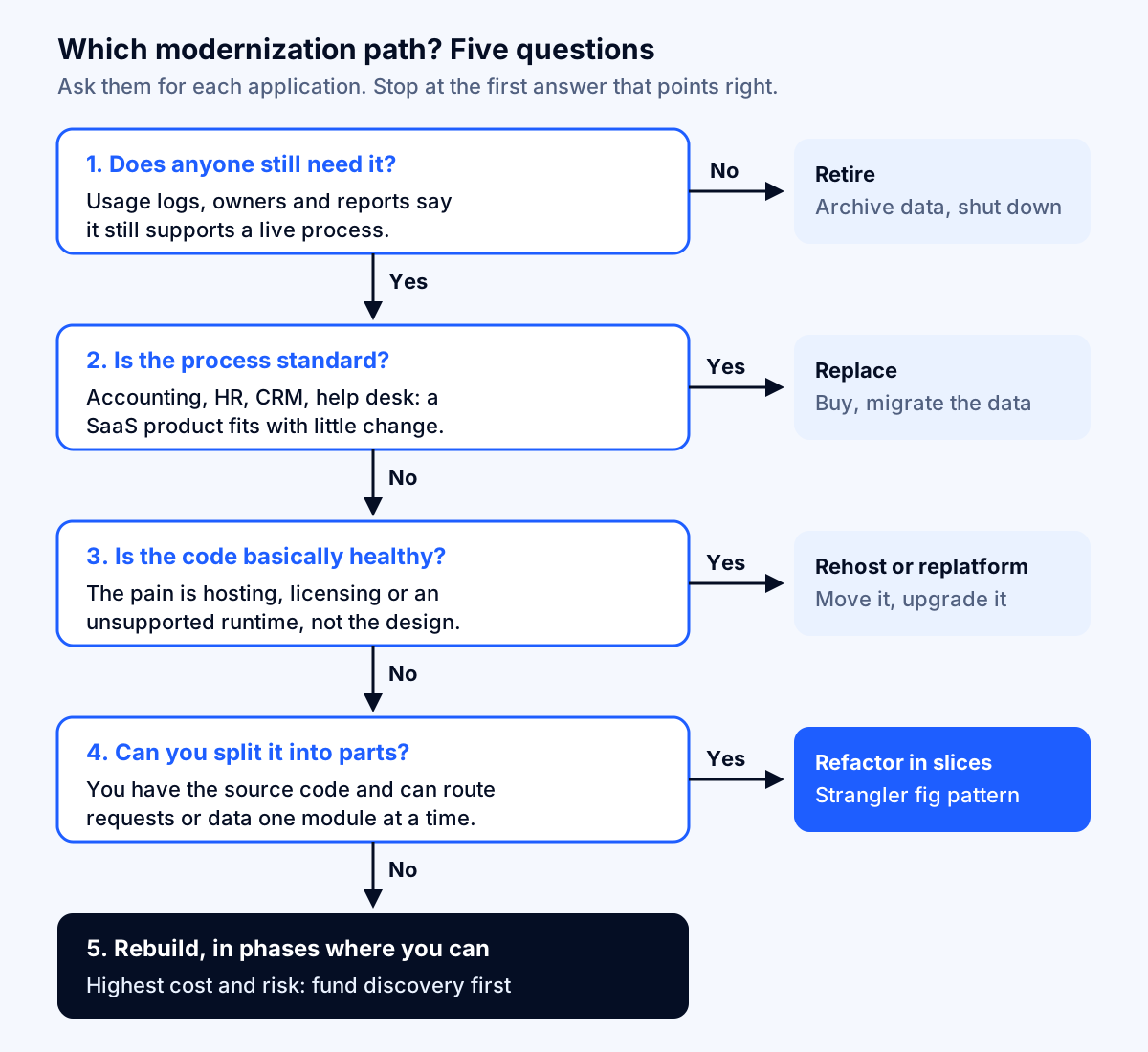
- Does anyone still need it? Check logins, report schedules and who complains when it is down. AWS's guidance suggests looking for applications with no inbound connections for 90 days, or very low CPU and memory use, as candidates to retire. Retiring is the cheapest modernization there is.
- Is the process standard? If the app does what accounting, HR, CRM or help desk software already does, replacing it usually beats rebuilding it. Microsoft lists "little need for customization" as a key indicator for replacing with SaaS.
- Is the code basically healthy? If the pain is the server, the license or an unsupported runtime rather than the design, rehost or replatform. Be honest here: if every feature takes weeks, the code is not healthy, and moving it to new infrastructure will not change that.
- Can you split it into parts? If you have the source code and can intercept requests or data module by module, refactor incrementally. This is the strangler fig approach described below.
- Otherwise, rebuild, and still release it in phases wherever you can.
Most real decisions mix paths. A common pattern for a mid-sized company is to replatform now to get off an unsupported runtime before a deadline, then refactor the two modules that slow the business down over the following year.
Why big-bang rewrites fail, and the incremental alternative
The most expensive mistake in legacy modernization is the full rewrite delivered in one cutover. It is attractive because it promises a clean start. It fails because the old system keeps changing while the new one is built, users wait months or years for anything new, and the old system's behavior turns out to be far harder to specify than anyone expected. Martin Fowler, who named the alternative, writes that he and his colleagues have seen this plan "go down in flames most of the time" in his article on the strangler fig application.
The alternative is named after a vine that grows around a host tree until it replaces it. Microsoft's Strangler Fig pattern describes it in four steps:
- Put a facade (a routing layer) in front of the legacy system, so users and other systems call the facade instead.
- Rebuild one piece of functionality at a time in the new system and point the facade at it.
- When nothing depends on the old system any more, decommission it.
- Remove the facade.
For a database-centric app, the same idea applies to data: move one domain's tables to a new database, keep them synchronized with change data capture while both systems run, validate, then cut over. Microsoft's guidance notes that you can roll back until the legacy tables are removed, which is exactly the safety net a big-bang cutover lacks.
The pattern has limits, and Microsoft lists them. It may not suit you when requests to the back end cannot be intercepted, when you cannot access the legacy source code or any other integration point such as its database, when the system is small enough to replace simply, or when you must decommission the old system quickly. It also costs something: the facade and the synchronization are temporary infrastructure you pay to build and then throw away.
Key takeaway: An incremental refactor costs more per feature than a rebuild, because of the transitional plumbing. It is usually cheaper overall, because each slice delivers value on its own and a failed slice costs weeks, not the whole budget.
Outgrowing a no-code tool: moving from Bubble or similar to custom code
Many smaller companies' "legacy" system is two or three years old. It was built on a no-code platform such as Bubble to prove the idea, and it worked. Now it is slow, the monthly bill keeps rising, investors ask about the technology, or a feature you need is impossible on the platform.
The first thing to know is that you are planning a rebuild, not a code transfer. Bubble's manual describes exporting database records as CSV, JSON or NDJSON, and notes that some field types, such as date intervals, export differently from how they import. That export covers your data, not your pages and workflows.
The good news is that a no-code rebuild is one of the least risky rebuilds there is:
- The specification already exists. Every screen and workflow is visible in the editor. Discovery is a matter of reading it, not interviewing people who may have left.
- The data model is usually small. Most no-code apps have dozens of data types, not hundreds of tables.
- There is less hidden logic. No-code workflows can be messy, but they are not buried in stored procedures written in 2009.
For a typical no-code product with 20 to 40 screens, the rebuild package looks like a SaaS MVP with a data migration attached. The main extra costs are planning how existing users will sign in to the new app (check what account data can move, or plan a password reset), re-creating integrations that ran through platform plugins, and running both systems while customers move. Build the new version against an export of your real data from the start, and test the migration at least twice before the cutover weekend.
Do not leave a no-code platform just because developers on a forum say you should. If the app is fast enough, affordable and meets the roadmap, it is not legacy yet.
Taking over from a previous development agency
A related situation: the system is fine, but the agency that built it is gone, unresponsive or too expensive, and you need someone else to take it over. The modernization cost here starts with a takeover audit, which we plan at 40 to 120 hours ($3,000 to $9,000 at $75 an hour). It answers one question: can a new team safely deploy a change to production next week?
The audit is only as good as what you can hand over. Before the last invoice to the old agency is paid, get these into your company's name and control:
| Asset | What "handed over" means |
|---|---|
| Source code | Admin ownership of the repository (GitHub, GitLab, Bitbucket), with full history, not a zip file |
| Cloud and hosting accounts | Your company is the account owner and billing contact; agency access removed afterward |
| Domain and DNS | Registrar account in your name; DNS records documented |
| App store and payment accounts | Apple, Google, Stripe and similar accounts owned by your company |
| Credentials and keys | Every API key, service account and password, rotated after the handover |
| Third-party services and licenses | A list with owners, costs and renewal dates |
| Deployment | Written steps or scripts to build and deploy from scratch |
| Database | Schema, backups and the restore procedure, tested once |
| Known issues | Open bugs, workarounds and anything "temporary" that became permanent |
Then confirm what your contract says about who owns the code. This is a question for your counsel, not your developers, and it is far easier to settle before the relationship ends than after. Our guide on how to hire a web app developer covers the contract terms to put in place with the next team so you never repeat the exercise.
The audit usually ends in one of three findings: the code is sound and a new team can maintain it (retain, with a maintenance plan); the code works but the runtime is out of support (replatform); or the code is so tangled that every change is risky (refactor or rebuild). Only the third is expensive, and you should see evidence, such as failed test deployments or specific modules, before accepting it.
Is it worth it? Comparing modernization with keeping the old app
Modernization rarely pays for itself through lower hosting bills alone. Here is an illustrative example, not a benchmark, using the reference application:
- Keeping it as is: 40 maintenance hours a month at $75 is $36,000 a year, before hosting, licenses and any paid extended security updates.
- After a replatform at $60,000 (the midpoint of the $75 range), suppose maintenance falls to 25 hours a month. That saves $13,500 a year, a payback of about four and a half years on labor alone.
- After a refactor of the worst modules at $175,000, suppose maintenance falls to 15 hours a month. That saves $22,500 a year, a payback of nearly eight years on labor alone.
On those numbers alone, nobody would modernize. The business case comes from the things the maintenance line does not capture:
- Risk. An unsupported runtime or database stops receiving security fixes. The cost of a breach, a failed audit or a cyber insurance questionnaire you cannot answer honestly is not in the maintenance budget, but it is real.
- Speed of change. If a pricing change, a new product line or a customer integration takes three months instead of three weeks, the lost revenue usually dwarfs the engineering cost. Put your own number on one delayed initiative from last year.
- Key-person dependency. If one person understands the system, the cost of that person leaving is the cost of an emergency modernization at the worst possible time.
- Running cost. Moving off per-core database licenses or oversized servers can matter. Our guides on why an AWS bill gets so high and the Azure cost optimization checklist show where the hosting savings usually are, and where a lift-and-shift quietly raises the bill instead.
A useful test: write down the one business outcome the modernization must deliver (for example "ship pricing changes in under two weeks" or "pass the customer security review"), and choose the cheapest path that delivers it. If you cannot name the outcome, the right path is probably retain.
Does AI change the cost of legacy modernization?
Partly. Code-conversion tools have improved quickly, and the cloud providers now price some of them aggressively. As of October 2026, AWS Transform's pricing page lists its Windows, mainframe and VMware transformation agents as free, its managed .NET transformation as free for up to 50,000 agent minutes a month, and custom transformations at $0.035 per agent minute. The page also warns that future capabilities may become paid.
In our work-package model, tools like this mainly shrink the framework upgrade line of a replatform and the mechanical part of module rewrites. They do much less for the lines that drive overruns: discovering what the system actually does, testing that the new version produces the same results, migrating messy data and getting users through the change. AI assistants help there too, for example by summarizing stored procedures or drafting characterization tests, but a person still has to confirm that the summary is right.
So budget as before, and treat AI-assisted conversion as a way to reach the low end of the range rather than a reason to plan below it. Be wary of any estimate that has cut discovery and testing because "the AI will handle it."
How to keep a modernization project on budget
- Fund discovery as its own phase. Two to six weeks, a fixed fee, and a written output: the inventory of features and business rules, the data map, the integration list and a recommended path with a range. You should be able to take that document to any vendor.
- Write characterization tests before changing anything. These record what the old system does today, right or wrong, so you can prove the new one matches.
- Ship something to real users within the first three months. In a refactor, that is the first rewritten module. In a rebuild, it is the first workflow running in parallel. Long silences are where budgets disappear.
- Migrate data early and often. Run the full migration in a test environment from the first month, not the last, and reconcile totals with finance.
- Decide what not to rebuild. Every legacy app has features nobody uses. Fowler makes the point that much of the old behavior is unwanted, so rebuilding it is waste. Usage data settles these arguments.
- Plan the parallel run and the switch-off date. Running two systems is expensive. Put the decommissioning date in the plan, and in the budget.
- Keep the team that built it. Modernized code becomes legacy again quickly if nobody owns it. Budget ongoing maintenance at the outset.
Conclusion: start with the path, not the price
Legacy application modernization cost ranges from about $9,000 for a straightforward rehost to $450,000 or more for a full rebuild of the same application at the same rate. The path decides the price, and the amount you know about the old system decides where in the range you land.
The practical sequence is short. List your applications and their support deadlines, starting with anything on .NET 8 or 9, SQL Server 2016 or Windows Server 2016. Run the five questions for each. Retire and replace what you can, replatform what is healthy, and fund a proper discovery phase for anything heading toward refactor or rebuild. If an agency or no-code platform is involved, secure the accounts and the data first.
Fleurant AI plans and delivers custom web app and software development, including modernization of legacy systems, with a free discovery call to start. If you would like a second opinion on which path fits your application, talk to a specialist.
Frequently asked questions
How much does it cost to modernize a legacy application?
For one mid-sized line-of-business application, our planning ranges are 120 to 300 engineering hours to rehost it, 400 to 1,200 hours to replatform it, 1,200 to 3,500 hours to refactor it in slices and 2,500 to 6,000 hours to rebuild it. At a $75-an-hour team rate that is roughly $9,000 to $22,500, $30,000 to $90,000, $90,000 to $262,500 and $187,500 to $450,000, plus an assessment of $3,000 to $7,500.
Is it cheaper to refactor or rewrite legacy software?
Refactoring is usually cheaper and less risky, because you keep the parts that work and replace the rest one module at a time while the old system stays live. A full rewrite only wins when the code cannot be split, the source is lost, or the business process has changed so much that little of the old behavior is worth keeping. Even then, release the rebuild in phases rather than in one cutover.
What is the difference between rehost, replatform, refactor and rebuild?
Rehost moves the application to new infrastructure without changing the code. Replatform makes modest changes to use managed services or a supported runtime, such as moving a database to a managed service. Refactor restructures the code to reduce technical debt. Rebuild rewrites the application from scratch. Microsoft's Cloud Adoption Framework adds rearchitect, replace, retire and retain.
How long does legacy application modernization take?
With three engineers delivering roughly 350 productive hours a month, a replatform takes about one to four months, an incremental refactor of the most valuable modules three to ten months, and a full rebuild seven to seventeen months. Discovery, data migration and the parallel run are where schedules slip, because they depend on people who know how the old system really behaves.
Can I export my Bubble app's code and move it to a developer?
Plan on a rebuild rather than a code transfer. Bubble's manual describes exporting database records as CSV, JSON or NDJSON, which covers your data, not your pages and workflows. The upside is that a no-code app is a clear, working specification, which makes the rebuild faster and less risky than a typical legacy rewrite.
What should I get from my old development agency before switching?
Get admin ownership of the source code repository, cloud accounts, domain and DNS, app store and payment accounts in your company's name, plus every credential, API key and license. Ask for deployment instructions, the database schema, a list of third-party services with renewal dates and any open bugs. Confirm in your contract that you own the code before the last invoice is paid.
Does AI make legacy modernization cheaper?
It reduces some of the mechanical work. AWS Transform lists its Windows, mainframe and VMware agents as free, and its .NET transformation as free up to 50,000 agent minutes a month as of October 2026. Tools like this speed up code conversion, but discovery, business-rule recovery, testing and data migration still take most of the hours, so budget for them as before.
Sources
- Information Technology: Agencies Need to Plan for Modernizing Critical Decades-Old Legacy Systems (GAO-25-107795), U.S. Government Accountability Office
- Select your cloud migration strategies, Microsoft Learn, Cloud Adoption Framework
- About the migration strategies, AWS Prescriptive Guidance
- Strangler Fig pattern, Microsoft Learn, Azure Architecture Center
- Strangler Fig Application, Martin Fowler
- .NET 8 and .NET 9 will reach End of Support on November 10, 2026, Microsoft .NET Blog
- SQL Server 2016 lifecycle, Microsoft Learn
- Windows Server 2016 lifecycle, Microsoft Learn
- Supported Versions, PHP
- Status of Python versions, Python Developer's Guide
- AWS Transform pricing, Amazon Web Services
- Exporting data, Bubble Manual
- Software Development Pricing Guide, Clutch
- Software Developers, Quality Assurance Analysts, and Testers: Occupational Outlook Handbook, U.S. Bureau of Labor Statistics
- Employer Costs for Employee Compensation, June 2026, U.S. Bureau of Labor Statistics


