Web & Software Development
Retool vs Custom Internal Tools: Finding the Break-Even Point
Retool vs custom internal tools, priced over three years from 2026 list prices: where custom overtakes Retool, which plan you really need, and when to switch.

In this article
- What Retool actually costs in 2026
- Which Retool plan you will really need
- What a custom internal tool costs to build and run
- Retool vs custom internal tools: the three-year cost at three team sizes
- Signs you have outgrown Retool
- When Retool is the right answer
- Lock-in and the real cost of leaving
- How AI coding assistants change the math in 2026
- Other options besides Retool and custom
- How to decide: a six-question checklist
- Putting it together
- Frequently asked questions
- Sources
The short answer on Retool vs custom internal tools: Retool is cheaper for small teams and for tools that mostly read and edit data, and a custom build becomes cheaper once enough people use the tool, because Retool charges for every user every month and a custom app does not. In the three-year model below, built from Retool's October 2026 list prices and federal wage data, custom catches up with Retool's Business plan at roughly 65 internal users and with the Team plan at roughly 225. Cost is only half the decision, though. Retool keeps single sign-on, Git-based source control and self-hosting on its quote-only Enterprise plan, and a classic Retool app cannot run anywhere outside Retool.
This article gives you the numbers to make that call on your own situation: what Retool actually costs once you understand how it counts users, which plan your security review will push you onto, what a custom tool costs to build and run, a break-even formula you can fill in, and the specific signs that a team has outgrown low-code.
Key takeaway: Retool's price scales with headcount. A custom tool's price scales with complexity. Find out which of those two numbers is growing faster in your company and you have most of the answer.
What Retool actually costs in 2026
Retool publishes per-seat prices for its Team and Business plans. Enterprise is quote-only. These are the list prices on Retool's pricing page as of October 2026:
| Plan | Builder, per month | Internal user, per month | What it is for |
|---|---|---|---|
| Free | $0 | $0 | Up to 5 users, production environment only |
| Team | $10 annual, $12 monthly | $5 annual, $7 monthly | Unlimited users, staging and production |
| Business | $50 annual, $65 monthly | $15 annual, $18 monthly | Adds audit logs, external users, unlimited environments |
| Enterprise | Custom | Custom | Adds SSO, SCIM, source control, self-hosting |
The table is the easy part. Three billing rules decide what you will really pay, and most cost comparisons skip them.
Who counts as a builder
Retool does not bill by job title. Its billing documentation defines a builder as an enabled user who "built or edited an app or workflow during the billing cycle," and an internal user as anyone enabled who did not. The count is recalculated every month from activity.
In practice, that means an operations manager who tweaks one table column in March is billed as a builder for March. The docs describe a way for Business plan admins to restrict users to the internal-user rate with permission groups. If you are on Team, or you have not set that up, every person who touches the editor counts at the higher rate. On Business, the difference between a builder and an internal user is $35 a month per person, so this is worth configuring on day one.
What annual billing commits you to
Annual billing is 20% cheaper, and it is a real commitment. According to the same documentation, you prepay for a set number of builders and internal users for the year. You can add users mid-term, prorated, but you cannot remove them, and canceling does not produce a prorated refund for unused time. Usage above your prepaid count is billed monthly at the monthly rate.
The practical rule: buy annual seats for the users you are sure of, and let the growth spill over at monthly rates until it settles. Buying annual seats for a planned rollout that slips by two quarters is one of the more common ways teams overpay.
Usage that is not seats
Retool also meters three things beyond users, and each one matters more as you automate.
- Workflow runs. Team and Business include 5,000 runs a month and Free includes 500. Retool's workflow billing page says a run is billable when it completes successfully and was triggered automatically, by a webhook, a schedule, another workflow, a query trigger or an app. Failed runs and manual test runs are free. The docs do not publish an overage price, so ask for it in writing if you plan a scheduled job that runs every few minutes. A job every five minutes is roughly 8,600 runs in a 30-day month, well past the included 5,000.
- AI credits. Each plan includes a monthly pool: 250 on Free, 1,000 on Team, 3,000 on Business and 10,000 on Enterprise. Additional packs are available, but the pricing page does not list their price. Enterprise customers can bring their own model API key instead.
- Agents. Retool's agent runtime is billed by the hour, at rates that vary by model, with up to 20 free hours a month on every plan.
Key takeaway: Model Retool's cost from three numbers, not one: builders, internal users, and automated activity. The seat price is the smallest surprise.
Which Retool plan you will really need
Most build-vs-buy comparisons price Retool on the Team plan, because the Team plan makes Retool look cheap. Whether you can stay there depends on what your security, compliance and IT teams require.
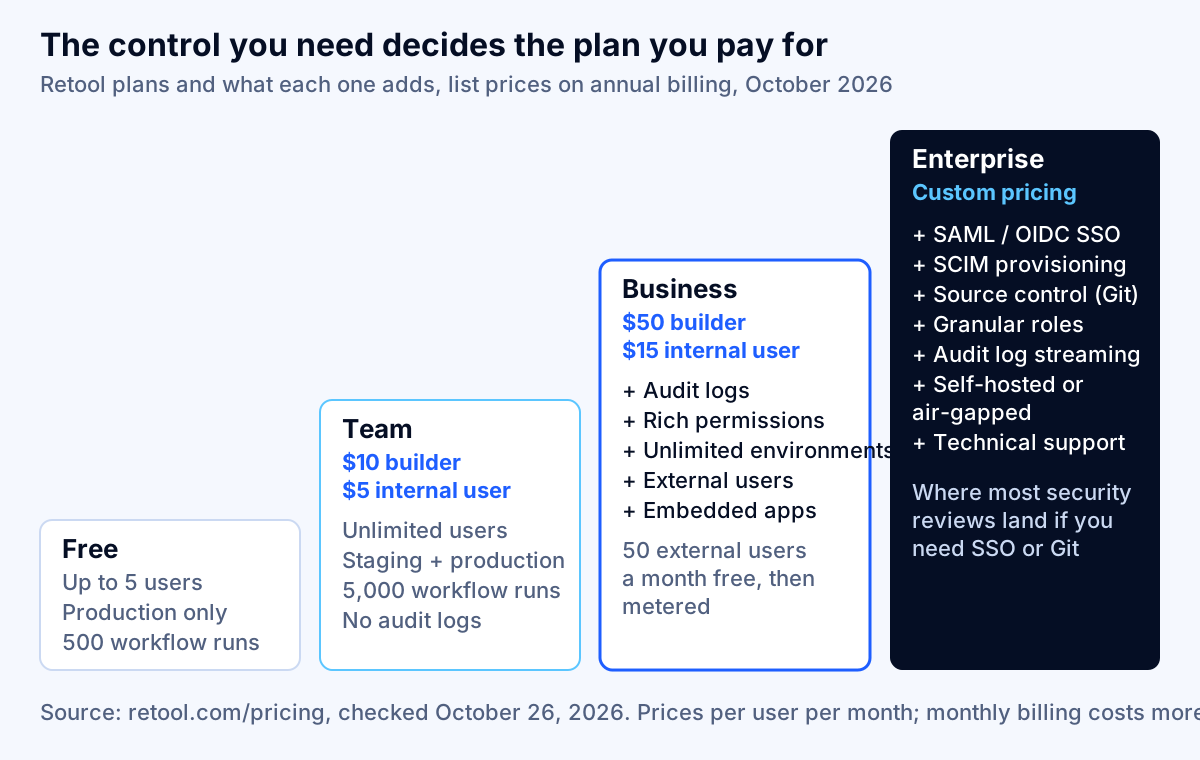
Here is where each common requirement sits, per the pricing page:
| If you need | Lowest Retool plan that includes it |
|---|---|
| A staging environment separate from production | Team |
| Audit logs of who did what | Business |
| Users outside your company (customers, partners) | Business |
| Embedding apps in another site or portal | Business |
| More than two environments | Business |
| SAML or OIDC single sign-on (Okta, Microsoft Entra ID) | Enterprise |
| SCIM user provisioning and deprovisioning | Enterprise |
| Git-based source control and branch editing | Enterprise |
| Self-hosted or air-gapped deployment | Enterprise |
| Technical support | Enterprise |
Two of those rows change the economics for most mid-sized companies.
Audit logs push you to Business. If the tool lets staff change customer records, issue refunds, approve payments or view personal data, someone will eventually ask who changed what. That moves you from $5 to $15 per internal user, a threefold increase in the line that grows with headcount. If you are in a regulated industry, our guide to AI audit trail requirements covers what examiners now expect to see in those logs, and the same principles apply to internal tools that do not use AI.
Single sign-on pushes you to Enterprise. Many companies require every application to authenticate through the corporate identity provider, so that leavers lose access everywhere at once. Retool lists custom SSO under Enterprise only. Because Enterprise pricing is not published, the honest way to model it is as an unknown above the Business line, and to get a quote before you commit.
Key takeaway: Price Retool at the plan your security review will actually approve. For many companies that means Business at minimum, and an Enterprise quote if SSO or Git are non-negotiable.
What a custom internal tool costs to build and run
A custom internal tool has no seat fees. It has labor, hosting and maintenance, and it is easy to underestimate all three if you only picture the screens.
The labor rate
All labor in this article uses one rate. The median wage for software developers, quality assurance analysts and testers was $64.44 an hour as of May 2025. In private industry, wages and salaries accounted for 70.0% of employer compensation costs in June 2026, with benefits making up the other 30.0%. Dividing the wage by 0.70 gives a fully loaded rate of $92.06 an hour.
That is the cost of the work done by an employee at the median. It is not a quote. Agencies and consultancies charge more because their rates carry recruiting, management, QA, tooling and margin, so treat every labor figure below as a floor and a sanity check on bids, not a target price.
What goes into the build
Take one realistic internal tool: an operations console where staff look up orders, fix exceptions, issue credits that need approval, and export a daily report. It reads from your main database and writes back through two internal APIs.
On Retool, the components, tables, forms and database connectors exist already. Our planning assumption is 80–200 builder hours to get this tool into production, or $7,400–$18,400 at the loaded rate. The low end assumes clean data sources and simple permissions; the high end assumes approvals, error handling and a few custom components.
Built from scratch, the same tool needs everything Retool provides out of the box: authentication, role-based permissions, an audit log, the screens, the API layer, tests and a deployment pipeline. Our planning assumption is 300–700 hours, or $27,600–$64,400. The width of that range is mostly decided by how many of those pieces already exist in your company. A team with a shared login service, a component library and a deployment template sits near the bottom.
Hosting and authentication
Hosting an internal tool of this size is a small line. Amazon Lightsail lists a 2 vCPU, 4 GB instance at $24 a month and a managed database from $15 a month (or $30 for the high-availability plan) as of October 2026. Budgeting $30–$150 a month covers a single small server at the low end and redundancy, backups and monitoring at the high end, or $1,100–$5,400 over three years.
Authentication is cheaper than most people expect in license terms. If your staff sign in through your existing identity provider, Amazon Cognito charges nothing for the first 50 monthly active users who sign in through SAML or OIDC federation and $0.015 per user after that, so 500 staff would cost about $6.75 a month. The real cost of single sign-on in a custom build is engineering hours to wire it up correctly, which is already inside the build estimate.
Maintenance
Maintenance is where custom tools quietly become expensive. Dependencies need upgrading, the APIs the tool calls change, and users ask for new fields. A common budgeting rule is 15–20% of the build cost every year. Over three years, that adds $12,400–$38,700.
Retool apps need maintenance too, but less of it, because Retool upgrades the platform and its components. Our assumption is 4–8 builder hours a month, or $13,300–$26,500 over three years. Notice that Retool's maintenance labor can exceed a cheap custom build's maintenance. That is real: Retool apps still need changes when the business changes, and the platform does not make that work disappear.
| Cost line, three years | Retool | Custom build |
|---|---|---|
| Build labor | $7,400–$18,400 | $27,600–$64,400 |
| Maintenance labor | $13,300–$26,500 | $12,400–$38,700 |
| Hosting | Included in seats | $1,100–$5,400 |
| Seat licenses | Depends on users (next section) | $0 |
| Total before seats | $20,600–$44,900 | $41,100–$108,500 |
Retool vs custom internal tools: the three-year cost at three team sizes
Now add the seats. The table below prices the same operations console for three companies, using annual list prices from the Retool pricing page and the labor ranges above.
| Scenario | Retool Team | Retool Business | Custom build |
|---|---|---|---|
| Small: 3 builders, 25 internal users | $26,200–$50,500 | $39,500–$63,800 | $41,100–$108,500 |
| Mid: 4 builders, 150 internal users | $49,100–$73,400 | $108,800–$133,100 | $41,100–$108,500 |
| Large: 6 builders, 500 internal users | $112,800–$137,100 | $301,400–$325,700 | $41,100–$108,500 |
The seat line alone, over three years, is $5,580 (Team) or $18,900 (Business) for the small company, $28,440 or $88,200 for the mid-sized one, and $92,160 or $280,800 for the large one. Enterprise would sit above the Business figures, at a price only Retool can tell you.
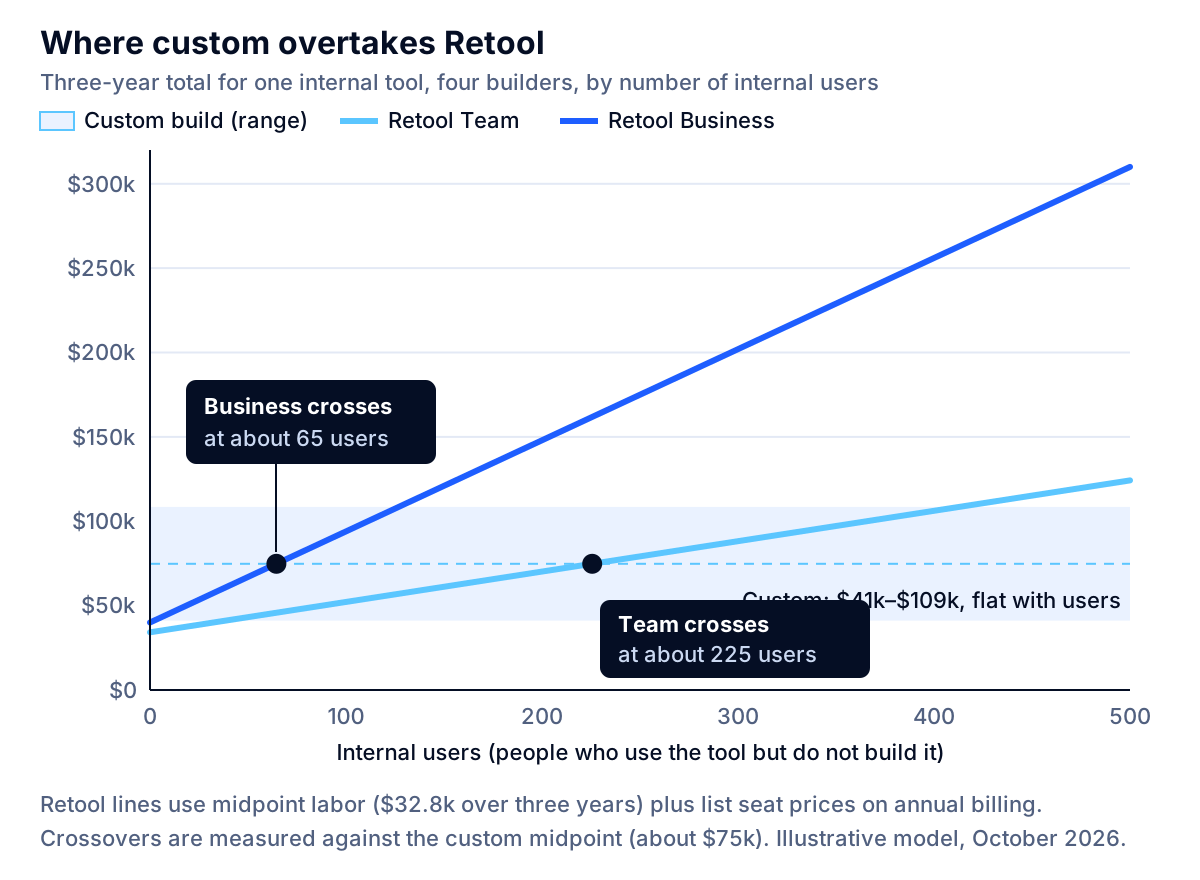
The break-even formula
You can find your own crossover point with one line of arithmetic. Over three years (36 months):
Break-even internal users = (custom total − Retool labor − 36 × builders × builder price) ÷ (36 × internal-user price)
Using the midpoints above (custom $74,800, Retool labor $32,800) and four builders:
- On Business: ($74,800 − $32,800 − $7,200) ÷ $540 ≈ 65 internal users.
- On Team: ($74,800 − $32,800 − $1,440) ÷ $180 ≈ 225 internal users.
Below those numbers, Retool is cheaper over three years. Above them, custom is. Run the same formula with your own build estimate and you will often find the answer is more sensitive to the custom build hours than to anything Retool charges.
What the numbers do and do not say
Three cautions before you take this to a budget meeting.
First, the ranges overlap in the small and mid scenarios. A simple custom build can beat a complicated Retool deployment even at 25 users, and a difficult custom build can lose to Retool Business at 150. The model tells you which way the odds lean, not the outcome.
Second, this is one tool. Retool's pricing is per user, not per app, so ten tools for the same 150 people cost the same in seats as one. Ten custom tools cost roughly ten times as much to build, although shared login, permissions and deployment get reused. If you plan a portfolio of small internal apps for the same group, Retool's economics improve sharply. If you plan one important tool for a large group, custom's do.
Third, three years is a choice. Seat fees continue forever, while build cost is mostly paid once. Stretch the horizon to five years and the break-even user count falls; shorten it to one year and Retool wins almost everywhere.
Key takeaway: Retool wins for many small tools used by a modest group. Custom wins for one important tool used by many people. Most companies have both kinds, which is why the best answer is often a mix.
Signs you have outgrown Retool
The cost crossover is the clearest signal, but it is rarely the first one teams notice. Score your situation against these ten statements. Each true statement is one point.
- Your seat bill has passed the break-even for your user count, or will within a year at current hiring.
- Customers, partners, drivers, brokers or patients now use the tool, not only employees.
- Your security review requires SSO, SCIM or Git-based change control, and the Enterprise quote changes your math.
- Engineers write custom components or iframes to get around the platform more than occasionally.
- Large apps have become slow or hard for several people to work on at once.
- The tool encodes logic you consider a competitive advantage, such as pricing, scheduling or allocation rules.
- You run scheduled automations frequent enough to hit the workflow run allowance every month.
- Data residency, an air gap, or a customer contract requires you to host everything yourself.
- The app needs a responsive mobile layout, heavy drag-and-drop or a branded customer-grade interface.
- You would struggle to pass a vendor-risk review of a platform that holds credentials to your production databases.
0–2 points: stay on Retool and revisit next year. 3–5 points: keep Retool for the long tail of small tools, and plan a custom build for the one or two tools that score highest. 6 or more: you are paying a platform to slow you down. Plan a migration, one tool at a time.
Several of these signals come straight from Retool itself. In its own guidance on choosing between React and Retool, Retool says "very large, monolithic apps with complex component hierarchies can sometimes cause performance problems" and can be difficult to work on with a large team, that responsive layouts are difficult, and that drag-and-drop interactions usually need a custom component. That is an unusually candid list, and it matches what teams report.
The customer-facing signal deserves extra weight. Retool's Business plan includes 50 external users a month at no charge, then meters them at published rates that step down with volume, starting at $8 per external user per month on annual billing for 51–250 users. Once a tool serves customers rather than staff, branding, uptime and user experience start to matter in ways an internal-tool platform is not built for. If that is where you are heading, our breakdown of customer portal development cost compares custom portals with off-the-shelf portal software.
When Retool is the right answer
Low-code gets dismissed by engineers and oversold by vendors. Here is where it genuinely wins.
- Many small tools for one team. Admin panels, lookup screens, approval queues and data-correction tools. Seat pricing covers every app, and each new tool costs only build hours.
- A small user base. Under roughly 50 internal users, the seat bill rarely justifies the cost and distraction of a custom build, even on Business.
- Tools that may not last. If the process might change or disappear within two years, a fast Retool build you can throw away beats a careful custom build you cannot.
- A team without front-end engineers. Retool lets backend engineers and technical operations staff ship usable interfaces. If nobody on staff could maintain a React app, the custom option carries a hidden staffing cost.
- Proving a workflow before you commit. Building the first version in Retool is a cheap way to learn what the process really is. Many of the best custom tools started as a Retool prototype that taught the team what to build.
If the problem is that a process lives in spreadsheets and email, start one step earlier: our guide on when to replace spreadsheets with custom software helps you decide whether you need low-code, off-the-shelf software or a custom build at all.
Lock-in and the real cost of leaving
The most important number missing from most Retool comparisons is the exit cost.
For classic Retool apps, the exit cost is a full rebuild. When a user asked whether an exported Retool app could be used in a React project, a Retool staff member replied that "the app can't be used anywhere outside of Retool," because the exported file is specific to what the Retool platform expects. Exports are a backup and sharing format, not portable code.
That picture is changing. Retool's new app builder produces React apps, and in June 2026 Retool added the ability to import React apps built in tools such as Replit, Lovable and Claude Code, in public beta on all plans. Import is a door into Retool. Whether the new builder also gives you a clean door out was not documented in the sources we reviewed, so ask Retool directly and get the answer in your contract before you treat it as an exit plan.
How to keep your options open on Retool
You can reduce lock-in without avoiding Retool:
- Keep business logic out of the platform. Put rules in your own APIs or database functions and let Retool call them. A rebuild then means replacing screens, not rediscovering logic.
- Use your own database as the source of truth. Avoid storing important data only in platform-specific storage.
- Document each app's purpose, owner and data sources in a register outside Retool, so a migration can be scoped in days rather than archaeology.
- Review the seat bill quarterly against the break-even formula above. Lock-in is most expensive when nobody notices the crossover.
The same principle protects you on a custom build: software you cannot maintain is lock-in too, just to a former employee or an agency instead of a platform. Our guide on how to hire a web app developer covers the contract terms, code ownership and documentation that keep a custom tool yours.
How AI coding assistants change the math in 2026
Retool's original pitch was speed: build in days what would take weeks in code. AI coding assistants have attacked that advantage directly, and Retool acknowledges it. In a June 2026 community discussion about whether AI-assisted React and Postgres apps now beat Retool, a Retool representative wrote that AI-assisted building is no longer the company's main differentiator, and that its time savings have shifted downstream to deploying and maintaining apps in a governed environment.
That is a useful framing for buyers, because it tells you where to look.
What AI assistance makes cheaper: the first version of the screens, forms, tables and API calls. That was the part of a custom build that used to take the longest, and it is the part where Retool's advantage has narrowed most.
What it does not make cheaper: deciding who may see and change what, wiring the tool into your identity provider, producing an audit log someone can rely on, hosting with backups and monitoring, keeping dependencies patched, and handling the change requests that never stop. Those are the lines in the cost table that Retool bundles into its seat price, and they are why our custom estimate stays at 300–700 hours even with modern tooling.
The practical consequence: AI tools lower the build-hours number in the break-even formula, which lowers the crossover user count. If your team is genuinely productive with AI-assisted development and already has shared authentication and deployment templates, use the bottom of the custom range. If it is not, a fast first version can turn into an expensive application nobody fully understands. That trade-off is the same one we discuss in our guide to legacy application modernization cost: code that was cheap to write can still be expensive to own.
Other options besides Retool and custom
Retool is not the only internal-tool platform, and switching platforms can solve a pricing problem without a rebuild in code.
| Option | Price, as of October 2026 | Best fit |
|---|---|---|
| Appsmith Community | Free, open source, self-hosted | Teams that want self-hosting without an enterprise contract and can run their own infrastructure |
| Appsmith Business | $15 per user per month, up to 99 users | Small teams that want audit logs and Git without per-builder pricing |
| Appsmith Enterprise | $2,500 a month for 100 users | Companies that need SAML or OIDC SSO and SCIM at a published price |
| Power Apps Premium | $20 per user per month, billed yearly | Companies already on Microsoft 365 and Entra ID |
| Hybrid | Retool seats plus a custom build | Retool for small admin tools, custom for the one tool that is big, customer-facing or core |
Two notes on those prices. Appsmith counts every workspace member and bills a member present at any point in the cycle for the full month, while builders cost nothing extra; that suits teams with many builders and a modest user count. Power Apps licenses per user with no limit on apps, but storage beyond the included Dataverse capacity costs $40 per GB per month, which matters if the app holds documents or large tables.
The hybrid deserves more attention than it gets. Retool's own guidance says most non-trivial internal applications will end up using both platform-built and custom components. For many mid-sized companies the right answer is not to leave Retool at all, but to move the single tool that has crossed the break-even, or that now faces customers, into custom web app development while the long tail stays on the platform.
How to decide: a six-question checklist
Work through these in order. Each answer narrows the options.
- How many people will use the tool in 18 months? Not today: after the rollout and the hiring plan. Put that number in the break-even formula.
- Which Retool plan will your security review approve? If audit logs are required, use Business prices. If SSO or Git are required, get an Enterprise quote before comparing anything.
- Will anyone outside your company use it? If yes, price external users and weigh the customer experience, or plan for custom from the start.
- Is this one important tool or many small ones? Many small tools for the same people favor Retool. One important tool for many people favors custom.
- Who will maintain it? A custom app needs someone who can own the code. A Retool app needs someone who can own the platform and its bill. Name the person before you choose.
- What would leaving cost? For Retool, assume a rebuild of the screens. For custom, check that you own the code, the documentation and the deployment.
If your answers point in different directions, that is normal, and it is usually a sign the hybrid is right.
Putting it together
Retool is a good product with a pricing model that rewards small teams and many tools, and punishes large user counts and enterprise security requirements. A custom tool costs more up front and less as it spreads across people. In our model, the crossover is around 65 internal users against Retool Business and around 225 against Team, with wide ranges that depend mostly on how hard the custom build is and which plan your security team will approve.
Next steps:
- Count your users honestly, including the people who will be added in the next 18 months.
- Identify the plan you would really need, using the requirements table above.
- Run the break-even formula with your own build estimate.
- Score the ten outgrown signs. Three or more means at least one tool should probably move.
- Decide tool by tool, not platform by platform.
If you want a second opinion on your numbers, bring your Retool invoice and a list of your tools and talk to a specialist. The discovery call is free, and a specialist replies within one business day. You can also browse our other guides on build-vs-buy decisions or see what we build.
Frequently asked questions
Is Retool cheaper than building a custom internal tool?
For small teams, usually yes. In the model in this article, one tool with three builders and 25 internal users costs $26,200–$50,500 over three years on Retool's Team plan, against $41,100–$108,500 for a custom build. The gap closes as internal users grow because Retool charges per seat and a custom app does not. On the Business plan, custom matches Retool at roughly 65 internal users using midpoint assumptions.
How much does Retool cost per user in 2026?
As of October 2026, Retool's pricing page lists Team at $10 per builder and $5 per internal user per month on annual billing ($12 and $7 monthly), and Business at $50 per builder and $15 per internal user ($65 and $18 monthly). Enterprise is quote-only. A builder is anyone who built or edited an app or workflow during the billing month.
Which Retool plan do I need for SSO and audit logs?
Audit logs start on the Business plan. SAML or OIDC single sign-on, SCIM provisioning, Git-based source control and self-hosting are listed only on Enterprise, which has no published price. If your security review requires SSO through Okta or Microsoft Entra ID, budget for an Enterprise quote rather than the Business list price.
Can I export a Retool app and run it somewhere else?
Not as working code, for classic Retool apps. A Retool staff member confirmed in the community forum that exported files are specific to the Retool platform and cannot run outside it. Retool's new app builder produces React apps, but check the current export terms in writing before treating that as an exit path. Plan as if leaving means rebuilding.
When should we move from Retool to a custom app?
When at least two of these are true: seat costs have passed the break-even for your team size, the tool now serves customers or partners, you need SSO or Git workflows that force an Enterprise quote, engineers are fighting the platform with custom components and workarounds, or the tool has become core to how you compete. Move one tool at a time, starting with the one that hurts most.
Do AI coding assistants make custom internal tools cheaper than Retool?
They lower the cost of writing the first version, which was Retool's original advantage. Retool's own staff wrote in June 2026 that AI-assisted building is no longer its main differentiator. They do not remove the cost of hosting, authentication, permissions, audit logging and maintenance, which is where most of a custom tool's lifetime cost sits.
What are the best alternatives to Retool?
It depends on why you are leaving. Appsmith offers an open-source edition you can self-host and a Business plan at $15 per user per month. Power Apps Premium is $20 per user per month and fits companies already on Microsoft 365. If seat costs, customer-facing use or control are the reason, a custom web app is the alternative.
Sources
- Retool pricing, Retool
- Billing and usage, Retool Docs
- Workflows billing and usage, Retool Docs
- React app import (changelog, June 3, 2026), Retool Docs
- React or Retool? Choosing a front-end approach for internal apps, Retool
- Is there any provision available to use the exported Retool app in my React project?, Retool Community
- Where is Retool still saving time vs AI-assisted React/Postgres apps?, Retool Community
- Appsmith pricing, Appsmith
- Power Apps pricing, Microsoft
- Software Developers, Quality Assurance Analysts, and Testers: Occupational Outlook Handbook, U.S. Bureau of Labor Statistics
- Employer Costs for Employee Compensation, June 2026, U.S. Bureau of Labor Statistics
- Amazon Lightsail pricing, Amazon Web Services
- Amazon Cognito pricing, Amazon Web Services


