Custom AI
Private LLM vs ChatGPT Enterprise: Cost, Control, Compliance
Private LLM vs ChatGPT Enterprise on real numbers: three-year costs at 50, 200 and 1,000 users, what each option controls, and where the break-even sits.

In this article
- What people actually mean by "private LLM"
- What ChatGPT Business and Enterprise commit to in writing
- Private LLM vs ChatGPT Enterprise: the three-year cost comparison
- Where the break-even sits, and what moves it
- What a private deployment actually buys you
- What a private deployment does not fix
- The compliance work neither option removes
- A scorecard for the decision
- The hybrid pattern most companies end up with
- How to decide in three weeks, not three months
- Frequently asked questions
- Sources
Short answer: for most US companies under about 500 users, private LLM vs ChatGPT Enterprise is not a cost decision. Licensed seats are cheaper. A private deployment wins when your data must stay inside your own cloud account, when you need retention and logging you control rather than a vendor's defaults, or when the assistant has to reach into systems no SaaS product will ever touch. Below the break-even, you are buying control and paying for it.
The numbers below say roughly where that break-even sits: about 500 users for a private assistant built on a cloud AI platform in your own tenant, and about 750 to 1,500 users before self-hosting an open-weight model on rented GPUs pays back. Every assumption is stated so you can replace it with your own.
You will get: what "private" actually means at each rung of the ladder, exactly what ChatGPT Business and Enterprise commit to in writing, a three-year cost model at 50, 200 and 1,000 users, the compliance work neither option removes, and a scorecard for making the call.
All prices are US list prices as of October 2026 and change often. Check the linked pricing pages before you commit a budget. This article was updated on October 14, 2026 for new Claude model prices, ChatGPT Enterprise data residency and key management, and a change to how Amazon Bedrock retains data for some models.
What people actually mean by "private LLM"
"Private LLM" gets used for five different things, and the argument usually goes wrong because two people are comparing different rungs of the same ladder.
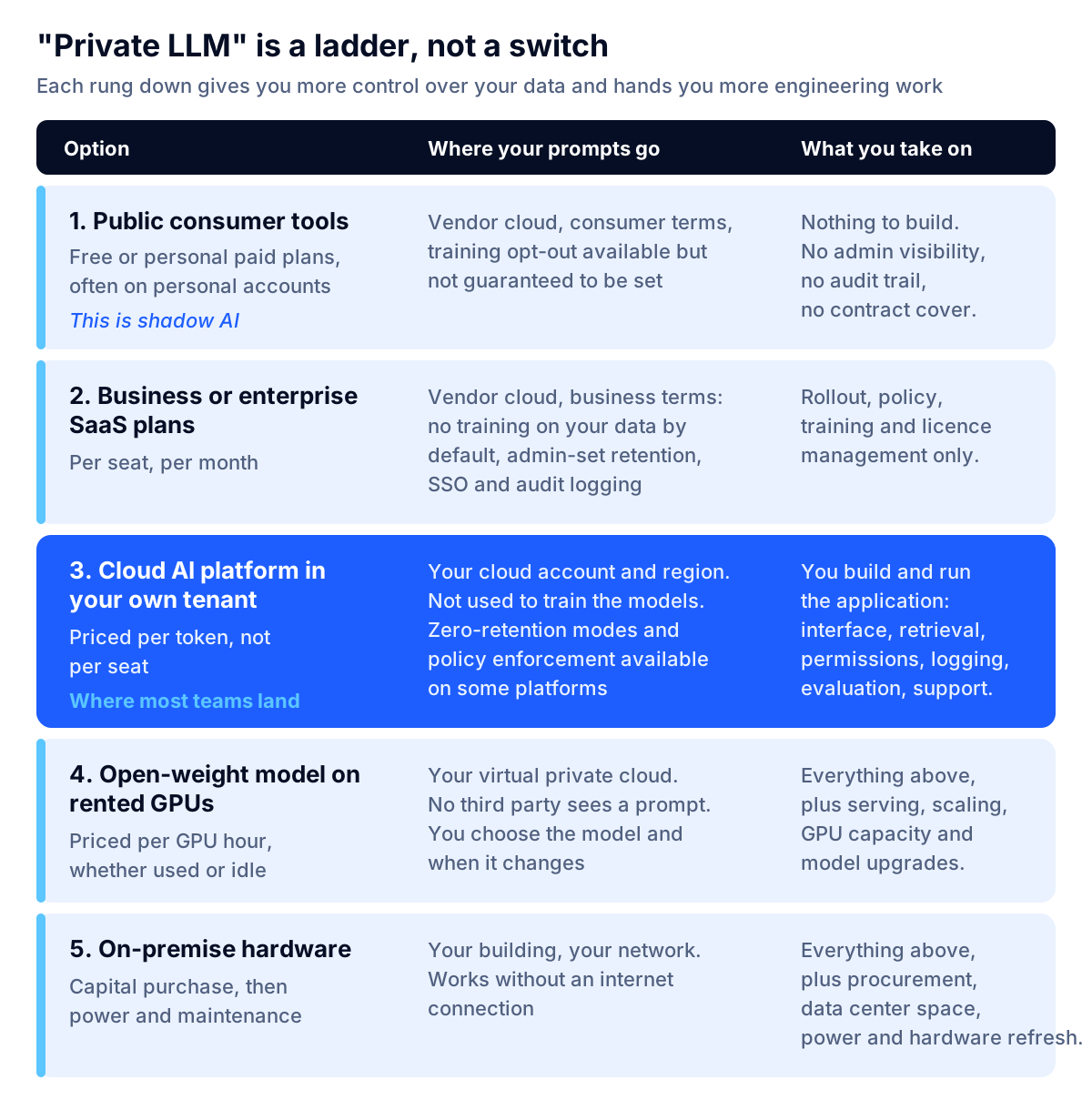
- Public consumer tools. Free or personal paid accounts. No admin visibility, no audit trail, no contract covering your data. This is what people mean by shadow AI, and it is usually the status quo you are replacing.
- Business or enterprise SaaS plans. ChatGPT Business, ChatGPT Enterprise, Claude Team and Enterprise, Microsoft 365 Copilot. Your data still goes to the vendor, but under business terms: no training on your data by default, admin-controlled retention, single sign-on and audit logging.
- A cloud AI platform inside your own cloud tenant. Amazon Bedrock, Microsoft Foundry or Google Vertex AI, called from an application you build. You use a frontier model without a per-seat license, and the data stays inside your cloud account and region.
- An open-weight model you serve yourself on GPUs you rent, inside your own virtual private cloud. No third party sees a prompt at all.
- On-premise hardware in your own building, which works with the internet unplugged.
Options 3, 4 and 5 all get sold as "private." They have wildly different costs and require wildly different amounts of engineering. When a vendor tells you a private LLM is cheaper than ChatGPT Enterprise, the first question is which of these they mean.
Key takeaway: Decide which rung you actually need before you compare prices. Most companies that think they need option 4 need option 3.
What ChatGPT Business and Enterprise commit to in writing
Before deciding what to build, read what the SaaS option already gives you. OpenAI's enterprise privacy page, updated January 8, 2026, is specific:
- Training. "By default, we do not use your business data for training our models." This covers ChatGPT Business, Enterprise, for Healthcare, Edu, for Teachers and the API Platform, unless you explicitly opt in.
- Ownership. You retain rights to your inputs and own the outputs you rightfully receive, to the extent permitted by law.
- Retention. For Enterprise, Edu and for Healthcare, workspace admins control how long data is retained, and deleted conversations are removed within 30 days unless retention is legally required. For Business, admins can view, access, export and delete conversations, and OpenAI states that specialized third-party contractors bound by confidentiality may review content solely for abuse and misuse.
- Security and compliance. AES-256 at rest, TLS 1.2+ in transit, a completed SOC 2 Type 2 audit, and a Data Processing Addendum available in support of GDPR compliance.
- Audit. Enterprise workspaces get an audit log of conversations and GPTs through the Enterprise Compliance API.
- Residency and keys. OpenAI's Business pricing page lists, for Enterprise, SCIM, enterprise key management (EKM), role-based access controls, custom data retention policies and "support for data residency in ten regions": the US, EU, UK, Japan, Canada, South Korea, Singapore, India, Australia and the UAE, as of October 2026.
- Health data. OpenAI states it can sign a Business Associate Agreement for the API Platform, and offers ChatGPT for Healthcare as a workspace designed to support HIPAA compliance.
Anthropic makes a stronger contractual commitment for its commercial services. Its commercial terms state plainly that "Anthropic may not train models on Customer Content from Services," and that Anthropic assigns to the customer its rights in outputs. Claude Enterprise adds SCIM, audit logs, a compliance API, custom data retention controls, IP allowlisting and a HIPAA-ready offering.
That is a serious set of commitments, and for a large share of companies it is enough. The honest limitation is this: these are contractual and operational controls, not architectural ones. Your prompts still leave your network and are processed on the vendor's systems under the vendor's terms, which the vendor can change with notice. If your objection to public AI tools is contractual, business plans answer it. If your objection is that certain data must not leave infrastructure you control, they do not.
Residency and key management have moved into the SaaS tier
A year ago, "our data must stay in the EU" or "we must hold the encryption keys" were common reasons to build. They are weaker reasons now. ChatGPT Enterprise lists data residency in ten regions and customer key management, and Anthropic's API offers US-only inference for an extra 10% on Claude 4.6 and later models, according to its pricing documentation. Before you fund a private deployment on residency grounds, ask whether the requirement is about where data is stored (now often solvable with a license) or who operates the system that processes it (still only solvable by running it in your own tenant).
The seat-minimum myth
Many comparison articles still claim ChatGPT Enterprise requires a 150-seat minimum. OpenAI's own pricing FAQ says otherwise as of October 2026: "Business plans are available starting at 2 users," and the Business plan is pitched at teams of 2 to 200 employees. Enterprise is quoted by sales, with credit-based and token-based pricing available. Anthropic now publishes a floor for its own top tier: Claude Enterprise lists a 20-seat minimum, while Claude Team covers 2 to 150 people. If someone told you that you are too small for business terms, check the current page before you conclude you must self-host.
Private LLM vs ChatGPT Enterprise: the three-year cost comparison
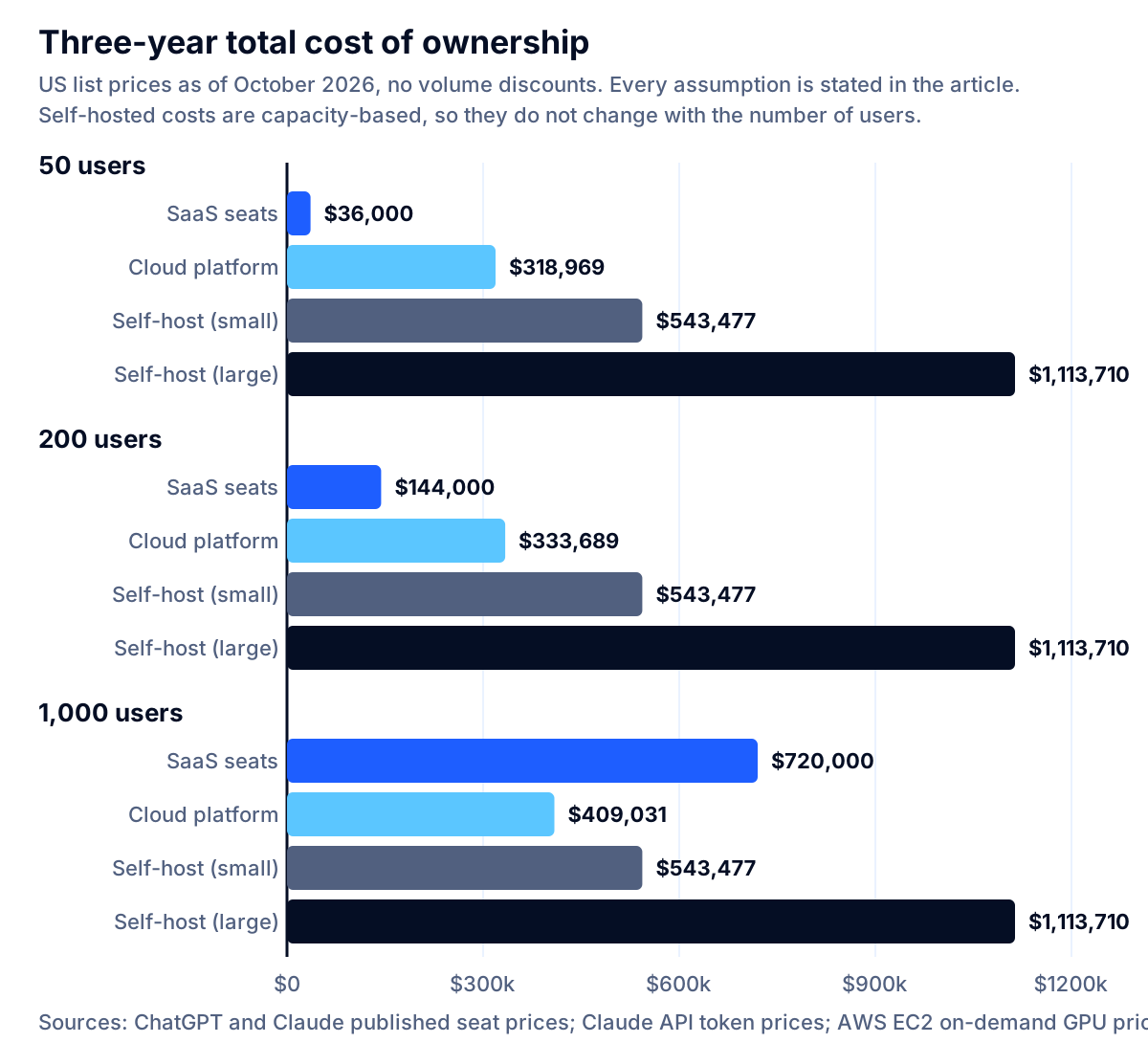
Here is the model. It compares four ways to give staff a secure assistant over three years, at three company sizes. All inputs are cited and all assumptions are stated, so you can rebuild it with your own numbers.
Option A: per-seat licenses
ChatGPT Business standard seats are $20 per seat per month billed annually, or $25 billed monthly; premium seats are $100 and $125. Claude Team is priced identically at $20 per seat per month on annual billing ($25 monthly), with Claude Enterprise at $20 per seat plus usage billed at API rates, billed annually with a 20-seat minimum. Microsoft prices the Microsoft 365 Copilot Business add-on at $21 per user per month paid yearly, discounted to $18 through the end of 2026, on top of a qualifying Microsoft 365 license. ChatGPT Enterprise is custom-priced by sales.
At $240 per seat per year, three-year totals are $36,000 for 50 users, $144,000 for 200 users and $720,000 for 1,000 users.
Option B: a private assistant on a cloud AI platform in your own tenant
You build an internal assistant that calls a frontier model through Amazon Bedrock, Microsoft Foundry or Google Vertex AI. There is no per-seat fee. You pay for tokens, hosting and the people who build and maintain it. If you have not settled on which of the three to use, our comparison of AWS Bedrock vs Azure OpenAI vs Google Vertex AI works through the data handling, residency and quota differences that decide it.
Token assumptions. 12 messages per user per working day and 21 working days a month, so 252 messages per user per month. Each message carries 6,000 input tokens (system prompt, retrieved documents and conversation history), of which 4,500 are prompt cache reads, and produces 700 output tokens. Priced at Claude API list prices as of October 2026, with cache reads at each model's published cache-hit price (0.1 times the input price by default, 0.05 times on Sonnet 5.5 and Opus 5.5) and cache writes ignored for simplicity:
| Model | Input / output per million tokens | Cost per message | Cost per user per month | 1,000 users per month |
|---|---|---|---|---|
| Claude Haiku 5.5 (prompts up to 100K tokens) | $0.10 / $0.50 | $0.0005 | $0.14 | $137 |
| Claude Haiku 4.5 | $1 / $5 | $0.0055 | $1.37 | $1,373 |
| Claude Sonnet 5.5 | $2 / $10 | $0.0105 | $2.63 | $2,633 |
| Claude Sonnet 5 | $2 / $10 | $0.0109 | $2.75 | $2,747 |
| Claude Opus 5.5 | $4 / $20 | $0.0209 | $5.27 | $5,267 |
| Claude Opus 5 | $5 / $25 | $0.0273 | $6.87 | $6,867 |
That is the first surprise for most buyers. At list prices, a heavy internal assistant on a mid-tier model costs under $3 per user per month in tokens, against $20 for a seat, and the newest small model brings that under 15 cents. Tokens are not what makes a private deployment expensive. Anthropic has also confirmed that Sonnet 5's $2 and $10 introductory rate is now its standard price, and that a previously scheduled increase to $3 and $15 on September 1, 2026 will not happen, so the planning number is stable for now.
Build and run assumptions. A production internal assistant with retrieval over your documents, single sign-on, permission-aware search, logging and an evaluation set is roughly 16 person-weeks of engineering. Priced at a loaded in-house rate of $93 an hour, that is $59,520. The rate comes from the BLS median software developer wage of $135,980 as of May 2025, grossed up using the June 2026 Employer Costs for Employee Compensation release, in which wages and salaries averaged 70.0% of private-industry employer compensation costs. Maintenance is 0.4 of a full-time engineer, or $77,703 a year. Application hosting, database, vector store and logging are assumed at $600 a month; substitute your own.
Three-year totals using Claude Sonnet 5.5: $318,969 at 50 users, $333,689 at 200 users and $409,031 at 1,000 users.
Options C and D: self-hosting an open-weight model on rented GPUs
You run an open-weight model on GPU instances inside your own virtual private cloud. Nothing leaves your account. You now own model serving, capacity planning and upgrades on top of everything in option B, so assume 20 person-weeks to build ($74,400) and more ongoing operations time.
GPU prices below are from the Amazon EC2 On-Demand pricing page for Linux in US East (N. Virginia), rechecked in October 2026 and unchanged since September, at 730 hours a month:
| Instance | GPUs / GPU memory | On-demand hourly | Per month | Two nodes per year |
|---|---|---|---|---|
| g6e.xlarge | 1 / 48 GB | $1.8610 | $1,359 | $32,605 |
| g6e.12xlarge | 4 / 192 GB | $10.4926 | $7,660 | $183,831 |
| g6e.48xlarge | 8 / 384 GB | $30.1312 | $21,996 | $527,904 |
| p5.48xlarge | 8 / H100 | $55.0400 | $40,179 | $964,301 |
- Option C, small: two g6e.xlarge nodes for redundancy ($32,605 a year) plus 0.6 of an engineer ($116,554) plus $7,200 hosting. Three-year total $543,477.
- Option D, department scale: two g6e.12xlarge nodes ($183,831 a year) plus 0.8 of an engineer ($155,406) plus $7,200 hosting. Three-year total $1,113,710.
Reserved capacity and savings plans reduce the GPU line materially, and so does shutting capacity down outside business hours. Both options still carry a cost that per-seat licensing does not: you pay for the GPU whether anyone is using it or not. That is also where cloud cost optimization work pays for itself fastest on AI workloads. If you are weighing buying the GPUs instead of renting them, the five-year cost of an on-premise LLM deployment works through the hardware, power, staffing and the utilization you would need to sustain before ownership wins.
Key takeaway: Per-token pricing scales with use. Per-seat pricing scales with headcount. Self-hosted GPU pricing scales with neither — it scales with capacity you reserve in advance. That single difference explains most of the chart.
Where the break-even sits, and what moves it
Setting the three-year totals equal gives the crossover points under these assumptions:
| Comparison | Break-even | What it means |
|---|---|---|
| Seats vs private assistant on a cloud AI platform | about 503 users | Below this, licenses are cheaper. Above it, the fixed build and maintenance costs spread far enough to win. |
| Seats vs small self-hosted deployment | about 756 users | Only true if two small GPU nodes can actually serve that many people. |
| Seats vs department-scale self-hosted deployment | about 1,547 users | The GPU bill alone is $183,831 a year before anyone logs in. |
The second row carries the trap. Two single-GPU nodes are unlikely to serve 750 knowledge workers with acceptable latency on a capable model, so the arithmetic break-even arrives before the engineering one does. Whether a given node serves 50 or 500 people depends on model size, context length, concurrency and answer length, and the only way to know is to load-test with your own traffic. Any vendor quoting you a seat-equivalent GPU cost without a load test is guessing.
Four things move the break-even in favor of building:
- Existing cloud commitments. If you already hold an AWS or Azure enterprise agreement with committed spend, the platform option draws down budget you have already promised.
- Reuse. If you will build several AI applications, the retrieval, permissions, logging and evaluation work in option B is paid for once and reused. That is a large part of what custom AI development is actually for.
- Uneven usage. If 1,000 people have accounts but 150 use it weekly, per-seat licensing charges you for the other 850. Per-token pricing does not.
- Volume discounts. Every vendor here negotiates above a certain spend. List prices are a ceiling, not a quote.
And three that move it against building:
- Feature parity. A seat is not just a chat box. It includes mobile and desktop apps, voice, image generation, deep research, connectors to internal tools, spreadsheet and document extensions, and vendor support. Rebuilding even a fraction of that is expensive, and the model above deliberately does not attempt it.
- Model churn. Frontier models are replaced often. On a seat license, upgrades simply arrive. In a self-hosted deployment, every upgrade is a project with its own testing and rollback plan.
- Key-person risk. A private deployment maintained by one enthusiastic engineer becomes a liability the day that person leaves.
What a private deployment actually buys you
If it is usually more expensive below 500 users, why do serious companies still do it? Because some things cannot be bought with a license at any price.
Data that never leaves your account. Microsoft states for models sold by Azure in Foundry that your prompts, completions, embeddings and training data "are NOT available to OpenAI or other providers of Models sold by Azure" and "are NOT used by providers of Models sold by Azure to improve their models or services." It also states that the models are stateless: "no prompts or completions are stored in the model," and prompts are processed within your specified geography for standard deployments. That is a materially different architecture from calling a vendor's own consumer-facing service.
Retention you can enforce technically, not just contractually. Amazon Bedrock exposes data retention as an account-level and project-level mode. Setting none means, in AWS's words, "No request or response data is written to durable storage by AWS or shared with the model provider," and Bedrock blocks any request to a model that would require retention. You can enforce that across an organization with a service control policy so nobody can quietly loosen it. There is one catch worth knowing as of October 2026. Some models require AWS review: AWS currently names Claude Fable 5 and Claude Fable 5.1, whose prompts and completions "are retained within the AWS boundary for up to 30 days" and may be reviewed by AWS, though not shared with the model provider. Those models are unavailable if your effective retention mode is none or default, so a strict zero-retention policy also decides which models your teams can use. AWS also notes that model providers have no access to the deployment accounts, so "they don't have access to Amazon Bedrock logs or to customer prompts and completions." Being able to demonstrate a control with an IAM policy rather than a contract clause is exactly what an examiner or a customer security review asks for.
Integration that goes deeper than a connector. An assistant that reads your claims system, applies your underwriting rules and writes a decision back is not a SaaS feature. It is software. That is AI agent development territory, and it is the most common honest reason to build rather than buy.
Model choice and stability. You decide which model runs and when it changes. In a regulated environment where a model change can trigger revalidation, that matters more than benchmark scores.
Cost that tracks usage, not headcount. Consider an organization with 1,000 employees where 200 use AI weekly. Universal licensing costs $240,000 a year. Tokens for the 200 who actually use it, on the assumptions above, cost roughly $6,300 a year on Sonnet 5.5. The gap funds a lot of engineering — which is the real argument for building, once you are large enough for the gap to exist.
What a private deployment does not fix
This is where most vendor comparisons stop being useful.
It does not stop shadow AI. Cyberhaven's 2026 AI Adoption and Risk Report, published February 11, 2026, found that 39.7% of AI interactions involve sensitive data, and that a large share of usage runs through personal accounts that bypass corporate controls entirely — 32.3% for ChatGPT, 58.2% for Claude and 60.9% for Perplexity in its dataset. Building a private assistant does nothing about that unless the private assistant is genuinely good enough that people prefer it, and unless you pair it with policy and monitoring. An internal tool people find slow or unhelpful drives more shadow AI, not less.
It does not make answers correct. A self-hosted open-weight model is typically less capable than the frontier model in a licensed seat. Hosting it yourself changes who sees the data, not whether the answer is right. You still need an evaluation set, sampling and human review.
It does not create an audit trail. Logging every prompt, retrieved source, model version and output is work you do, and it is the work regulators ask about. A licensed Enterprise workspace may hand you more of this out of the box than your first internal build does.
It does not solve permissions. If the assistant retrieves a document, anyone who can reach the assistant can effectively read that document. Permission-aware retrieval is one of the hardest parts of an internal assistant and one of the most commonly skipped.
It does not remove the regulator. Hosting a model yourself is not a governance program. NIST's AI Risk Management Framework, released January 26, 2023, with a Generative AI Profile added July 26, 2024, organizes the work around Govern, Map, Measure and Manage. NIST says the framework is now being revised under the White House AI Action Plan, and in April 2026 it released a concept note for a profile on AI in critical infrastructure, so expect the reference points to move. None of those functions is satisfied by a deployment choice.
Key takeaway: Hosting changes who can see your data. It does not change whether the output is accurate, logged, permissioned or governed. Budget for those separately, whichever option you pick.
The compliance work neither option removes
If you are in healthcare, banking, insurance or legal services, the deployment decision is a small part of the file.
HIPAA. HHS is explicit that the Rules permit a covered entity to disclose protected health information to a business associate only if the covered entity "obtains satisfactory assurances, in the form of a contract or other written arrangement," that the business associate will appropriately safeguard the information. A cloud service provider engaged to create, receive, maintain or transmit electronic PHI is itself a business associate. So a BAA is table stakes, not the finish line: you still owe minimum necessary, access controls, audit controls and a risk analysis across the whole flow, including the retrieval layer and the logs. If prompts containing PHI sit in an application log for a year, the model host is not your problem. Our HIPAA-compliant AI development checklist walks through each of those controls and the places a signed BAA still leaves uncovered.
Financial services. Model risk management, third-party risk management and consumer protection obligations apply to AI systems the way they apply to other models and vendors. Expect examiners to ask for a model inventory, documented validation, change control and evidence that a named human is accountable for decisions. Banks should note that the revised guidance put generative and agentic AI outside model risk management altogether, which we cover in what SR 26-2 changed for bank AI. Law and accounting firms have their own layer of ethics and tax-privacy rules, covered in our guide to law firm AI confidentiality. Our AI compliance work starts from that documentation burden rather than from the model.
Everyone. Whatever you deploy, write down: who may use it, on what data, what is logged and for how long, who reviews outputs, and what happens when it is wrong. None of this is legal advice — confirm the specifics with your counsel and compliance team.
A scorecard for the decision
Score each row 0, 1 or 2 for your situation. Higher totals point toward a private deployment.
| # | Question | 0 points | 1 point | 2 points |
|---|---|---|---|---|
| 1 | Does regulated or contractually restricted data enter the prompts? | No | Sometimes | Routinely |
| 2 | Can you accept a vendor's contractual no-training commitment? | Yes | With conditions | No, it must be architectural |
| 3 | Do you need to prove controls technically to an examiner or customer? | No | Occasionally | Every year |
| 4 | How many people will genuinely use it weekly? | Under 100 | 100 to 500 | Over 500 |
| 5 | Must the assistant write to internal systems, not just read documents? | No | Read-only integrations | Yes, it takes actions |
| 6 | Do you have, or will you hire, engineers to own it? | No | Partly | Yes, a named team |
| 7 | Do you have committed cloud spend to draw down? | No | Some | Substantial |
| 8 | Is usage concentrated in a few teams rather than company-wide? | Company-wide | Mixed | A few teams |
| 9 | Would a model change require revalidation in your process? | No | Sometimes | Yes |
| 10 | Do you plan more than one AI application in the next two years? | No | Maybe | Yes, a roadmap |
0 to 6: buy seats. Write an acceptable use policy, turn on single sign-on and admin controls, and revisit in a year.
7 to 13: buy seats for the company and build one private application for the sensitive workflow. This is the hybrid pattern below, and it is where most mid-sized companies land.
14 to 20: build inside your own tenant. Start with a cloud AI platform (option B), not self-hosted GPUs, unless row 2 scored 2 and your legal position genuinely requires that nothing leaves your own infrastructure.
The hybrid pattern most companies end up with
After the analysis, the answer is rarely one or the other.
Layer 1: licensed seats for general productivity. Give everyone a business or enterprise plan under business terms. This is how you reduce shadow AI — not by blocking tools, but by making the sanctioned one better than a personal account.
Layer 2: a private application for the sensitive workflow. Build one internal assistant or AI agent inside your own cloud tenant for the workflow that touches regulated data or needs real integration. It reuses your identity provider, your permissions and your logging.
Layer 3: policy and evidence across both. One acceptable use policy, one model inventory, one logging standard, one review cadence. Regulators and enterprise customers ask about the program, not the hosting.
The costs above support that split. Layer 1 at $240 per seat per year is cheap for broad coverage. Layer 2 at roughly $60,000 to build and $85,000 a year to run is affordable when aimed at one workflow that matters, and ruinous when aimed at replacing a whole product suite.
How to decide in three weeks, not three months
You do not need a six-month evaluation. You need evidence.
- Week 1: measure the real problem. Find out what staff already do. How many people use AI tools weekly, on what data, on which accounts. If you cannot answer that, the deployment debate is premature.
- Week 1: score the decision. Run the scorecard above with your security, compliance and operations leads in one room. Disagreement on a row is more informative than the total.
- Week 2: price your own model. Replace the token, wage and hosting assumptions here with your numbers. Count people who will genuinely use it weekly, not headcount.
- Weeks 2 and 3: prototype the sensitive workflow. Build one working assistant on your real documents, inside your own tenant, and run it against real past cases. A prototype built in one to two weeks tells you more about feasibility and cost than any vendor comparison, and our line-by-line guide to RAG chatbot development cost covers what that assistant costs to build and run once it leaves the prototype stage. If the plan involves fine-tuning a model on your own data, price it first with our breakdown of custom AI model development cost, where hosting a private model is the line that moves the total.
- Week 3: decide the layers, not the vendor. Decide what belongs in licensed seats and what belongs in your own tenant. Then pick vendors.
Fleurant AI builds private AI deployments and internal assistants for US companies, including those in regulated industries, and we start with a free discovery call and a working prototype rather than a licensing debate. If you want a second opinion on the model above using your own numbers, talk to a specialist, or read more about how we approach custom AI development and the rest of our services.
Frequently asked questions
Is a private LLM cheaper than ChatGPT Enterprise?
Usually not, until you are large. Under the assumptions in this article, a private assistant built on a cloud AI platform costs more over three years than per-seat licenses up to roughly 500 users (about 503 at October 2026 list prices), and a self-hosted deployment on rented GPUs does not break even until roughly 750 to 1,500 users. Below those points, a private deployment is a control decision rather than a savings decision.
Does OpenAI train its models on ChatGPT Enterprise data?
No. OpenAI's enterprise privacy page states that by default it does not use business data from ChatGPT Business, Enterprise, Edu, for Teachers, for Healthcare or the API Platform to train its models, unless you explicitly opt in to share data. That commitment is contractual, not architectural: your prompts still leave your network and are processed on OpenAI's systems.
What is the minimum number of seats for ChatGPT Business?
OpenAI's pricing FAQ states that Business plans are available starting at 2 users, and its Business pricing page describes the plan as for teams of 2 to 200 employees, as of October 2026. The often-repeated figure of a 150-seat minimum refers to an older version of the offering. ChatGPT Enterprise is quoted by sales. On the Claude side, Team covers 2 to 150 people and Enterprise now lists a 20-seat minimum.
Does ChatGPT Enterprise offer data residency or customer-managed keys?
Yes. As of October 2026, OpenAI's Business pricing page lists enterprise key management (EKM) and support for data residency in ten regions, including the US, EU, UK, Japan, Canada and India, for ChatGPT Enterprise. That closes part of the gap with a private deployment: you can choose where data is stored and hold encryption keys. It does not change the fact that prompts are processed on OpenAI's systems under its terms.
Can I use ChatGPT with protected health information?
OpenAI states it can sign a Business Associate Agreement for the API Platform, and offers ChatGPT for Healthcare as a workspace designed to support HIPAA compliance. A BAA is necessary but not sufficient: HHS requires covered entities to obtain satisfactory assurances and to apply the Privacy and Security Rules across the whole data flow, including access controls, audit logs and minimum necessary. Confirm the specifics with your counsel and compliance team.
What does a private LLM not fix?
It does not stop staff using consumer AI tools on personal accounts, does not make outputs accurate, and does not create an audit trail on its own. It also does not solve permissions: if the assistant can retrieve a document, whoever can reach the assistant can effectively read it. Those problems are solved by policy, permission-aware retrieval, evaluation and logging, whoever hosts the model.
Which is better for a regulated mid-sized company: a private LLM or ChatGPT Enterprise?
Most end up with both. Licensed seats give the whole company general productivity under business terms, and a private deployment inside your own cloud tenant handles the specific workflows that touch regulated data or need deep integration. Splitting them this way is usually cheaper and faster than forcing every use case into one option.
How long does it take to build a private AI assistant?
As a planning range, a working prototype on your real documents takes 1 to 2 weeks, and a production internal assistant with retrieval, single sign-on, permissions, logging and an evaluation set takes roughly 8 to 20 person-weeks. Self-hosting an open-weight model on your own GPUs adds serving, capacity planning and upgrade work on top of that.
Sources
- ChatGPT Pricing, OpenAI
- Enterprise privacy at OpenAI, OpenAI
- ChatGPT Business and Enterprise pricing, OpenAI
- Claude pricing, Anthropic
- Claude API pricing, Anthropic
- Data, privacy, and security for Foundry Models sold by Azure, Microsoft Learn
- Data retention in Amazon Bedrock, Amazon Web Services
- Data protection in Amazon Bedrock, Amazon Web Services
- Amazon EC2 On-Demand Pricing, Amazon Web Services
- Employer Costs for Employee Compensation, June 2026, U.S. Bureau of Labor Statistics
- Software Developers, Quality Assurance Analysts, and Testers, U.S. Bureau of Labor Statistics
- Business Associates, U.S. Department of Health and Human Services
- AI Risk Management Framework, National Institute of Standards and Technology
- Sensitive Enterprise Data Is Flowing Into AI Tools at Scale, Cyberhaven
- Microsoft 365 Copilot Business pricing, Microsoft


