Custom AI
pgvector vs Pinecone: Cost and Fit at 1M, 10M and 50M Vectors
pgvector or Pinecone for RAG? Default to the Postgres you already run, then see monthly costs at 1M, 10M and 50M vectors with break-even query volumes.

In this article
- pgvector vs Pinecone at a glance: the one-table answer
- What do pgvector and Pinecone cost at 1M, 10M and 50M vectors?
- When does pgvector win?
- When does Pinecone win?
- How do filtering and permissions work in each?
- What is pg_pinecone, and does it change the decision?
- What are the real limits of each?
- How do hybrid search and operations compare?
- How should you test before committing?
- Decision flow: which one should you choose?
- Conclusion: start in Postgres, keep the exit open
- Frequently asked questions
- Sources
pgvector vs Pinecone, the short answer: if your application already runs on Postgres and your corpus is under roughly 10 million chunks, use pgvector. It keeps vectors, text, permissions and metadata in one database you already back up, monitor and secure. Choose Pinecone when you have hundreds of separate tenants, a corpus well past 20 million chunks, spiky or low query volume against a large corpus, or nobody to run a database.
The cost story is less obvious than most comparison pages suggest. Pinecone bills each query by the size of the namespace it searches, so the same 10 million vectors cost about $128 a month at 100,000 queries and about $1,086 at a million. A Multi-AZ Postgres server for the same data costs about $1,465 a month whether it serves ten queries or ten million. This article prices both at 1 million, 10 million and 50 million vectors from current published rates (as of November 2026), shows where the lines cross, and covers the parts price pages skip: filtered search, permissions, memory limits and a new option, Pinecone's own Postgres extension.
This guide is for founders, CTOs and engineering leads choosing a retrieval store for a RAG system (retrieval-augmented generation, where a model answers from your documents). It follows our guides to RAG chatbot development cost and training an LLM on company data, and it is the kind of decision our custom software built for your business team works through with clients before any code is written.
pgvector vs Pinecone at a glance: the one-table answer
pgvector is a free open-source Postgres extension that adds a vector column type and approximate-nearest-neighbor indexes to a database you run or rent. Pinecone is a managed, usage-priced vector database that stores only vectors and their metadata. Every other difference follows from that.
| Question | pgvector (on Postgres) | Pinecone (serverless) |
|---|---|---|
| What you pay for | A database server plus storage, flat per hour | Storage, plus per-query read units and per-write write units |
| Cost shape | Flat; rises in steps as you resize | Linear in queries; each query costs more as the namespace grows |
| Starting cost | Marginal cost near zero on a database you already run | Free Starter tier; Builder $20 a month flat; Standard $50 monthly minimum |
| Permissions | Row-level security in the same query | Namespace per tenant, or metadata filters |
| Joins with business data | Native SQL | None; fetch IDs, then join in your app |
| Index limits | 2,000 dimensions (4,000 halfvec) | Dense, sparse and full-text indexes managed for you |
| Scale ceiling | Set by RAM on one server, then partitioning | 100,000 namespaces per index on Standard |
| Who runs it | You: upgrades, backups, memory tuning | Pinecone |
| Best default when | You already run Postgres and have under about 10M chunks | You have many tenants, a very large corpus, or no database owner |
Sources for the rows: Pinecone's pricing page, its object limits and the pgvector README.
Key takeaway: The two products are priced on different axes. Pinecone charges for use; Postgres charges for capacity. Which is cheaper depends on how many queries you run and how you partition your data, not on vector count alone.
What do pgvector and Pinecone cost at 1M, 10M and 50M vectors?
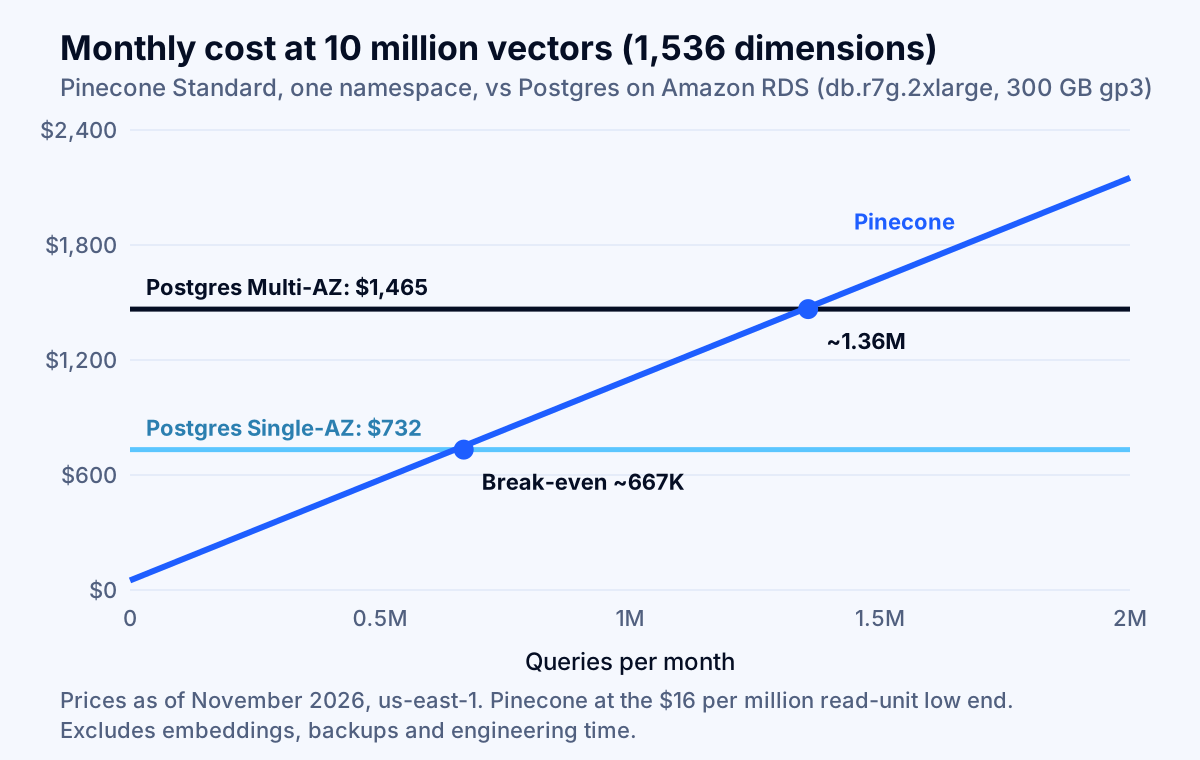
At 10 million 1,536-dimension vectors, Pinecone costs roughly $22 a month to store plus $0.001 per query in a single namespace, while Postgres on Amazon RDS costs roughly $732 (Single-AZ) to $1,465 (Multi-AZ) a month flat. The assumptions below make that reproducible.
Assumptions. Embeddings are 1,536 dimensions, the default of OpenAI's text-embedding-3-small (OpenAI documentation). Each Pinecone record carries an 8-byte ID, 500 bytes of metadata and the vector, so 1,536 × 4 + 508 = 6,652 bytes, using the formula in Pinecone's cost guide. Pinecone read and write prices are taken at the low end of the Standard ranges on its pricing page ($16 per million read units, $4 per million write units) because the page says the rate varies by cloud and region. For Postgres we price Amazon RDS for PostgreSQL in us-east-1 from the November 13, 2026 AWS price file: db.r7g.large at $0.239 an hour, db.r7g.2xlarge at $0.956, doubled for Multi-AZ, plus gp3 storage at $0.115 per GB-month ($0.23 Multi-AZ). We use 730 hours a month. Embedding costs, backups, data transfer and engineering time are excluded on both sides.
How does Pinecone's bill work?
Pinecone's bill has three parts, and one of them surprises people. Storage is $0.33 per GB-month. Writes cost 1 write unit per KB of data upserted, with a 5-unit minimum per request. Reads cost 1 read unit per GB of the namespace being searched, with a 0.25-unit minimum per query (cost guide). A query against a 66 GB namespace therefore costs 66 read units, whether it returns 3 results or 300, and filters do not reduce it.
That per-GB rule is why the same vectors can cost very different amounts. Pinecone's own multitenancy guide gives the example: searching one 1 GB tenant namespace out of 100 costs 1 read unit, while filtering inside one 100 GB namespace costs 100 (multitenancy guide).
How does the Postgres bill work?
Postgres is priced on the server that must hold your index in memory. pgvector stores a vector as 4 × dimensions + 8 bytes and a halfvec (half precision) as 2 × dimensions + 8 bytes (pgvector README). We model halfvec storage with an HNSW index. Using the index sizes in Pinecone's own pg_pinecone benchmark (4.1 GB of HNSW index for 1 million 768-dimension full-size vectors, 2.0 GB for half precision), the index is roughly 1.33 times the raw vector bytes. That ratio is our estimate from one vendor benchmark; measure yours.
At 1,536 dimensions in half precision, one million vectors are about 3.1 GB raw, an index of about 4.1 GB, and perhaps 1 GB of text and metadata in the table: around 8 GB in total, which fits a 16 GiB instance. Ten million need about 41 GB of index plus 40 GB or more of table data, so we price a 64 GiB db.r7g.2xlarge and note the 128 GiB db.r7g.4xlarge as the comfortable option.
What does it add up to?
| Vectors (1,536 dims) | Pinecone size | Pinecone at 100K queries/mo | Pinecone at 1M queries/mo | Postgres on RDS, Single-AZ | Postgres on RDS, Multi-AZ |
|---|---|---|---|---|---|
| 1 million | 6.7 GB | $50 (Standard minimum; $20 on Builder) | $109 | $186 (db.r7g.large, 100 GB) | $372 |
| 10 million | 66.5 GB | $128 | $1,086 | $732 (db.r7g.2xlarge, 300 GB) | $1,465 |
| 50 million | 332.6 GB | $642 | $5,431 | Does not fit one 128 GiB instance | Does not fit one 128 GiB instance |
Pinecone figures use one namespace, $16 per million read units and $0.33 per GB storage; usage below $50 is billed at the $50 Standard minimum. A one-time load costs 6.65 million write units at 1 million vectors (about $27 at $4 per million), $266 at 10 million and $1,330 at 50 million. The 4xlarge alternative at 10 million vectors costs $1,431 Single-AZ and $2,861 Multi-AZ. Calculations use the AWS price list published on aws.amazon.com/rds/postgresql/pricing.
Three readings of the table matter more than any single cell.
- At 1 million vectors Pinecone is almost always cheaper than a dedicated Postgres server. The Builder plan is $20 a month flat, with a 10 GB serverless storage limit and 2 million read units a month per organization (object limits, rate limits), which covers 6.7 GB of vectors and about 300,000 queries. But if you already pay for a Postgres server, the marginal cost of adding 8 GB of vectors to it is close to zero.
- At 10 million vectors the lines cross. The break-even is about 667,000 queries a month against Single-AZ Postgres and about 1.36 million against Multi-AZ (figure below). That is under one query per second on average.
- At 50 million vectors the question changes. A half-precision HNSW index of roughly 205 GB no longer fits memory on the largest instance we priced, so you are choosing between partitioning Postgres across servers, a disk-based index and a managed service.
Why the Pinecone line is a worst case
The Pinecone line assumes one 66 GB namespace. If your data splits naturally by customer, it should not be one namespace. With 100 tenants of 1 GB each, a query costs 1 read unit instead of 100: a million queries cost about $16 in reads instead of $1,600, and storage is $33 either way. Pinecone recommends one namespace per tenant for this reason, and Standard allows up to 100,000 namespaces per index. For multi-tenant products, this single design choice outweighs the pgvector-versus-Pinecone choice.
The line is also a worst case in rate limits. Reads are capped at 2,000 read units per second per namespace on the on-demand service. At 66.5 read units a query that is about 30 queries per second; at 332.6 (the 50 million case) it is about 6. Past that, Pinecone's documentation points to Dedicated Read Nodes, which replace per-query billing with an hourly rate: one example on its page is $336.42 a month for a b1 node in aws-us-east-1, multiplied by shards and replicas, plus storage and writes (DRN guide). Once you are there, Pinecone is a capacity bill like Postgres, and the comparison becomes node-for-server.
When does pgvector win?
pgvector wins when your vectors are not the whole problem. Four situations make it the default.
You already run Postgres. Adding CREATE EXTENSION vector to a database you already back up, patch and monitor costs close to nothing in new infrastructure and no new vendor to approve. AWS lists pgvector on RDS for PostgreSQL (version 0.8.2 on current PostgreSQL 18 minor releases at the time of writing) and supports HNSW indexes on Aurora PostgreSQL from pgvector 0.5.0 (RDS extension versions, Aurora documentation). Managed hosts such as Supabase sell the same capability by compute tier: its Large (8 GB RAM) is about $110 a month, XL (16 GB) about $210 and 2XL (32 GB) about $410, with disk billed separately (Supabase compute and disk).
Retrieval needs relational context. A support assistant that must retrieve only from tickets a user can see, in the right region, created after a given date, and joined to the customer's plan, is one SQL query in Postgres. In Pinecone it is a vector query, a metadata filter and an application-side join.
Your traffic is steady. A flat-rate server rewards constant, high usage. If your assistant runs at several queries per second all day, a Postgres server is cheaper per query than any per-read bill.
Compliance wants fewer systems. Every additional vendor that touches company documents is another entry in your AI vendor risk assessment. Keeping vectors inside a database already covered by your controls shortens that review.
The vendor-neutral caveat: a vendor benchmark from Tiger Data (which sells managed Postgres) reports pgvector with its pgvectorscale extension beating Pinecone's older pod-based indexes at 50 million 768-dimension vectors, with about 75% lower monthly cost on its $835-a-month EC2 server. The authors excluded Pinecone's serverless product and the cost figure excludes operations labor (Tiger Data). Read it as evidence that a tuned Postgres can keep up, not as a verdict.
When does Pinecone win?
Pinecone wins when capacity planning, not features, is your problem. Four situations make it the better default.
Many tenants, each searched alone. One namespace per tenant gives physical isolation, nearly instant tenant deletion and a per-query cost proportional to that tenant's size. Reproducing that in Postgres means partitioning by tenant or maintaining partial indexes, which pgvector's own README recommends over a shared approximate index for tenant isolation.
A large corpus with low or spiky traffic. An internal knowledge assistant with 30 million chunks and a few thousand queries a day would need a large always-on server in Postgres. In Pinecone it is mostly a storage bill.
No one owns a database. A small team without database experience pays for pgvector in tuning time: choosing m and ef_search, sizing memory, running REINDEX, tracking extension versions across upgrades. If those hours are scarce, the managed bill is the cheaper one.
You expect to grow past what one server holds. Past roughly 20 million chunks at 1,536 dimensions, a half-precision HNSW index exceeds 64 GiB, and you are partitioning, sharding or moving to a disk-based index. Starting on a service built for that avoids a migration.
The honest cost of choosing Pinecone: you add a vendor, a second data store to keep in sync with your source of truth, no SQL joins, and a bill that scales with your success if you let one namespace grow. Standard also has a $50 monthly minimum, and Pinecone's Starter plan is limited to 2 GB and a single AWS region (us-east-1) on its pricing page.
How do filtering and permissions work in each?
Filtered search is where vector databases fail quietly, so test it before you choose. Approximate indexes return the nearest neighbors first and apply your filter afterward, so a restrictive filter can leave you with too few results.
In pgvector, the README gives the arithmetic: with a filter matching 10% of rows and HNSW's default hnsw.ef_search of 40, a query returns about 4 rows on average, not the 10 you asked for. Since version 0.8.0 you can turn on iterative index scans (SET hnsw.iterative_scan = strict_order; or relaxed_order), which keep scanning until enough rows pass the filter, stopping at hnsw.max_scan_tuples (default 20,000). Strict ordering returns exact distance order; relaxed ordering allows slight misordering for better recall. For filters on a few values, a partial index works; for many values, partitioning (pgvector README).
Permissions in Postgres can live in the database itself. Row-level security is enabled per table with ALTER TABLE ... ENABLE ROW LEVEL SECURITY, after which all access must be allowed by a policy, and a table with no policy returns no rows. Superusers and roles with BYPASSRLS always bypass policies, and table owners bypass them unless you run FORCE ROW LEVEL SECURITY (PostgreSQL documentation). Connect your application with a role that is neither, or a bug in your query code cannot leak another tenant's chunks.
In Pinecone, isolation comes from namespaces. Per-document permissions inside a namespace are metadata filters, and Pinecone warns that large namespaces raise latency and cost, that $in and $nin are limited to 10,000 values each, and that filtering by long lists of individual user IDs is an anti-pattern (multitenancy guide). Model permissions as a small number of group or role labels on each chunk, not one entry per user.
For regulated data, treat permission-aware retrieval as a requirement, not an enhancement: the model can only be trusted not to reveal what it was never shown. Our guide to AI audit trail requirements covers logging which chunks each answer used.
What is pg_pinecone, and does it change the decision?
pg_pinecone is a new third option rather than a replacement for either. Pinecone released it on October 27, 2026 as an open-source (Apache 2.0) Postgres extension that indexes your existing pgvector columns with its own search engine (Pinecone announcement, Techzine).
What it does, per Pinecone's post:
- Native engine (default). Runs entirely inside Postgres with no Pinecone account. It uses an inverted-file index with RaBitQ codes (about one bit per dimension) instead of an HNSW graph, then reranks candidates with full vectors. Tables and full vectors stay in Postgres.
- Filtering during the search. Narrow filters (3% of rows or fewer by default) use pre-filtering with exact scoring; wider filters filter inside each cluster.
- Remote engine. One call,
SELECT pinecone.set_engine('docs', 'remote');, syncs embeddings to a Pinecone index in the background and moves search there while your SQL stays the same.
Pinecone's benchmark ran on one million 768-dimension vectors (wiki_dpr) on an AWS r6id.4xlarge with 128 GB RAM:
| Metric | pg_pinecone native | pgvector HNSW half precision | pgvector HNSW full size |
|---|---|---|---|
| p50 latency at 0.99 recall | 2.28 ms | 4.65 ms | 6.72 ms |
| Index size | 136 MB | 2.0 GB | 4.1 GB |
| Build time | 45 s | 62 s | 79 s |
With a filter matching 1% of rows, Pinecone reports 0.981 recall at 8.3 ms for its engine against 0.924 at 56 ms for HNSW half precision. These are the vendor's own results on one dataset, so treat them as a reason to run your own test, not as a ranking.
If the numbers hold on your data, the effect on this decision is large: a 136 MB index per million vectors removes the memory argument that pushes teams off Postgres at 10 to 20 million chunks, and the remote engine gives a migration path without rewriting queries. The risks are equally plain: it is weeks old, requires PostgreSQL 17 or 18 and superuser access, and you cannot assume every managed Postgres host will allow it. For now, use it in a staging bake-off, not as the production default.
What are the real limits of each?
Limits decide the edge cases, so check them against your embeddings and tenants before you commit.
| Limit | pgvector | Pinecone (Standard) |
|---|---|---|
| Dimensions stored | 16,000 (vector, halfvec) |
Dense, sparse and full-text indexes |
| Dimensions indexed | 2,000 (vector), 4,000 (halfvec), 64,000 (bit) |
Managed by the service |
| Tenants | One schema, partition or filter per tenant | 100,000 namespaces per index |
| Indexes | Any number of tables | 20 serverless indexes per project |
| Query rate | Set by your server | 100 query requests and 2,000 read units per second per namespace |
| Index memory | Should fit RAM for speed | Not your concern, but you pay per GB read |
OpenAI's text-embedding-3-large defaults to 3,072 dimensions, above pgvector's 2,000-dimension limit for a full-precision HNSW index. OpenAI documents a dimensions parameter to shorten embeddings (for example to 1,024), and pgvector can index the same data as halfvec up to 4,000 (OpenAI embeddings guide). Decide your embedding model before you size anything, because dimensions multiply every number in the cost table.
How do hybrid search and operations compare?
Most business RAG systems need keyword matching next to vector similarity, because people search for part numbers, names and clause references that embeddings blur. Postgres handles this in one query: AWS's own Aurora instructions for a Bedrock knowledge base create a GIN full-text index on the chunk text beside the HNSW vector index (Aurora documentation). Pinecone lists dense, sparse and full-text indexes on its pricing page and offers reranking models through Pinecone Inference. Either way, plan to merge two result lists and rerank them; do not expect pure vector search to carry accuracy by itself (see how to evaluate AI chatbot accuracy).
Operations are the quiet half of total cost. On Postgres you own memory sizing, index builds (pgvector index builds on large tables take time and memory, so schedule them), extension upgrades (extension versions do not upgrade automatically with the engine; AWS recommends moving to the latest after an engine upgrade) and failover. On Pinecone you own API keys, rate limits, plan changes and a sync pipeline from your source of truth. Neither is free; they are different kinds of work.
How should you test before committing?
Run a one-week bake-off with your own data and questions, because vendor benchmarks use their own. Use this checklist:
- Build a labeled set. Collect 200 to 500 real questions with the chunks that should answer them.
- Load the same chunks into both systems using the same embedding model, and record dimensions and bytes per record.
- Measure recall against exact search. Compare approximate results with a brute-force scan on a sample, with and without your real permission filters. Enable
hnsw.iterative_scanin pgvector before judging it. - Measure p95 latency under concurrency at two to three times your expected peak, from the region your application runs in.
- Price the month from your own numbers: vectors, bytes per record, queries per month, tenants and write rate, using the formulas above.
- Test the failure paths: delete a tenant, re-embed everything with a new model, restore from backup.
- Check the exit. Keep source text and metadata in Postgres as the system of record, with a stable chunk ID and the embedding model name on every row, so either store is a rebuildable copy.
A common pattern follows from step 7: start in pgvector, keep the vector index disposable, and move to a dedicated service only when a measured limit (memory, tenant count, query rate) forces it.
Decision flow: which one should you choose?
Answer these four questions in order; the first yes decides. If none applies, the default is pgvector in the Postgres you already run.
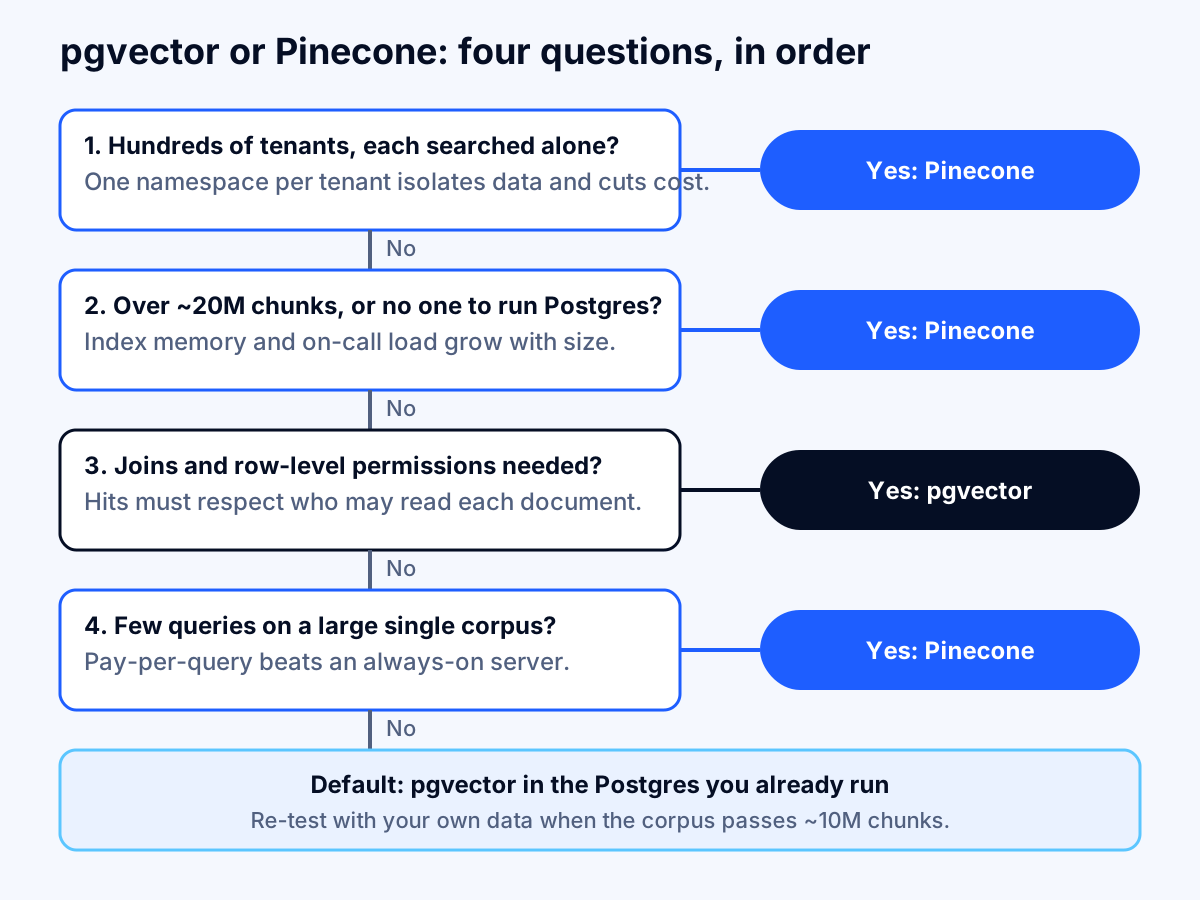
Two notes on the thresholds. Ranking pages disagree about where Postgres stops being enough, with cut-offs from 1 million to 50 million vectors, because the answer depends on dimensions, filters, query rate and how much RAM you buy. Treat any single number, including ours, as a prompt to measure. And if you are still deciding between model platforms, our comparison of Amazon Bedrock, Azure OpenAI and Google Vertex AI covers the managed vector stores each one bundles, and LLM API cost optimization covers the other half of the RAG bill: generation tokens.
Conclusion: start in Postgres, keep the exit open
For most teams the right first move is pgvector on the Postgres they already run, with stable chunk IDs, the embedding model recorded per row, and the vector index treated as disposable. Move to Pinecone when you measure a limit you cannot fix cheaply: a tenant count that needs namespaces, an index that no longer fits memory, or a team that cannot own a database. Watch pg_pinecone for the next few months, because it may blur the line between the two.
Pricing, plan names and limits change often (Pinecone now lists a $20 Builder plan and released a Postgres extension on October 27, 2026), so re-check the pricing pages before you commit. If you want a second pair of eyes on a retrieval design or a cost model, talk to a specialist and we will work through your corpus, tenants and query volume with you.
If you'd like one clear, practical take on AI, software and cloud decisions each month, subscribe to the Fleurant AI Briefing: one email a month, unsubscribe any time.
Frequently asked questions
Do I need a dedicated vector database for RAG?
Usually not at the start. If your application already runs on Postgres and your corpus is under roughly 10 million chunks, pgvector keeps vectors, text, permissions and metadata in one database you already back up and monitor. A dedicated service earns its place when you have hundreds of separate tenants, a very large corpus, or no one to run a database.
Is Pinecone cheaper than pgvector?
It depends on queries per month and on how you split your data. At 10 million 1,536-dimension vectors in one namespace, Pinecone's pay-per-query bill is lower than a Multi-AZ Postgres server below about 1.36 million queries a month and higher above it. Split the same data into one namespace per tenant and the per-query cost drops sharply.
How many vectors can pgvector handle?
pgvector stores up to 16,000 dimensions per vector and indexes up to 2,000 dimensions (4,000 for halfvec). The practical limit is memory: an HNSW index should fit in RAM. A 10 million-vector halfvec index at 1,536 dimensions needs roughly 41 GB, so plan a 64 GiB to 128 GiB instance. Beyond that, partition or move to a dedicated service.
What is pg_pinecone and should I use it?
pg_pinecone is an Apache 2.0 Postgres extension Pinecone released on October 27, 2026. It indexes existing pgvector columns with a compressed index and can optionally hand search to a managed Pinecone index. Its benchmarks are Pinecone's own, and it is only weeks old, so test it on your data before relying on it in production.
Can pgvector enforce document-level permissions?
Yes. Postgres row-level security applies a policy to every query, so a user only retrieves chunks they may read. Enable iterative index scans (added in pgvector 0.8.0) so filtered approximate searches still return enough rows, and remember that superusers and table owners bypass the policies unless you force them.
How do I migrate from pgvector to Pinecone later?
Keep the source text and metadata in Postgres as the system of record and treat the vector index as a rebuildable copy. Then a migration is a batch export of IDs, vectors and metadata into a Pinecone index, plus a switch of the query path. Keep stable chunk IDs and store the embedding model name with each row.
What should I measure before choosing?
Measure recall against exact search on your own queries, p95 latency under your real filters, and the monthly cost at your expected query volume. Run the same 200 to 500 labeled questions against both systems for a week. Vendor benchmarks, including the ones cited here, use their own datasets and are only a starting point.
Sources
- Pinecone pricing, Pinecone
- Understanding cost, Pinecone Docs
- Object limits, Pinecone Docs
- Rate limits, Pinecone Docs
- Implement multitenancy, Pinecone Docs
- Dedicated Read Nodes, Pinecone Docs
- Introducing pg_pinecone: open-source search for your Postgres data, Pinecone
- Pinecone brings its own vector search technology to PostgreSQL, Techzine
- pgvector: open-source vector similarity search for Postgres, GitHub (pgvector)
- Amazon RDS for PostgreSQL extension versions, Amazon Web Services
- Amazon RDS for PostgreSQL pricing, Amazon Web Services
- Using Aurora PostgreSQL as a Knowledge Base for Amazon Bedrock, Amazon Web Services
- Row Security Policies, PostgreSQL Documentation
- Compute and disk, Supabase Docs
- pgvector vs Pinecone, Tiger Data
- Vector embeddings, OpenAI